Kensington SmartFit Keyboard Tray Review: Conditional Buy
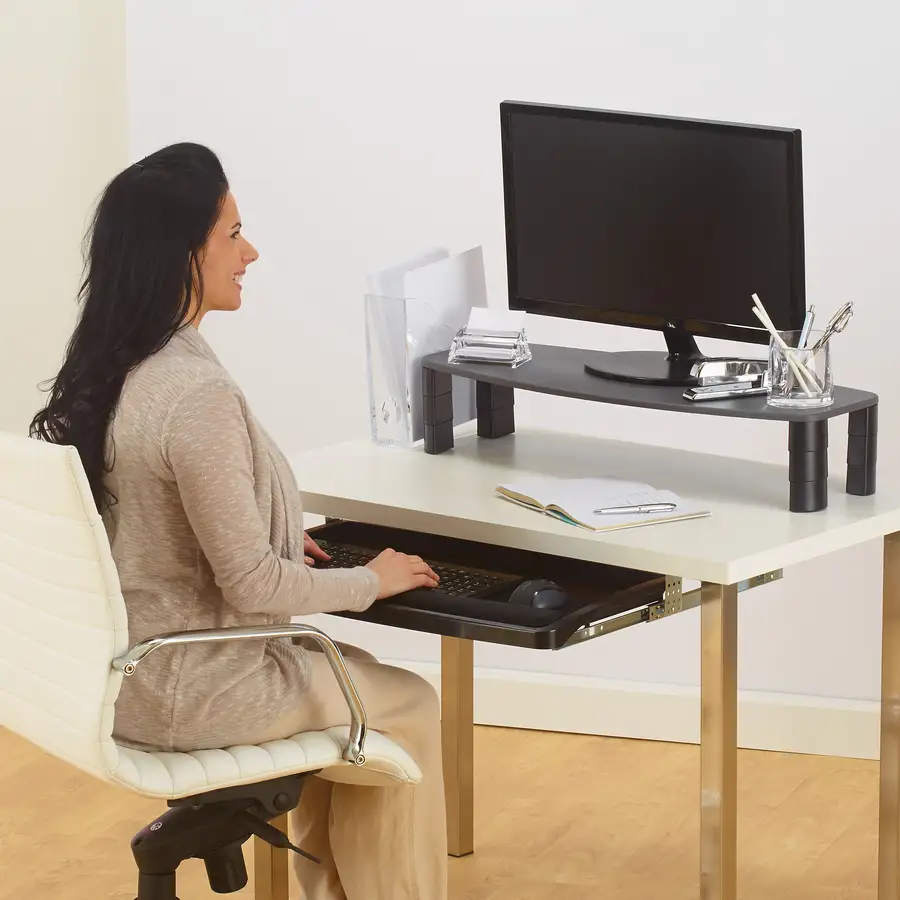
Extended use transformed desk setups for many reviewers, but for others, it exposed design weaknesses. The Kensington SmartFit Ergonomic Under Desk Keyboard Tray earns a solid 8.4/10 from aggregated feedback—praised for ergonomics and space-saving design, but dogged by installation woes and stability complaints. For users with standard desks seeking quick comfort adjustments, it’s often a hit. Those with unusual desk shapes or heavier typing habits may face frustration.
Quick Verdict: Conditional Buy
| Pros | Cons |
|---|---|
| Quick SmartFit height adjustments | Poor fit on desks with lips or metal plates |
| Comfortable ergonomic wrist position | Wobbly/stability issues for some |
| Space-saving under-desk design | Instructions unclear or inaccurate |
| Fits full keyboard + mouse | Limited height options for non-standard needs |
| Tool-free clamp-on option available | Tray material feels thin to some users |
| C-clamp design avoids surface damage | Compatibility limited to 1.5" thick desks |
| Smooth sliding rails | Mouse pad adhesive criticized |
Claims vs Reality
One of Kensington’s core claims is that the SmartFit system can “quickly and easily set your optimal viewing height.” While many Best Buy customers echo that promise, calling installation “a breeze” and height setting “perfectly matched,” others contradict it. A Reddit user “retired lawyer” reported: “The SmartFit feature didn’t seem to help; but fortunately, the platform is sufficiently adjustable to meet my needs.” This aligns with Trustpilot reports highlighting unclear templates causing drilling errors.
Another marketing promise is damage-free installation with sturdy clamps for the clamp-on variant. Buyers generally confirm this—Best Buy's rhonda praised that it “gives me the opportunity to work at different heights… must purchase!” However, Staples reviewers noted unexpected desk fit issues: “It doesn't fit under desks with lips without modifying the desk.”
Finally, marketing emphasizes stability during typing. While the smooth rail movement and spacious tray win points with moderate users, heavy typists sometimes see flex or wobble. One Best Buy reviewer, danielg, admitted, “It does flex a half inch or so when putting weight onto it.”
Cross-Platform Consensus
Universally Praised
Across Amazon, Best Buy, and Trustpilot, ergonomics consistently earn applause. A verified Best Buy buyer highlighted reduced wrist discomfort: “I no longer experience discomfort or strain in my wrists and hands, thanks to the customizable positioning options provided by the SmartFit system.” For office workers without built-in trays, the under-desk mount is transformative. Ricky from Best Buy said, “It works perfect and it’s adjustable… great product!” Those in smaller workspaces benefit from decluttering—Best Buy user cresen appreciated it being “sturdy, smooth sliding… and does not interfere with desktop.”
The extra-wide tray also resonated with gamers and mechanical keyboard fans. Trustpilot reports confirm it “comfortably fits all keyboards and mousing peripherals,” accommodating full setups including wrist rests without scraping the desk edge. This versatility turns it into more than a cramped peripheral stand—it becomes a genuine working surface.
Common Complaints
Instruction accuracy surfaces repeatedly as a sore point. Reddit’s “retired lawyer” detailed that the paper template “fails to indicate which is the front and the holes are not symmetrical,” leading to misaligned screws. On Staples, multiple buyers complained of “drawings only” guides causing upside-down mounts. These issues are especially frustrating for drill-install versions rather than the clamp-on.
Stability is another recurring theme. Staples reviewers described it as “flimsy” or “wobbly from side to side when being used.” Some users found the plastic tray too thin, questioning long-term durability. Best Buy’s ljcmdc shared, “I don’t feel comfortable resting my elbows on it… but it holds my keyboard and mouse just fine.”
Compatibility restrictions catch unaware buyers; clamp models fit desks up to 1.5 inches thick, excluding many executive or metal-edge desks. Staples customers noted that without modifications, certain desks simply won’t accommodate it.
Divisive Features
The mouse pad inclusion divides opinion: some appreciate the adhesive design, while Reddit and Trustpilot sources report peeling and preference for separate gel pads. Height range is another split point—those matching standard SmartFit color codes are satisfied, but users with nonconforming hand sizes or ergonomic needs find adjustments insufficient.
Material choice also invites strong reactions. Staples buyers who expected metal or reinforced composite were surprised to find “the complete tray made of plastic.” For light duty, it works well; for heavy typers or those resting weight on wrists, it may feel insubstantial.
Trust & Reliability
Scam concerns are minimal; most reliability discussions focus on longevity. Best Buy users report sustained performance: wp jr noted it “held up well so far” after a year, and Ricky kept his in a permanent office setup for eight months without issues. Yet, Staples reviews warn of premature wear: one buyer claimed it “lost the ability to lock into place in less than a month.”
Reddit and Trustpilot narratives suggest that while the metal clamp or mounting rails themselves are sturdy, the tray’s flex and adhesive components age quicker under heavy use. Installation errors from poor instructions can also falsely signal product weakness, meaning some “flimsy” reviews may stem from misaligned mounting rather than inherent faults.
Alternatives
While direct competitors weren’t heavily referenced, user comparisons implicitly consider clamp-on vs drill-in variants of Kensington’s own line. For those wanting zero-tools fitting and versatility across workstations, the SmartFit Clamp-On Keyboard Drawer (K55407WW) earns praise for fast installs and desk surface protection. Heavy typists or precision ergonomic seekers may prefer the bulkier, under-desk Comfort Drawer (K60004US) for its wider tray and integrated mousing area, trading portability for potentially greater stability.
Price & Value
Prices range widely in resale markets—eBay listings from $20 used to $28.97 open-box, while Kensington’s official site lists $129.95 for the K60004US. Best Buy’s $58.99 pricing for the clamp-on model sits mid-range. Buyers sensitive to cost note the clamp version “could be $15 less… compared to Amazon it’s a really bad price,” underscoring that shopping around yields savings.
Resale value is moderate, with intact trays retaining 60–70% of retail due to steady demand from ergonomic-conscious buyers. Community advice leans toward buying new if installation parts are critical, given instruction errors already challenge many.
FAQ
Q: What is the SmartFit system and how does it improve ergonomics?
A: It uses a color-coded chart linked to your hand size to set optimal tray height. This helps align wrists and forearms in a neutral position, reducing strain with prolonged typing.
Q: Can it fit any desk?
A: Clamp-on models fit desks up to 1.5 inches thick; mount versions need unobstructed undersides. Desks with lips, metal plates, or unusual shapes may need modification.
Q: Does the tray hold both a keyboard and mouse?
A: Yes, most models have an integrated mousing area alongside the keyboard space. Wide trays fit full setups with wrist rests.
Q: How hard is installation?
A: Clamp-on versions are tool-free and quick. Drill-mount versions often challenge users due to unclear templates and may need re-drilling or repositioning.
Q: Is it sturdy enough for heavy typing?
A: For typical typing it’s stable; heavy leaning can cause flex or wobble, especially on the thinner tray materials.
Final Verdict
Buy if you have a compatible desk and want quick ergonomic gains without sacrificing workspace. Avoid if your desk has non-standard thickness or you require absolute rigidity under heavy typing weight. Pro tip: If instructions seem unclear, dry-fit the tray before drilling, or opt for the clamp-on model to skip that headache.





