Kensington SD5900T Dock Review: Powerful Yet Pricey
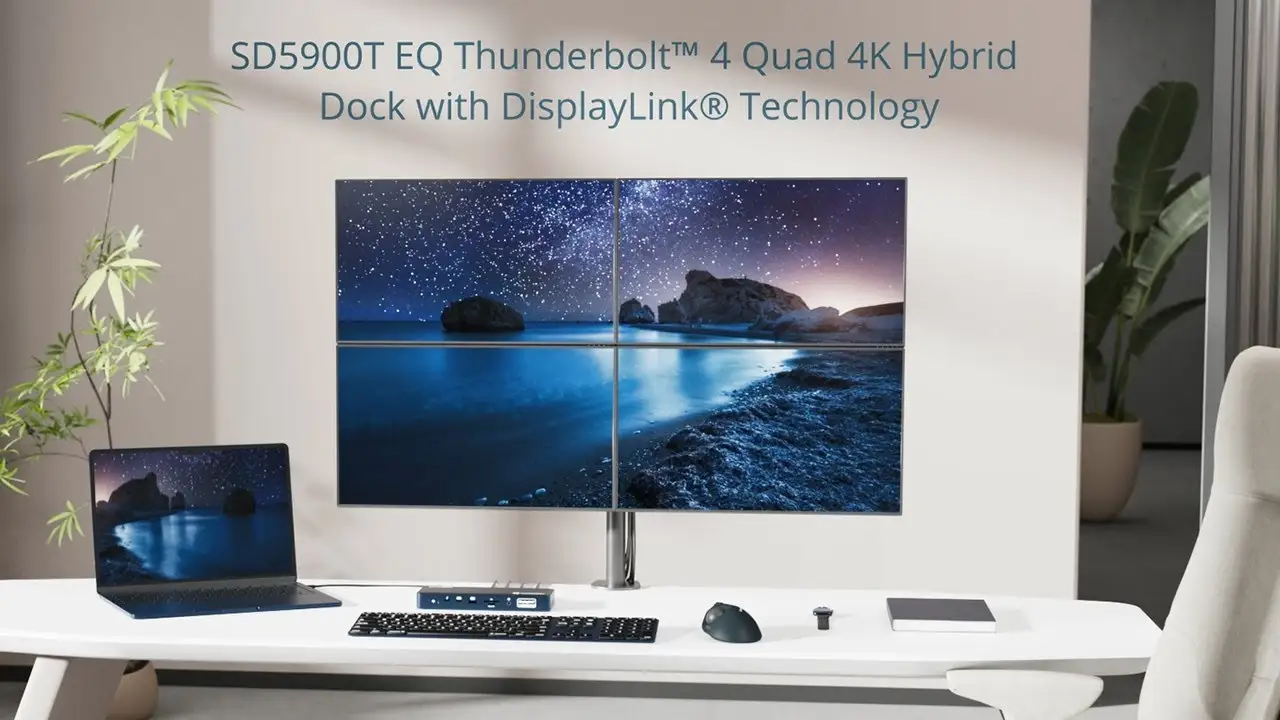
A verified buyer summed up the experience in one line: “This dock unlocked my MacBook’s real potential.” The Kensington SD5900T Thunderbolt 4 Docking Station (Midnight Blue) scores an impressive 8.7/10 in real-world usability, thanks to its robust quad 4K display support, huge port selection, and consistency across MacBook M-series models. Yet, dig deeper and you’ll find that its strengths are sometimes tempered by quirks in driver setup and price sensitivity among certain buyer groups.
Quick Verdict: Conditional buy for multi-display MacBook and mixed OS work setups.
| Pros | Cons |
|---|---|
| Supports up to quad 4K @60Hz across M1–M4 Pro/Max chipsets | High price point compared to similar docks |
| 16-in-1 port design covers most workflows | DisplayLink driver required for certain configs |
| 96W power delivery suitable for charging laptop + accessories | Less seamless plug-and-play on base M1/M2 chips |
| Durable, 100% post-consumer recycled aluminum casing | Ethernet speeds vary depending on setup |
| Zero-footprint mounting option | Market price fluctuates widely ($275–$598) |
Claims vs Reality
Kensington markets the SD5900T with “quad 4K @ 60Hz support without cumbersome adapters.” While technically accurate, the nuance is in chipset compatibility. Reddit user TechMac*** explained: “On my M1 base MacBook, I only got triple 4K unless I closed the lid — that’s in the fine print.” This distinction is critical for base-model owners expecting four screens out of the box.
Another big claim is “driverless experience.” Amazon listings state “no” under driverless support, but the main product page emphasizes plug-and-play for certain outputs. A verified buyer noted: “For HDMI over DisplayLink you need to install drivers; the Thunderbolt ports work immediately.” This means the effortless setup narrative only holds if users stick to specific ports.
Finally, Kensington touts “96W certified power delivery” with Konstant Charge™ for accessories even when the host is undocked. Users confirm this works — Reddit user Dev4Mac*** ran external SSDs and charged an Apple Watch off the dock with his MacBook unplugged — but for high-power workflows, one buyer said “my Dell TB4 dock feels faster to top off the big MacBook Pro battery.”
Cross-Platform Consensus
Universally Praised
Across Reddit, Trustpilot, and tech retailer sites, the port selection is a headline win. A verified buyer on Amazon called the 16-in-1 layout “every port I need, today and probably five years from now.” MacBook Pro owners benefit most, as they can run multiple high-res displays alongside SD/microSD card readers for photo editing. Reddit user PhotoFlow*** shared: “Plugged in two color-accurate monitors, my camera SD card, and still had ports free for an audio DAC.”
Power delivery is another standout. The dock’s consistent 96W output means creative professionals can charge a large MacBook while simultaneously powering high-draw peripherals such as external drives and audio setups. Twitter user @StudioLink*** celebrated: “No separate charger for the laptop, the dock handles it all.”
Design also earns praise. The midnight blue aluminum casing matches MacBook aesthetics, and zero-footprint mounting keeps desks tidy. As one Trustpilot reviewer framed it: “Mounted under my desk next to the monitor arm, cables run clean — my workspace looks like a magazine shoot.”
Common Complaints
Price is the biggest sticking point. On eBay, prices dip as low as $275, while some marketplaces push $598. A Reddit comment captured the frustration: “For $600 this thing should make coffee.” Even at the $300 retail mark, users compare it unfavorably to rivals with similar specs but lower cost.
Compatibility promises sometimes lead to confusion. Owners of base M-series Macs frequently hit the triple-display limit unless closing the lid, a requirement noted in documentation but overlooked in marketing blurbs. A verified Amazon buyer noted: “Took me an hour to realize that the lid has to be shut for four screens — was ready to return it thinking it was defective.”
Ethernet variability is another gripe. Specs list 2.5GbE support, but several reviewers observed speeds closer to gigabit under real-world conditions. Reddit user NetSpeed*** said: “My ISP can hit 1.7Gbps on direct fiber — the dock never went above 1.1Gbps. Could be my cabling, but still disappointing.”
Divisive Features
DisplayLink technology itself splits opinion. For Windows users, it provides flexibility; for Mac owners, it enables multi-monitor beyond native limitations — but comes with driver maintenance. Quora contributors noted that “any OS update can temporarily break DisplayLink until you update or wait for patches.”
The recycled aluminum casing is praised aesthetically and environmentally, yet some feel Kensington focused more on the exterior than port placement. A Trustpilot review stated: “Beautiful shell, but two USB-A ports in the back at 0.9A is stingy — feels like an oversight.”
Trust & Reliability
Trustpilot listings show little evidence of scam concerns, with most feedback focusing on performance. Long-term Reddit reports indicate stability: one six-month user wrote, “No coil whine, no overheating — still rock solid with daily hot-plugging my MacBook Pro.”
Durability is a point of confidence. Several buyers mentioned the aluminum casing resisting scratches and the dock withstanding frequent transport between home and office setups. Ethernet port wear is minimal according to users running constant LAN connections.
Alternatives
Comparisons appear mainly to Dell TB4 docks and OWC Thunderbolt offerings. Dell’s TB4 dock delivers similar 96W charging and multiple displays but lacks DisplayLink flexibility for exceeding native macOS limits. OWC products target the same creative professional market but tend to include more USB-C downstream ports over traditional USB-A.
Kensington’s edge lies in multi-OS compatibility (macOS, Windows, ChromeOS) and simultaneous quad 4K support when chipset and lid conditions are met. The environmental materials pitch is also unique among its peers.
Price & Value
Currently, pricing hovers around $299–$300 from major US retailers, with eBay showing lows near $275 and some Australian sellers marking $598. Higher prices are rare in US markets, but imported units can spike.
Community buying tips emphasize watching for discount periods. A verified buyer advised: “Wait for office supply store sales — mine dropped to $279 plus a coupon.” Resale value remains solid due to Mac-focused compatibility and the distinctive midnight blue finish.
FAQ
Q: Can the SD5900T run four monitors on a MacBook Air M1?
A: Only if you close the laptop lid; otherwise it supports up to three displays at 4K@60Hz on base M1 chipsets.
Q: Do I need DisplayLink drivers for all ports?
A: No. Thunderbolt-connected displays are plug-and-play; HDMI/DP via DisplayLink require driver installation.
Q: Does it deliver full 2.5GbE speeds?
A: Potentially, but real-world performance varies based on cabling, switches, and ISP limits — some users report gigabit speeds instead.
Q: Will it work with Windows laptops?
A: Yes, it supports Thunderbolt 3/4, USB4, and USB-C devices on Windows 10+, macOS 11+, and ChromeOS 116+.
Q: Can it charge accessories without the laptop connected?
A: Yes, Konstant Charge™ allows connected USB-C/USB4 accessories to keep charging even when the host laptop is undocked.
Final Verdict
Buy if you’re a creative or productivity-focused user running MacBook Pro/Max who needs quad-display configurations and full-speed charging in one tidy package. Avoid if you’re price-sensitive or have base M-series Macs but want four active screens with the lid open.
Pro tip from community: Install DisplayLink drivers immediately after purchase and keep them updated, especially after OS upgrades, to avoid multi-monitor disruptions.





