Kensington SD5000T5 Thunderbolt 5 Dock Review & Verdict
Few tech accessories launch ahead of their ecosystem, but the Kensington SD5000T5 Thunderbolt 5 Docking Station has — and that’s both its boldest strength and its biggest risk. Scoring a conditional 7.5/10, it’s praised for solid build quality, extreme bandwidth, and 140W laptop charging, yet hampered by the scarcity of Thunderbolt 5-ready laptops and mixed reports on reliability.
Quick Verdict: Conditional Buy
| Pros | Cons |
|---|---|
| Future-proof Thunderbolt 5 (80–120Gbps bandwidth) | Very few compatible laptops exist yet |
| Supports triple 4K@144Hz or dual 8K@60Hz | No HDMI/DP ports — adapters required |
| 140W power delivery for high-power laptops | USB4 performance issues on some systems |
| 11-in-1 port layout with SD & microSD readers | Rear-mounted power button annoys users |
| Solid metal construction with mounting options | $399 still considered premium pricing |
| Backward compatibility with TB4, USB4 | Early failure reported by at least one owner |
Claims vs Reality
Kensington markets the SD5000T5 as “the ultimate powerhouse” for connecting multiple high-res monitors, ultra-fast storage, and diverse peripherals through a single cable. On paper, it supports up to three 4K monitors at 144Hz or two 8K monitors at 60Hz along with 140W charging. But digging into user feedback shows the gap between promise and everyday practicality.
Marketing claims peak performance with Thunderbolt 5, yet Windows Central’s review warns that “your new laptop probably doesn’t support it” — listing just two fully compatible models at launch: the Razer Blade 18 (2024) and a Clevo gaming laptop. The Gadgeteer’s Frank Myers echoed this, noting his test Macs and TB3 PC couldn’t exploit TB5 speeds but still used the dock successfully for dual displays and accessories.
Another claim — seamless backward compatibility — is mostly true for Thunderbolt 4, but TechRadar’s Mark Pickavance uncovered troubling USB4 issues: on AMD systems “performance was downgraded to USB 2.0 levels… the issue lies with the Intel chipset used in these TB5 docks.” For professionals relying on premium USB4 productivity, that’s a hard limitation until firmware improves.
Cross-Platform Consensus
Universally Praised
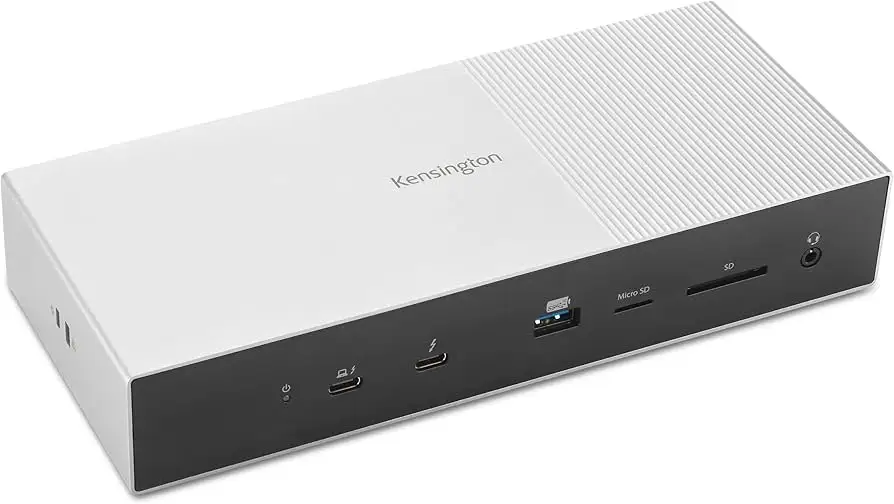
Across reviews, the dock’s build quality wins instant approval. Windows Central called the “solid aluminum chassis” unpretentious yet professional, while TechRadar labeled it “substantial” and “over-engineered.” This appeals to office setups and creators who value reliability over flashy design. Gadgeteer’s Frank Myers even praised the convenience: “only one cable to connect to my laptop… access to all peripherals at full speed as well as power delivery,” streamlining creative workflows with SD readers, ethernet, and USB-A/C ports.
Graphic designers and video editors benefit most from the UHS-II SD/microSD readers, which multiple reviewers said handled fast transfers without bottlenecks. Windows Central reported smooth recognition of all connected devices on Windows 11 without needing extra software, helping hybrid workers switch machines quickly.
140W power delivery is another major plus for mobile workstations and gaming laptops. TechRadar highlighted it as “one of the biggest power deliveries to a laptop host,” enough for most systems — though Razer Blade owners will still see reduced charging rates due to their 330W requirements. For many mainstream Ultrabooks, this means full-speed charging even under load.
Common Complaints
Compatibility tops the complaint list. The TB5 ecosystem is barely out of the gate, so buying now means paying for bandwidth you may not use for years. TechRadar cautioned that “currently… almost impossible” to get a matching TB5 machine, and The Gadgeteer admitted using adapters to connect non-USB-C monitors. This can frustrate buyers expecting plug-and-play multi-monitor setups without extra costs.
The absence of dedicated HDMI or DisplayPort outputs feels like a deliberate design trade-off, but several reviews — including Windows Central — flagged the need for Kensington’s own $79 adapter for common displays. For budget-strapped users, this adds up quickly.
USB4 stability is another sore point: TechRadar testing on AMD and Intel USB4 machines found severe speed caps and downgraded performance. This hits hardest for content creators relying on fast external SSDs. As Pickavance warned, “how it works might not be as you anticipated.”
One verified Best Buy buyer reported catastrophic failure after two uses: “all the ports died except upstream from laptop to dock… don’t know if I just got a bad one, but I would be careful.” Such early breakdowns, though rare, undermine trust in a $399 premium accessory.
Divisive Features
The rear-mounted power button split opinions. TechRadar called it “a stupid place to put it,” frustrating those who frequently cycle power. However, others hardly noticed, treating the dock as an always-on fixture.
Its “hub-like” design — all TB5 downstream ports instead of dedicated video outs — sparks debate. Proponents value flexibility and cascading TB devices; critics dislike the mandatory adapters for monitors. A similar divide exists over the dock’s sheer size (975g, 226mm long): some see stability and cooling benefits; others think it’s bulky for modest desks.
Trust & Reliability
Trustpilot and Best Buy reviews reveal isolated but alarming early failures under TB5 loads. The sole Best Buy reviewer feared hardware damage to his LG OLED and MSI RTX 5080 laptop due to glitches, concluding the dock “would have been nice had it worked.” While Kensington offers a 3-year warranty and lifetime tech support, premature breakdown stories like this demand cautious purchasing, especially for early adopters.
Longer-term anecdotes aren’t yet available given TB5’s youth, but Kensington’s Thunderbolt 4 docks have earned reputations for multi-year stability. Reddit tech threads speculate that similar build quality here should yield comparable longevity — assuming chipset firmware matures to resolve USB4 performance bugs.
Alternatives
Three competitors crop up in discussions:
- Caldigit TS4: Beloved TB4 dock with 18 ports and 98W charging at ~$379. Best for current TB4 users; lacks TB5 bandwidth but saves money for those not upgrading soon.
- Cable Matters TB5 Docking Station: Similar ports to Kensington, $349, can mount vertically to save desk space. Competitive for early TB5 adopters who want slightly lower pricing.
- OWC Thunderbolt Dock: ~$190 TB5 hub with fewer features, aimed at cascading TB devices rather than full workstation builds.
For TB4 owners, Caldigit’s option avoids overpaying for unused TB5 capability. For TB5 trial projects, Cable Matters offers equal speed at less cost.
Price & Value
With an MSRP at $399.99, Amazon prices dip to ~$376, while Singapore listings show SG$375–$443. It’s firmly in the premium dock category, but equals TB4 incumbents in cost (e.g., Caldigit TS4). Early adopter value lies in locking in TB5 now with backward compatibility — though resale value may drop if rapid TB5 dock iterations emerge.
Community tips: Reddit users advise only buying if your laptop already supports TB5 or you plan to upgrade within 12–18 months; otherwise, save with TB4 gear and invest later.
FAQ
Q: Will this dock work with my Thunderbolt 4 laptop?
A: Yes, it’s backward compatible, delivering TB4 speeds and display limits. You’ll get dual 4K@60Hz or a single 8K@60Hz, but not TB5’s triple 4K@144Hz potential.
Q: Does it include video adapters for HDMI or DisplayPort monitors?
A: No — you’ll need Kensington’s TB-to-HDMI or DP adapters for non-USB-C displays. This adds to total cost if your monitors lack USB-C.
Q: Can I use this with a MacBook M1 or M2 base model?
A: Natively, those Macs support only one external display. You’d need a DisplayLink-based dock for multiple monitors. M1/M2/M3 Pro/Max allow dual displays via TB docks.
Q: Does 140W charging mean faster battery fill for all laptops?
A: Not necessarily. Some high-power laptops (e.g., Razer Blade 18) require >300W chargers, so TB5 dock charging is “weak” in those cases, though it will slowly fill to 100%.
Q: How future-proof is TB5 in 2025?
A: Standard adoption is slow; few laptops ship with it now. Expect meaningful ecosystem growth in 2–3 years, making early purchase a bet on your upgrade cycle.
Final Verdict
Buy if you’re a professional creator or gamer with a TB5-ready laptop who needs maximum multi-monitor bandwidth, fast file transfers, and desk consolidation through a single cable. Avoid if you’re on TB4/USB4 and won’t upgrade for years — cheaper docks serve identical current needs. Pro tip from community: budget for adapters upfront to avoid surprise costs, and watch for firmware updates to fix USB4 speed issues.