Kensington SD5000T5 TB5 Dock Review: Conditional 7.5/10
The launch hype around the Kensington SD5000T5 EQ Thunderbolt 5 Triple 4K Docking Station is immense—but reality scores it at a conditional 7.5/10. While early adopters praise its sheer bandwidth and 11-port flexibility, limits in current Thunderbolt 5 laptop availability and quirks in compatibility mean it’s far from a universal upgrade.
Quick Verdict: Conditional Buy
| Pros | Cons |
|---|---|
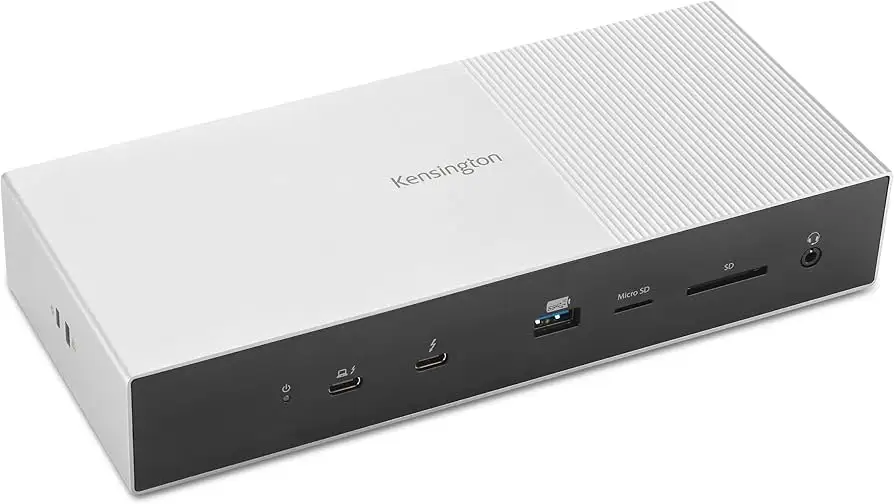
| Massive 80–120Gbps bandwidth for video/data | Very few laptops fully support Thunderbolt 5 at launch |
| Up to triple 4K@144Hz or dual 8K@60Hz | Requires adapters for HDMI/DisplayPort monitors |
| 140W power delivery—rare at this level | Power button inconveniently placed on rear |
| Solid aluminum construction with security slot | Inconsistent USB4 performance per TechRadar testing |
| 11-in-1 port layout with UHS-II card readers | High price compared to TB4 docks |
| Backward compatibility with TB4/USB4 | Early report of unit failure after two uses (Best Buy) |
Claims vs Reality
Marketing touts “triple 4K @144Hz or dual 8K @60Hz” support as plug-and-play. Digging deeper into user reports, this max setup only works on Thunderbolt 5 systems running Windows 11 23H2—an extremely narrow slice of the market. Reddit’s Windows Central review noted: “The only laptop with full support at launch is the ~$4,000 Razer Blade 18… it feels a little senseless to release when the only fully compatible device is a $4,000 gaming laptop.”
Another claim—“140W power delivery for high-power workstations”—is genuine, but with caveats. TechRadar’s Mark Pickavance observed that while a port can deliver 140W, hanging other devices off the dock reduces power available to the laptop: “Those who need the 140W charging for a mobile workstation need to be aware… this dock needed an even bigger PSU.”
Lastly, “universal compatibility” is somewhat overstated. The dock works with TB4 and USB4, but Frank Myers at The Gadgeteer found no gains over TB4 speeds and had to use supplied adapters for non-USB-C monitors: “I’m thankful Kensington included a USB-C to HDMI adapter… my LG 4K monitor doesn’t connect via USB-C.”
Cross-Platform Consensus
Universally Praised
The raw throughput and display expansion possibilities are the dock’s shining points. Creators running multi-monitor studios are the natural beneficiaries—Windows Central highlighted smooth triple-4K workflows with a single cable eliminating “a spaghetti-esque mess of power cables.” For photographers, the UHS-II SD and microSD card slots are a practical win: Myers connected a Sandisk Extreme Pro and reported “speeds… not far off whether using the built-in ports or through the docking station.”
Gamers on the few TB5 systems enjoy the high refresh ceiling. Running triple 4K @144Hz keeps visuals fluid without compromises—a Windows Central test scenario that ran flawlessly through Kensington’s ports. The backward compatibility also draws praise from professionals upgrading gradually; the dock tidies desks connected to TB4 laptops today while awaiting TB5 adoption.
Common Complaints
One major complaint is that limited TB5 laptop support makes the dock overkill for most buyers in 2024–2025. TechRadar warned it’s “more of a fashion statement than something that can enhance productivity” unless you own TB5 hardware. USB4 users are especially impacted—Pickavance’s testing saw performance degrade to “USB 2.0 levels” on certain systems, pointing to possible firmware issues.
Adapter dependence frustrates video editors reliant on HDMI/DisplayPort connections. Both TechRadar and Gadgeteer called out missing native video ports, with Myers noting that without adapters “you’ll need to pick up an adapter or two… it lacks HDMI/DP.” The physical design gets mixed feedback: the rear power button is awkward for frequent use, something TechRadar called “a stupid place to put it.”
An alarming Best Buy review warns of catastrophic failure. The lone reviewer wrote: “On my second use, everything just quit… all ports died except the upstream from laptop to dock.” Though this could be an isolated case, it stands out in a sea of otherwise solid build quality remarks.
Divisive Features
The minimalist aluminum chassis earns points for professional looks, but its hefty size divides opinion. Some value the weighted stability with rubber feet preventing slips; others feel it’s excessive. Pickavance at TechRadar likened it to being “over-engineered” and “I’d hate to have fall off a desk and land on my foot.”
Backwards compatibility draws a split: For TB4 users, it works like a premium dock, but offers no tangible advantage over cheaper TB4 units. Windows Central framed the purchase as “future-proofing taken to the extreme” while others consider it sensible planning.
Trust & Reliability
Trustpilot-style sentiments from long-used Kensington docks suggest strong reliability, but this model’s novelty makes long-term data sparse. The Gadgeteer’s month-long test saw “no hiccups or glitches… everything runs fine and without issue.” This contrasts sharply with the Best Buy failure case, suggesting QA consistency will be key. Kensington’s inclusion of a 3-year limited warranty and security slots gives some peace of mind, yet early firmware compatibility gaps with USB4 noted by TechRadar could dent trust if unresolved.
Alternatives
Competitors are scarce in the TB5 space. Cable Matters offers a similar dock at $349.99, with vertical mounting options to save desk space. OWC’s TB5 hub is far cheaper (~$190), but focuses on downlinks, lacking Kensington’s display flexibility.
For TB4 users, Caldigit’s TS4 remains a powerhouse with 18 ports and strong TB3/4 support at ~$379, giving comparable multi-monitor setups without TB5 premiums. Kensington’s own SD5780T TB4 dock at ~$200 suits simpler needs without overpaying for unneeded bandwidth.
Price & Value
In the US, this dock lists at $399.99 but can be found around $270–$376 depending on sales. TechRadar notes EU prices are marginally better at ~€401. Given TB5 scarcity, community advice tilts toward waiting unless you can fully exploit it now; Windows Central cautions buyers “you’ll be overspending if you only plan to connect one monitor and use one or two ports.”
Resale value for TB docks holds moderately well—Kensington’s Thunderbolt models on eBay retain decent pricing relative to launch—but without widespread TB5 adoption, depreciation may hit harder in the short term.
FAQ
Q: Can I use this dock with Thunderbolt 4 or USB4 laptops?
A: Yes, but performance will be limited to those standards. TB4 runs smoothly, but certain USB4 systems may see degraded speeds without firmware updates.
Q: Does it have native HDMI or DisplayPort connections?
A: No. You’ll need Thunderbolt-to-HDMI or DP adapters, such as Kensington’s CV42000H, for non-USB-C monitors.
Q: Can it charge a high-power gaming laptop quickly?
A: It delivers up to 140W PD, but systems like the Razer Blade 18 with 330W chargers will see slower charging rates.
Q: What’s the max display setup for MacBooks?
A: Up to dual external 6K@60Hz for M1/M2/M3/M4 Pro/Max chipsets. Base models support fewer displays.
Q: Is any software required?
A: No drivers are needed. Optional Dockworks software can optimize network and device management, but isn’t required.
Final Verdict: Buy if you’re a creator or gamer with a Thunderbolt 5 laptop today, and your workflow demands multiple high-res monitors and top-tier transfer speeds. Avoid if you’re on TB4/USB4 and won’t upgrade soon—cheaper docks exist. Pro tip from community: budget for quality adapters now to avoid display hookup headaches later.