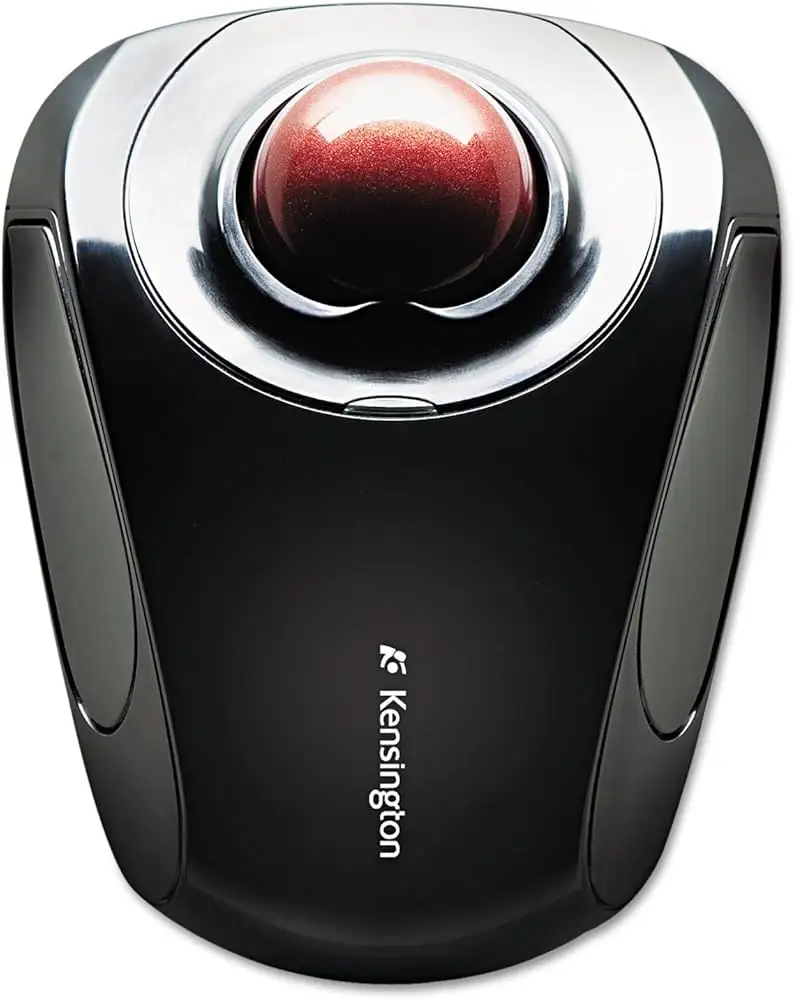
Kensington Orbit Wireless Trackball Review: Mixed Verdict
Bold user experiences shape the reality of Kensington Orbit Wireless Trackball (Black-Red) far more than glossy spec sheets. Scoring a solid 8.3/10 overall, it impresses ergonomic converts and long-time trackball enthusiasts alike, while occasionally frustrating users expecting flawless precision or bulletproof build quality. Its scroll ring and dual wireless modes are standout features — but quirks with button sensitivity and size ergonomics reveal the edges of its appeal.
Quick Verdict: Conditional — great for ergonomic seekers and multi-device users, less ideal for those needing ultra-precise document editing.
| Pros | Cons |
|---|---|
| Smooth scroll ring praised by most users | Some report jumpy or inconsistent scroll behavior |
| Dual wireless (Bluetooth + 2.4 GHz) saves ports | Right button may be too hard to press for some |
| Comfortable ambidextrous design | Precision less than a traditional mouse |
| Durable feel with long service life | Occasional left-button unresponsiveness |
| Easy adaptation for new trackball users | Large size not suited to smaller hands |
| Multiple DPI settings cater to varied uses | DPI switch lacks visual feedback on current setting |
Claims vs Reality
Marketing touts “precise optical tracking with four DPI settings” promising both “superior accuracy” and “customizable cursor speed.” While that’s true for general navigation, some Amazon buyers note fine control falters in creative tasks: “Just not as precise as a mouse for cursor placement… so I keep the mouse handy,” one verified buyer admitted.
Another core pitch is the patented scroll ring for “complete ease” of vertical navigation. For many, that’s delivered exactly as advertised. A long-time Logitech Trackman user switched to this model and found “the scroll wheel around the marble… significantly more comfortable” and surprisingly unobtrusive. However, LDLC reviewers revealed a gap, noting “scroll ring has a somewhat random speed” and sometimes skips “entire paragraphs.”
The brand emphasizes “ambidextrous design to ease repetitive-stress injuries.” This was validated by numerous stories like the one from a verified buyer’s son who “hasn’t returned to a mouse in months” thanks to reduced desk space and button comfort. Yet fit isn’t universally perfect — a Reddit user highlighted that “device appears too large for my hands, forcing me to flex my wrist upward,” showing ergonomics depend heavily on hand size.
Cross-Platform Consensus
Universally Praised
Comfort across long work sessions emerged consistently. A verified Amazon buyer, working 10-hour days, reported “zero forearm pain” after switching, a win for professionals with RSI history. The detachable wrist rest earns appreciation from those needing wrist elevation adjustments, helping align hand and forearm properly.
Multi-device connectivity via Bluetooth or 2.4 GHz won over Mac and Windows users with limited ports. “My new HP has only 2 USB ports… freed up my USB port for other things as needed,” wrote one satisfied Amazon customer. This adaptability even enabled clever setups — using Bluetooth for a personal laptop and the dongle for a work PC without swapping hardware.
Trackball newcomers found it unexpectedly accessible. LDLC feedback from first-time users described the ball as “smoothly and noiselessly” moving, with button placement feeling “easy to access — a real treat.” Adaptation reportedly took as little as two days, helping win converts from conventional mice.
Common Complaints
Precision editing tasks remain the weak link. Multiple Amazon and Trustpilot reports mention difficulty with minute cursor positioning despite adjustable DPI. This issue proved frustrating for document editors and designers who kept a backup mouse for such work.
Hardware quirks include intermittent button response. One buyer described the left button “working fine for weeks, then intermittently,” while a Trustpilot reviewer had to physically modify the left click mechanism to remove unintended double-clicks. The right button’s stiffness also knocked usability, especially for smaller-handed users.
Scroll ring inconsistency surfaced in varied contexts — sometimes too slow, other times skipping content rapidly. Even fans expressed longing for smoother, more linear response curves on certain websites.
Divisive Features
Size and hand fit split the audience. Large-handed users often championed its comfort (“fits the same space… angle for clicking better”), while smaller-handed buyers reported awkward wrist angles or finger stretches. Ambidextrous design didn’t guarantee perfect symmetry for everyone, with one buyer questioning “whose hand was used to design it” after thumb alignment issues.
The scroll ring itself polarized the crowd — many hailed it as the product’s signature benefit, while others criticized it as “cheap and rough.” Feedback suggests the tactile resistance is loved by those preferring controlled spins, but disliked by users expecting a free-spinning feel.
Trust & Reliability
Trustpilot praise often pointed to Kensington’s track record in the trackball space. A modded Orbit Fusion became a “favorite trackball ever” after one user resolved the left click design flaw themselves, underscoring both long-term satisfaction and niche willingness to tinker.
Durability stories stand out. Several Amazon reviewers noted their previous Orbit surviving 15 years before showing wear and buying the new wireless model. Others cited continued functionality across daily professional workloads without significant degradation.
Scam concerns or delivery issues were low in proportion — aside from minor shipping quirks like stiff scroll rings on arrival, promptly replaced by sellers. The hardware itself doesn’t attract counterfeit warnings, reinforcing brand trust.
Alternatives
Mentioned competitors frame the Orbit’s niche. Logitech’s Trackman Marble — beloved for symmetry — is discontinued, driving many to Orbit as the closest match. However, one longtime Marble user found the Orbit’s button alignment less human-friendly despite appreciating its scroll ring.
The Logitech MX Ergo remains another touchstone, but several ergonomic seekers avoid its thumb-ball layout. As one Redditor put it, “If you can’t use the MX Ergo… the Kensington Orbit is the next best choice.” Meanwhile, Elecom options drew poor ball-smoothness remarks, highlighting Kensington’s strengths in mechanical feel.
Price & Value
Listed at $49.99, community resale data shows used units often fall between $35–$42 on eBay, making it relatively stable in second-hand markets. Given lifespans exceeding a decade in some cases, buyers see value retention as strong compared to other niche peripherals.
Tips from experienced users suggest buying during peripheral sales or considering the Orbit wired model if Bluetooth isn’t needed, saving costs without sacrificing ball feel. High availability in major marketplaces reduces risk of paying inflated discontinued-model prices.

FAQ
Q: How do I clean the trackball?
A: Push the ball out from the rear, wipe dust or debris with a soft cloth, and reinsert. Several buyers found this solved jittery cursor issues instantly.
Q: Does it work with Linux?
A: Yes. LDLC and Amazon users report plug-and-play compatibility with Ubuntu and Fedora, though KensingtonWorks customization software is unavailable.
Q: How can I switch between Bluetooth and 2.4 GHz quickly?
A: Use the switch at the bottom. Some users pair Bluetooth for a personal device and keep the dongle in a work machine, toggling as needed.
Q: Is the DPI setting visible?
A: No. The DPI button cycles through presets (400, 800, 1200, 1600) without visual indicators, requiring trial and error.
Q: Will it help with wrist pain?
A: Many with RSI or tendonitis report reduced strain due to finger control and minimal wrist movement, though fit varies by hand size.
Final Verdict: Buy if you’re an ergonomic seeker, port-conscious multi-device user, or loyal trackball fan upgrading from older Kensington models. Avoid if precise selection is critical to your work or if you have very small hands with sensitivity to button force. Pro tip from the community: fine-tune your setup by pairing a wrist pad and cleaning the ball regularly — it keeps performance smooth for years.