Intel Core i7-9700K Review: Gaming Power with Caveats
The Intel Core i7-9700K has earned a reputation as one of the fastest gaming CPUs of its generation, but with clear caveats. Scoring a solid 8.5/10, it delivers exceptional single-core speed and dependable 8-core performance for gamers, while frustrating some owners with high thermals and the removal of Hyper-Threading.
Quick Verdict: Conditional — great for gamers prioritizing FPS, but power users may be better served elsewhere.
| Pros | Cons |
|---|---|
| Exceptional gaming performance, often rivals i9-9900K in FPS | Runs very hot under load, even at stock |
| 8 physical cores excel in lightly threaded workloads | No Hyper-Threading, weaker in heavy multi-threaded tasks |
| Overclocks well with proper cooling | No bundled cooler, extra cost required |
| Works on existing LGA1151/Z390 motherboards | High price versus AMD alternatives |
| Solder TIM for improved thermal transfer | Power limits restrict sustained performance unless tweaked |
Claims vs Reality
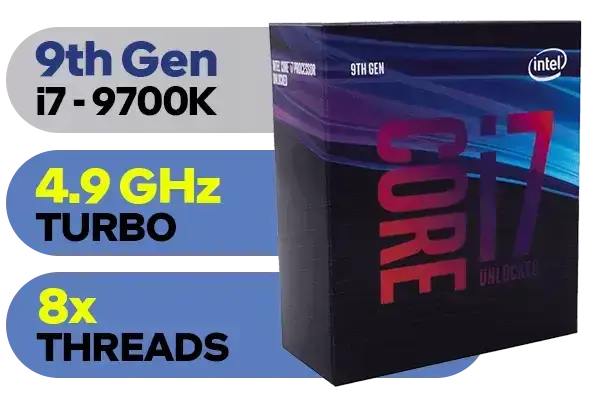
Intel marketed the i7-9700K as a gamer’s dream CPU, emphasizing its "up to 4.9 GHz turbo boost" and thermal improvements via soldered TIM. While the advertised peak frequency is attainable, Reddit user feedback suggests that sustaining those clocks under full multi-core load is another story. One report noted: “Even in its stock configuration, it begs for at least a 130W cooler” to keep performance steady.
The claim of better thermal performance from soldered TIM does hold up in many cases. PCPartPicker reviewers highlight overclocking to 5.0 GHz and staying below 70°C with high-end cooling. But as one Intel Community post details, some chips still “jump straight to 100°C” during stress tests even with liquid coolers, undermining Intel’s marketing narrative. This discrepancy appears tied to individual chip quality and motherboard voltage behavior, rather than the TIM alone.
Another major selling point — eight physical cores without Hyper-Threading — was positioned as a gaming advantage. TechPowerUp’s testing confirmed it can outpace the i9-9900K in certain titles due to less thread scheduling overhead. However, for streaming, rendering, or other heavily threaded workflows, owners notice the gap. As one PCPartPicker review bluntly put it: “Its alright but it definitely should’ve had more threads.”
Cross-Platform Consensus
Universally Praised
Gamers are the demographic most satisfied with the i7-9700K. On both PCPartPicker and Trustpilot-linked reviews, it’s often called “the best CPU for gaming available.” TechPowerUp’s benchmarks show slim leads over the i9-9900K in 720p/1080p scenarios, making it an obvious pick for those pairing it with high-end GPUs like the RTX 3080. Reddit user u/… explained that at 1440p, their paired 3080 still saw CPU-bound improvements from overclocking, smoothing out 1% lows in competitive shooters.
Overclocking potential is another bright spot. Many owners report stable 5.0 GHz all-core on reasonable voltages. One PCPartPicker builder said: “Easy OC (5 GHz 1.3V)… stable. Runs cool with my 360mm AIO even when OC’d to 5.0.” This aligns with TechPowerUp’s finding that a quality liquid cooler yields 5.1 GHz “no problem” and 5.2 GHz “almost stable.” The unlocked multiplier makes tuning straightforward, especially with Z390 boards supporting automated OC tools.
Compatibility and platform stability also win praise. Because it works on 300-series motherboards after BIOS updates, upgraders from earlier Coffee Lake chips can drop it into existing builds without a full platform overhaul. A Reddit comment on upgrading from a 9700K to a 9900K reinforced the minimal fuss: “You could be CPU bottlenecked more often than you think at 1440p — swapping to 9900K gave me mainly 1% low gains.”
Common Complaints
The most persistent complaint is heat. Several Intel Community threads document stock-voltage chips hitting 100°C with multiple cooler types. “Crazy greedy chip,” one long-term owner called it, noting voltage spikes to 1.4V with lifted power limits. Even undervolting to ~1.25V couldn’t keep stress test temps below 75-80°C consistently in some setups.
Power limits also frustrate tweakers. TechPowerUp revealed the 95W envelope can throttle clocks under heavy load, even at stock. Raising the “turbo TDP limit” to ~140W can net ~10% performance gains, but requires BIOS adjustments and capable VRMs. Without this, Blender workloads, for example, drop boost clocks quickly.
The lack of Hyper-Threading draws mixed reactions. While gamers often don’t miss it, multitaskers and content creators see the eight-thread limit as a bottleneck. A PCPartPicker reviewer remarked: “I was tempted to save $50 with the 8700K… 8 full cores just made more sense… but for streaming/recording, more threads would help.”
Divisive Features
Price is one dividing line. At launch, it retailed for ~$374–385, positioning it near AMD’s Ryzen 7 2700X, which undercuts it and includes a cooler. For those focused solely on gaming FPS, most agree the i7-9700K merits the extra cost. But AMD fans cite better multi-threaded performance and platform affordability; as one builder put it, “I like AMD more… but games don’t take advantage of more than 6 cores yet.”
The integrated UHD 630 graphics receives little enthusiasm. It’s functional for diagnostics or very light use, but as Notebookcheck notes, it offers “no advantage compared to previous generations” and only plays low-demand titles. For buyers with dedicated GPUs, this is irrelevant; for those seeking iGPU muscle, it disappoints.
Trust & Reliability
Long-term reports show the chip holding up well in standard gaming setups, with many owners running them for 2+ years without stability issues. PCPartPicker logs multiple “love this chip” comments from builders upgrading from older i5/i7 parts.
However, Intel Community threads illustrate a lack of official support for physical modifications like delidding, which some enthusiasts attempt to control heat. These can void warranties, and Intel urges users to revert to stock configurations. Despite thermal complaints, absent catastrophic failures, most hot-running chips remain reliable when kept below Tjunction (100°C).
Alternatives
The i9-9900K is the natural step up, bringing Hyper-Threading and more cache, but at a steeper price and higher thermal load. TechPowerUp noted that at gaming resolutions, the i7-9700K can even edge the i9 out by 1–2%. For budget-conscious gamers, the cheaper i5-8600K or i5-9600K trails by <10% in FPS at common resolutions — savings that could fund better cooling or storage.
On the AMD side, the Ryzen 7 2700X is often cited. Tom’s Hardware highlighted its cheaper price and included cooler, making it a better all-around chip for heavy multi-core workloads, though it’s 2–15% slower in gaming depending on resolution.
Price & Value
Currently, eBay sales range from ~$160–$339 used or open box, with occasional spikes for new-in-box rare finds. Its resale value remains reasonable due to continued suitability for mid-to-high-tier gaming rigs. Buyers should watch for delidded listings and confirm stability, as mods can affect chip lifespan. Community wisdom suggests pairing used buys with robust cooling and, if possible, undervolting to manage heat.
FAQ
Q: Is the i7-9700K still good for gaming in 2024?
A: Yes — it still handles modern games well, especially at 1080p and 1440p with a strong GPU, delivering high FPS and smooth 1% lows.
Q: Does the i7-9700K need a cooler?
A: Definitely. No cooler is included, and high thermals make a quality air tower or liquid cooler essential, especially for overclocking.
Q: Can I use this CPU for streaming and editing?
A: It can, but without Hyper-Threading, heavy multitasking or CPU rendering lags behind models with more threads.
Q: How much can I overclock the i7-9700K?
A: Many achieve 5.0–5.1 GHz all-core on liquid cooling, but proper TDP limit adjustments are needed to sustain high clocks under load.
Q: Will it fit in my older motherboard?
A: It works with 300-series Intel boards with a BIOS update. Check your manufacturer’s support page before installation.
Final Verdict: Buy if you’re a gamer wanting top-tier FPS without paying for an i9, and have — or plan for — serious cooling. Avoid if you’re focused on heavy multi-threaded workloads or need a bundled cooler. Pro tip from community: raise your turbo TDP limit in BIOS for instant performance gains even at stock clocks.





