HP OfficeJet Pro 8139e Review: Strong Output, Setup Issues
The HP OfficeJet Pro 8139e Wireless All-in-One Color Inkjet Printer arrives with bold promises: fast, professional-quality printing, seamless wireless connectivity, and a full year of HP Instant Ink. Across platforms, it earns a solid 7.9/10, with praise for its sharp print output and versatile features but recurring frustration over setup complexity, paper tray quirks, and HP’s strict cartridge policies.
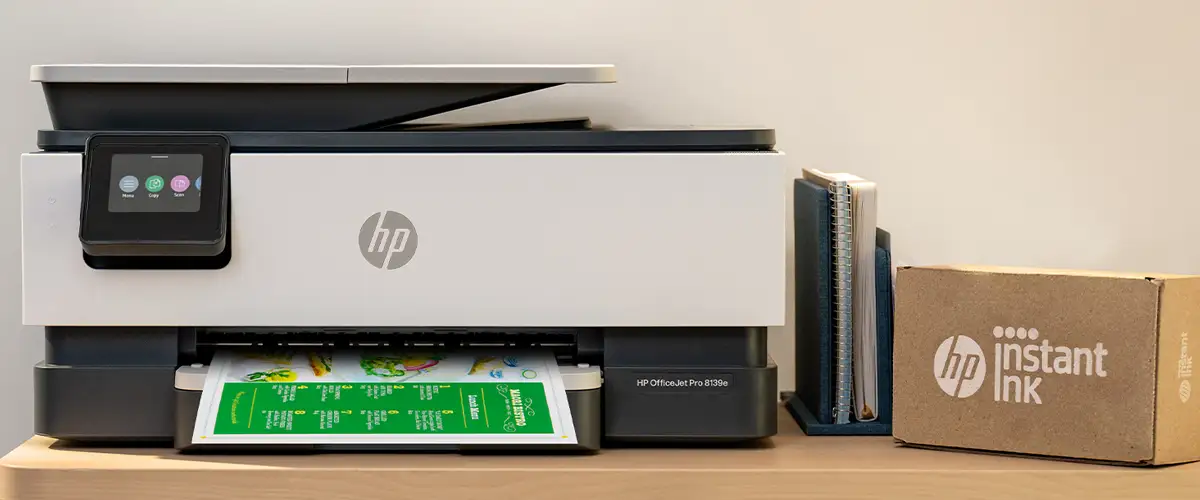
Quick Verdict: Conditional buy — excellent for home office users who value Instant Ink and versatile connectivity, but expect potential hiccups with setup and hardware design.
| Pros | Cons |
|---|---|
| Crisp text and vibrant color printing | Setup instructions confusing for many |
| 12 months of free HP Instant Ink | Flimsy, finicky paper tray |
| Reliable duplex printing | Cartridge compatibility locked to HP chips |
| Solid scanner with ADF | Occasional Wi-Fi disconnects |
| Compact footprint | Touchscreen small and overly sensitive |
| Easy mobile printing via HP Smart app | High long-term ink costs |
| Multiple connectivity options (Wi-Fi, Ethernet, USB) | No duplex scanning |
Claims vs Reality
HP markets the 8139e as “supercharged performance for the home office” with 20 ppm black, 10 ppm color print speeds, “professional output,” and “self-healing Wi-Fi.” While many users confirm the speed is adequate for home use, others note it’s slower than expected compared to older HP models. A Best Buy buyer remarked: “Coming from a laser jet, it was a bit slower…but printed quickly enough to not be bothered by the speed.”
The promise of effortless setup is undermined by consistent reports of confusing instructions. Reddit user bayou bengals fan complained: “There is no printed instruction book…had to download the HP app to find out the printer’s IP address and password. The touch screen is so small…I have to use a pen tip to hit the correct letters.”
HP promotes “never run out of ink” via Instant Ink, and indeed, many owners praise the convenience. A Best Buy reviewer stated: “That within itself is worth a bunch of $. Ink arrives before you run out, no tracking needed.” Yet, others express dissatisfaction with cartridge restrictions, with scque 814 calling it “bait and switch” after being forced into HP-branded ink updates.
Cross-Platform Consensus
Universally Praised
Speed, quality, and Instant Ink convenience dominate positive feedback. Home office owners particularly value the duplex printing and multiple connectivity options. A Trustpilot user noted, “It works well for small business office at home…easy to use. I’m very happy with the printer all in one.” The scanner earns praise for clarity and ease of use via both the automatic document feeder and flatbed, making it a strong asset for those digitizing contracts or multi-page forms. Mobile printing via HP Smart app is a standout; angelm shared: “From my phone I can print from anywhere I am…and when I am at home I can use the app on my computer to do it all.”
Common Complaints
The paper tray’s design is a recurring source of irritation. Reports describe it as “cheap and poorly designed” (Best Buy user albert) and prone to misalignment, sometimes grabbing multiple sheets. Setup challenges appear frequently, especially for less tech-savvy users. runner cyclist lamented, “Absolutely terrible start up instructions…we couldn’t get it working.” Wi-Fi instability is another gripe; irenac reported constant disconnections that required restarting both printer and computer. Touchscreen usability divides opinion: too small for comfortable interaction, overly sensitive, and making navigation frustrating.
Divisive Features
Instant Ink is loved by frequent color printers but disliked by those wary of HP tracking usage. teach kids voiced discomfort: “It’s a little odd to be tracked so tightly…feels creepy.” Cartridge compatibility enforcement is similarly polarizing — some see it as ensuring quality, others as limiting choice. Photo printing quality draws mixed reviews: while adequate for documents, Consumer Reports found “almost any other inkjet prints better photos,” a sentiment echoed by owners who use it for marketing materials.
Trust & Reliability
Trustpilot and Reddit reveal tension between long-term HP loyalty and frustration with recent support experiences. Multiple buyers complain of poor customer service and upselling of paid support plans for new or refurbished units. cosmo fugue recounted, “Tried to get tech support…but since it was refurbished its serial number was still in the system so you wouldn’t honor support.”
Durability feedback varies. Some users report seamless operation months in, while others encounter early hardware faults, such as cartridges not locking or persistent print quality issues. Positive long-term anecdotes exist — m leahy praised their old HP lasting 12 years and hoped the 8139e would match that longevity — but newer units haven’t yet proven multi-year resilience.
Alternatives
Within HP’s own lineup, the OfficeJet Pro 8135e shares much of the 8139e’s design but with different Instant Ink offers, and the 9135e offers potentially higher specs. Competitors in the same price range include Canon and Brother all-in-ones, which some reviewers switched from, noting differences in setup ease and tray design. For higher-volume users, laser printers may offer faster speeds and lower per-page costs.
Price & Value
Community pricing snapshots show wide variance: MSRP around $319.99 CAD, Best Buy promos dipping to $169.99 USD, and eBay resale as low as $47.50 for used units. The year-long Instant Ink offer adds tangible value for heavy users, offsetting high cartridge costs (Consumer Reports estimates $125/year for ink). Resale value trends low, reflecting rapid depreciation — buyers should consider total cost over lifespan rather than upfront price.
FAQ
Q: Can it print and copy legal size documents (8.5x14)?
A: Yes, multiple users and HP support confirm legal-size support for both printing and copying.
Q: Does it have OCR scanning capability?
A: Yes, via the HP Smart app, allowing documents to be converted into editable, searchable files.
Q: Can you disable automatic duplex printing?
A: Yes, through printer properties on your PC, adjusting defaults and preferences.
Q: Is it compatible with macOS and Safari?
A: Yes, supports macOS 11 through 14, with full HP Smart app functionality.
Q: Can you fax directly using the paper feed?
A: Yes, the automatic document feeder supports multipage faxing.
Final Verdict: Buy if you’re a home office user printing regularly in color and value Instant Ink’s convenience. Avoid if you require flawless setup out of the box, need unrestricted cartridge choice, or demand top-tier photo printing. Pro tip from the community: install the HP Smart app before setup, have your Wi-Fi and cloud storage ready, and expect to spend extra time getting familiar with the touch interface.





