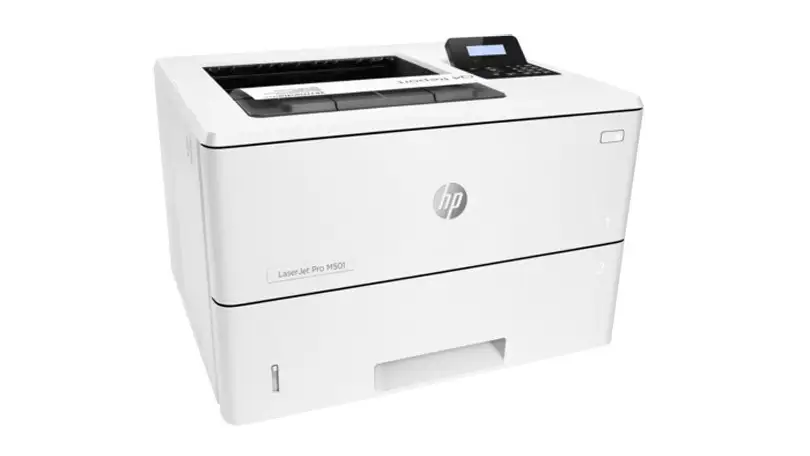
HP LaserJet Pro M501dn Review: Conditional Buy (7.6/10)
A recurring complaint boils down to a single button: one office buyer described a “quiet horror” where “every time you want to print… you need to go to the printer and press ‘OK’—otherwise it won’t print.” That frustration sits alongside praise calling it “awesome,” “quiet,” and built for “big loads,” making the HP LaserJet Pro M501dn Duplex Printer feel less like a home gadget and more like a workhorse that can still trip up real workflows. Verdict: Conditional buy — 7.6/10.
Quick Verdict
For high-volume, wired-office printing: Yes. For small-format duplex workflows (like A5/half-sheets) or “set-and-forget” convenience: Conditional.
| What matters | What people said | Who it affects most |
|---|---|---|
| Speed & throughput | “Fast,” “for large volumes” | Offices, admins, print-heavy teams |
| Duplex printing | “Does double-sided printing” | Anyone printing contracts, packets |
| Noise | “Very quiet,” “not very noisy” | Shared offices, front-desk areas |
| Consumables cost | “Cartridge price” | Budget-conscious teams |
| Paper-size duplex limits | “Not all page sizes are supported for automatic duplexing” | Booklets, half-sheet jobs |
| Support/region friction | “Find support only among friends… seller washes hands” | Buyers of imported/gray-market units |
Claims vs Reality
HP and retailers position the HP LaserJet Pro M501dn Duplex Printer around speed, office readiness, and efficiency: “print speed up to 45 ppm,” “automatic duplex,” and a security-and-management story aimed at fleets. Digging deeper into user reports and test-style writeups, the broad outline holds—fast monochrome output and duplex are central to why people buy it—but the day-to-day experience depends heavily on job type and setup choices.
Claim: “Automatic duplex printing” (office-friendly two-sided printing).
In practice, duplex is a major draw for people churning through full-page documents. A verified buyer-style review on Yandex Market (user Виктория Кукушкина) framed it simply: “fast,” “does double-sided printing,” and “not very noisy.” But the gap shows up when users expect duplex to apply to every paper size and workflow. On HP’s Support Community, one owner trying to print half sheets for hundreds of copies hit a hard limitation: “Not all page sizes are supported for automatic duplexing as the distance between feed rollers in the duplex path does not always support shorter paper.” Their pain point was clear: “tired of flipping pages.”
Claim: “High speed (up to 45 ppm) and fast first page.”
Speed is consistently used as the justification for deploying it in busy settings. A buyer on Yandex Market (user Алексей Г.) called out “reliability… speed and print quality,” tying it to “a large volume of printing.” Independent-style testing detail from Consumer Reports reinforces the idea that it’s quick for text, reporting “text printing was very quick” (measured at 23.1 ppm in their test environment). While the numbers differ from marketing’s “up to 45 ppm,” the underlying reality is that it’s widely perceived as fast—especially in office contexts where consistency matters more than peak lab figures.
Claim: “Office-ready ownership costs and long-running toner.”
Here, the story gets nuanced. Consumer Reports characterized the printer as “very expensive for a black and white laser printer” at the time they checked (about $550), while also describing low estimated yearly toner cost in their usage model (“$6” per year) but a high total cost over two years (“$561”) because upfront pricing dominates. On the ground, users echo the cost tension differently: one Yandex Market buyer (glavu ptk) praised “cost at the time of purchase” and “big print resource,” while another (glavu ptk / old review set) flagged “cartridge price” as the downside: “цена картриджа.”
Cross-Platform Consensus
Universally Praised
A recurring pattern emerged around “office workhorse” identity: owners buying for heavy printing loads tend to celebrate the HP LaserJet Pro M501dn Duplex Printer for speed, endurance, and the practical benefit of duplex on standard sizes. On Yandex Market, user Алексей Г. described the core appeal as “reliability… speed and print quality,” and explicitly connected it to scale: “a good office device designed for a large volume of printing,” adding that “it’s possible to find compatible high-capacity cartridges for small money.” That combination—high throughput plus consumable flexibility—is exactly what administrators and purchasing teams look for when they don’t want downtime.
Noise is another commonly praised “quality of life” attribute, especially for shared spaces. Yandex Market user Виктория Кукушкина summarized the lived experience: “fast,” “does double-sided printing,” and “not very noisy.” Another owner (older review snippet repeated across listings) said the printer is “very quiet,” “withstands big loads,” and “we’re satisfied with the printer,” framing it as something that can sit in an office without becoming a constant annoyance.
Print-volume confidence shows up repeatedly in language like “for a big office” and “for large volumes.” Yandex Market user Георгий Ольховиков kept it blunt: “for a big office it’s what you need.” Another buyer (Астан Г.) pushed the value angle: “best printer in price-quality ratio!!! for big print volumes!! recommend,” while user Игорь М said they were on their “3rd printer,” praising “big print resource” and the “ability to use non-original cartridges” with “no problems,” plus simple wired setup: “connected to the network via cable. everything is convenient.”
After those stories, the praised themes can be summarized cleanly:
- High-volume readiness: “withstands big loads,” “for big office”
- Quiet operation: “very quiet,” “not very noisy”
- Duplex on standard paper: “does double-sided printing”
- Practical wired networking: “connected… via cable”
Common Complaints
The sharpest complaints aren’t about print quality—they’re about workflow friction and feature expectations. One of the most vivid negative accounts comes from Yandex Market user Старина Джо, who described a fleet problem across offices: “This is quiet horror… every time you want to print… you need to go to the printer and press ‘OK’… otherwise it won’t print.” They emphasized the scale: “7 printers in one office, more than 15 offices in the city with the same problem,” concluding that if you want “regular dances with a tambourine around the printer—go ahead and take it.” For IT teams, that kind of “human-in-the-loop” failure mode is a nightmare: it turns printing into a support ticket generator.
Small-format duplex printing is another recurring tripwire for specific users—anyone making half-sheet documents, booklets, or two-up workflows. On HP’s Support Community, a new owner said: “It prints duplex on full sheets but I can’t get it to print half sheets.” They tried “A5 selection” and “custom page size of 5 1/2 inches by 8 1/2 inches” and explained why it matters: “I want to print a 2 page document on one piece of paper… several hundred copies.” The accepted explanation was mechanical rather than software: “Not all page sizes are supported for automatic duplexing… duplex path does not always support shorter paper.” This is exactly the kind of expectation gap that feels like a defect to a user but is actually a design constraint.
Support and “who will help me if something goes wrong” also appear as pain points in markets with imported units. Yandex Market user sergey konovalov complained: “this is an American product, you can find support only among friends and acquaintances. the seller washes hands.” For buyers who expect local warranty handling, that’s a major risk factor—even if the hardware itself is fine.
In short form:
- Workflow interruptions: “need to… press ‘OK’”
- Automatic duplex limitations on short paper: “not all page sizes… supported”
- Support/warranty friction for imported units: “seller washes hands”
- Consumables sticker shock: “cartridge price”
Divisive Features
The same traits that make the HP LaserJet Pro M501dn Duplex Printer attractive can polarize users depending on context. Take “simple, office-focused design”: for some, a single-function monochrome printer is exactly the point—fewer moving parts, fewer “extras,” more reliability. Consumer Reports explicitly calls it “a single-function printer” that “lacks a built-in scanner/copier,” which aligns with buyers who already have dedicated scanning elsewhere.
But for others, “office-focused” becomes “inconvenient,” particularly when the printer behaves differently than expected in distributed environments. Старина Джо’s complaint about needing to press “OK” suggests that certain settings, driver states, or job conditions can make printing feel anything but automatic. Meanwhile, other owners describe it as effortless: Игорь М praised that they “connected to the network via cable” and “everything is convenient.” The same core product can feel smooth in one network and maddening in another.
Trust & Reliability
Digging deeper into reliability signals, Consumer Reports’ test-style notes emphasize strong text quality and a long-lasting toner model in their estimate, suggesting the printer can run for years under typical schedules. Meanwhile, real owners often frame reliability as the main reason to buy: Алексей Г. highlighted “reliability” first, and the repeated theme of “withstands big loads” (very quiet, heavy duty) supports the idea of durability in office conditions.
On the other hand, trust issues in the data revolve less around the device breaking and more around support ecosystems and deployment friction. sergey konovalov’s complaint—“find support only among friends… seller washes hands”—is the kind of risk that matters most when buying through less traditional channels or when regional support is unclear. The most severe “fleet-wide” frustration (the “press OK” issue) also reads like an operational reliability problem: not hardware failure, but process unreliability that can still derail day-to-day productivity.
Alternatives
Only a few “alternatives” are explicitly implied in the provided data, and most are indirect comparisons rather than named competitor models. Consumer Reports frames the HP LaserJet Pro M501dn Duplex Printer as “very expensive for a black and white laser printer” at around $550 at the time of their update, implying that many buyers consider cheaper mono lasers in the same category. However, since no specific competitor models are named in the dataset, comparisons can only be framed at the category level: if the goal is lowest upfront cost, the data suggests this model’s value proposition may not land; if the goal is office throughput plus duplex, it tends to win supporters.
One practical alternative path that is clearly evidenced is buying used or refurbished instead of new. eBay listings show the model sold used with low page counts (e.g., “page count 388”) and refurbished offerings with short seller warranties (“90 days warranty,” “60 days seller’s warranty”), creating a different value profile than retail.
Price & Value
Pricing signals in the dataset pull in different directions depending on market and channel. Consumer Reports pegged the purchase price at “about $550,” calling it “very expensive for a black and white laser printer,” while also modeling toner life so long that the yearly cost looked low in their scenario. That combination—high upfront cost, potentially low ongoing cost—is consistent with a device that makes more sense for offices printing enough to amortize the hardware.
Resale and secondary-market pricing appears active. On eBay, one used listing shows $294.99 with “page count 388,” while a refurbished listing shows $199.99 with “free shipping” and “90 days warranty.” For budget-minded buyers, those prices change the equation: the same high-speed duplex office printer becomes more accessible, but the trust tradeoff shifts to seller quality and warranty limitations.
Buying tips embedded in user feedback are surprisingly practical. If you specifically need automatic duplex on half sheets or A5, the HP Support Community answer suggests checking supported paper sizes first because “not all page sizes are supported for automatic duplexing.” And if you’re buying in regions where official support is uncertain, sergey konovalov’s story highlights the risk of ending up with a unit where “the seller washes hands.”
FAQ
Q: Does the HP LaserJet Pro M501dn support automatic duplex on half sheets (A5/5.5" x 8.5")?
A: Not always. An HP Support Community solution explained that “not all page sizes are supported for automatic duplexing” because the duplex path’s feed rollers may not handle shorter paper. One owner trying A5 and a custom 5.5" x 8.5" size still couldn’t get automatic duplex to work.
Q: Is the HP LaserJet Pro M501dn considered fast in real use?
A: Many owners call it “fast,” especially for office printing. Yandex Market user Виктория Кукушкина praised it as “fast,” and Consumer Reports described text printing as “very quick” in their testing. Marketing claims “up to 45 ppm,” but measured speeds can vary by test method and document type.
Q: Is it quiet enough for a shared office?
A: Several buyers describe it as quiet. One Yandex Market review called it “not very noisy,” and another said it is “very quiet” while handling “big loads.” That combination is appealing for front desks, shared rooms, and teams printing all day without constant noise.
Q: Can you use non-original/compatible toner cartridges?
A: Some owners report success. Yandex Market user Игорь М praised the “ability to use non-original cartridges” and said there were “no problems,” and another buyer mentioned finding “compatible high-capacity cartridges.” Results can vary by cartridge quality and firmware, but these are direct owner claims.
Q: Are there support or warranty risks?
A: Some buyers warn about it, especially with imported units. Yandex Market user sergey konovalov wrote that it’s hard to find support and that “the seller washes hands.” If buying refurbished or cross-region, check warranty terms and whether local service is available.
Final Verdict
Buy the HP LaserJet Pro M501dn Duplex Printer if you’re outfitting a wired office that needs fast monochrome printing, standard-size duplex, and a machine that owners describe as “very quiet” and able to “withstand big loads.” Avoid it if your workflow depends on automatic duplex for half sheets/A5—one HP Support Community answer bluntly states “not all page sizes are supported for automatic duplexing.”
Pro tip from the community: before committing to a specific “two-sided on smaller paper” workflow, verify supported duplex paper sizes—one frustrated owner only resolved their situation after realizing the limitation and admitted: “I humbly accept the deserved dunce cap.”





