HP LaserJet Pro M283FDW (Renewed) Review: Fast, Risky
A printer that’s “Amazon’s Choice” can still drive owners to rage-reset it from a hidden touchscreen corner — and that tension defines the HP LaserJet Pro M283FDW Multifunction Printer (Renewed). Verdict: a capable, fast color laser all-in-one with strong day-to-day output, but reliability and firmware behavior show up as deal-breakers for some buyers. Score: 7.2/10.
Quick Verdict
Digging through cross-platform feedback, the renewed HP LaserJet Pro M283FDW Multifunction Printer (Renewed) looks best for home offices that want crisp text, quick duplex printing, and a sturdy-feeling machine — and worst for anyone who needs “set it and forget it” network reliability. Consumer Reports’ lab-style write-up frames it as strong on text and typical on speed, but not a photo/graphics perfectionist: it prints “black-and-white text with excellent quality,” while “color graphics” can have “some obvious defects, but ok for casual use.”
That aligns with what’s repeated in user summaries elsewhere. BestViewsReviews’ compilation includes people praising output and speed: “the print quality is excellent and it’s an upgrade from my previous printer” and “delivers lightning-fast prints and copies, even for large documents.” But a recurring pattern emerged in support/community threads: some owners describe ongoing instability that undercuts the hardware’s strengths.
| Decision | Evidence from sources | Who it fits |
|---|---|---|
| Conditional Yes | Amazon lists 4.4/5 from 3,065 reviews; strong feature set (duplex, ADF, fax) | Home office / small team printing |
| Strong text output | Consumer Reports: “excellent quality” black-and-white text | Contracts, invoices, schoolwork |
| Fast enough for volume bursts | Specs: up to 22 ppm; BestViewsReviews: “lightning-fast prints” | People printing multi-page packets |
| Costly to run in color | Consumer Reports: graphics cost “41.8 cents per page” (testing estimate) | Heavy color users should budget |
| Firmware/network risk for some | HP Support Community: “never-ending firmware update loop… becoming unavailable on the network” | Anyone needing high uptime |
Claims vs Reality
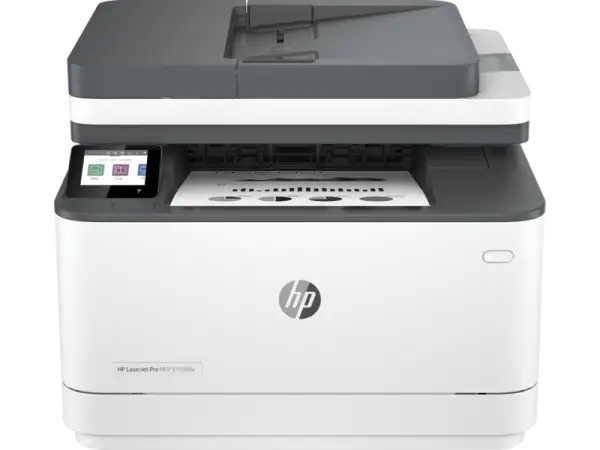
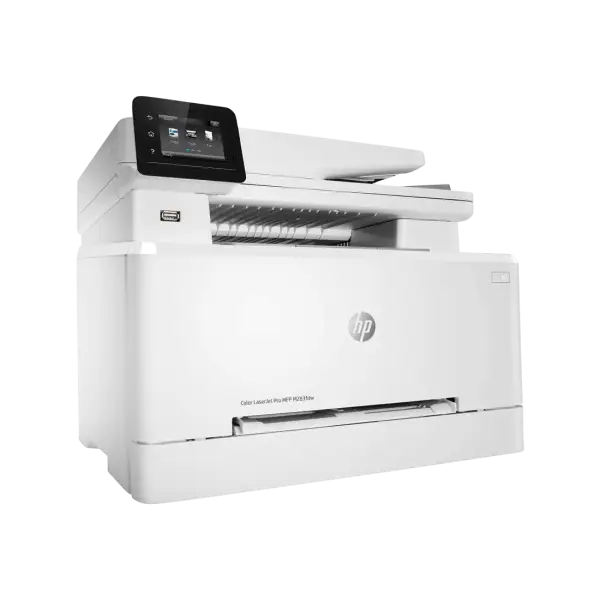
HP’s marketing positions the HP LaserJet Pro M283FDW Multifunction Printer (Renewed) as a productivity hub: “print, scan, copy, and fax,” “up to 22 ppm,” “wireless connectivity you can count on,” and “strong security designed to detect and stop attacks,” with HP Smart app remote workflows. On paper, it’s the right checklist for a home office that wants laser reliability without giving up color.
Digging deeper into user feedback, speed and baseline printing mostly track the promise. Consumer Reports calls text speed “typical” and gives a concrete datapoint: “5 pages took 22 seconds.” BestViewsReviews echoes the lived experience of quick jobs and duplex convenience: “delivers lightning-fast prints and copies, even for large documents” and “automatic two-sided printing feature saves time.” For the user printing meeting packets or kids’ school forms, that’s the difference between a quick task and a bottleneck.
Where the marketing tone starts to fray is the “wireless connectivity you can count on” story. In an HP Support Community thread, one owner’s narrative reads like a running log of instability: “never-ending firmware update loop, becoming unavailable on the network, waking up right after going idle,” followed by a new issue where “it turns completely off after a while.” Their workaround is telling: “pressing the bottom right corner of the display when the printer boots solved that problem for now,” but they add they need to do it “regularly when the printer breaks down in various ways.”
The “strong security” and cartridge messaging also collides with real-world ownership. Amazon’s listing includes a warning about “dynamic security” and that “cartridges using a non-hp chip may not function or may cease to function.” That’s not a minor footnote for budget-focused users, and the same HP Support Community poster points to frustration around cartridges: “the revelations about the cartridges’ premature end of life (and what happens if we use 3rd-party cartridges).”
Cross-Platform Consensus
Universally Praised
The most consistent praise centers on the basics that matter in a busy home office: clear text, solid speed, and a machine that feels like it belongs in a work setting. Consumer Reports’ evaluation is blunt about text: it prints “black-and-white text with excellent quality.” For users who mainly print documents — invoices, labels, school packets, shipping forms — that kind of “boring reliability” in output quality is the main reason to go laser.
Across user-curated summaries, print quality keeps coming up as an “upgrade” moment. BestViewsReviews captures that sentiment with quotes like: “the print quality is excellent and it’s an upgrade from my previous printer” and “the print quality looks fantastic so far with nice and clean output.” That’s the story of a typical upgrader: someone moving from an inkjet with clogging/drying issues to a toner-based unit that behaves predictably after sitting for days.
Speed and duplexing also land as practical wins, especially for people who print in batches. BestViewsReviews includes: “delivers lightning-fast prints and copies, even for large documents” and calls out that “automatic two-sided printing feature saves time.” HP and Amazon both position it at “up to 22 ppm,” and while lab results vary by test method, Consumer Reports frames the speed as “typical” for the class and provides the “5 pages took 22 seconds” data point that feels believable for daily use.
Another recurring positive is paper handling flexibility and the all-in-one workflow. The spec sheet emphasizes a 250-sheet tray and a 50-page ADF, and users echo how that translates to real tasks. BestViewsReviews highlights media flexibility: “The printer’s flexibility to print various paper sizes, including envelopes, and different paper types is an appreciated feature,” plus “I can print various paper sizes, including envelopes, and different paper types.” For small businesses mailing invoices or printing shipping labels, that’s a concrete quality-of-life benefit.
Summary takeaways (praised):
- Crisp document printing (Consumer Reports: “excellent quality” text)
- Fast batch printing and duplex convenience (BestViewsReviews: “lightning-fast” + duplex saves time)
- Solid-feeling hardware and flexible paper handling (BestViewsReviews: “robust and well-made” + envelopes/media)
Common Complaints
A recurring pattern emerged around stability, particularly firmware and network behavior. The most detailed complaint in the provided data comes from HP Support Community, where the owner calls it “the worst i’ve ever had” and lists a chain of issues: “never-ending firmware update loop,” “becoming unavailable on the network,” and “waking up right after going idle.” The story escalates into a behavior that breaks remote printing entirely: “it turns completely off after a while… I have to manually power it on… Trying to access it from the network doesn’t wake it up.”
That same user describes a kind of maintenance ritual that will sound familiar to anyone burned by flaky office devices: “doing the reset cycle - again!” and needing it “regularly when the printer breaks down in various ways: endless reboot cycle, disconnection from the network, erratic shut downs.” For people buying renewed/refurbished hardware specifically to save money, this kind of instability can erase the value fast — the printer isn’t useful if it’s “unavailable on the network” right when you need a document.
Longer-term durability complaints show up sharply on ProductReview.com.au. One reviewer says: “original unit purchased July 2021 have now had three replacement units under extended warranty in less than 18 months,” describing “poor quality units” with “different error codes each time.” Another review frames it as “essentially, a disposable product,” adding that they’re “built with poor quality components and have a tendency to break,” and criticizes the replacement-only approach: “not repairing these devices… they will only replace the entire device.”
Even noise becomes a small but repeated friction point. BestViewsReviews summarizes that “82% appreciated its quiet operation, but 18% found it loud during startup,” and one quote captures the experience: “it was loud and took a couple of minutes to initiate… once it settled down… the noise disappeared.” For a home office in a quiet room, that startup racket can be a daily annoyance even if printing itself is “no louder than any other laser printer.”
Summary takeaways (complaints):
- Network/firmware instability stories (HP Support Community: update loops, disconnects, shut downs)
- Reliability concerns and multiple replacements (ProductReview.com.au: “three replacement units”)
- Loud startup for some (BestViewsReviews: “loud… couple of minutes to initiate”)
Divisive Features
Toner economics and HP’s cartridge controls split opinion. On one side, people like the long intervals and the “laser doesn’t dry out” logic. BestViewsReviews includes: “replacement cartridges are expensive but they last longer than ink cartridges and don’t dry up or clog the print head,” and another user is happy it “came with regular toner cartridges instead of cartridges that are only good for 100 pages.” That’s a practical perspective for low-to-moderate volume users: fewer emergency runs to buy ink, fewer clogs, fewer “why is it streaking again?” moments.
On the other side, cost and lock-in concerns repeatedly surface. Consumer Reports quantifies how expensive color printing can be in testing terms — “41.8 cents per page” for graphics — and ProductReview.com.au includes a user who worries: “don’t know yet, but they don’t look cheap,” plus “unsure if i can use cartridges from elsewhere as hp voids warranties.” Officially, Amazon’s listing warns about “dynamic security” and that non-HP chips “may not function or may cease to function,” reinforcing why some shoppers treat ongoing toner cost as the real price of ownership.
Trust & Reliability
Looking at “trust” signals, the sharpest red flag in the provided data is the repeated mention of firmware behavior and support friction rather than scams or fake listings. The HP Support Community thread shows a user openly skeptical of the help they receive; after an HP employee posts troubleshooting steps, the user replies: “have you even read my problem description before copying / pasting this text?” That exchange doesn’t prove widespread failure, but it does illustrate how quickly trust erodes when users feel the device is unpredictable and support feels templated.
For longer-term reliability, ProductReview.com.au contains the most explicit durability stories: “three replacement units under extended warranty in less than 18 months,” plus criticism that “hp refuse to take them back… units provided under warranty are refurbished service units.” Those are exactly the kinds of multi-year anecdotes that renewed buyers should weigh, since refurbished pipelines can mean mixed unit histories.
At the same time, other owners describe painless setup and strong early impressions. One ProductReview.com.au user says: “it took me fewer than 10 minutes to set up the entire printer… I’ve never set up a printer this quickly before,” paired with “excellent print quality.” The reliability story here isn’t one-sided; it’s polarized between “works immediately and well” and “keeps breaking in different ways.”
Alternatives
Only a few competitors are explicitly mentioned in the provided data, and they appear in TechGearLab’s review narrative: Epson WorkForce Pro WF-4820 and HP OfficeJet 8015e. TechGearLab frames the HP Color LaserJet Pro M283fdw as “pricey” but high-performing for text and office work, suggesting the WF-4820 as “more affordable,” and the OfficeJet 8015e as a “budget-friendly document printing option.”
For shoppers considering renewed units, that contrast matters. If the appeal of the HP LaserJet Pro M283FDW Multifunction Printer (Renewed) is laser text clarity and fast duplexing, the alternatives mentioned are positioned as budget paths — but they’re not described in the dataset as matching laser output characteristics, only as cheaper options. The decision becomes less about a spec checklist and more about which risk you’d rather take: higher upfront/toner costs with laser, or potentially lower purchase price with a different class of printer.
Price & Value
Price signals in the dataset vary widely, and that spread is especially relevant for renewed/refurbished shoppers. Consumer Reports noted the purchase price “about $555” when their page was updated, calling it “high for a all-in-one color laser printer.” TechGearLab lists a “$549 USD list” price point in its header.
But the resale/refurb market snapshots on eBay show significantly lower entry points for refurbished units. One listing shows $329.99 for “excellent - refurbished,” while another shows $239.99 for a “used” unit described as “remanufactured,” and a separate listing in Canada shows C$799.99 for “very good - refurbished.” The market clearly isn’t stable; condition grading, included toner/drum, and warranty terms drive the real value.
Buying tips also emerge indirectly from user pain points: if firmware/network stability is a worry, warranty support and return windows matter. And because toner is a major ongoing cost lever, Consumer Reports’ cost framing — especially color graphics at “41.8 cents per page” in testing — implies that a cheap renewed unit can become expensive quickly if your usage is color-heavy.
Value-focused buying checklist (from patterns in feedback):
- Prioritize listings with a real warranty period (eBay listings highlight 1-year limited warranties in some cases).
- Confirm what’s included (some listings mention toner/drum/cables; others don’t).
- Budget for OEM toner policies (Amazon: “dynamic security” may block third-party chips).
FAQ
Q: Is the HP LaserJet Pro M283FDW fast enough for a home office?
A: Yes for typical home-office batches. Amazon and HP list “up to 22 ppm,” and BestViewsReviews quotes users saying it “delivers lightning-fast prints and copies.” Consumer Reports measured “5 pages took 22 seconds,” describing speed as “typical” for the class.
Q: Does it print great photos and graphics?
A: It’s better for documents than photo perfection. Consumer Reports says it prints text with “excellent quality,” but “color graphics” can show “some obvious defects” and are “ok for casual use.” If your work is design-heavy, plan for compromises.
Q: Are toner costs high?
A: They can be, especially for color. Consumer Reports estimated graphics printing at “41.8 cents per page” in testing conditions and noted toner prices around $74–$89 per cartridge at the time. Some users accept the tradeoff because toner “doesn’t dry up or clog.”
Q: Is Wi‑Fi reliable?
A: Some owners have serious complaints. An HP Support Community user reported the printer “becoming unavailable on the network” and a “never-ending firmware update loop,” plus issues waking or powering off. Others report easy setup, so reliability appears inconsistent across experiences.
Q: Can you use third-party toner cartridges?
A: It may be risky. Amazon explicitly warns the printer uses “dynamic security” and that non-HP chips “may not function or may cease to function” after firmware updates. One ProductReview.com.au user worried they were “unsure if i can use cartridges from elsewhere.”
Final Verdict
Buy the HP LaserJet Pro M283FDW Multifunction Printer (Renewed) if you’re a home-office user who prioritizes crisp text, quick duplex printing, and an all-in-one workflow with ADF and fax — the kind of person who’ll appreciate that it prints “black-and-white text with excellent quality” (Consumer Reports) and that owners call it “lightning-fast” (BestViewsReviews).
Avoid it if your top priority is rock-solid network uptime or if you’ve been burned by firmware quirks before; the HP Support Community story about a “never-ending firmware update loop” and needing frequent reset rituals is the kind of ownership experience that can dominate everything else.
Pro tip from the community mood: treat returns and warranty terms as part of the purchase. When some users describe “three replacement units” in under 18 months (ProductReview.com.au), the safest renewed deal is the one that lets you walk away if your unit lands on the wrong side of that reliability lottery.





