HP LaserJet MFP M234sdw Review: Fast Prints, Scan Caveats
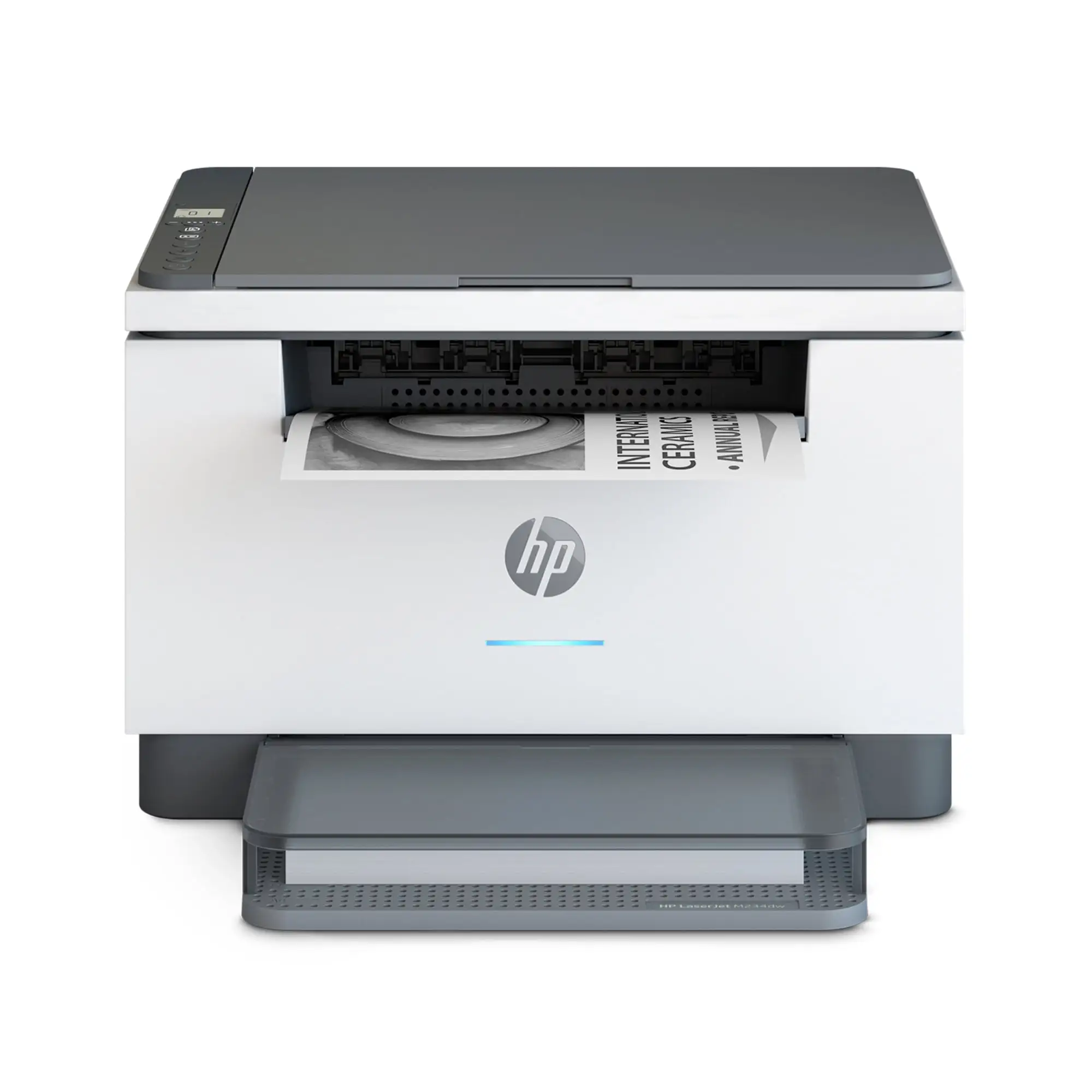
“Scanning—what a joke!” is how one Amazon reviewer summed up their experience, even while others gush that the same machine is “an excellent one stop shop small business printer.” That split reaction defines the HP LaserJet MFP M234sdw Wireless Black & White Printer: fast, compact, and reliable for printing, but with real friction once you move beyond basic jobs. Overall verdict based on user feedback: a strong pick for light‑to‑moderate monochrome printing with caveats for scanning and app dependence, 7.8/10.
Quick Verdict
Conditional Yes. If your priority is quick, crisp black‑and‑white printing in a small footprint, users across platforms are mostly happy. If you need painless duplex copying or consistent multi‑page ADF scanning, several buyers warn you may be fighting the workflow.
| What Users Like | Evidence | What Users Don’t Like | Evidence |
|---|---|---|---|
| Fast B&W printing | Amazon buyer: “amazing printing speeds… over 300 pages… without an issue.” | Scanning via ADF can be frustrating | Amazon buyer: “pages got scanned slanted.” |
| Easy setup (for many) | Best Buy buyer: “set‑up was an easy 15‑20 minutes.” | HP Smart app dependence/quirks | Amazon buyer: “HP wants you to use its HP Smart app… would not even install on my PC.” |
| Compact size | Best Buy buyer: “bought because it’s not bulky.” | Only one paper tray | Amazon buyer: “disappointed… only had one paper tray.” |
| Clear text quality | PCMag: “solid performance and output quality.” | Toner/running cost concerns | PCMag: “high running cost.” Best Buy buyer: “1st ink cartridge went quick.” |
| Duplex printing convenience | Best Buy buyer: “two sided printing very convenient.” | No automatic duplex scanning/copying | PCMag: “ADF limited to simplex scanning only.” Amazon buyer: “copying double sided pages has to be done manually.” |
Claims vs Reality
HP markets the printer as “fastest two‑sided printing in its class” and “stay productive from anywhere” with the HP Smart app. Digging into feedback, the speed claim largely holds up. A verified Amazon reviewer described a heavy job where the printer “had a print job of over 300 pages and it was able to handle it without an issue,” and another noted “fast and clear printing… prints both sides… wow!” PCMag’s lab review aligns, calling performance “solid,” with rated 30 ppm and strong duplex behavior for longer documents.
Where the “productive anywhere” story starts to wobble is the reliance on HP Smart for setup and scanning. Many users appreciate it. A Best Buy verified buyer said the app “walked me through it easily,” and an Amazon reviewer called setup “a breeze… guided us through the entire process.” But the downside is clear in frustrated reports. One Amazon buyer wrote: “HP Smart would not even install on my PC running Windows 10… meaning I would have to use my phone to control the scanner.” For laptop‑centric home offices, that app gatekeeping can feel like a productivity tax.
Another marketing‑adjacent expectation is that an all‑in‑one with ADF will streamline scanning and copying. Officially, it includes a 40‑page ADF and is positioned for small offices. Users do value the feeder: a Best Buy reviewer said, “really like the automatic document feed for scanning,” and an Amazon buyer praised that it “does the feed, scan, and eject sequence all by itself.” Yet multiple accounts highlight limitations: PCMag flags “ADF limited to simplex (one‑sided) scanning only,” and an Amazon reviewer contrasted this with older machines, saying duplex copying requires “reinserting the printed page upside down… play paper jockey.”
Cross-Platform Consensus
Universally Praised
“Small size, big performance” isn’t just a slogan in user language; it’s a theme. Owners who need a desk‑friendly printer keep calling out the compact footprint. A Best Buy verified buyer said, “compact and good… I bought because it’s not bulky,” and another called it a “budget laser” that still “scans and copies nicely.” For apartment dwellers or small home offices, that space efficiency shows up as a real benefit, not a marketing nicety.
Print quality and speed are the other near‑universal wins. Amazon buyers repeatedly emphasize clean text and dependable throughput. One wrote that prints were “quick and consistent with more than 30 pages per minute… no ink smudges,” while another praised “clear and crisp documents,” important for professional paperwork. Consumer Reports also described “very good text quality” and “text printing was very quick,” reinforcing that what most people buy a mono laser for—sharp pages fast—is met.
Wireless flexibility is praised especially by multi‑device households and small teams. An Amazon reviewer liked being able to print “directly from various devices… from anywhere in the office,” and another called out “HP app, USB, AirPrint” as multiple “ways to print,” useful when one connection method hiccups. For families mixing phones, tablets, Macs, and Windows PCs, that redundancy is a practical advantage.
Common Complaints
A recurring pattern emerged around scanning workflows. Even satisfied printers‑first owners describe scanning as slower or fiddlier than expected. One Amazon reviewer said, “HP scan software takes quite a bit time to load,” while another was far harsher: “Scanning—what a joke!” They reported being pushed to scan via phone, with ADF output “scanned slanted.” That kind of ADF alignment issue hits hardest for people digitizing multi‑page contracts or school packets where straight pages matter.
Duplex handling is another sore spot. Officially, the printer has auto‑duplex printing, and users love that. But duplex scanning/copying isn’t automatic, and that gap catches people off guard. An Amazon buyer complained that copying double‑sided documents requires “copying the first page… reinserting… and then copying the reverse page,” calling it a downgrade from older models. PCMag echoes this limitation, noting the ADF is simplex‑only. For users who routinely scan or copy two‑sided legal forms, this is the most consistent “don’t buy if…” warning.
Running cost and toner messaging also surface. PCMag’s review points to a higher cost per page for its class, and buyers mirror that anxiety. A Best Buy reviewer said the first cartridge “went quick,” and another hoped for third‑party cartridges but doubted they’d work. The price of official HP 134A/134X toner is a real factor for heavier print users, even if light‑duty owners find it manageable.
Divisive Features
Setup via HP Smart splits the crowd. Some call it painless: a Best Buy buyer said setup was “not complicated,” and an Amazon reviewer got running “in less than 5 minutes.” Others feel blocked by software friction. One Amazon reviewer needed to disable antivirus to be discovered, while another couldn’t get the app on Windows or macOS Catalina. For tech‑comfortable users, the phone‑first onboarding is fine; for those expecting a traditional LCD‑guided setup, it can feel like unnecessary hoops.
HP’s cartridge security model is divisive too, even among people who like the printer. A reviewer on Woot clarified differences between the M234sdw and the HP+ “e” variant and warned about being “policed by HP” if you choose the monitored version. Their bottom line: once past the ecosystem pressure, “this is still a very good printing machine.” That tension—great hardware, guarded supplies—shows up repeatedly in user tone.
Trust & Reliability
Best Buy’s verified reviews skew strongly positive, with 92% recommending and frequent mentions of reliability: “works like a champ,” “fast reliable,” and “working very efficiently.” These patterns suggest low early‑failure rates for basic printing, which aligns with Consumer Reports’ note that toner can last years at typical volumes.
But durability confidence is not universal, mainly because of software/firmware trust. The harsh Amazon reviewer who returned it after errors described “error 41… had to reboot,” and their overall statement—“worst printer/scanner I have ever used!”—frames reliability as a full‑stack experience, not just hardware. Long‑term “6 months later” style reports aren’t explicitly present here, so the strongest reliability evidence is early satisfaction plus HP’s established laser track record as perceived by buyers.
Alternatives
Only competitors mentioned in the data are fair game. PCMag positions the Canon ImageClass MF264dw II, Brother MFC‑L2820DW XL, and HP LaserJet Tank MFP 2604sdw as alternatives depending on priorities. The M234sdw is described as smaller with better text quality than Canon and Brother, but with higher cost per page. If you print enough to care about pennies, PCMag suggests considering the 2604sdw because of its “astoundingly low 0.6‑cent cost per page.” If faxing or larger trays matter, the Brother and Canon options add capacity or fax but may trade off text sharpness or running cost.
Price & Value
Pricing varies by channel. Consumer Reports pegged a typical purchase price around $240, while Best Buy buyers report deals like $179. On eBay, new units list around $170–$200 plus shipping, and open‑box listings hover near $170. That spread matters because perceived value hinges on how close you get to sale pricing.
At lower sale prices, users call it a bargain for what it replaces. An Amazon reviewer said it “basically replaces 3 machines in the office,” and Best Buy buyers describe “great value for the money.” When priced closer to MSRP, value debates shift to toner: PCMag’s “high running cost” and user worries about cartridge lock‑in make it feel less attractive for high‑volume print shops. Buying tips implicit in community tone: aim for discounts, and if you dislike supply restrictions, avoid the HP+ “e” variant.
FAQ
Q: Does the HP LaserJet M234sdw scan double‑sided documents automatically?
A: No. PCMag notes the ADF is “limited to simplex (one‑sided) scanning only.” An Amazon buyer said duplex copying requires manually flipping pages: “play paper jockey like that.” If duplex scanning is a daily need, users suggest this limitation is a deal‑breaker.
Q: How hard is setup for home users?
A: Many find it quick, especially using HP Smart. A Best Buy buyer said setup took “15‑20 minutes,” and an Amazon reviewer got it running “in less than 5 minutes.” Others struggled when HP Smart couldn’t detect the printer or install on their PC.
Q: Is print speed really as fast as advertised?
A: Most users say yes. Amazon buyers cite “over 30 pages per minute” and large jobs without pauses. Consumer Reports measured 5 pages in 15 seconds. For normal home‑office batches, speed is one of the most reliable strengths.
Q: Are toner costs a concern?
A: For light users, not much. Consumer Reports estimates a cartridge could last “at least 4 years” at very low monthly volume. Heavy users and PCMag both warn about “high running cost,” and Best Buy buyers note cartridges can go fast.
Q: Can I use third‑party toner?
A: Feedback is cautious. HP’s specs state the printer blocks non‑HP chipped cartridges. A Best Buy buyer hoped third‑party would work but said, “I doubt it.” One Woot reviewer chose the non‑HP+ model specifically to avoid stricter monitoring.
Final Verdict
Buy if you’re a home office, small business, or family that prints mostly black‑and‑white documents and wants a compact, fast laser with easy wireless options. Users repeatedly praise sharp text, strong duplex printing, and small size. Avoid if your workflow depends on effortless duplex scanning/copying or you dislike app‑centric setup; the loudest complaints come from people who expected a smoother scan/copy experience. Pro tip from the community: as the Woot reviewer put it, pick the standard M234sdw if you want “freedom of the unmonitored printer,” then enjoy what another Amazon buyer called “a very good printing machine.”





