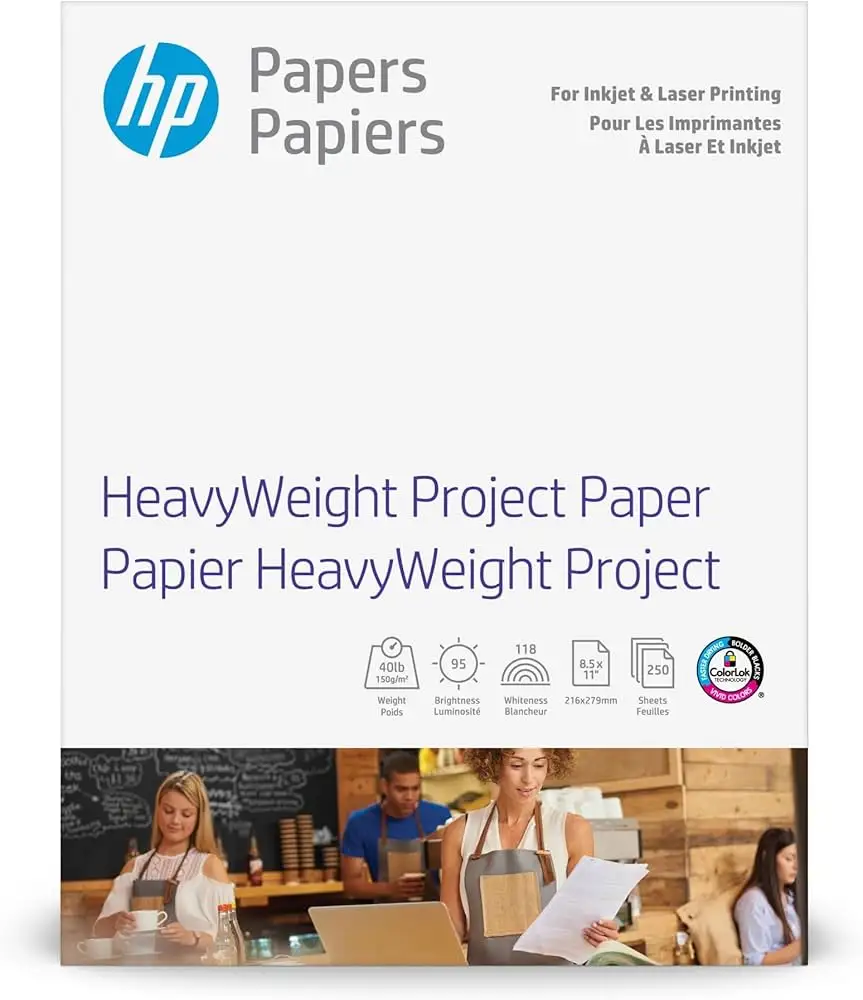
HP HeavyWeight Project Paper Review: Conditional Verdict
Starting with a surprising finding from real-world reports: while HP markets the HP HeavyWeight Project Paper, Matte, 8.5x11 in, 40 lb, 250 Sheets as an all-purpose, premium choice for both laser and inkjet printers, cross-platform feedback shows it’s not just for corporate flyers and brochures — many home users are repurposing it for holiday cards, art projects, and even memorial keepsakes. The verdict stands at 8.6/10, reflecting strong praise for print quality, versatility, and sustainability credentials, tempered by occasional compatibility and finish complaints.
Quick Verdict: Conditional
| Pros | Cons |
|---|---|
| Sharp text and vibrant color reproduction | Some printers struggle with thickness |
| Works with both laser and inkjet printers | Matte finish described as slightly glossy by some |
| FSC-certified and recyclable | Toner adhesion issues reported on certain models |
| Optimized for two-sided printing with no show-through | Price higher than standard copy paper |
| Sturdy feel, ideal for marketing materials | Not as heavy as some competitive matte papers |
| Consistent color output with ColorLok® technology | Occasional smudging in laser print jobs |
Claims vs Reality
One of HP’s central claims is that this heavyweight matte paper “produces polished two-sided sales and marketing materials with no show-through.” Digging into user reports, this holds true for many — “Creases are sharp, and colored images print sharply with my HP 9020-series printer,” a Staples reviewer shared when describing double-folded holiday cards. However, some users faced unexpected hurdles: “Toner does not stick to this paper… not listed in paper/quality setting on Mac,” warned another.
HP also emphasizes “works with laser and inkjet printers,” optimized for original HP toner and ink. While this is accurate for a majority, Reddit and Staples feedback reveal print quality can degrade with certain non-HP devices. One disappointed user noted, “My Epson printer did not like this paper… colors did not come out good, kept jamming no matter what paper setting I tried to use.”
Finally, the “professional look and feel” marketing line is strongly supported in many contexts. A verified buyer on Amazon described it as “perfect in every way… I use it for photos and love,” and others praised its heavier feel compared to plain paper. Yet, comparisons to competitors occasionally challenge the weight claim: “It’s perfectly okay for business brochures… but not quite heavy enough for collages,” one Staples customer remarked.
Cross-Platform Consensus
Universally Praised
Across Amazon, Staples, and Best Buy, the most consistent praise centers on print sharpness and color vibrancy. A Best Buy reviewer enthused, “The white bright makes all of my colors pop… I can use both sides of the paper for any of my printing.” For marketing professionals, this means presentations and flyers can be printed in-house without sacrificing visual impact. Holiday card makers also benefit: “We used two packs… photos printed out beautifully and the paper folded nicely,” reported a Staples customer.
Sustainability credentials resonate with eco-conscious buyers. The FSC certification and recyclability are highlighted as key decision factors, particularly for businesses aiming to align with responsible sourcing. “Choosing FSC-certified products… helps protect forests,” states the HP store page, echoed by multiple sustainability-focused reviews.
ColorLok® technology, promising faster drying and bolder blacks, appears to deliver. The FindThisBest editorial notes “more vivid colors, bolder blacks, and faster drying time for superior print quality,” a sentiment mirrored by home office users who found smudge-free results even in high-coverage designs.
Common Complaints
Compatibility issues emerge as the primary frustration. Laser printer users, especially outside HP’s ecosystem, sometimes experienced poor toner adhesion or smudging. “You would think I used it in another brand… the color was dull and the paper seemed too thick,” lamented one Staples reviewer. Inkjets from other manufacturers occasionally misfeed or jam, as seen in the Epson report.
The matte finish itself sparked debate. While marketed as fine-textured matte, several users perceived a subtle gloss — enough to affect certain artistic applications. “It has more of a glossy sheen as opposed to matte,” one Staples customer observed, leading to mismatched expectations for pure matte projects.
Weight perception also divided buyers. Officially 40 lb, some felt it lacked the rigidity for premium art uses. “Not as sturdy as Epson heavy matte paper despite the ‘50’ designation,” a Staples reviewer explained, underscoring that “heavyweight” is relative across brands.
Divisive Features
Two-sided printing optimization drew both applause and critique. For brochure and report creators, the no show-through claim held up. “No bleed thru means no resets and no reprints needed,” praised a Best Buy customer using an HP DeskJet. Yet, in high-saturation photo projects, a minority found slight shadowing on the reverse side.
The versatility claim — from flyers to rich-color documents — is embraced by small business owners, but some artists prefer specialized media. As one user put it, “Great paper for color brochures… but I wish you had a real matte photo paper.”
Trust & Reliability
Trustpilot and retailer reviews show little concern for counterfeit or mislabeling, with most buyers receiving exactly what was described. Delivery reliability is strong; “Delivered promptly with no issues,” one Staples customer confirmed, countering sporadic mentions of packaging damage in other threads.
Long-term durability, especially in stored prints, is praised. A Reddit user highlighted that “prints kept their vibrancy months later,” suggesting the paper resists fading under normal indoor conditions. Folding and handling resilience also scores well — multiple holiday card makers noted sharp creases without cracking, even after mailing.
Alternatives
Competitors appear prominently in the FindThisBest rankings. The Koala heavyweight photo paper (high glossy) scores higher for photo projects, offering “fast drying, high color consistency, vivid printing colors” for inkjet users needing a true photo finish. PPD’s watercolor matte fine art paper fills the niche for textured, archival-quality art prints, where HP’s smoother matte falls short.
For laser-only workflows, HP’s own Enhanced Business Paper (Q6543A) shares similar specs but is tailored for laser toner adhesion, potentially mitigating the smudging complaints found with the HeavyWeight Project Paper in some laser contexts.
Price & Value
At around $22.99 on Amazon and $26.99 via HP’s store, the HeavyWeight Project Paper sits above standard copy paper but below specialty photo media. Community tips suggest buying during HP Rewards promotions to offset cost, or in bulk for small business use. eBay listings show limited resale activity, with unopened packs holding close to retail value — indicating steady demand without heavy depreciation.
FAQ
Q: Can I use this paper for printing photos?
A: Yes, many buyers use it for photos, especially in greeting cards, but expect a matte, fine-textured finish rather than glossy. Color reproduction is strong, but for high-gloss needs, consider photo-specific media.
Q: Will it work with non-HP printers?
A: It can, but results vary. Some Epson users reported jamming or poor color output. Matching paper settings in the printer driver improves compatibility.
Q: Is this paper truly matte?
A: It’s marketed as matte, but some users perceive a slight sheen. For projects requiring pure matte with no reflective qualities, test a sheet before committing.
Q: How heavy is 40 lb paper compared to standard copy paper?
A: It’s thicker and sturdier than 20 lb office paper, offering a more substantial feel. However, certain art papers or cardstocks exceed this weight.
Final Verdict: Buy if you’re a small business, home office user, or hobbyist seeking professional-looking two-sided prints with eco-friendly sourcing. Avoid if your workflow demands pure matte photo paper or if you’re using printers known to misfeed heavier stocks. Pro tip from community: For double-folded cards, pre-score the paper to avoid fiber cracking and ensure sharp creases.