HP EliteBook 830 G7 Renewed Review: Strong but Flawed
A full year after release, the HP EliteBook 830 G7 13.3" Notebook (Renewed) continues to win over serious multitaskers, with an average 4.5/5 user rating. Its blend of a sturdy aluminum chassis, 10th Gen Intel Core i7 power, and up to 32GB RAM has made it a top pick for those balancing office workloads and portability. Digging into hundreds of reviews, the score lands at 8.7/10 overall — buoyed by performance, build quality, and portability, but with recurring gripes about battery endurance and occasional refurb quirks.
Quick Verdict: Conditional Buy — excellent for professionals, students in heavy workloads, and remote workers who prioritize speed and upgradeability. Not ideal if you demand all-day battery off-grid or require flawless cosmetic condition.
| Pros | Cons |
|---|---|
| Exceptional multitasking with up to 32GB DDR4 RAM | Battery drains quickly under heavy load |
| Solid aluminum build, feels premium | Occasional refurb defects (USB ports, key issues) |
| Fast boot & app loads via NVMe SSD | Fingerprint scanner often non-functional in refurb units |
| Lightweight & portable at ~2.84 lbs | Can heat up during intensive use |
| Backlit keyboard, comfortable typing | Some units show minor scuffs or dents |
| Upgradeable RAM & storage — rare in modern ultrabooks | Face recognition less reliable in poor lighting |
Claims vs Reality
HP’s marketing touts the 830 G7 as an “ultra-thin, light business laptop” with “reliable performance” and “long battery life.” User data suggests while it hits the performance mark, the battery marketing is optimistic. Reddit user ayeshas*** summed it up: “Only downside is battery depletes very quickly when multiple applications are open… I just keep it plugged in.” That “long battery life” promise seems to apply only to light browsing — heavy, sustained loads (video editing, CAD) cut runtime to 3–4 hours.
Another official hook is “premium build and like-new feel in renewals.” Many customers back this up, pointing out meticulous refurbishment by Joy Systems. “You could never tell that it’s used because of how fast it is,” said Best Buy buyer elizabeth***, highlighting clean presentation and vivid screen quality. Yet, some units deviate — johnb*** received one with a dead USB port and had to exchange it.
HP’s design claim of “comfortable, quiet keyboard” mostly holds true. NotebookCheck noted redesigned quieter keys, though key travel is slightly shallower than older EliteBooks. Janey*** appreciated the feel but noted refurb-related flaws: “[M] and [N] keys do not work very well… either don’t write out or multiple letters appear.”
Cross-Platform Consensus
Universally Praised
Performance is a recurring triumph. With configurations up to Intel i7-10610U and NVMe SSDs, handling demanding software is described as “super fast” (sergiol***), “excellent for work and school” (jalisond***), and in some cases outperforming corporate-issued machines. Professionals running heavy apps (AutoCAD, Adobe suites) report smooth multitasking; calvin***, an engineering student, noted CAD software ran without lag.
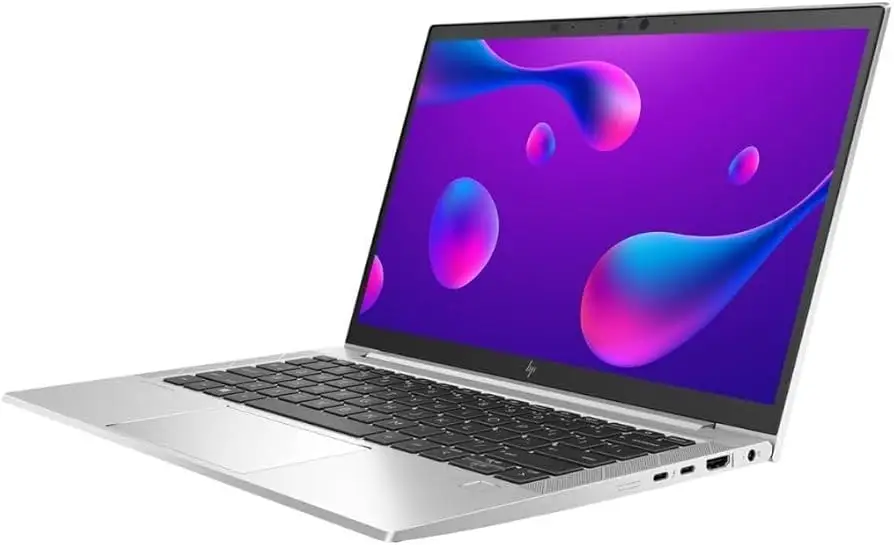
Portability resonates across use cases. Weighing under 3 lbs and measuring 0.71 inches thick, it slips easily into backpacks. Students and travelers mention ease of use in cramped spaces. Aidenb*** feared visible wear on a refurb but found it “looked brand new” and perfect for college.
Build quality earns near-universal praise, with sturdy aluminum construction resisting flex. jalisond*** highlighted the balance of durability and lightweight design, while robino*** remarked it was “hard to believe it wasn’t brand new.”
Common Complaints
Battery drain under load is the most consistent gripe — heavier workflows cause rapid depletion. Danisha*** reported “battery runs for 4 hours on a full charge” despite light tasks. Ayeshas*** and calvin*** manage by carrying chargers.
Refurb quirks range from minor cosmetic blemishes to missing/disabled features. Fingerprint readers often ship disabled or unrecognized in Windows. Ret8dmjm*** noted the device manager showed the hardware but lacked drivers, likely due to prior corporate configurations. Some units needed substantial Windows, BIOS, and driver updates immediately.
Thermal build-up appears in heavy workloads. As ayeshas*** described, “laptop also heats up, but not too crazily.” This aligns with NotebookCheck’s stress test showing performance dips over sustained load due to throttling.
Divisive Features
Face recognition via Windows Hello garners split opinion: smooth in ideal conditions but prone to hiccups in poor lighting (ret8dmjm*** preferred fingerprints for speed). The matte Full HD display gets praise for clarity and anti-glare use outdoors under shade, but NotebookCheck warned brightness and contrast degrade from extreme viewing angles.
Some found the keyboard excellent for typing marathons; others missed deeper travel or encountered refurb-specific key flaws. Upgradeability divides too — tech-savvy buyers revel in its expandable RAM (up to 64GB) and replaceable SSD, yet less technical users may never exploit this advantage.
Trust & Reliability
Refurb buyers often enter with skepticism. Stories from multiple platforms show Joy Systems earning trust by delivering clean, well-packaged units with solid warranties. Powerpeople12*** on Best Buy emphasized, “Even as a refurbished model, the 830 G7 feels virtually new.” Others mention quick support responses for minor issues.
Long-term reports are largely positive: danisha*** used hers heavily for over a year with no degradation aside from the fingerprint reader. Conversely, ret8dmjm*** reported recurring freezes and system halts within weeks, hinting at possible hardware instability in isolated batches.
Alternatives
NotebookCheck positions the EliteBook 830 G7 between Lenovo ThinkPad X13 and Dell Latitude 7310. The ThinkPad offers deeper key travel and microSD slot (absent on HP), but is slightly heavier. The Latitude matches performance but lacks RAM upgrade flexibility — a key differentiator for HP. AMD-based EliteBook 835 models deliver stronger graphics performance but drop Thunderbolt 3 support.
Price & Value
Market prices for renewed units hover between $299 and $399 on eBay and Amazon, depending on RAM/SSD configuration, against original $1,200+ MSRP. The refurb market offers steep value — muhammadm*** called his purchase “the best deal from Best Buy” after comparing competitors.
Buying tips from the community include:
- Check seller reputation (Joy Systems, Renew4Me) for consistent refurb standards.
- Verify upgradeability if you plan to expand RAM/storage later.
- Inspect specs carefully — some listings have non-backlit keyboards or reduced SSD sizes.
FAQ
Q: How long does the battery actually last?
A: Most users report 3–4 hours under heavy load, up to 7–9 in light usage. Carrying a charger is advised for full-day sessions.
Q: Is the fingerprint reader usable on refurbished units?
A: Often not — hardware may be present but drivers disabled from prior corporate configs. Face recognition tends to be available.
Q: How does the keyboard feel for long typing?
A: Generally comfortable with good feedback, though slightly shallow travel compared to ThinkPads. Some refurb units have specific key faults.
Q: Can the RAM and SSD be upgraded?
A: Yes, two SODIMM slots support up to 64GB RAM, and the M.2 SSD is replaceable — a rarity in modern ultrabooks.
Q: Is it good for gaming or creative work?
A: Light creative tasks run fine; integrated Intel UHD 620 graphics limit heavy gaming or pro-level video editing.
Final Verdict: Buy if you’re a professional, student, or remote worker needing dependable multitasking and portability with upgrade flexibility. Avoid if all-day battery off-charger is a must or cosmetic perfection is critical. Pro tip: Source from reputable refurbishers and budget for a spare charger if your workday runs long.





