HP Color LaserJet Enterprise M554dn Review: Conditional Yes
“Colored areas and photos… turned out to be too dark.” That single line keeps popping up across sources—and it undercuts the “premium color” promise in a way spec sheets can’t.
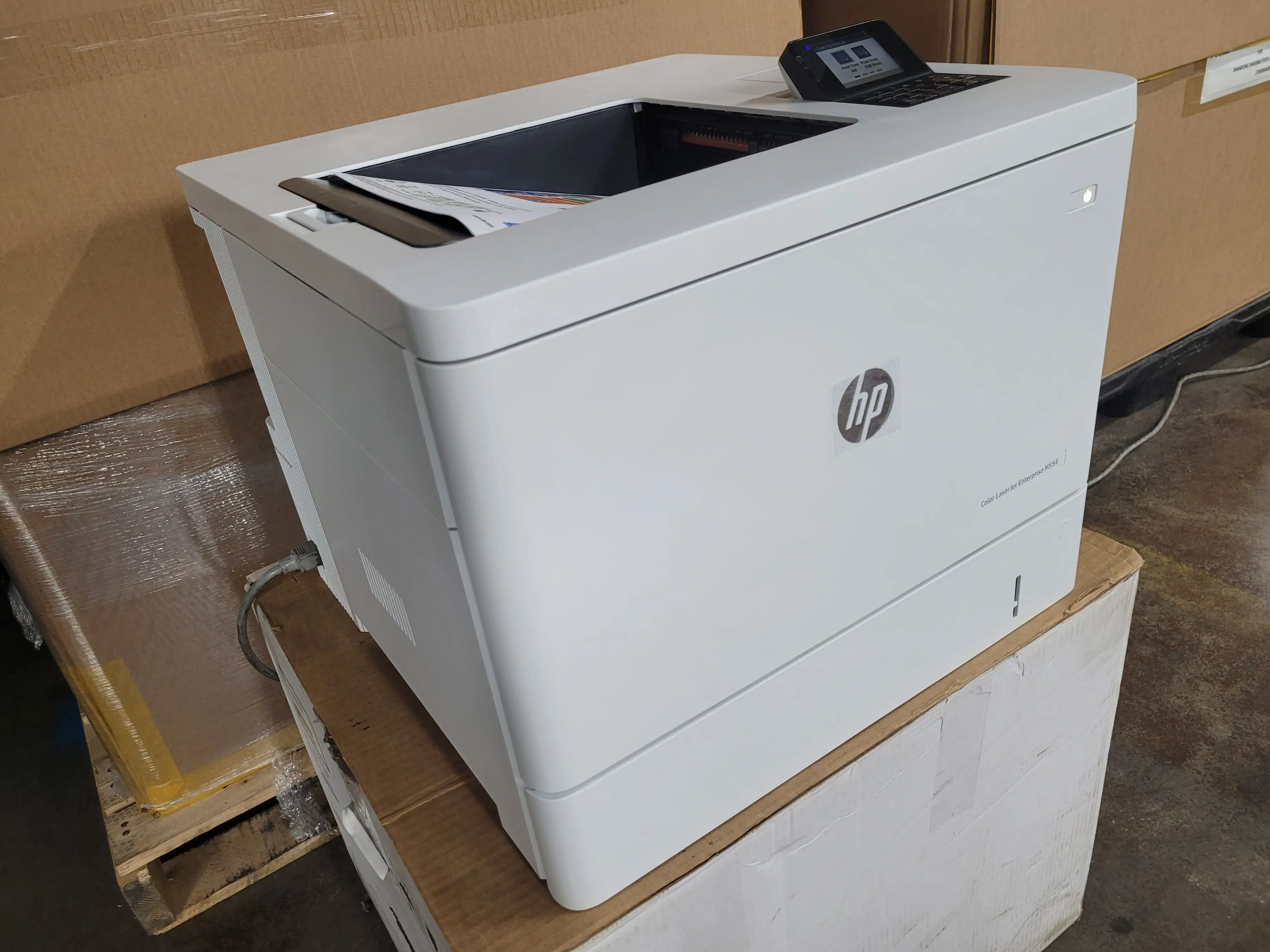
HP Color LaserJet Enterprise M554dn Duplex Printer (White) earns a conditional verdict: impressive speed and office-friendly workflow features, but color rendering and “enterprise” convenience can vary depending on what you print and how you manage trays. Score: 7.9/10
Quick Verdict
For most offices: Conditional Yes (especially high-volume document teams). For color-critical work: Proceed cautiously.
| What matters | What feedback suggests | Who it impacts most |
|---|---|---|
| Speed | “Printed a good 35 pages per minute… duplex… hardly slower.” (hpmanual.net) | Busy teams printing lots of docs |
| Text/graphics quality | “Impressed with its clean print.” (hpmanual.net) | Office documents, presentations |
| Photos & heavy color fills | “Colored areas and photos… too dark.” (hpmanual.net) | Marketing teams, photo-heavy output |
| Duplex convenience | “Automatic two-sided printing… saves paper.” (Amazon specs) | Anyone printing multi-page packets |
| Tray behavior | “Self-assigns… the fold-down tray… can’t force it back.” (WizeMart user review) | Shared/network printer setups |
| Noise | Some describe “fairly quiet” (hpmanual.net), but others flag “potential noise levels.” (Provantage summary) | Open-plan offices |
Claims vs Reality
HP’s marketing leans hard on enterprise-grade speed, security, and professional output. Digging deeper into user-facing commentary, the printer’s real-world story looks more nuanced—especially around color.
Claim #1: “High-quality… vivid colors… crisp graphics.”
Official descriptions emphasize “sharp blacks, vivid colors, and crisp graphics” (Amazon specs) and “professional… colour documents” (HP pages). Yet at least one detailed write-up warns that “colored areas and photos… turned out to be too dark” (hpmanual.net). For an office that mostly prints charts, slide decks, and regular business graphics, the same source still credits “clean print” for “text and graphics” (hpmanual.net). The gap shows up when the job shifts from business graphics to image-heavy work.
A recurring pattern emerged: when users talk about “representative PowerPoint presentations,” they’re not just asking for color—they want gradients and photo tones to look right. The same source praises “clean color transitions and nicer gradients,” but also notes “light stripes and clear steps in the color gradient” that “mean that points are deducted” (hpmanual.net). In other words: great for many office visuals, but not immune to banding or tonal issues.
Claim #2: “Fast performance… up to 33–35 ppm.”
On paper, the printer is positioned for speed (HP lists up to 33 ppm black / 35 ppm color depending on region; Amazon highlights fast printing). In narrative feedback, speed is one of the most consistent positives. One write-up says it “printed a good 35 pages per minute” and that duplex printing was “hardly slower” (hpmanual.net). That matters most to workgroups pushing recurring batches—policies, invoices, onboarding packets—where throughput beats perfection.
That said, some user commentary (in Russian-language owner reviews) suggests extremely fast page cadence like “a page… about 2 seconds” and “first page… about 6 seconds,” paired with praise for “high speed printing” and “duplex printing” (WizeMart user reviews). While those impressions align with the “fast first page out” specs, they also show how speed can feel “instant” in day-to-day office use even if exact timing varies by job complexity.
Claim #3: “Easy to use, simple to manage.”
HP promises straightforward management (HP Web Jetadmin, “easy to use”), and the control panel is positioned as intuitive. Yet user feedback suggests management friction can appear in shared setups—particularly around paper source selection. One WizeMart user notes that used as a network printer, it “often spontaneously assigns” printing to the “fold-down tray” and is hard to force back to the main tray, while also criticizing that it “quickly goes into standby” and “unclearly determines trays and formats” (WizeMart user review). That’s a very specific, operational complaint—exactly the kind that derails a busy office, regardless of security features.
Cross-Platform Consensus
Universally Praised
A clear throughline is speed paired with office-ready duplex printing. For teams juggling high-volume workloads, the printer’s pace becomes the selling point. One source calls it “extremely fast” and says duplex mode is “hardly slower” (hpmanual.net), which is exactly what office admins want when they’re trying to keep multi-user printing from becoming a bottleneck. In owner-style feedback, that speed turns into a lived experience: “I don’t have time to grab the page, the next one is already coming out” (WizeMart user review, translated). For a small office printing contracts and internal docs, that kind of immediacy reduces queue frustration.
Print clarity for text and standard business graphics is another repeat strength. The same write-up says “in terms of text and graphics, it impressed with its clean print” (hpmanual.net). For accounting teams, legal admins, or operations groups where crisp text is non-negotiable, the emphasis isn’t “beautiful”—it’s legibility at scale. Owners echo that framing: “every letter and symbol” is printed clearly, with “no smearing” even if touched right after printing (WizeMart user review, translated). Whether or not every office will see identical results, the recurring story is document confidence—print it and hand it out.
Ease of everyday use also shows up—though more in user-style testimonials than in spec sheets. One owner describes it as easy to learn even without being an “office equipment expert,” praising how it’s “fully designed so non-professionals can work calmly” (WizeMart user review, translated). That’s a real productivity factor: if staff can reliably send jobs without training, IT tickets drop and printing becomes background infrastructure instead of a weekly drama.
Finally, several comments describe the physical experience as office-friendly: “fairly quiet” appears in the hpmanual.net narrative (hpmanual.net), and some owner feedback says it “works without extra noise” (WizeMart user review, translated). While not universally agreed (see complaints), this “quiet enough” story matters for reception desks, clinics, or shared spaces.
Common Complaints
The most consequential complaint is color output on challenging content—especially photos and heavy fills. One source is blunt: “Colored areas and photos… turned out to be too dark” (hpmanual.net). For marketing teams printing mockups, real estate flyers, or event materials, “too dark” doesn’t just mean “a little off”—it can mean wasted toner, reprints, and awkward client-facing output. Even when color transitions are described as “clean,” the same source flags gradient issues: “light stripes and clear steps in the color gradient” (hpmanual.net). That points to a printer that can look great on charts and headings, yet stumble when asked to behave like a photo printer.
Paper handling and tray logic is another recurring operational frustration—especially in networked office scenarios. A WizeMart user describes the printer “spontaneously” choosing the fold-down tray and refusing to switch back to the main tray in the moment, plus “unclear” tray/format detection (WizeMart user review, translated). For an office manager, this isn’t a “minor inconvenience”: it can cause misprints, the wrong paper being used, and repeated user complaints that “the printer is broken” when it’s actually mis-selecting sources.
Cost sensitivity also emerges, though unevenly. A Provantage-style summary flags “high initial cost” (Provantage summary), and a WizeMart user explicitly complains about “high price of cartridges” (WizeMart user review, translated). For budget-conscious teams printing thousands of pages, the total cost of ownership becomes the bigger story than the purchase price. This aligns with HP’s own “dynamic security” disclaimers about blocking non-HP chips (HP/Amazon product disclaimers), which can limit cheaper third-party toner options—an issue that matters most to high-volume offices trying to control consumables spend.
Noise is the complaint that shows up as a split verdict. One summary notes “potential noise levels” and that “some users report it can be noisy during operation” (Provantage summary), even as other sources call it “fairly quiet” (hpmanual.net) or “not loud” (WizeMart user review, translated). The likely takeaway: noise tolerance depends on placement and expectations—fine in a copy room, more noticeable near desks.
Divisive Features
The printer’s “enterprise” positioning creates expectations that aren’t universally met in day-to-day behavior. While official materials emphasize manageability and control (HP Web Jetadmin and enterprise fleet language), a network user complaint about tray selection and standby behavior suggests some offices will still face workflow friction (WizeMart user review, translated). For IT teams, this becomes a “last-mile” problem: the device can be powerful and secure, yet still annoy users if the paper path behavior isn’t predictable.
Color quality is similarly polarized by use case. If your output is mostly text, tables, and business graphics, feedback like “clean print” for “text and graphics” (hpmanual.net) reads like a win. But if you print photo-heavy collateral or gradient-rich slides, the same source’s “too dark” photos and gradient banding flags become dealbreakers (hpmanual.net). The printer can be both “high-quality color” and “not for photos,” depending on who’s holding the output.
Trust & Reliability
Digging deeper into buyer-style stories, durability is often described indirectly through confidence language: “quality, reliable, worthy” and “super” (WizeMart user review, translated). Another owner praises build quality as “made in Japan,” with “quality plastic” and “no smell,” while also noting it’s “heavy” and awkward to carry alone (WizeMart user review, translated). That “heavy, don’t move it much” theme fits an office printer meant to be placed once and used for years.
On scam concerns or review trust: the most detailed “reliability” signals in the provided data come from owner-style reviews (WizeMart) rather than complaint-driven platforms. No concrete scam pattern is documented in the provided Trustpilot-labeled data beyond generic reposted text, so the strongest trust indicators here are practical: repeat emphasis on speed consistency, clean text output, and “no jams” style claims like “nothing gets crumpled inside” and paper feeds reliably without perfect stacking (WizeMart user review, translated).
Alternatives
Only a few competitors appear directly in the provided data, and they’re mostly shown in HP’s own product navigation. The closest “alternative” explicitly named is the HP Color LaserJet Enterprise 6701dn, positioned for much higher speed (“up to 61 ppm”) (HP South Africa page). For large departments where throughput is the primary constraint, that model reads like the step-up path—but it’s also likely a different cost and footprint class.
For mixed print/copy/scan needs, HP’s navigation mentions multifunction devices like the HP LaserJet Pro MFP 4103fdw (HP South Africa page). The key difference isn’t just speed; it’s workflow consolidation. If your office needs scanning and copying daily, an MFP can replace multiple devices—whereas the M554dn story is about fast, secure printing first.
Price & Value
Pricing in the provided data spans wide. Amazon lists the HP Color LaserJet Enterprise M554dn Duplex Printer (White) at $799 with 4.5/5 stars across 20 reviews (Amazon listing). Market listings show new units higher in some channels—for example $893.56 on eBay from a high-feedback seller (eBay listing). There’s also evidence of extreme discount outcomes in secondary liquidation/auction contexts (BidFTA shows an auction-ended sale far below MSRP), which suggests resale and liquidation pricing can swing dramatically depending on condition, missing consumables, and local pickup constraints.
Value hinges on whether you’re buying it as a long-term office workhorse or as a “deal find.” Owner feedback that highlights high cartridge pricing (WizeMart user review, translated) and HP’s dynamic security language about blocking non-HP chips (HP/Amazon disclaimers) imply that bargain-hunting on toner can be complicated. For procurement teams, the buying tip embedded in the data is indirect: budget not only for the device, but for Original HP toner compatibility constraints and the realistic cost per page.
FAQ
Q: Is the HP Color LaserJet Enterprise M554dn actually fast in real office use?
A: Feedback consistently emphasizes speed. One source says it “printed a good 35 pages per minute” and that duplex mode was “hardly slower” (hpmanual.net). Owner-style reviews also describe pages coming out so quickly they “don’t have time to grab” them before the next prints (WizeMart user review, translated).
Q: How good is color printing for presentations and photos?
A: For business graphics, one source says “text and graphics… impressed with its clean print” (hpmanual.net). But for photo-like output, the same source warns “colored areas and photos… turned out to be too dark,” and it flags visible steps/stripes in gradients (hpmanual.net). For color-critical work, that’s a caution sign.
Q: Does it have Wi‑Fi built in?
A: Official specs focus on USB and Ethernet as standard connections (Amazon specs; HP Switzerland specs). Wireless is described as optional via accessories (HP Switzerland specs). If you need Wi‑Fi out of the box, plan for an add-on rather than assuming it’s included.
Q: Are there paper tray or paper detection issues?
A: At least one networked-office user reports frustrating tray behavior: the printer “spontaneously” assigns jobs to the fold-down tray and “unclearly determines trays and formats,” making it hard to force the main tray during use (WizeMart user review, translated). For shared printers, this may be worth testing early in deployment.
Q: Can you use third‑party toner cartridges?
A: Official disclaimers state the printer is intended to work only with cartridges using HP chips/circuitry and “will block” cartridges using non‑HP chips, with firmware updates maintaining these measures (Amazon listing; HP pages). That doesn’t describe every scenario, but it signals limited flexibility compared with printers without such restrictions.
Final Verdict
Buy if you’re a busy office team that needs fast duplex printing and consistently crisp text—especially in a shared environment where speed matters more than photo fidelity. Avoid if you regularly print photos, heavy color fills, or smooth gradients where “too dark” output and visible gradient steps would be unacceptable (hpmanual.net). Pro tip from community: if it’s going to live on a desk, remember owners call it “heavy,” so “better to place it and not move it” (WizeMart user review, translated).





