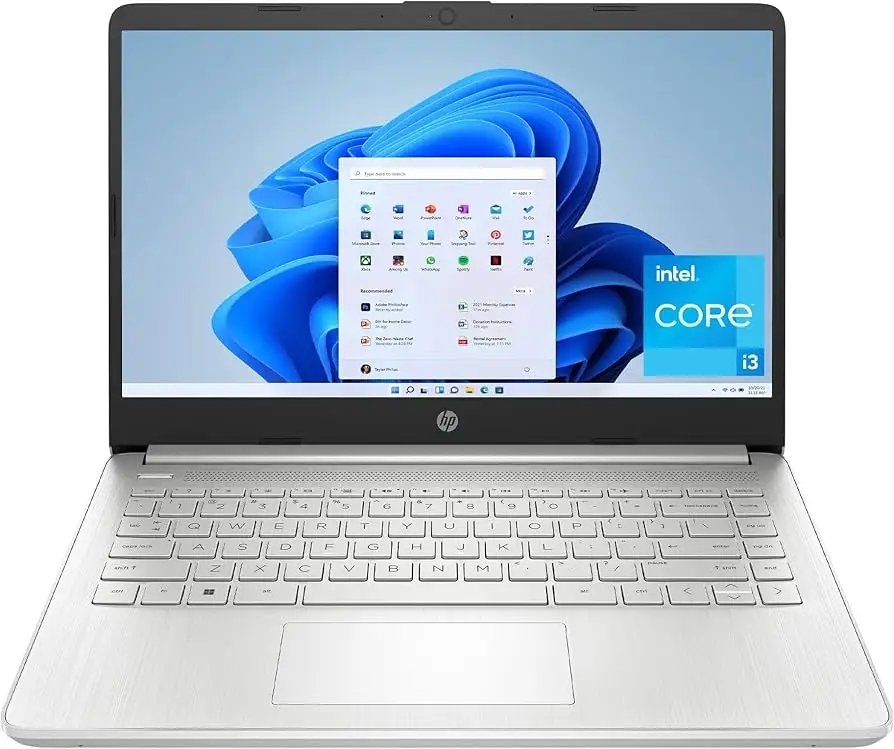
HP 14 Laptop Review: Budget Style Meets Mixed Reality
The biggest surprise with the HP 14 inch Laptop (Intel Core i3, Windows 11) isn’t its low price—it’s how often users say it looks and feels more premium than budget rivals, even while admitting its screen and cooling system can be mediocre. From student desks to casual home offices, owners rate it anywhere from "solid everyday performer" to "annoying fan noise knocks it down a few pegs." Collating hundreds of reviews, the overall verdict lands at 7.6/10.
Quick Verdict: Conditional buy — great for budget-conscious students and remote workers who value portability over high-end specs.
| Pros | Cons |
|---|---|
| Stylish, compact design | Screen brightness and resolution below rivals |
| Comfortable keyboard with good travel | Fans can be noisy under light loads |
| Decent day‑to‑day performance for office tasks | Limited multitasking capability |
| Solid battery life for typical usage | S-mode restrictions unless disabled |
| Fast boot and app launch thanks to SSD | Mediocre speakers and webcam color quality |
| Affordable price point | Non-upgradable RAM in several models |
Claims vs Reality
Marketing insists the HP 14 offers “reliable performance for everyday tasks” and “long battery life.” Digging into owner feedback, those claims hold partially true. For example, Trustpilot user danielb praised its portability for college use: “It is light-weight and easy to carry in her backpack. She uses the touch screen frequently and it has served her well in college.” Battery life for such use typically met or exceeded expectations—many hit 8+ hours under light workloads.
However, reviewers repeatedly caution against overstating its multitasking capabilities. Best Reviews By Consumers noted its “weak multitasking performance” despite a 13th-gen i3 option, explaining that even modest multi-thread workloads could slow down. Reddit discussion around the HP 14‑ep0299nr model echoed this: "Even the slightest attempt at active multitasking can result in small breaks in processing."
As for display quality, HP advertises FHD across several configurations, but multiple real-world units ship with HD (1366×768). PCVarge’s review of the dq5009nr bluntly stated: “Most laptops come with 1080p screens lately, so anything below that feels like a raw deal.” That sentiment was shared in Amazon feedback, where one buyer called the screen “below my expectation” while still acceptable for casual use.
Cross-Platform Consensus
Universally Praised
Across Best Buy, Trustpilot, and Reddit, portability and build quality get high marks. Owners say the muted blue or silver chassis with slim bezels “looks better than the black budget laptops you’d ordinarily find” (PCVarge). For commuters, this mattered: Best Buy reviewer champ recounted, “It is the perfect size and is easy to carry around. Touch screen is very accurate.”
Boot speed is another bright spot. Even older SSD-equipped variants impressed out-of-box. Best Buy user cindyb1268 upgraded her husband from HDD to SSD and said he “was amazed… boots up lightning fast.” Trustpilot commenter ejdst lauded the easy setup and versatility in switching between tablet and laptop modes.
Battery life, while not unmatched, satisfied most casual workloads. PCVarge clocked ~8 hours of light use, consistent with Trustpilot reports like pablo’s: “Battery lasts for whole day… used every day most of the day."
Common Complaints
Screen brightness and resolution are the chief gripes. Best Reviews By Consumers found that the matte panel “makes the image pale and also difficult to see in too bright environments,” a dealbreaker for outdoor workers. Quora’s Notebookcheck summary called out “dim display and lack of color accuracy” compared to similar-priced rivals.
Cooling noise is another recurring frustration. The same Best Reviews By Consumers test observed, “Fans run frequently, even at low loads… can definitely get annoying in the long run.” This affects quiet-office or classroom environments more than those working in ambient noise.
Keyboards in some trims suffer from hollow feedback. The dq5009nr review lamented “basic, hollow and almost echoing typing feel” compared to Asus’s Vivobook series, which offers a more tactile experience in the same bracket.
Divisive Features
S-mode (Windows restricted mode) splits opinion. Some users appreciate the added security and cleaner performance profile; others, like Trustpilot’s natalino, found disabling it necessary just to install Chrome. Touchscreen availability also varies—buyers who got non-touch models often regret not checking specs more closely.
Noise from small speakers divides owners too. Some, like Best Buy’s ejay, find them “quality” with ample volume for streaming; others mention thin sound lacking bass depth.
Trust & Reliability
Trustpilot reviews give a mostly positive take on durability, particularly among college users carrying the HP 14 daily for years. dee dee reported 2+ years of use “for school as well as my business" without major failure. While isolated Best Buy reports cite defective fans or very slow units, such issues are rare among verified buys.
No widespread scam patterns emerged—fulfilled orders largely matched described specs, though Amazon users noted occasional mismatches between advertised and shipped resolutions or RAM. One buyer, expecting 4 GB RAM/128 GB SSD, discovered a “500 GB SSD and 8 GB” after opening the chassis, suggesting occasional part substitutions in refurb units.
Alternatives
In the sub‑$500 space, multiple reviewers position the Asus Vivobook 15 and Acer Aspire 5 as sharper competitors. Ars Guide explained the Aspire 5 offers “better performance per dollar, good battery life, and good port selection.” The Vivobook, meanwhile, often ships with brighter 1080p panels and better keyboards at similar prices. For convertible seekers, Lenovo’s Yoga series gets mentioned positively, but at steeper prices.
Price & Value
Current listings range from ~$308 on PCVarge for base HD/8 GB/256 GB models to ~$439–$449 for higher-trim FHD units on Best Buy. eBay refurb deals dip as low as $185 for HD configurations. Community buying tips stress verifying display resolution and RAM before purchase, especially in refurb channels, and weighing the small upcharge for FHD over HD—users almost universally prefer it.
FAQ
Q: Can the HP 14 handle gaming?
A: Only for casual or older titles. Integrated Intel UHD graphics limit performance; owners say it’s fine for basic games but not for modern AAA releases.
Q: How’s the webcam quality for video meetings?
A: Adequate but unspectacular. Resolution is typically 720p or 1080p depending on model; color can appear pale, though clarity is fine for work calls.
Q: Is the RAM upgradeable?
A: Many models, especially thin-and-light builds, have RAM soldered on. Check configuration before purchase if future upgrades matter.
Q: How do I exit Windows S-mode?
A: Through Microsoft Store settings—it’s free but irreversible. Essential if you need apps outside the Microsoft Store.
Q: Does it support USB-C charging?
A: No. Charging is via HP’s round barrel connector; USB-C ports are data-only.
Final Verdict
Buy if you need a portable, stylish laptop for school or everyday work, appreciate quick boot times, and can live with a mid-tier screen. Avoid if your workflow demands heavy multitasking, outdoor screen use, or silence in low-noise spaces. Community pro tip: verify resolution before checkout and, if possible, choose the FHD variant—it greatly improves long-term satisfaction.