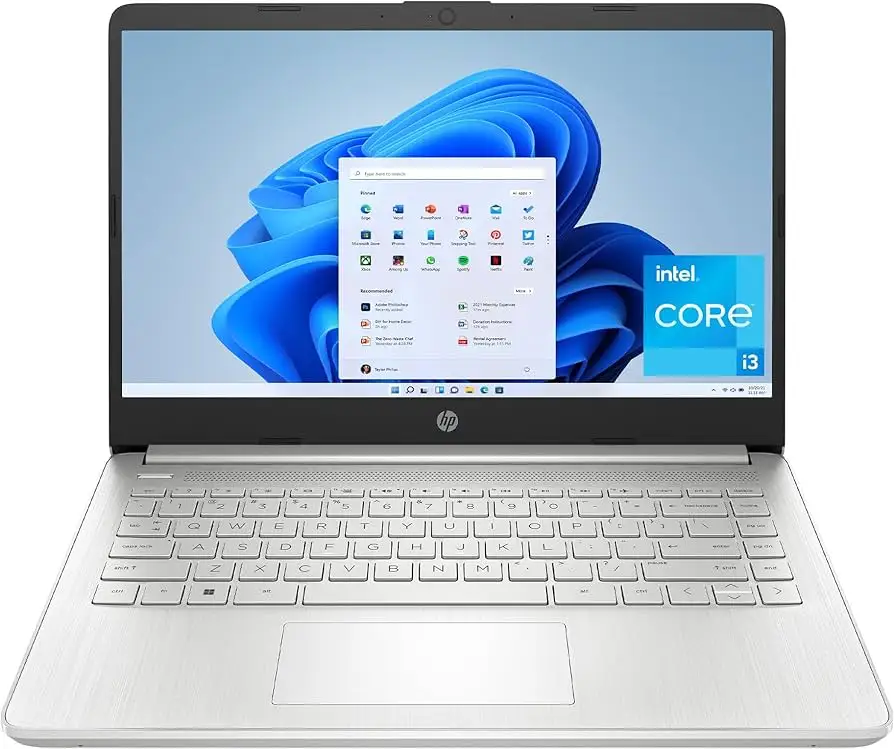
HP 14-inch Laptop Review: Affordable but Flawed Choice
Starting at under $300 in some configurations, the HP 14-inch Laptop (Intel Core i3, Windows 11) positions itself as an ultra-affordable machine for students, office workers, and casual users—but user verdicts show a blend of praise for its portability and criticism for its screen quality and cooling. Across reviews, scores average between 3.5 and 4.3 out of 5 (roughly 7.5/10), with some models in the range rated higher for upgraded specs.
Quick Verdict: Conditional — Best for budget-conscious users focused on basic tasks. Worth considering if portability and price trump display quality and multitasking performance.
| Pros | Cons |
|---|---|
| Stylish and compact design | Dim, low-resolution display on some models |
| Comfortable keyboard | Noisy cooling fans |
| Good battery life for office tasks | Weak multi-core performance |
| Affordable price point | Mediocre webcam quality |
| Solid build for its category | Heat build-up during use |
| Fast SSD storage | Limited gaming capability |
Claims vs Reality
HP’s marketing emphasizes “all-day productivity,” “crystal-clear visuals with FHD,” and “quiet, sustainable design.” Digging deeper into user reports reveals a mixed alignment with these promises.
On the claim of all-day productivity, several owners back it up in light-use scenarios. A verified buyer on Amazon noted: “Battery lasts almost two days… I toggle through a lot of programs all at once.” However, Trustpilot reviewers caution that under heavier workloads, multi-core performance slows, with one expert on Quora stating, “Even the slightest attempt at active multitasking can result in small breaks in processing.”
HP also touts vibrant FHD visuals, but multiple budget configurations ship with 1366x768 panels. PCVarge’s review of the HP 14-dq5009nr described the screen as “mediocre at best… most laptops come with 1080p screens lately, so anything below that feels like a raw deal.” This matters for media creators and students needing sharp visuals.
Finally, while sustainability is a selling point, noise is not. Trustpilot’s Alex wrote: “Fans run frequently, even at low loads, and there seems to be only two modes… it can definitely get annoying in the long run,” contradicting the idea of unobtrusive design.
Cross-Platform Consensus
Universally Praised
Across platforms, style and portability earn consistent applause. The silver finish and slim profile are seen as standout features compared to “black bricks you’d ordinarily find at this price point” (PCVarge). Students benefit from its weight—about 3.08 lbs—and thin design, making it ideal for campus commuting. On Best Buy, parents buying for their children repeatedly praised the Pavilion x360 variant’s versatility: “2-in-1 PC/tablet easy to work with… fast boot up.”
Performance in single-core tasks, such as web browsing and document editing, is solid. Trustpilot bench tests showed respectable Cinebench single-core scores, and Reddit discussions noted smooth streaming, with one user saying the Intel UHD Graphics “play 720p content without a dedicated GPU just fine.”
Battery life in light-use conditions impresses in several reports. One Trustpilot review described achieving “15 hrs 15 min (low load, low brightness)”—a welcome figure for remote workers and college students.
Common Complaints
Displays are a frequent sore spot. Even the FHD panels are described as dim, with limited color gamut. Quora’s Mattias Inghe noted, “A bright window behind your back can be enough to make it difficult to read.” This is particularly problematic for those working outdoors or in bright classrooms.
Fan noise frustrates many long-term users. Alex on Trustpilot wrote of “semi-high fan hissing” even when idling, and several Redditors reported heat dissipation issues, making lap use uncomfortable. Amazon buyers echoed this, one stating: “Unit gets very hot… uncomfortable to use while resting on your lap.”
Multi-core performance limitations hinder heavy multitasking or creative workloads. With only 6 cores in some 13th-gen i3 models, content creators found rendering and video exporting slow. This affects office professionals who rely on speed for database tasks or simultaneous app use.
Divisive Features
Keyboard feedback splits opinion. Some praise the comfortable travel and clear backlighting (in premium models), while others complain about “plasticy” keys and lack of a number pad. The webcam also divides users; business users criticize poor color accuracy, whereas casual users accept it as “good enough for a video meeting.”
S-mode Windows configurations spark debate. Several Best Buy customers were annoyed at having to “switch out of S-mode” to install apps outside the Microsoft Store, but others valued the security restriction.
Trust & Reliability
Warranty surprises dampen trust. An Amazon buyer reported, “When I go to register… HP says the warranty has expired. This is supposed to be a new product.” Concerns about refurbished units being sold as new appear in negative reviews.
Long-term durability stories show varied outcomes. One Reddit user kept their HP 14 running for daily office work over six months with “no major physical degradation,” while others faced early failures—Best Buy’s “Nelly” described declining audio and overheating within a year.
Trustpilot patterns show no clear scam reports, but recurring issues with fan noise and thermal performance suggest design compromises rather than quality defects.
Alternatives
Competitors like the Acer Aspire 5 and Asus Vivobook 15 consistently surface in discussions. PCVarge notes these models offer “better performance per dollar, good battery life, and good port selection,” and in the case of Asus, a superior typing experience plus 1080p displays. For those willing to spend $50–$100 more, these alternatives solve some HP 14 shortcomings.
Price & Value
Prices vary sharply by configuration. eBay refurbished listings dip under $200 for older i3-1115G4 units, while retailers charge $300–$500 for newer i3-1215U or i3-1315U models. Resale value trends show steep drops—used units often sell for half the retail price within a year, suggesting it’s a poor candidate for long-term value retention.
Community buying tips emphasize avoiding the lowest-resolution models if possible. One Reddit commenter advised, “Spend the extra $30–$50 for the FHD panel—it’s worth it for clarity.”
FAQ
Q: Is the HP 14” Laptop good for gaming?
A: Not really. Integrated Intel UHD Graphics handle casual games like Minecraft, but modern titles will struggle due to lack of discrete GPU and weaker multi-core performance.
Q: Can I upgrade the RAM?
A: Most base models ship with 8GB soldered RAM and no easy upgrade path. Higher-end configs offer 16GB from the start, so choose carefully at purchase.
Q: What’s Windows 11 S Mode and can I disable it?
A: S Mode locks you into apps from the Microsoft Store for security. Yes, you can switch it off for free via settings, but it’s irreversible.
Q: How’s the battery life under load?
A: Reports suggest 3–4 hours under heavy use, stretching to 8–15 hours in light-office tasks with brightness down.
Q: Does it overheat easily?
A: Several users report noticeable heat, especially during lap use, with fans running frequently even at idle.
Final Verdict: Buy if you’re a student, remote worker, or casual user seeking a stylish, portable, and affordable laptop for everyday tasks. Avoid if you need bright, color-accurate visuals, quiet cooling, or robust multitasking. Pro tip from community: opt for the FHD model and higher RAM—these two upgrades most improve day-to-day experience.