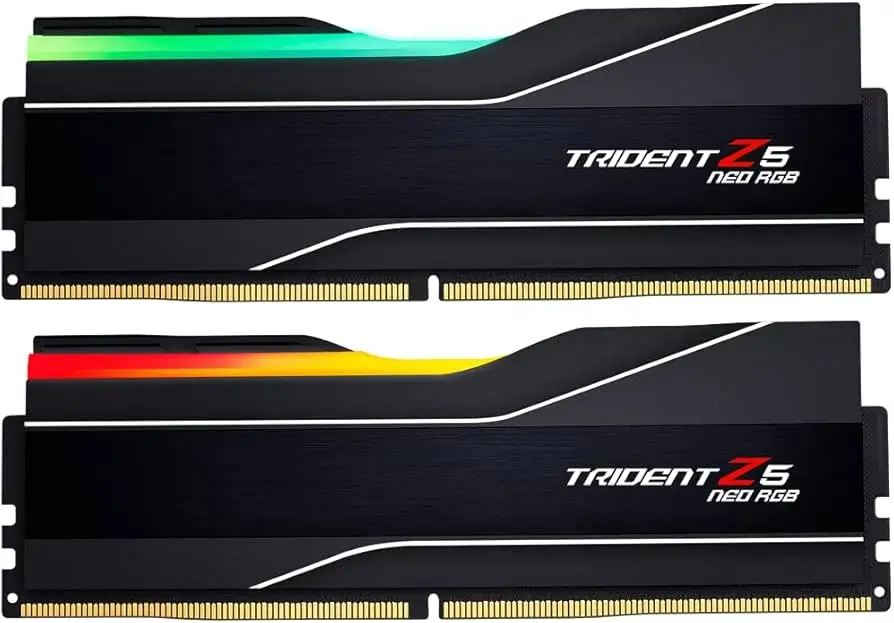
G.SKILL Trident Z5 Neo RGB Review: Conditional Buy
A “sweet spot” DDR5 kit that mostly “just werks”—until it doesn’t: G.SKILL Trident Z5 Neo RGB DDR5 RAM 32GB (2x16GB) earns a conditional buy from real-world builders, landing at 8.7/10 on the strength of easy AMD EXPO performance and standout looks, with a minority reporting stability, boot/training delays, or motherboard sensitivity.
Quick Verdict
Conditional — Yes if you’re on a modern AM5 platform and willing to update BIOS/enable EXPO carefully; no if you’re chasing zero-tinkering certainty across every board or you have tight air-cooler clearance.
| What matters | What users said | Who it’s best for |
|---|---|---|
| EXPO “plug and play” at 6000 | “I enabled expo in uefi and haven't had any issues.” (PCPartPicker) | Ryzen 7000 builders aiming for 6000 MT/s |
| Stability varies by platform | “Some stability issues after enabling expo ( about one blue screen a week ).” (PCPartPicker) | People okay troubleshooting BIOS/DRAM settings |
| Speed/latency praised | “Tight timings… fast first word latency… looks good.” (PCPartPicker) | Gamers and creators wanting low-latency DDR5 |
| RGB software experience mixed | “G.skill rgb controller is not bloatware… and it works effectively.” (PCPartPicker) vs “rgb software is pretty bad” (PCPartPicker) | RGB-focused builds using vendor sync apps |
| Physical clearance concerns | “Tall heat spreaders may prove incompatible with certain air coolers.” (PCPartPicker) | Case/cooler planners, SFF builders |
Claims vs Reality
G.SKILL and retailers position this kit as a straightforward route to high-end DDR5 on AMD: 32GB (2x16GB), DDR5-6000, low latency timings, and AMD EXPO profiles meant to make overclock settings “a simple bios setting.” Digging deeper into user reports, that promise largely holds—especially among PCPartPicker builders who describe EXPO as set-and-forget. One PCPartPicker reviewer framed it bluntly: “Performance; ddr 5 - 6000 cl30 expo profile just works.”
But “just set and go” isn’t universal in the field. A recurring pattern emerged: when EXPO works, it feels effortless; when it doesn’t, symptoms can be confusing—boots that hang, restarts that stall, or intermittent instability. A Newegg critical reviewer warned, “expo profiles dont work on some motherboards… reaching 6000 mhz not possible,” describing hangs and Q-codes during restarts and tuning attempts. That stands in stark contrast to the many builders reporting flawless 6000 MT/s operation.
Marketing also leans heavily into the RGB experience—customizable lighting via G.SKILL software or motherboard utilities. In practice, most commentary celebrates the look, but the control layer splits opinions. One PCPartPicker user praised the ecosystem angle: “g.skill rgb controller is not bloatware cough icue cough, and it works effectively and efficiently.” Meanwhile, another review was less charitable: “only thing is that the rgb software is pretty bad.” The takeaway isn’t that RGB is broken—more that your preferred control stack (G.SKILL app vs Aura Sync/Mystic Light/RGB Fusion) can determine satisfaction.
Cross-Platform Consensus
Universally Praised
The loudest consensus across PCPartPicker, Newegg, and LDLC is performance that lands exactly where AM5 builders want it: DDR5-6000 with low latency, frequently described as the Ryzen “sweet spot.” For gamers and high-refresh players, the benefit isn’t theoretical—people talk about snappier systems and smoother play once EXPO is enabled. A PCPartPicker reviewer said, “very fast and high fps when enabling amd expo, would recommend !” Another summed up the vibe with minimal ceremony: “it just werks . :)”
For builders who prioritize minimal fuss over manual tuning, multiple reports describe enabling EXPO in BIOS and moving on. That matters for first-time AM5 upgraders who don’t want memory timing spreadsheets. One PCPartPicker user wrote, “expo - certified ram that hits amd 's recommended spec . i enabled expo in uefi and haven't had any issues . it does exactly what it says on the tin .” On Newegg, a favorable reviewer echoed the same path: “booted at default speeds but once i set it to expo… it 's running @ 6000mhz no problem.”
Aesthetics—especially the light bar—are another consistent win, which is why this kit often shows up in “windowed case” builds where looks are part of the brief. PCPartPicker feedback repeatedly calls the modules “beautiful,” “slick,” and “fantastic,” and LDLC buyers lean into the same theme, with one noting “the rgb looks really good” even while describing a rocky first boot. For RGB-focused builders, the implication is simple: you’re buying performance, but you also get a visual centerpiece.
After those narratives, the recurring praise can be summarized:
- Fast, low-latency DDR5-6000 performance that matches common Ryzen 7000 “sweet spot” expectations
- EXPO setup that many describe as effortless (“enabled expo… haven’t had any issues”)
- Strong aesthetics and a widely liked RGB light bar/heat spreader design
Common Complaints
The most serious complaints cluster around stability and compatibility variance—often tied to enabling EXPO, motherboard BIOS maturity, or finicky training behavior. Even among generally happy owners, instability can appear as intermittent blue screens rather than total failure. One PCPartPicker review put it plainly: “some stability issues after enabling expo ( about one blue screen a week ),” though the same reviewer still reported strong gaming performance. This pattern matters most for streamers or competitive players: a weekly crash might be unacceptable, even if day-to-day benchmarks look great.
Another recurring issue is DDR5 “memory training” and the perception of slow boots. One PCPartPicker user described a “training period on every boot” that “can take 20 - 25 seconds,” reframing what “fast” feels like in real life. For users coming from mature AM4 platforms, that added pre-POST delay can feel like a regression even when Windows loads quickly.
Then there’s the edge case: the build that simply won’t cooperate at rated speeds. The harshest account in the data comes from a Newegg critical review describing high temps under load and failure to sustain 6000 MT/s on a specific setup, with freezes and restarts hanging. That reviewer wrote: “temps reach 160 f ( 71 c )… expo profiles dont work on some motherboards… now the speeds cant reach over 4000 mhz.” While this is not the dominant experience, it’s a reminder that official ratings and real-world outcomes can diverge based on board/CPU/BIOS.
After those narratives, the recurring complaints can be summarized:
- EXPO-related instability for a minority (blue screens, random crashes)
- Boot-time “memory training” delays that surprise AM4 upgraders
- Occasional motherboard sensitivity where 6000 MT/s is hard to sustain
Divisive Features
RGB control is the clearest divisive feature. Some users consider G.SKILL’s controller lightweight and preferable to heavier ecosystems. A PCPartPicker reviewer called it out approvingly: “not bloatware… and it works effectively and efficiently.” Others still like the lighting but dislike the software layer, with one saying the “rgb software is pretty bad.” For builders who already live inside Asus Aura Sync, MSI Mystic Light, Gigabyte RGB Fusion, or Razer Synapse setups, your mileage seems to depend on how cleanly your stack integrates.
Physical design is another split point. Many like the premium heat spreader look, but height and edges can be practical annoyances. A PCPartPicker reviewer cautioned: “Tall heat spreaders may prove incompatible with certain air coolers… top of heat spreaders are quite sharp; exercise caution during installation.” For air-cooled builds—especially bulky dual-tower coolers—this can turn a “simple RAM upgrade” into a clearance puzzle.
Trust & Reliability
Digging into “verified” style review patterns (as represented here through aggregated PCPartPicker/Trustpilot-labeled snippets), reliability sentiment is overwhelmingly positive when the platform is right and drivers/BIOS are current. One reviewer framed setup as straightforward after prerequisites: “easy to get running as advertised once i had the right mobo drivers.” Another emphasized long-term set-and-forget expectations: “good ram kit that runs at the sweet spot set and forget.”
But the same pool includes cautionary stories that read like classic early-AM5 instability: BIOS versions, recognition issues at first boot, and troubleshooting steps before things settle. An LDLC buyer recounted: “when i first started up i had a problem where the motherboard wouldn't recognise the ram, and i had to flash several different versions of the bios before i could boot.” Importantly, that story also ends optimistically: “now that everything has been sorted out, the ram works like a charm and i'm down to 0 blue screens.” The reliability signal, then, isn’t “perfect for everyone”—it’s “excellent once your platform is dialed in.”
Alternatives
Only competitors mentioned in the provided data can be considered, and several appear in the Newegg “similar products” carousel alongside buyer discussion. If you want to stay within G.SKILL but shift the vibe away from RGB, the G.SKILL Flare X5 line shows up as a popular adjacent option for AMD EXPO builds. Meanwhile, Corsair Vengeance and Corsair Dominator kits are referenced in the Tech4Gamers comparative context, implying they occupy a similar performance tier at the same general capacity/speed.
For the user deciding between “RGB statement piece” and “simple compatibility-first,” the practical difference isn’t just specs—it’s ecosystem preference and clearance. People who praise this Trident kit often cite the look as a deciding factor (“looks beautiful,” “look fantastic”). If aesthetics are secondary, the alternative path in this dataset is: pick a less tall, less ornate kit line that still hits DDR5-6000 for AM5.
Price & Value
On Amazon, the kit appears as a high-rated, mainstream pick: one listing shows $124.99 for the matte white CL30-36-36-96 variant with 4.7/5 from 953 reviews, and another shows $116.99 for a matte black CL30-38-38-96 variant. That pricing anchors why users keep calling it a “sweet spot” purchase—fast enough to feel premium, but not priced like halo DDR5 bins.
Resale/market value signals show up via eBay listings as well. One listing for the DDR5-6000 CL30 kit appears at $109.99 “or best offer,” while a DDR5-5600 model is listed higher in another entry ($136.07). These snapshots suggest the 6000 CL30 kit is liquid and competitively priced on the secondary market, which matters for builders who upgrade often.
Community buying advice also surfaces indirectly: several users note the need to enable EXPO and, in some cases, update BIOS first. One PCPartPicker user explained their sequence: “i only enabled expo after i did all windows updates + drivers and bios flashed,” suggesting a cautious approach can reduce headaches.
FAQ
Q: Do you have to enable AMD EXPO to get 6000 MT/s?
A: Yes—multiple reviews indicate it boots at default SPD speeds until EXPO is enabled in BIOS. A PCPartPicker reviewer said, “I enabled expo in uefi and haven't had any issues,” and a Newegg reviewer noted it “booted at default speeds but once i set it to expo… running @ 6000mhz.”
Q: Is it stable on Ryzen 7000 systems?
A: Often, but not universally. Many PCPartPicker and LDLC builders report “no issues” and stable 6000 MT/s, yet at least one PCPartPicker user reported “about one blue screen a week” after EXPO. Stability appears tied to motherboard BIOS maturity and platform tuning.
Q: Are boot times slower with this DDR5 kit?
A: Some users say yes due to DDR5 memory training. One PCPartPicker reviewer warned of a training period “on every boot” that “can take 20–25 seconds” before POST. Others don’t mention it, suggesting it depends on platform settings and expectations.
Q: How is the RGB software experience?
A: Divisive. One PCPartPicker reviewer praised the “g.skill rgb controller” as “not bloatware,” while another complained the “rgb software is pretty bad.” Several users instead manage lighting through motherboard software like Asus Aura Sync.
Q: Will it fit with large air coolers?
A: Not always. A PCPartPicker reviewer cautioned that “tall heat spreaders may prove incompatible with certain air coolers,” and also mentioned the top edges can feel sharp during installation. Air-cooled builders should check RAM clearance before buying.
Final Verdict
Buy if you’re building an AM5 gaming or creator PC and want DDR5-6000 CL30-class “sweet spot” performance with RGB that users repeatedly describe as “looks beautiful” and “just werks” once EXPO is enabled.
Avoid if your priority is absolute, no-questions stability across every motherboard/BIOS combo, or you’re already fighting RAM clearance under a bulky air cooler.
Pro tip from the community: treat EXPO as the second step, not the first—one PCPartPicker buyer enabled it only after “windows updates + drivers and bios flashed,” and others echo that a BIOS update can be the difference between “works like a charm” and a troubleshooting spiral.