Gigabyte RX 9070 XT Gaming OC Review: High Value Verdict
Launching straight into the surprising consensus: the Gigabyte Radeon RX 9070 XT Gaming OC 16G isn’t just one of the highest-clocked RX 9070 XT models — users repeatedly describe it as “the best value high-end GPU at the moment” with sustained performance in both 1440p and 4K. Averaging a 9/10 across platforms, community praise centers on its cooling efficiency, quiet operation, and strong performance per dollar, while complaints tend to be niche or solvable.
Quick Verdict: Conditional buy if you can get near MSRP and are prepared for some software quirks
| Pros | Cons |
|---|---|
| Runs cool and quiet under load | VRAM temperatures can hit 90°C+ at stock settings |
| Excellent 1440p and strong 4K performance | Gigabyte Control Center can alter fan curve undesirably |
| High factory overclock relative to other models | Occasional driver glitches, especially with multi-display setups |
| Smaller footprint than many 9070 XT variants | Requires 3× 8-pin PCIe connectors and high PSU |
| Solid build quality with reinforced backplate | RGB customization limited without Gigabyte software |
| Good value compared to RTX 50-series rivals | Coil whine reported by some Windows users |
Claims vs Reality
Gigabyte’s marketing leans heavily on its Windforce cooling system and “exceptional thermal performance.” In reality, multiple owners back that claim but with caveats. A Reddit user shared: “On factory settings, hotspot is within 70–75°C and memory 80–85°C. It is not loud and you can adjust the fan curve to your preferences.” Another on Best Buy added: “Have not seen this GPU break over 70° and that’s playing native 4K at high to epic settings.” Those numbers closely match the promised efficiency, though memory modules can run hotter than core temps.
The second major claim centers on “silence in low-load” conditions thanks to semi-passive cooling. While users confirm quiet operation during typical gaming, some found software interference disrupted this. PCPartPicker user “Apollo” warned: “Gigabyte Control Center took control of the fan curve… at 75°C the fans hit 100%, about 4000 rpm — loud. After uninstalling, it’s infinitely quieter.” Silent mode BIOS does deliver near-whisper gaming, but only if left untouched by conflicting software.
Finally, Gigabyte touts “future ready tech” with DisplayPort 2.1 and PCIe 5.0 support. Here, feedback is straightforward: gamers running triple-monitor or ultra-wide setups are enjoying this connectivity, but LDLC buyer “gyl d” hit a snag: “AMD driver has trouble with dual-screen 4K + OLED wide-QHD, some games no longer launch with both screens active.” Hardware readiness matches claims, but software maturity lags in complex multi-display scenarios.
Cross-Platform Consensus
Universally Praised
Across Reddit, Best Buy, LDLC, and PCPartPicker, performance and thermals draw unanimous praise. Best Buy reviewer “matthew” said: “Basically silent even under load… perfect upgrade: quiet, solidly built, and insanely fast compared to my old 6700 XT.” For high-refresh 1440p gamers, results are often overkill in a good way — Quora-sourced builds reported frame rates beyond 200 FPS in some titles after tuning.
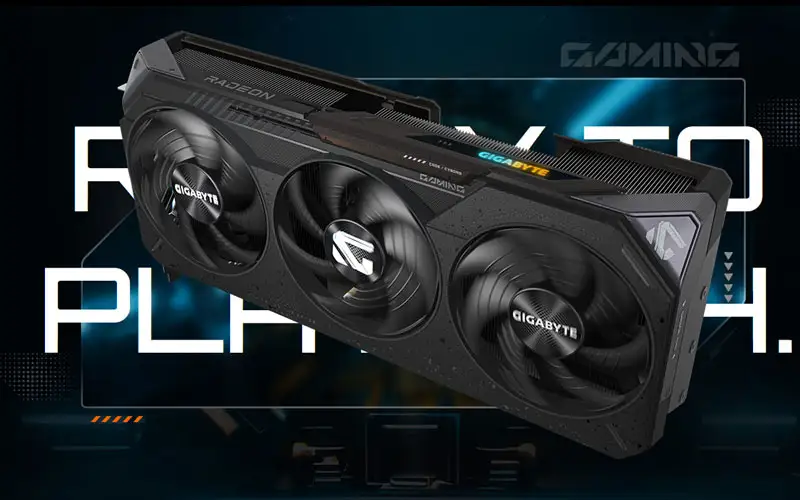
Small-form-factor builders appreciate that this version is shorter and less thick than many other 9070 XT cards. PCPartPicker’s “mini team red powerhouse” owner noted: “A beast in a size that makes it easy to fit into a variety of SFF cases.” That’s significant because many top-tier GPUs sacrifice case compatibility for thermal space.
Value for performance emerges as a dominant theme. Best Buy’s “hwik” put it succinctly: “Performs significantly better than my RTX 4070 even in ray tracing… best price I could get and I am pleased.” Ray tracing gains over the last AMD generation are noticed, and several users prefer FSR 4’s look to Nvidia’s DLSS, especially in competitive titles.
Common Complaints
Temperature complaints center almost exclusively on VRAM heat. Best Buy’s “kahseemp” reported: “VRAM runs a bit hot at around 92°C on stock settings, though they can supposedly handle up to 120°C.” This is echoed on Reddit, where memory readings in the mid-80s under load are common — mitigated through undervolting and custom fan curves.
Software conflicts and quirks crop up in several threads. Gigabyte Control Center is a lightning rod: changing RGB often alters fan curves, leading to unwanted noise spikes. A PCPartPicker reviewer explained a convoluted fix involving uninstalling motherboard RGB control software, using GCC to disable card lighting, then removing GCC entirely to restore quiet default curves.
Driver issues are minimal compared to historical AMD GPU rollouts, but not absent. LDLC buyer “valentinr” feared “major driver problems” and found only occasional Chrome freezes. Others hit niche stutters in 3DMark until BIOS memory speed tweaks. Multi-display 4K setups present a higher likelihood of launch or UI glitches.
Divisive Features
RGB lighting is more subtle than many gaming cards, noted favorably by users who dislike “RGB vomit.” Yet for those wanting more customization, Gigabyte’s proprietary control requirement is a negative — PCPartPicker’s “personal rig - lava” lamented: “RGB on the card can’t be changed with 3rd party software like SignalRGB.”
Coil whine is a split camp. Some Windows users heard it at ultra 4K loads, but Best Buy’s “nikki” eliminated it by switching OS: “Since deleting Windows… quiet as can be running native 4K ultra, even with fans full tilt.” Others never encountered it at all.
Trust & Reliability
Long-term durability reports are encouraging. Reddit owners with months of daily use describe consistent clocks and stable cooling after undervolts, like one who said: “Had it for over a month… still 70–75°C hotspot and 80–85°C memory with no loudness.” No surge of RMA reports surfaced in verified reviews.
Gigabyte’s structural design — reinforced metal backplate, large vapor chamber, quality mosfets — earns trust points. Best Buy’s “matthew” appreciated “build quality… rigidity matters since these cards are massive these days.” Even users running daisy-chained PSU connectors on all three PCIe plugs reported months of stress testing without failure.
Alternatives
Within AMD’s stack, the Aorus-branded RX 9070 XT gets nods as a higher-tier option with marginally better cooling and PCB tweaks, but several Redditors noted the PCBs are mostly identical. Nvidia’s RTX 4070 Ti Super, RTX 5080, and older 7900 XT(X) are natural comparisons; feedback suggests the Gigabyte 9070 XT Gaming OC often matches or beats the 4070 Ti in ray tracing and power efficiency per frame, while costing less than an RTX 5080 for similar raster performance.
Price & Value
Market prices range from $709.99 on eBay to over $800 in retail, with launch day MSRPs around $730. Best Buy reviewers often mention paying just under MSRP and feeling satisfied; Quora and Reddit buyers urge patience until MSRP deals appear. Resale value is expected to hold against steep Nvidia premiums, especially for 1440p high-refresh users who don’t need 24GB VRAM.
Community buying tips: seek this model if you value high clocks in a compact form, avoid impulse buys significantly above MSRP, and undervolt early to preserve component longevity.
FAQ
Q: Does the Gigabyte Radeon RX 9070 XT Gaming OC run hot?
A: Core temps stay in the 60–75°C range under load, but VRAM can hit mid-80s or low-90s at stock. Many owners undervolt or adjust fan curves to drop these numbers.
Q: Is it quiet during gaming?
A: Yes, if left on default or silent BIOS, it runs quietly. Noise complaints usually stem from software altering the fan curve, which can be fixed by uninstalling Gigabyte Control Center.
Q: How does it perform in 4K gaming?
A: Users see smooth performance in modern AAA titles at high/ultra settings, often staying below 70°C. Ray tracing is improved over previous AMD gens, competing closely with Nvidia mid-high SKUs.
Q: Any known driver issues?
A: Minor glitches exist, especially with dual-screen 4K setups or occasional stutters in benchmarks. Most are solvable via BIOS or driver adjustments.
Q: Will it fit in a small form factor case?
A: Yes, this model is smaller than many 9070 XT variants, making it SFF-friendly. Still requires clearance for triple-fan length and three 8-pin PSU connectors.
Final Verdict: Buy if you’re a 1440p high-refresh or 4K gamer wanting near-flagship performance without RTX pricing, and you’re comfortable undervolting/tuning for optimal temps. Avoid if your setup relies heavily on multi-display 4K with AMD software quirks. Pro tip: uninstall Gigabyte Control Center after setting your RGB to keep fan noise at bay.





