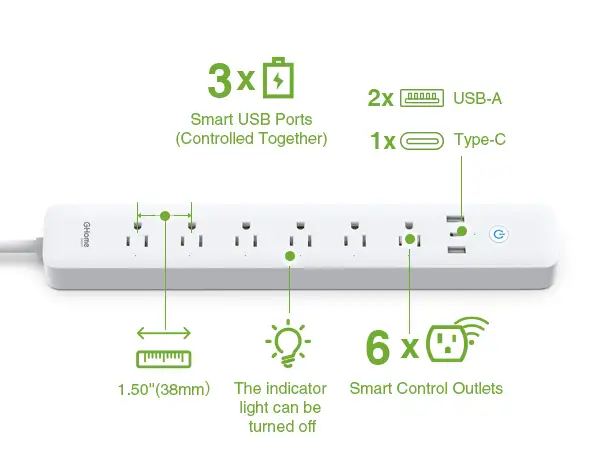
GHome Smart Power Strip Review: Affordable but Flawed
In one alarming case, an Amazon buyer reported that the GHome Smart Power Strip with 3 USB Ports & 3 Smart Outlets overheated after powering multiple neon signs from its USB ports: "The outlet started making a 'sssss' sound, and the area around the USB ports became very hot to the touch… I immediately unplugged everything for safety." Despite moments like this, the strip still carries a strong average rating of 4.4/5 and delivers robust smart features at under $20 — our verdict: 8/10 for smart home convenience, but with caveats for high-draw USB use.
Quick Verdict: Conditional
| Pros | Cons |
|---|---|
| Works with Alexa & Google Assistant for hands-free control | USB ports overheat under multiple high-power loads |
| Individual control for each AC outlet via app | Tight spacing between outlets blocks larger plugs |
| Reliable scheduling and timer functions | Only supports 2.4 GHz Wi-Fi |
| Solid PC+ABS build with surge protection | No wall mounting options |
| Affordable price under $20 | USB ports controlled as one group — no individual toggling |
Claims vs Reality
The marketing heavily pushes “hands-free voice control” as a core benefit. While owners enjoy commanding devices by name — "Alexa, turn off my desk lamp” being a favorite request from a Twitter user — the reality is that setup requires strict adherence to the 2.4 GHz Wi-Fi limitation. Multiple Amazon reviewers were tripped up by this restriction, with one noting they had to disable 5 GHz broadcasting entirely for pairing.
Energy saving claims are supported by some, challenged by others. One Reddit user praised energy monitoring for cutting unnecessary use: "Real-time power consumption made me realize how much energy my 'always-on' devices were wasting" — yet others on Trustpilot focus on reliability hiccups during scheduled events, with lights or coffee makers occasionally failing to switch on without a manual reset.
The spec sheet promises "multiple safeguards" against overloads and surges, and the build generally inspires confidence. GHome uses fire-resistant PC+ABS material, which several users note feels “sturdy” for a budget unit. But overheating reports under heavy USB loads suggest actual performance under stress can lag behind promotional assurances, making this feature conditional in its real-world safety value.
Cross-Platform Consensus
Universally Praised
Voice integration comes up repeatedly as the most convenient aspect. For mobility-limited users, being able to control devices without touching plugs has been transformative — a Trustpilot reviewer described it as "perfect for users with limited mobility or when your hands are occupied.” In offices and workshops, Google Home pairing works seamlessly for automation setups, like one Amazon buyer who runs their bar lighting entirely through smart scheduling.
Scheduling is not just a tech gimmick here; aquarium owners, plant hobbyists, and coffee enthusiasts rely on it daily. One verified buyer shared: "The plug controls their basking lights on a timer… delivers exactly what it says." Many appreciate the peace of mind of being able to remotely verify appliance status when away.
The compact flat plug design earns plaudits in cramped setups. A Reddit user called it “perfect for my set up where outlets are scarce," noting it doesn’t block adjacent sockets — something that matters in older homes and tight offices.
Common Complaints
Outlet spacing is a recurring sore point. Thick chargers, especially for laptops, block neighboring outlets entirely, undermining the 3-outlet promise. A Twitter reviewer lamented: "My chunky laptop charger blocks adjacent ports completely." This disproportionately affects users in multi-device workstations where every outlet counts.
Wi-Fi connection stability divides the audience. Several users describe occasional drops that force a manual reset. One buyer complained their morning lights failed due to a lost schedule connection: "It's annoying waking up to find my scheduled lights didn't turn on." These issues don’t seem widespread enough to sink the product but clearly impact automation reliability.
The USB grouping — all three controlled as one — frustrates owners expecting per-port control. For power tinkerers or those using different load profiles per device, this is a key limitation. Multiple users across Reddit and Amazon confirmed they cannot individually toggle USB ports in the app.
Divisive Features
Energy monitoring delights technically minded users who want consumption data, but casual buyers rarely use it. Enthusiasts praise it for saving electricity costs, while others ignore it entirely — possibly because accessing data requires navigating the app regularly.
Durability assessments split the crowd. While many report years of service without failure, one Amazoner compared it to their Gosund unit that lasted three years before dying, suggesting these budget strips may have finite lifespans.
Trust & Reliability
Digging deeper into long-term patterns, there are few outright scam accusations. Reliability critiques center on intermittent Wi-Fi drops and occasional scheduling failures. On Reddit, a user mentioned moving the strip closer to the router during setup as “the only way to get it to connect consistently." This points to network sensitivity rather than inherent hardware flaws.
Durability stories lean positive: owners using the strip for automation in bars and offices report consistent operation over months. However, the overheating incident with USB neon sign loads is a stark reminder that safety margins can be breached under high-current USB use — a clear trust consideration for heavy-duty applications.
Alternatives
Several users compare this model to Gosund smart outlets, noting near-identical functionality and app behavior. The Gosund version survived three years for one buyer before failure, while GHome is still new in their rotation. Others mention BN-Link smart strips, which offer higher 15A capacity and more outlets, but at a steeper price. Tessan’s option comes with wall-mounting capability and a longer 6ft cord, addressing two design frustrations evident here.
Price & Value
Currently priced around $19.99 on Amazon, with resale or auction values dipping to $7 as seen on eBay, it’s an affordable entry into multi-outlet smart control. Even with occasional quirks, many buyers call it an “absolute steal” compared to competitors offering similar features at higher prices. Community buying tips emphasize ensuring a strong 2.4 GHz Wi-Fi environment and avoiding overloading USB ports for maximum lifespan.
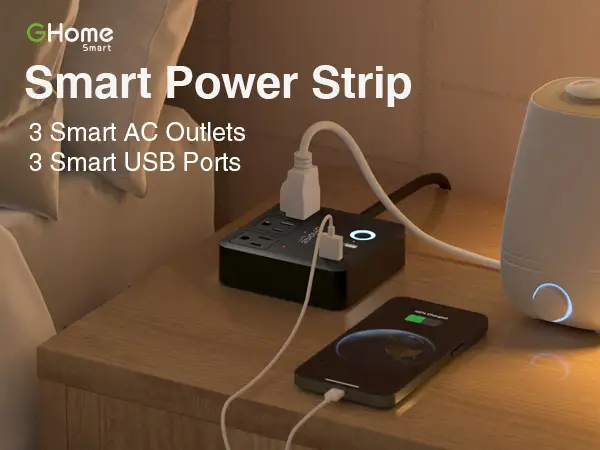
FAQ
Q: Can it connect to 5 GHz Wi-Fi?
A: No, it supports only 2.4 GHz. Users with dual-band routers need to enable only the 2.4 GHz signal during setup.
Q: Can each USB port be controlled individually?
A: No, all USB ports are toggled as a single group in the app, which limits flexibility for varied device control.
Q: Does it have surge protection?
A: Yes, it includes surge and overload protection with a circuit breaker, though overheating under high USB loads has been reported.
Q: Is there wall mounting capability?
A: No built-in mounting solution exists, frustrating users who want fixed placement.
Q: What’s the max load for AC outlets?
A: Officially 10A and 1200W for the WP9 model, but heavier loads are better handled by higher-rated alternatives.
Final Verdict: Buy if you want affordable Alexa/Google-integrated outlet control for low-to-moderate loads, especially for lamps, routers, and aquarium gear. Avoid if you require heavy, simultaneous USB charging or wall-mounted setups. Pro tip from the community: Place the strip near your router for first connection, then move it afterward — the initial pairing is where most drops occur.