Garmin GPSMAP 65s Review: Conditional Buy (7.8/10)
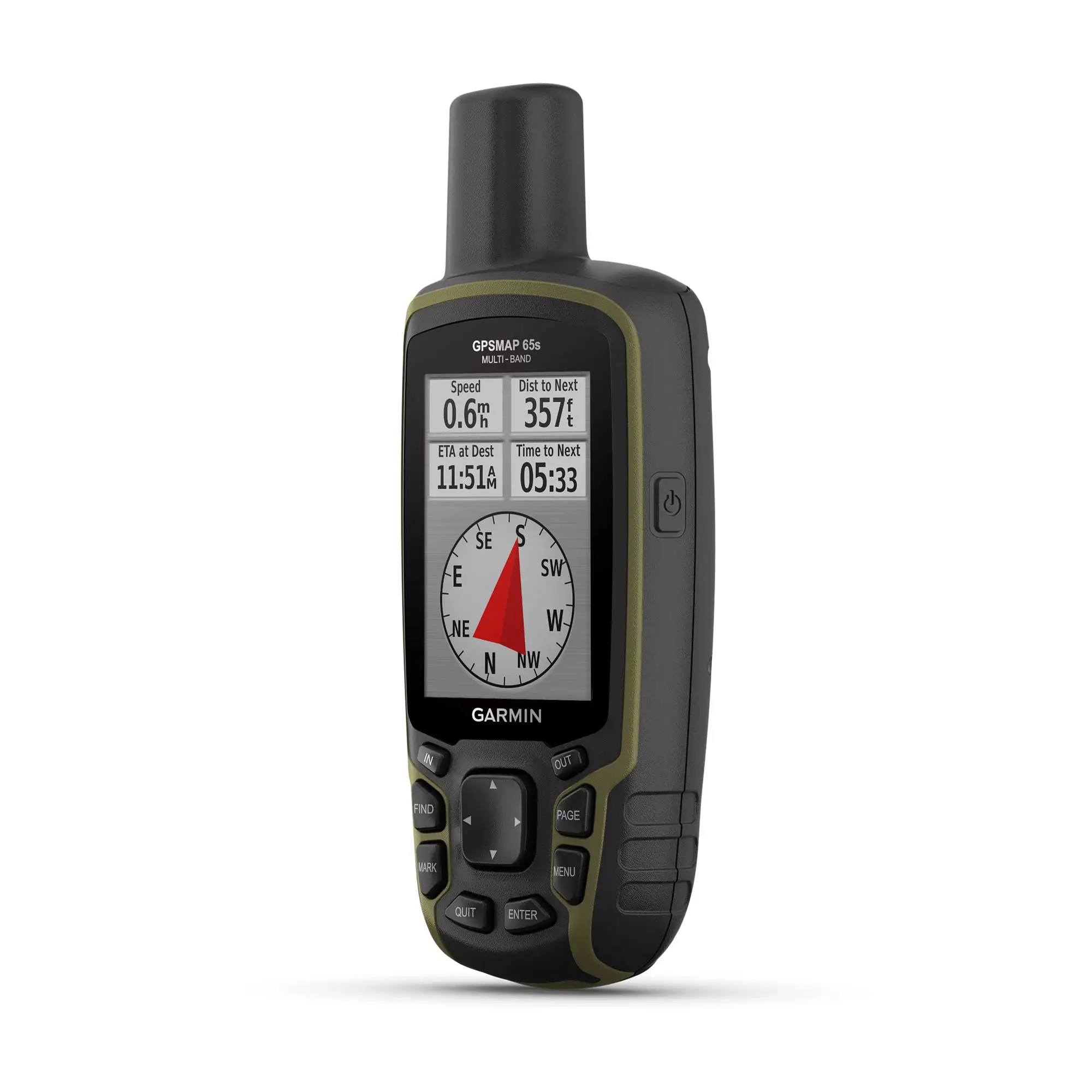
A Garmin forum owner summed up the anxiety perfectly: “the map vanishing… only way to get the map back was to turn the device off and back on.” That’s the tension at the heart of the Garmin GPSMAP 65s Handheld—pinpoint accuracy and rugged confidence, paired with software and mapping quirks that can derail a trip. Verdict: Conditional buy — 7.8/10.
Quick Verdict
For hikers and fieldworkers who care most about track accuracy and button control, Garmin GPSMAP 65s Handheld lands as a “solid unit” that some call “laser accuracy with multi band.” For users who expect modern software polish—or who rely heavily on custom maps and flawless mapping display—several reports describe frustration, bugs, or unexpected limitations.
| Decision | Evidence from users | Who it fits best |
|---|---|---|
| Conditional Yes | “laser accuracy with multi band” (Amazon) | hikers, survey/fieldwork, geocachers |
| Yes | “buttons… much easier to use in the bush” (Amazon) | glove use, wet weather, one-handed use |
| Caution | “takes 4 apps… just to update and add free maps” (Amazon) | Mac/phone users wanting simple setup |
| Caution | “software… buggy… unless i reboot” (Amazon) | anyone expecting smartphone-like UX |
| No (for some) | “no functionality allowing [custom maps] to be disabled” (Amazon) | heavy custom-map workflows |
Claims vs Reality
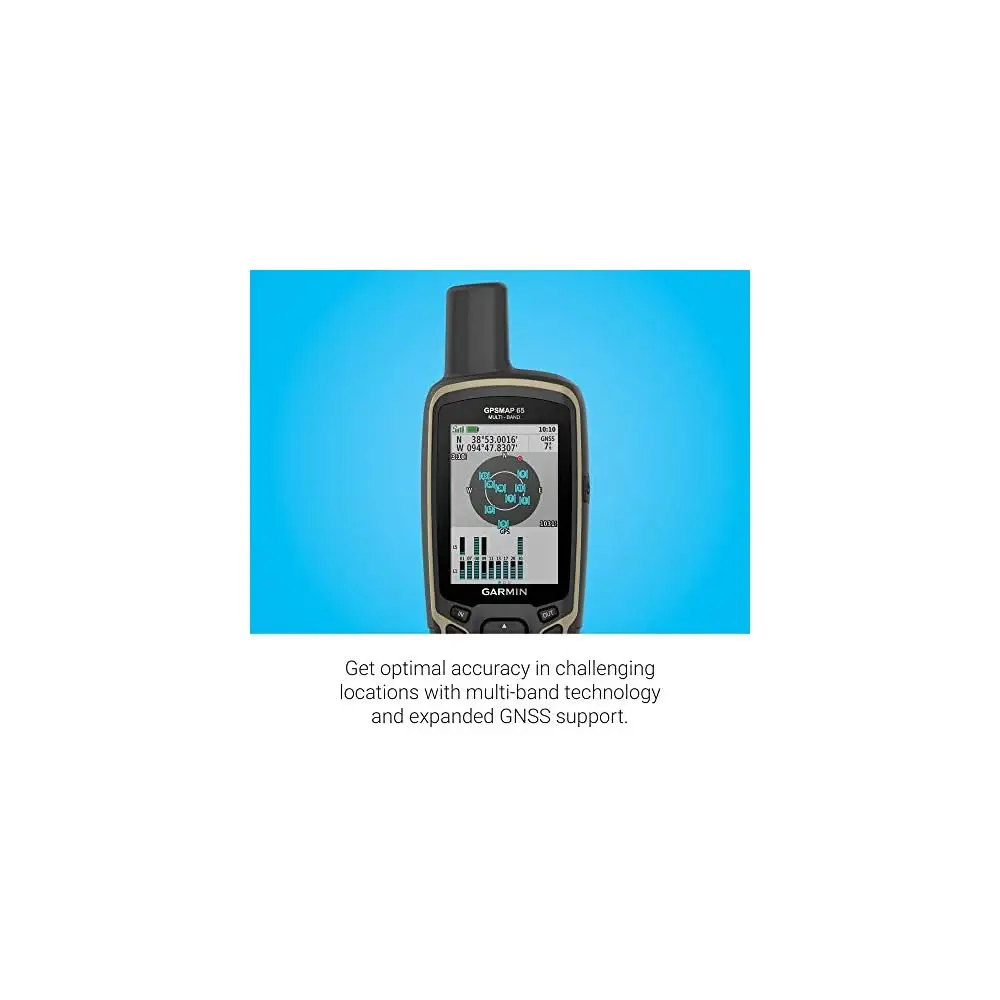
Garmin’s marketing leans heavily on accuracy and challenging-environment performance, promising “optimal accuracy in steep country, urban canyons and forests with dense trees” (Garmin/Amazon specs). Digging deeper into user reports, multiple Amazon reviewers echoed that positioning in real-world terms. One Amazon reviewer praised “laser accuracy with multi band,” arguing people “don’t seem to realize multi band gets you on avg 6’ of accuracy.” Another called it “super fast, super accurate,” reporting “always 1.8 meter accuracy (6 foot).” For scientific and exploration users, an Amazon reviewer went further: “regular accuracy is < 2 m,” adding that the unit even shipped with unexpectedly detailed local roads where they live.
But the same accuracy narrative runs into a direct contradiction in at least one user story. An Amazon reviewer who bought it for mapping described it as a “clunky handheld gps,” saying “my cell phone is highly more accurate than this unit” and complaining that direction updates took “at least 20-30 steps.” While the device is officially positioned as a high-accuracy multi-band handheld, at least one owner’s lived experience suggests the practical results can vary—or the compass/heading behavior can feel slow for certain workflows.
Garmin also sells the device on its mapping and navigation ecosystem—TopoActive maps, Garmin Explore syncing, and routable navigation (Garmin/Amazon specs). Several users say the hardware becomes excellent only after wrestling with the software stack. One Amazon reviewer warned upfront: “have patience,” then vented that it “takes 4 apps on my mac just to update and add free maps and plot routes,” with “very little workflow on why and which to use for what.” The same reviewer said default map detail settings are “buried deeeeeeeeeeep in map settings,” and argued that this “single default setting” could drive “massive poor feedback” from first-time Garmin owners.
Finally, Garmin materials emphasize a rugged, ready-to-go outdoor tool with preloaded mapping and expandable storage (Garmin/Amazon specs). Yet a recurring pattern emerged around mapping behaving unexpectedly. A Garmin forum user reported missing detailed coverage in specific UK regions: “can’t view detailed mapping for wales / west england or south scotland,” with zoom behavior breaking “after 5 km.” The same thread later mentions “map vanishing” mid-use, leaving only the track until a reboot. That gap—between “ready to ship” confidence and field reliability—shows up most sharply when the device is used as a primary navigation screen rather than a track recorder.
Cross-Platform Consensus
Universally Praised
“Accuracy” isn’t just a spec-sheet word in this dataset—it’s the emotional core of why many owners keep the Garmin GPSMAP 65s Handheld. On Amazon, one reviewer called it “the most accurate garmin gpsr,” saying it’s “perfect for scientific fieldwork and exploration.” Another wrote that the “accuracy is immediate and spot on,” describing a practical rescue-style use case: they “plugged in the coords and this gps took us to within 6 ft” of a lost drone. For backcountry hikers or search-style scenarios, that kind of story frames the device as a purpose-built locator rather than a convenience gadget.
Button-based control also draws consistent approval, especially from people who treat weather and gloves as the default. An Amazon reviewer contrasted it directly with touchscreens: “all the controls are with buttons, which makes it much easier to use in the bush… (you can do it with one hand).” From another angle, the Garmin Kenya long-form writeup reinforces the ergonomics story, noting it “fits nicely in the palm of you hand” and is “small enough” for “one-handed use,” while describing button feel as “soft tactile.” For hunters, hikers, and anyone navigating in rain, these aren’t small details—they’re the difference between operating a tool and babysitting a device.
Durability stories appear most clearly in the Trustpilot/Yandex Market review set. A buyer there described a real trip beating: “survived a one-day hike… a river crossing… shaking and falls,” and still “catches satellites well, even in a pine forest under the canopy.” That same reviewer framed the UI as dated—“a-la 90’s”—but treated it as expected for this class of gadget. The implication is blunt: for users prioritizing survival and signal lock over aesthetics, the trade-off feels acceptable.
After those narratives, the repeated “why” becomes clear: many users see the Garmin GPSMAP 65s Handheld as a dedicated instrument that stays working when phones become compromises. One Amazon reviewer put it plainly: “The gps in a phone is at best a compromise… a purpose-built device that won’t die if it gets wet or dropped.”
Common Complaints
The loudest frustration isn’t about satellites—it’s about software and workflow. An Amazon reviewer’s “solid unit have patience” reads like a warning label: “takes 4 apps on my mac just to update and add free maps and plot routes plus two on my cell phone,” with “very little workflow on why and which to use for what.” They also complained that map detail defaults are set too low out of the box, forcing users to dig through menus to make maps look “right.” For newcomers, that translates to an early impression that something is broken—when it may simply be buried settings.
Mapping glitches and UI mismatch complaints are more severe because they undermine trust. One Amazon reviewer rated it “not as advertised,” stating: “screenshots… on amazon and on the garmin page do not match… you will see something quite different in hand.” They added that Garmin support “confirmed what you see on the device is different than what is advertised,” and then pointed to bugs: “could not get deleted waypoints to stop displaying on the map unless i reboot the device.” For users who buy based on interface clarity—especially if they’re transitioning from smartphone apps—this becomes a credibility problem, not merely a learning curve.
Custom maps also surfaced as a fault line. A frustrated Amazon reviewer described “many bluetooth issues at first” and called the interface “cluncky,” but said the deal-breaker was custom maps: “no functionality allowing them to be disabled… when a custom map is put on the device, no other maps are visible.” Garmin support allegedly suggested a workaround—put custom maps on an SD card and remove it to “turn it off”—which the reviewer called “a laughable work flow.” If your navigation depends on switching overlays quickly (land management, research grids, specialty layers), this complaint suggests the device can actively fight your process.
Cross-platform, the Garmin forums add another kind of complaint: region-specific map rendering and disappearing maps mid-trip. One user couldn’t view detailed mapping for “wales / west england or south scotland,” even though the same card worked in another device and in BaseCamp. Later they reported: “another issue… the map vanishing… only way… was to turn the device off and back on.” For route-followers rather than track-loggers, those moments can turn a premium handheld into a stress generator.
Divisive Features
The “old-school” interface is both tolerated and criticized. The Yandex Market reviewer shrugged: “interface… a-la 90-e… in such gadgets always like that.” Meanwhile, an Amazon reviewer called the ecosystem and UI “just… bad,” demanding Garmin hire “better senior level software developers.” The same person still praised the core performance—“laser accuracy”—suggesting the device can be simultaneously loved as hardware and disliked as software.
Accuracy itself is mostly praised but not universal. Multiple Amazon owners describe sub‑2‑meter style results—“regular accuracy is < 2 m,” “always 1.8 meter accuracy (6 foot)”—yet another Amazon reviewer insisted their “cell phone is highly more accurate,” and complained about heading/direction lag. For users who equate “accuracy” with responsive heading updates while moving, these accounts show the experience can feel inconsistent depending on expectations and use case.
Trust & Reliability
Digging deeper into buyer language, “scam” concerns show up less as fraud accusations and more as resentment toward paid mapping and complex setups. An Amazon reviewer urged: “don’t buy maps from garmin, it’s huge scam when you can get open street maps… for free,” describing a learning process that required “a few youtube videos.” Another Amazon reviewer’s complaint is adjacent: Garmin’s multi-app ecosystem felt chaotic, with BaseCamp described as unstable (“crashed on me 3 times”). The pattern is frustration with the value proposition of Garmin’s software layer—especially when free alternatives exist.
On durability, the most concrete long-term-style claim in the dataset comes from Yandex Market: “after a year of active use looks like new,” alongside stories of water exposure and falls. While the prompt calls for Reddit “6 months later” style posts, the provided Reddit-labeled content is a Garmin Kenya blog-style guide rather than community follow-ups, so the durability signal here is strongest from marketplace reviews and the general theme of “rugged, waterproof build” echoed by Amazon owners.
Alternatives
Only a few competitors are explicitly mentioned in the data. The Garmin Kenya writeup frames the Garmin GPSMAP 65s Handheld among other Garmin handhelds: “gpsmap 66s,” “gpsmap 66i,” “gpsmap 67i,” and “montana 700.” The author’s key takeaway is blunt: in “mountains and thick forest cover,” “they were all about the same in terms of recording tracks,” adding the 65s “will get the job done” in extreme terrain.
For buyers choosing within Garmin, that suggests a persona-driven decision. If you prioritize a “touchscreen,” the same source points at the “Montana 700.” If you want inReach-style satellite communication, the list includes “66i” and “67i.” Meanwhile, Amazon reviewers repeatedly elevate the 65s for button control and accuracy, implying it’s best for people who don’t need a “large screen and navigation” but do need reliable position and tracks.
The most direct “alternative” argument comes from the unhappy Amazon reviewer who preferred a smartphone: “my phone still had better accuracy and was faster and was much easier to use,” recommending “a premium subscription from caltopo” instead. That’s not a hardware competitor, but it’s a real buyer path: app-first navigation vs dedicated handheld.
Price & Value
Pricing varies by region and listing, with official-style Amazon/Garmin specs showing £349.99 in the UK context and an Amazon US listing around $382.03. On eBay, new listings in the dataset range roughly from $306.64 (converted listing) to $338.95 + shipping, with another at $427.22. That spread hints at a meaningful resale/market-price swing depending on seller, region, and bundle.
Value perceptions hinge on whether you treat it as hardware-first. Satisfied owners justify the cost through precision and ruggedness: “purpose-built device that won’t die if it gets wet or dropped.” But frustrated buyers treat the price as unjustified when software pains dominate: “can’t believe i paid $300 for this.” For budget-minded hikers, several users point to free mapping: one Amazon reviewer said you can get “open street maps… for free,” and a Yandex Market buyer similarly noted Russian road maps “do not have,” but “they are easily downloaded from OpenStreetMap.” The recurring buying tip is implicit: if you’re paying full price, be ready to invest time in setup—or plan to rely on third-party/free maps rather than expensive add-ons.
FAQ
Q: Is the Garmin GPSMAP 65s actually accurate in real use?
A: Many Amazon reviewers describe standout accuracy, including “regular accuracy is < 2 m” and “always 1.8 meter accuracy (6 foot).” However, one Amazon buyer disagreed, saying “my cell phone is highly more accurate” and that direction updates took “20-30 steps,” suggesting results can depend on expectations and workflow.
Q: Is it easy to set up maps and routes on a Mac or phone?
A: Several owners say setup can be frustrating. An Amazon reviewer wrote it “takes 4 apps on my mac just to update and add free maps,” with confusing workflow. Others say free maps are “pretty awesome once you spend a lot of time figuring them out,” implying a steep learning curve rather than plug-and-play simplicity.
Q: Do custom maps work well on the GPSMAP 65s?
A: Some users rely on custom maps, but one Amazon reviewer reported a major limitation: “no functionality allowing them to be disabled,” claiming custom maps can block visibility of other maps unless removed. They said Garmin suggested using an SD card and physically removing it to “turn it off,” which they disliked.
Q: Does the device have mapping bugs or glitches?
A: A few reports point to issues. A Garmin forum user described detailed maps not displaying in parts of the UK and later said the “map vanishing” required rebooting to restore. An Amazon reviewer also reported “software… buggy,” including deleted waypoints continuing to show “unless i reboot the device.”
Q: Is the button-operated design better than a touchscreen outdoors?
A: For many, yes. An Amazon reviewer said buttons are “much easier to use in the bush” and can be used “with one hand.” The Garmin Kenya guide similarly highlights one-handed operation and tactile button feel, which matters for hikers using gloves, operating in rain, or avoiding accidental taps.
Final Verdict
Buy the Garmin GPSMAP 65s Handheld if you’re a hiker, geocacher, or fieldworker who values “laser accuracy with multi band,” wants one-handed button control, and accepts that the UI can feel “a-la 90’s.” Avoid it if your trips depend on flawless map rendering, modern software polish, or frequent custom-map toggling—one user called the custom map workflow “a laughable work flow.” Pro tip from the community: lean on free mapping options—Amazon and marketplace buyers repeatedly mention OpenStreetMap as a practical alternative to paid maps.