Fellowes Star+ Binding Machine Review: Compact, Light-Duty Winner
A homeschooling parent summed it up best: “I ordered this wonderful Fellowes binding Star Plus machine about a week ago and have already made a dozen books.” The Fellowes Star+ Comb Binding Machine has amassed a loyal following among educators, small business owners, and home office users who value professional-looking documents without the bulk or cost of high-end binders. With a consensus rating around 9.2/10, it’s praised for simplicity, compactness, and affordability — tempered by a few quirks in capacity and alignment.
Quick Verdict: Conditional — Best for light-duty home, school, and small office use; less ideal for heavy or laminated projects.
| Pros | Cons |
|---|---|
| Compact and easy to store | Alignment can be tricky |
| Built-in comb storage & sizing guide | Struggles with laminated pages |
| Affordable purchase & accessories | Max capacity lower than heavy-duty models |
| Professional results for low volumes | Handles made of hard plastic—risk if dropped |
| Vertical loading improves punch accuracy | Starter instructions unclear—video needed |
| Quick setup and operation | Edge guide not always perfect |
| Durability for light usage | Needs patience for larger comb sizes |
Claims vs Reality
The marketing emphasizes a “light-duty binding machine ideal for small offices and classrooms” with a stated punching capacity of up to 15 sheets and binding up to 150 sheets. In practice, some users have found those numbers optimistic. A verified Staples reviewer cautioned, “Don’t try to hole punch more than 13 pages at once, they will get stuck.” Multiple reports advise loading less for smoother operation, especially with thicker paper or laminated sheets.
Fellowes also touts its “enhanced accuracy edge guide” for perfect punch alignment. Digging deeper into user reports, precision is not always guaranteed. One Reddit user admitted, “Alignment can be very tricky — even after getting the hang of it I still mis-punched a couple of reports.” While the vertical document loading helps, meticulous adjustment and checking seem necessary when exact alignment is critical.
The official literature limits comb size to 18mm. Yet, some users push boundaries — as one homeschooling parent explained: “It says maximum comb size is 18 mm (150 pages) but I tried a 1-inch comb and made it work… if you are patient you can make it work.” This improvisation appeals to creative users but requires extra care in handling.
Cross-Platform Consensus
Universally Praised
Ease of use is the standout benefit. Trustpilot user feedback glows: “My favorite part… is how easy (and fast) it is for me to bind my own books.” First-time users consistently report mastering the process quickly, often aided by online video tutorials rather than the included guide.
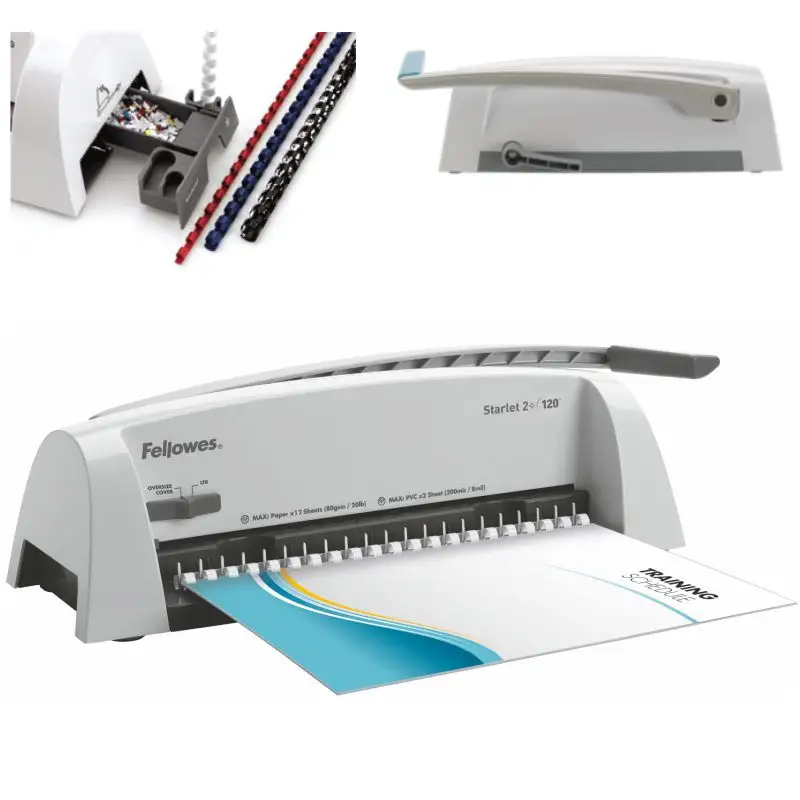
Portability and compactness resonate with home users and small offices. A verified buyer wrote, “This unit is so much more compact and easily stored than others I have used.” Teachers appreciate being able to bind projects in class — one educator noted it condensed a month-long prep process into a single day.
Built-in features like the comb measurement guide and storage tray save time and reduce clutter. As one Reddit comment observed, “Storage tray with built-in comb sizer… handy for me a time or two.” Combined with the chip tray “burst-out” feature, it simplifies maintenance during long binding sessions.
Affordability is another strong point. Several users purchased at steep discounts, with Trustpilot reviewers highlighting combs at “about $5 per 100” — making the cost per document extremely low. The ability to re-open bound books for editing is a reported advantage over thermal binding systems.
Common Complaints
Alignment issues are the most frequent gripe. Even satisfied buyers admit occasional mis-punches, often due to paper not sitting fully in the guide. This problem particularly frustrates those preparing client presentations or reports where precision is paramount.
Durability concerns center on the handles — made of hard plastic and potentially vulnerable to breakage if dropped. “If unit got dropped on the left side (smaller handle) I think the handle would lose the battle,” one Reddit reviewer cautioned.
The official 15-sheet punch capacity proves ambitious in reality, especially with heavier stocks or laminated sheets. A user working with special needs materials found “it would not cut through the laminated pages correctly… some holes were not even punched through all the way.”
Instructions are another weak point. Several platforms repeat the sentiment that the included guide is insufficient. Many recommend watching the manufacturer’s video or third-party tutorials to avoid early mistakes.
Divisive Features
The machine’s light-duty nature is ideal for some but limiting for others. Small offices and home users find the 150-sheet binding limit adequate, while high-volume or commercial users may consider upgrading. One Quora review said, “Great product… only giving a four because I wish it would take more papers!”
Manual operation polarizes opinions. Some appreciate the control and simplicity (“Better than the electric powered units”), others miss the speed and ease of electric systems — especially when binding many packets in bulk.
Trust & Reliability
Long-term reliability receives generally positive notes for light use. Several replacement stories underscore trust in the brand; one Reddit user replaced a 20-year-old drop-damaged unit with the Star+. Trustpilot reviews speak of solid weight and build, fostering confidence it “should last long enough to pay for itself.”
Minor mechanical flaws do occur, with isolated reports of inconsistent perforation alignment. However, there’s no widespread indication of systemic defects or seller scams. Packaging quality is consistently praised, indicating care in shipping.
Alternatives
Two obvious alternatives appear in cross-platform feedback:
- Fellowes Pulsar+ 300 — Punches 20 sheets and binds up to 300 sheets, suited for medium-volume offices. Its edge guide and vertical loader are similar but scaled for bigger jobs.
- Galaxy-E 500 Electric — Electric operation, up to 28-sheet punches and 500-sheet binding. Efficiency for high-volume work, plus simultaneous two-person operation.
Users choosing Star+ tend to prioritize cost, size, and portability over raw capacity. In contrast, electric models attract departments and businesses with tight deadlines and large batch requirements.
Price & Value
eBay shows used units around $29.99 plus shipping, while retail ranges from $60 on sale to $159.99. Community buying tips stress watching for discounts; Trustpilot reviewers frequently report finding Star+ at “about 50% off retail” on Amazon.
Given low accessory costs and wide availability, operational expenses remain minimal. Resale potential is solid — used units in good condition fetch a respectable fraction of purchase price, adding to overall value.
FAQ
Q: Can the Fellowes Star+ punch laminated sheets?
A: It struggles with laminated materials; some holes may not punch fully. Several school-use reviewers recommend alternative methods for laminates.
Q: Is the punch capacity truly 15 sheets?
A: While rated for 15 sheets, multiple users suggest limiting to 12–13 sheets for smoother operation and reduced jamming.
Q: Can I use off-brand combs?
A: Yes. One homeschooling user plans to try off-brand combs after success with Fellowes sizes, though fit and ease may vary.
Q: Does the machine allow editing after binding?
A: Yes. You can reopen combs to add or remove pages — an advantage over thermal binding systems cited by many home and school users.
Q: Are instructions sufficient?
A: Most find them lacking. Many recommend watching a video tutorial for clarity on comb orientation and loading technique.
Final Verdict: Buy if you need an affordable, compact, and easy-to-use binder for home, classroom, or small office projects under 150 sheets. Avoid if you routinely bind heavy, laminated, or high-volume jobs. Pro tip from community: Keep loads slightly under rated capacity and use video guides for best results.





