Epson XP-7100 Review: Great Photos, Pricey Ink (7/10)
“Every time I try, I have to go at least 6 pop ups…” isn’t the kind of line you expect to read about a family-friendly all‑in‑one—but it captures the split personality of the Epson Expression Premium XP-7100 Wireless Color Photo Printer with ADF, Scanner and Copier, Black. Verdict: Conditional buy, 7/10.
Quick Verdict
For photo-first households that print often enough to keep ink flowing, Epson Expression Premium XP-7100 Wireless Color Photo Printer with ADF, Scanner and Copier, Black earns praise for output quality and features. For anyone sensitive to ink costs or wireless finickiness, the same machine becomes a recurring headache.
| Decision | Evidence from sources | What it means in practice |
|---|---|---|
| Conditional | Consumer Reports calls photo output “very good,” but ownership cost “very high” | Great results, expensive to keep fed |
| Yes (photo families) | Fakespot quote: “The photo I printed is amazing” | Strong for glossy photo printing |
| No (budget ink users) | Fakespot: “ink cartridges are very expensive” | Cartridge cost drives total cost |
| Conditional (Wi‑Fi users) | Consumer Reports: “relatively easy to set up the wifi”; Fakespot: “hard to get connected wirelessly” | Setup experience varies a lot |
| Yes (scan/copy stacks) | Specs: 30‑page ADF + auto 2‑sided scan/copy; Consumer Reports confirms duplex ADF (DADF) | Good for homework packets and paperwork |
| No (print-if-black-empty) | Consumer Reports: “If the black ink runs out, it stops printing” | Can’t limp along on color alone |
Claims vs Reality
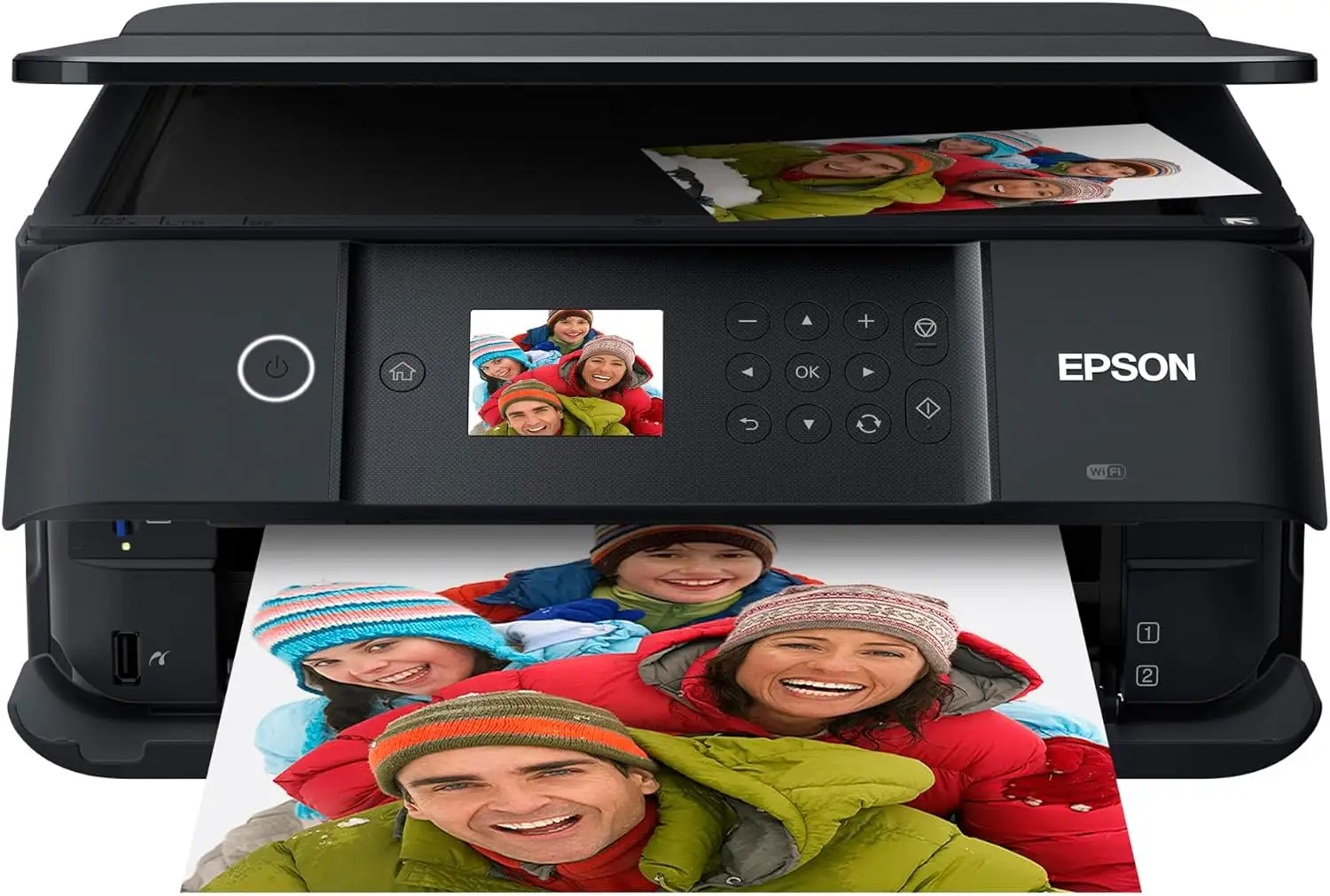
“Superior photo quality” is front-and-center in official materials, and third-party testing aligns with that—up to a point. Consumer Reports says it “prints very good photos on glossy paper that most people would be happy with,” reinforcing the printer’s photo-centric positioning. That kind of feedback matters most to scrapbookers, parents printing school memories, or anyone who actually uses the dedicated photo tray workflow.
But digging deeper into the same testing, the printer’s document side is less flattering. Consumer Reports describes its “text quality” as “not as good as most printers” and calls it “on the slow side for text.” So while marketing pushes an all-in-one that handles everything, the data suggests it’s best when “everything” leans toward photos and color graphics rather than high-volume text documents.
The “wireless…easy mobile printing” claim also shows a real gap between promise and lived experience. Consumer Reports notes: “We found it relatively easy to set up the wifi connection on this printer.” Yet a very different story appears in user review excerpts captured by Fakespot: “It’s hard to get connected wirelessly and doesn’t work unless I delete the printer and reinstall it on my computer each time.” For a household with multiple devices, that inconsistency can be the difference between “family printer” and “weekend troubleshooting project.”
Cross-Platform Consensus
Universally Praised
A recurring pattern emerged around output quality—especially photos—when the printer is behaving. From Fakespot’s captured praise, one user summary focuses on clarity: “Colors are sharp and printing is readable. The quality is more than respectable and I have had zero issues with it.” That kind of comment typically comes from everyday home users printing mixed documents and occasional photos, not from niche photo hobbyists chasing perfect calibration.
Consumer Reports backs up the “photo-first” story in more measured language: the XP-7100 “prints very good photos on glossy paper that most people would be happy with,” and its “color graphics printing is very good for reports, newsletters and web pages.” For students, small home businesses, or families printing presentations and color handouts, that “very good” graphics note signals a printer that can handle more than snapshots.
There’s also consistent value in the document-handling features as described in specs and testing. The official listings emphasize a “30-page auto document feeder” and “auto 2-sided print / copy / scan,” and Consumer Reports confirms the ADF can duplex: “The adf can duplex—it’s a dadf— which can scan / copy both sides of each page.” For anyone digitizing multi-page paperwork—medical forms, school forms, tax documents—that duplex ADF story is the practical payoff, even if the printer isn’t the fastest at plain text.
Some praise even centers on physical size versus capability. A Fakespot-captured comment highlights dorm and small-desk use: “It has a small enough footprint to fit on a dorm desk… it is surprisingly heavy for such a small footprint but does so many things.” For apartment dwellers or students, that “small but weighty” narrative suggests a compact machine that still feels substantial.
After those stories, the praise tends to consolidate into a few themes:
- Photo/graphics quality that satisfies most everyday users
- ADF + duplex scanning/copying convenience for multi-page jobs
- Compact footprint relative to feature set
Common Complaints
Ink economics is the loudest recurring frustration, and it shows up both in professional testing and user review excerpts. Consumer Reports estimates a “very high” cost of ownership, citing a “yearly cost” of “$172” and a “5-year ownership cost” of “$1074.” That’s not a small gripe—it reframes the purchase from “$200-ish printer” into a long-term expense that can eclipse the hardware.
Fakespot-captured user complaints echo the same pain in more direct language: “Epson printer ink cartridges are very expensive,” and, crucially for practical home printing, “If you run out of any color ink cartridge you cannot print in black / white.” Consumer Reports corroborates the behavior from the opposite angle: “If the black ink runs out, it stops printing — it can't be set to just use the remaining color ink.” For parents trying to print a permission slip at night, that’s less a feature debate and more a workflow failure.
Reliability and mechanical handling also surface in user excerpts, especially around trays and feeding. A Fakespot snippet complains: “The three trays are flimsy… The paper tray gets stuck repeatedly.” For users printing frequently—especially on mixed media like photo paper, specialty paper, and plain paper—that kind of friction can create the feeling that the printer’s clever multi-tray design is also a point of failure.
Finally, connectivity and software experience emerges as a recurring sore spot for a subset of owners. One Fakespot-captured complaint reads: “I have to go at least 6 pop ups… it’s hard to get connected wirelessly and doesn't work unless I delete the printer and reinstall it on my computer each time.” That kind of report hits hardest for households relying on Wi‑Fi Direct or multi-device mobile printing, where reinstallation isn’t a one-time annoyance—it becomes a repeating tax.
After those stories, the complaints usually cluster into:
- High ink cost and high long-term ownership cost
- Inability to print when a key cartridge is empty
- Tray/feed durability complaints from some users
- Wi‑Fi/software inconsistency depending on setup
Divisive Features
The XP-7100’s “wireless” story is where the record most clearly splits. Consumer Reports states, “We found it relatively easy to set up the wifi connection on this printer,” suggesting that for some environments the setup is straightforward. Yet Fakespot’s excerpted experiences include severe friction, including repeated reinstalls. The practical takeaway isn’t that one side is wrong—it’s that home networks, device ecosystems, and driver/app behavior can swing the experience from smooth to maddening.
The physical design also appears divisive. One Fakespot-captured user appreciates the compactness—“small enough footprint to fit on a dorm desk”—while another complains about tray construction and jams—“flimsy… gets stuck repeatedly.” For careful users printing occasionally, the design may feel clever and space-saving. For heavier use or less forgiving paper habits, those moving parts can become the first pain point.
Trust & Reliability
Concerns about reliability show up less as “it broke instantly” and more as repeated friction: ink restrictions, tray behavior, and streaking complaints. In Fakespot’s excerpts, one frustrated user reports: “It’s always printing with streaks across probably 50% of what I try to print no matter how much troubleshooting.” Another notes maintenance mess: “It uses lots of ink and occasionally needs the rollers inside cleaned up.”
Long-term durability narratives are more limited in the provided community text, but Consumer Reports frames a different kind of “reliability” issue: total cost and cartridge dependency over time. When a printer’s ongoing cost is “very high,” the long-term story becomes less about whether it lasts and more about whether owners keep it running without resentment.
Alternatives
Only models explicitly referenced in the provided data can be used for comparison, and Epson’s own comparison chart repeatedly places XP-6000, XP-8500, and XP-960 alongside the XP-7100. The XP-7100’s differentiator in that lineup is its 30‑page ADF and its 4.3" touchscreen, positioning it as a productivity + photo hybrid for home users.
The XP-8500 and XP-960 are framed as “Expression Photo” models with 6‑color ink sets in the manufacturer comparison, implying a tilt toward photo enthusiasts. If your household prints photos obsessively and accepts higher ink complexity, that “6-color” positioning may be the deciding factor—while the XP-7100 reads as the middle ground: fewer inks than the photo-centric models, but more paper-handling and scanning convenience than simpler printers.
Price & Value
Pricing signals in the data show a wide spread depending on condition and channel. Amazon lists it around the mid-$200s (with a small discount), while Epson’s own pages show promotional pricing and “Certified ReNew” listings at much lower prices. eBay pricing ranges from roughly under $100 pre-owned to around $200+ new, suggesting meaningful depreciation and a strong secondary market for bargain hunters.
Digging deeper into value, Consumer Reports’ ownership-cost estimates loom large: even if you score a great upfront deal, the “estimated yearly cost” of “$172” and “5-year ownership cost” of “$1074” can dominate the economics. For light printers who only occasionally run a few pages, those estimates may not map perfectly—but the direction is clear: this is not the budget-ink play.
Community-informed buying tips implicit in the quotes focus on practicality rather than optimization. The Fakespot excerpt advising messy maintenance—“wear latex gloves… lots of paper towels and plastic underneath the printer”—reads like hard-earned experience. It suggests that for some users, the “value” equation includes tolerance for maintenance rituals and ink handling.
FAQ
Q: Can the XP-7100 print if a cartridge runs out?
A: Not reliably in the way many users want. Consumer Reports states: “If the black ink runs out, it stops printing,” and a Fakespot-captured complaint adds: “If you run out of any color ink cartridge you cannot print in black / white.” This can be disruptive for last-minute documents.
Q: Is the Epson XP-7100 good for photos?
A: Yes—photo quality is one of the strongest points in the provided sources. Consumer Reports says it “prints very good photos on glossy paper that most people would be happy with,” and a Fakespot-captured user wrote: “The photo I printed is amazing.” It’s positioned as a photo-centric home all-in-one.
Q: How expensive is ink and ownership over time?
A: Multiple sources flag high ongoing cost. Consumer Reports estimates “very high” yearly and long-term ownership costs, including a “yearly cost” of “$172” and “5-year ownership cost” of “$1074.” A Fakespot-captured user echoes the same pain: “ink cartridges are very expensive.”
Q: Does it have duplex scanning and an ADF for multi-page jobs?
A: Yes. The official specs emphasize a “30-page auto document feeder” and automatic two-sided copy/scan, and Consumer Reports confirms the ADF can duplex: “The adf can duplex—it’s a dadf.” That’s useful for scanning stacks of paperwork without manual flipping.
Q: Is Wi‑Fi setup easy?
A: It depends on the user and setup. Consumer Reports says it was “relatively easy to set up the wifi connection,” but a Fakespot-captured complaint describes repeated failures: “It’s hard to get connected wirelessly and doesn't work unless I delete the printer and reinstall it.” Experiences vary sharply.
Final Verdict
Buy if you’re a photo-first home user who values a duplex ADF for scanning/copying stacks, and you’re comfortable budgeting for OEM cartridges over time. Avoid if you need the cheapest ink-per-page or you can’t tolerate being blocked from printing when a cartridge is empty. Pro tip from the community: a Fakespot-captured user suggests being prepared for mess during maintenance—“wear latex gloves… lots of paper towels and plastic underneath the printer.”





