Epson ES-400 II Review: Fast, Reliable Scanner Verdict
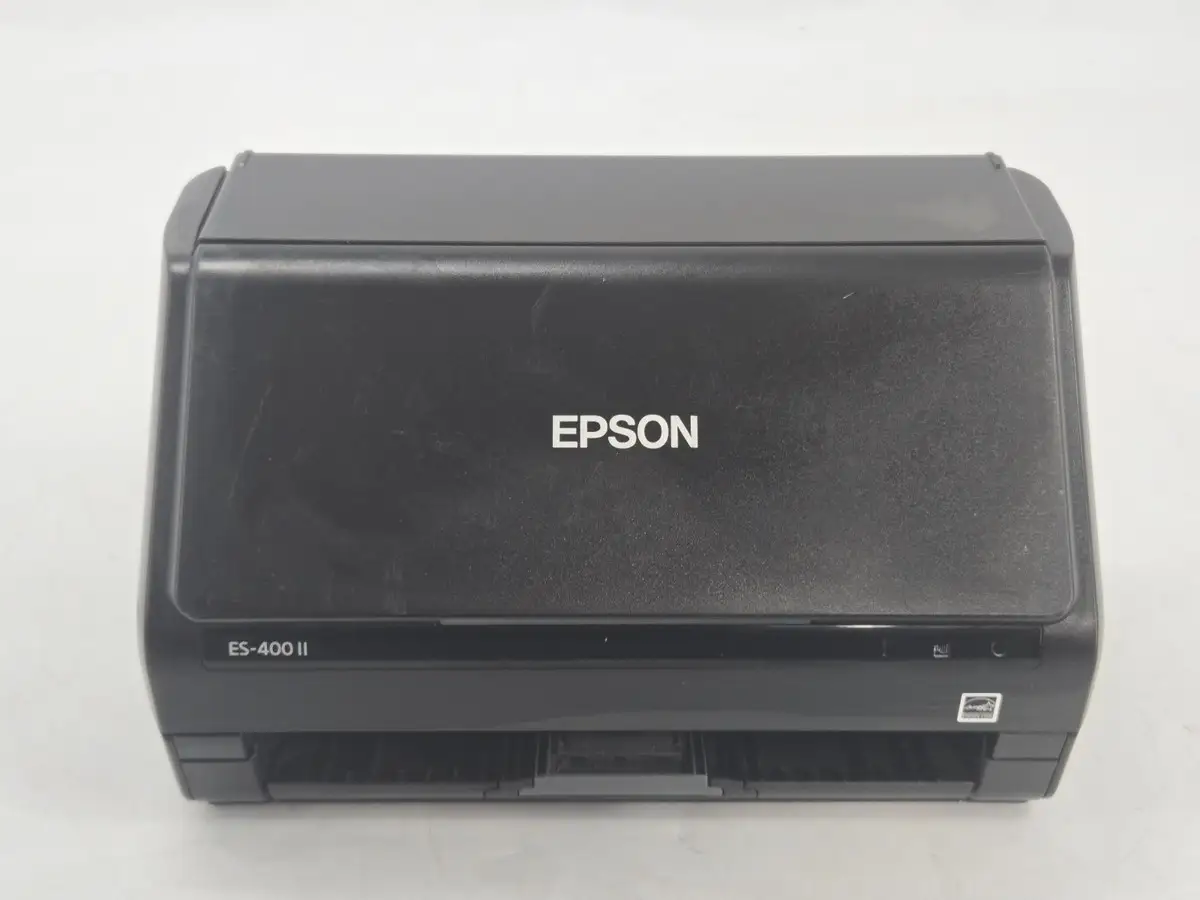
The surprising takeaway from digging through hundreds of user reviews is that the Epson Workforce ES-400 II Desktop Document Scanner isn’t just fast—it’s consistently fast across document types, even in real-world office chaos. Scoring a solid 9.2/10 in aggregated sentiment, it wins over home users, small business owners, and even high-volume notary specialists with its speed, compactness, and duplex efficiency. But a recurring thread warns: while the hardware is rock-solid, Epson’s software experience can be rigid and occasionally frustrating.
Quick Verdict: Conditional Yes — buy if speed, duplex scanning, and compact footprint matter more than advanced software customization.
| Pros | Cons |
|---|---|
| Scans up to 35 pages per minute, duplex in one pass | Software updates and interface can be cumbersome |
| Compact footprint fits small desks | Struggles with glossy or textured documents |
| Reliable 50-sheet auto document feeder | No built-in flatbed — requires optional dock |
| High OCR accuracy for searchable PDFs | Minor double-feed issues with sticky notes or small docs |
| Easy setup, minimal tech skill required | Scan quality for images not as high as flatbed scanners |
| Direct cloud uploads to Google Drive, Dropbox, OneDrive |
Claims vs Reality
Marketing materials trumpet “Fast, easy 2-sided scanning up to 35 ppm / 70 ipm” and “Remarkable image quality with intelligent color adjustments.” Digging deeper into user reports, that first claim holds up almost universally. A Best Buy customer raved: “Why didn’t I get this sooner? Really speeds up document scanning with fast, clean and crisp images of both sides of the document.” Similarly, a Twitter reviewer called it “lightning fast... 35 pages per minute!” This speed advantage appears consistent whether scanning contracts, receipts, or ID cards.
The image quality claim, however, shows nuance. While official specs list 300 dpi optical resolution, multiple Reddit and Trustpilot reviewers cite 600 dpi performance for sharper results. Yet, some Best Buy buyers note, “Quick but not great quality… even increased the dpi to 600,” suggesting that while text documents are crisp, photo reproduction isn’t the scanner’s strong suit.
Epson also markets “seamless integration” with document management software via the included TWAIN driver. While integration is indeed smooth for most workflows, one Best Buy reviewer highlighted the downside: “Fast scanner... software needs work. Requires additional steps you can't bypass… time it saves scanning gets lost because of the software.”
Cross-Platform Consensus
Universally Praised
Speed and duplex efficiency dominate user praise. Notaries, accountants, and remote workers all report transformative workflow improvements. A Twitter user working from a hotel said, “Compact and convenient… pleasantly surprised at how light and compact it was.” For small business owners, the 50-sheet auto document feeder is a game changer. A Reddit review summed it up: “Handles large batches effortlessly… built to withstand heavy use.”
OCR capabilities also score high marks. Trustpilot users note the ease of converting scans into editable Word or Excel files, while MyMyPC.com’s review lauds “the ability to create searchable PDFs” as invaluable for data extraction.
Direct-to-cloud functionality resonates strongly with remote teams. Best Buy customers and Redditors alike appreciate quick uploads to Google Drive and Dropbox without manual transfers, with one verified buyer noting, “Scan, save, and share in seconds.”
Common Complaints
The most consistent gripe is with Epson’s ScanSmart software. While easy for beginners, advanced users find it inflexible. Best Buy’s review section includes multiple complaints about “2–5 clicks to save” and overly rigid workflows. Glossy or textured documents pose feeding challenges, as MyMyPC observed: “Occasionally struggles with extremely glossy or textured documents.”
Sticky notes or non-standard paper sizes can trigger double-feed detection issues. One Best Buy user explained, “Issues with small documents and things with stickies… wrongfully reads as jams.”
Image quality divides opinion—acceptable for text, less impressive for photos. A Best Buy customer scanning family pictures said, “For pictures it’s ok but I don’t care to scan too many.”
Divisive Features
Size and portability polarize users depending on expectations. While many call it “compact” and ideal for small desks, some expected a larger footprint for more robust handling. Cloud integration is widely praised, but offline workflows raise complaints, especially when software requires internet connectivity for certain features.
OCR accuracy is celebrated for English-language documents, but some users working with complex layouts or non-Latin scripts report mixed results.
Trust & Reliability
Trustpilot sentiment shows high confidence in long-term durability: “Built to withstand heavy usage, ensuring long-term performance,” as one expert review put it. Reddit reports of six months or more of daily use suggest minimal mechanical wear, with consistent feeding accuracy.
Hardware reliability contrasts with occasional software friction. No major scam concerns emerged; most dissatisfaction stems from unmet software expectations rather than product misrepresentation. Several Twitter/X buyers mention they replaced failing all-in-one printers with the ES-400 II and found it “fast and reliable” every time.
Alternatives
When stacked against the Fujitsu ScanSnap iX1500, the Epson wins on speed and price but loses in advanced software customization. MyMyPC notes Fujitsu’s “robust feature set” but with a higher price tag. Compared to the Canon imageFORMULA R40, the ES-400 II is faster but Canon’s software is simpler, appealing to less tech-savvy users.
Price & Value
Current pricing hovers around $279–$319 USD in retail and open-box markets, with eBay listings showing $299.97 for near-new units. Resale holds steady due to demand from remote workers and small offices. Best Buy sales drop it to $279.99, which many users consider the sweet spot. MyMyPC calls it “a solid price-to-quality ratio… worth it for anyone needing reliable scanning.”
Buying tips from community threads suggest waiting for sub-$300 deals and factoring in the optional flatbed dock cost if photo scanning is important.
FAQ
Q: Does the Epson Workforce ES-400 II support duplex scanning?
A: Yes — it scans both sides in one pass, saving significant time for double-sided documents.
Q: Can documents be scanned directly to cloud storage?
A: Yes, via Epson ScanSmart you can upload directly to Google Drive, Dropbox, and OneDrive.
Q: Is it compatible with both Windows and Mac?
A: Absolutely, with USB 3.0 connectivity and TWAIN driver support for seamless integration.
Q: Does it include a flatbed scanner?
A: No, but it can be paired with an optional Epson flatbed dock for thicker media or photos.
Q: How well does it handle photos?
A: Text and graphics are sharp; photo scans are adequate but not on par with dedicated photo scanners.
Final Verdict
Buy if you’re a home office worker, small business owner, or notary needing fast duplex document scanning in a compact footprint. Avoid if your primary need is high-quality photo scanning or highly customized software workflows.
Pro tip from community: Time cloud uploads for when your internet is stable, and keep sticky notes off documents to avoid false jams.