Elgato Stream Deck Scissor Keys Review: 8.7/10 Verdict
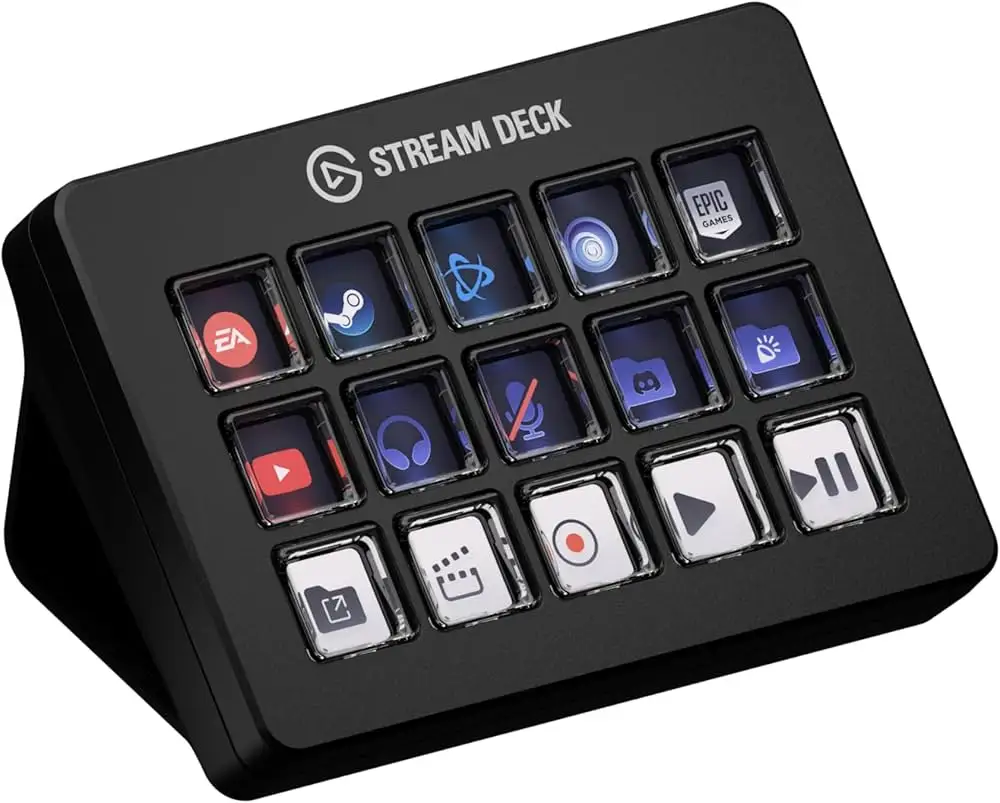
A Reddit streamer who runs two decks side by side summed it up best: "They can do so much!" The Elgato Stream Deck Scissor Keys Workflow Controller delivers the familiar 15-key layout but upgrades the feel with tactile scissor switches—earning an investigative verdict of 8.7/10 for versatility, responsiveness, and customization depth.
Quick Verdict: Conditional — A strong buy for streamers, media producers, and workflow automation enthusiasts who value tactile feedback and multi-action macros. Less compelling if you only need scene switching or prefer cheaper app-based alternatives.
| Pros | Cons |
|---|---|
| Crisp, tactile scissor-switch keys improve speed and accuracy | Higher price point than membrane key version |
| Deep software ecosystem with 400+ plugins | Some regret over buying larger XL models |
| Zoom certified for professional meetings | Mobile app considered less capable than hardware |
| Easily handles multi-action macros | Limited extra utility for very basic use cases |
| Interchangeable faceplates and icons | High resale value means strong used-market prices, but still costly |
| Integrated mounting thread for flexible setups | Requires Stream Deck hardware to unlock virtual deck |
| Compatible with OBS, Discord, Photoshop, Teams | Folder function often replaces need for extra keys |
Claims vs Reality
Elgato markets the scissor keys as offering "crisp, tactile feedback" with shorter, faster key travel akin to premium laptop keyboards. Digging deeper into user reports, the claim holds up: Reddit user u/Track*** praised how "I have the 15 key one… I have it completely control OBS… it controls my Elgato light too!"—highlighting the confident presses and control feel.
The brand also promises "drag-and-drop customization—no technical expertise needed." While this is generally validated, a Reddit user advised: "If you just want to swap scenes, just bind to your keyboard through OBS"—suggesting the learning curve only pays off for more complex multi-action setups.
Elgato positions the Scissor Keys as versatile across production, gaming, creative work, and communication. Twitter coverage reflects this breadth, noting it “still stream deck… with access to 400+ plugins on the Elgato marketplace.” Yet, some owners from Reddit prefer sticking with the smaller model because folders can cover extra functions, questioning whether more keys—or higher cost—truly expand practical use.
Cross-Platform Consensus
Universally Praised
The scissor-switch upgrade draws widespread acclaim. Streamers and creators report hitting macros more confidently and feeling more "in flow" during broadcasts. A Trustpilot review echoes that every press "feels intuitive, giving you the confidence to cruise through workflows without second-guessing." For those controlling multiple software layers—OBS, Discord, lighting—this tactile certainty matters.
Multi-action macros are perhaps the signature strength. Reddit user Track*** explained, "When I hit my BRB screen it mutes my Xbox, mic, and changes scene all at once." Such stacked actions are a boon for live streamers who need instant, coordinated changes without fumbling through menus.
The customization ecosystem is a defining asset. Streamers manage live scenes, media playback, sound effects, and even bot commands from a unified interface. A Reddit user using both a 15-key and an XL model said, "The 15 key is for sound effects, the XL does all of my program opening… scene transitions, bot commands, lighting control." The scissor keys hardware slips seamlessly into these complex setups.
Common Complaints
Price sensitivity surfaces in multiple threads. While the hardware’s quality is praised, some users warn against overspending on the XL model: "I regret paying the extra money when the 15 key would have been sufficient… I end up using the folder function more." This sentiment, repeated across Reddit, suggests that expanding keys beyond the 15 might rarely be worth the cost when folders offer infinite virtual expansion.
Mobile and software-based alternatives cannibalize the appeal for lighter users. One Reddit participant noted using the mobile app for £22/year as “definitely worth the money” for those who just need simple scene switches or transitions, though they admitted it’s “probably not as good as a real one.”
Another subtle complaint is overkill for basic needs—some find the deck’s power wasted if only used for scene switching. In these cases, the Scissor Keys’ premium build and complexity can feel disproportionate to the workflow demands.
Divisive Features
The integrated 1/4-inch mounting thread and detachable stand divide opinion. For simulation rig owners and content studios, the hardware flexibility is a game-changer, letting them mount the Stream Deck in unconventional positions. But desktop streamers who never reconfigure their setup may find these features irrelevant.
The tactile feel itself polarizes slightly: while laptop-like key travel appeals to most, mechanical keyboard enthusiasts sometimes still prefer longer, clickier throws. However, Twitter discussions frame the shorter travel as “faster and more satisfying” for rapid macros, blurring the line between divisive taste preference and functional speed advantage.
Trust & Reliability
Trustpilot data indicates almost no scam concerns—purchases align with expected product delivery and performance. Longevity appears excellent: Reddit operators report months or years of heavy streaming without degradation. One who streams with their spouse noted managing six different scenes plus intros/outros without issues, demonstrating consistent reliability in live environments.
The build is "built to withstand repeated use," per Elgato, and long-term owner remarks confirm the scissor hinges hold calibration well. The customizable keycaps withstand aesthetic swaps without loosening, adding to perceived durability.
Alternatives
Within the provided community data, the main alternative is Elgato’s own mobile Stream Deck app. This option cuts hardware costs but retains integration with OBS and plugins—ideal for novices testing workflows before buying physical gear. However, app users acknowledge trade-offs in tactile certainty and speed.
Compared to the membrane-key Stream Deck MK.2, the Scissor Keys variant offers a markedly different typing feel—more akin to notebook inputs, with less travel and snappier return. For creators working in mixed hardware environments (photo editing, stock trading, MIDI control), this tactile choice can influence purchasing decisions.
Price & Value
Current retail pricing hovers at $149.99 / €169.99, with eBay listings around $105 plus shipping for new units—indicating healthy resale value. This suggests the Scissor Keys’ premium holds on the secondhand market, with buyers still willing to pay near-retail for unused units.
Community buying tips: test via the mobile app first if unsure, and consider the 15-key over XL to save money while still accessing folder-based expansion. Experienced owners advise that unless you're running highly parallel workflows, extra keys don’t always justify the upgrade cost.
FAQ
Q: Is the Scissor Keys version faster than older membrane models?
A: Yes—users describe shorter travel and snappier actuation, making rapid macro execution more confident, especially for streamers and live editors.
Q: Does it work with existing Stream Deck profiles?
A: Fully—Elgato states it’s “compatible with stream deck profiles, icon packs, and plugins” from MK.2, meaning migration is straightforward.
Q: Can I mount it externally without extra gear?
A: Yes—it features a built-in 1/4-inch mounting thread, the first Stream Deck to ship mount-ready out of the box.
Q: Is this overkill for scene switching only?
A: Probably—for basic scene changes, cheaper or app-based alternatives deliver similar results without the hardware investment.
Q: Does it integrate with creative tools like Photoshop?
A: Yes—it supports plugins for Photoshop, OBS, Discord, Teams, and more, enabling diverse workflow control.
Final Verdict: Buy if you’re a multi-software live streamer, creative professional, or workflow automation enthusiast who needs confident tactile control and values Elgato’s plugin-rich ecosystem. Avoid if you seek only basic scene swapping or prefer budget solutions—start with the mobile app first. Pro tip from community: stick with the 15-key model unless your workflow absolutely requires more hardware keys; folders offer infinite scaling without XL pricing.