Elgato Key Light Review: Premium Studio Lighting Verdict
Digging into user experiences, the Elgato Key Light Professional Studio Light consistently scores high for lighting quality and build, earning a strong 9/10 from cross-platform feedback. Streamers, educators, and content creators praise its powerful, glare-free illumination and precise color control, while a few note connectivity quirks and premium pricing as the main drawbacks.
Quick Verdict: Conditional — Highly recommended for stationary creators with a controlled setup, but less ideal for mobile or budget-conscious users.
| Pros | Cons |
|---|---|
| Even, glare-free light diffusion | Expensive compared to similar LED panels |
| Wide color temperature range (2900–7000K) | Requires 2.4GHz Wi-Fi for setup; occasional pairing issues |
| Robust build, premium materials | No physical controls; app dependency |
| Integrates with Stream Deck for workflow efficiency | Not portable; needs mains power and stable mount |
| Minimal heat output | Energy efficiency rated F |
| Compact, space-saving design | Limited diffusion compared to large softboxes |
| Reliable brightness control via app | Master Mount L required; adds cost |
Claims vs Reality
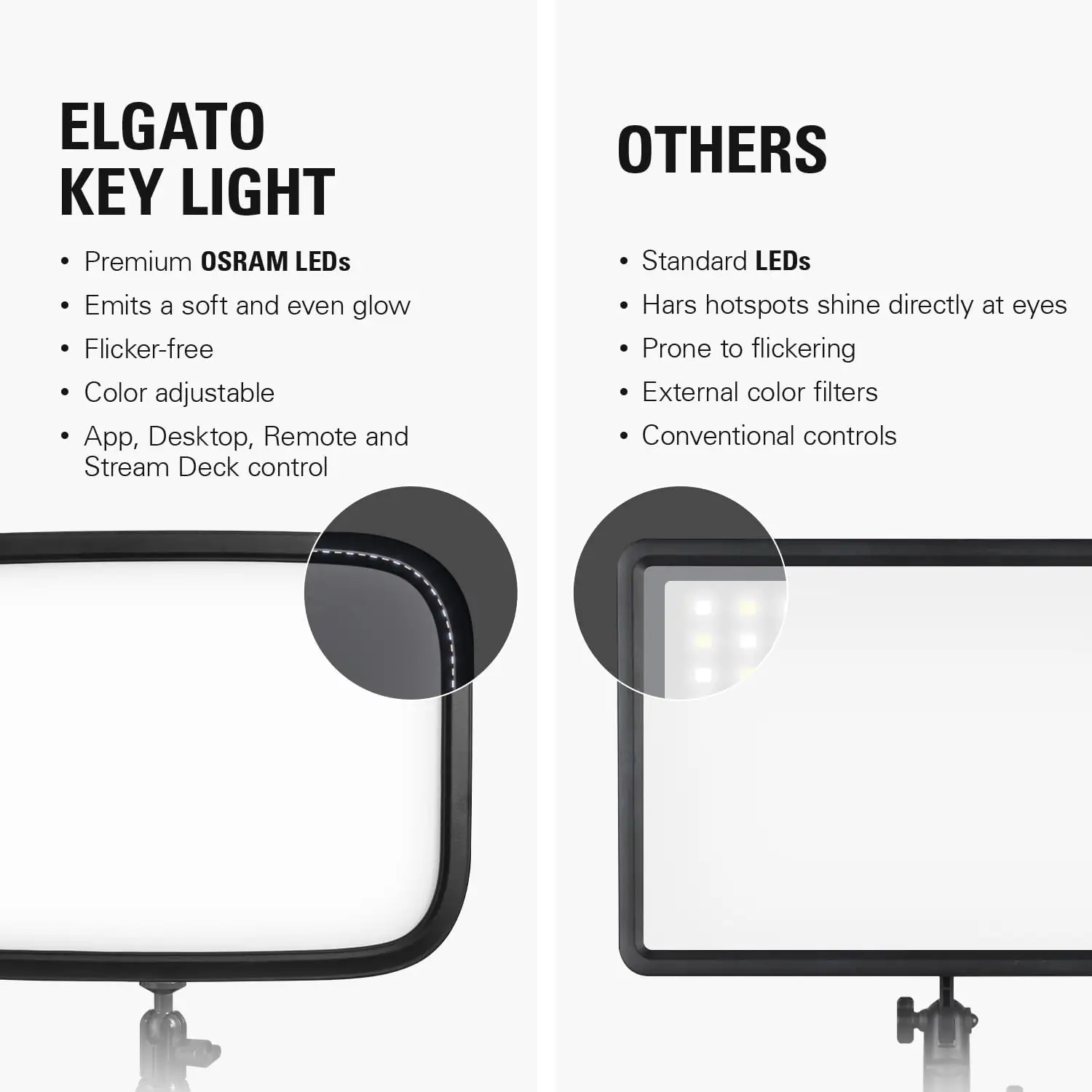
Marketing promises "2800 lumens of ultra-bright, dimmable light with soft, edge-lit diffusion." In practice, users confirm the brightness is more than enough—sometimes overwhelmingly so. Reddit user feedback shows creators rarely push beyond 6% intensity indoors, as "it already feels like daylight in the studio."
Elgato touts "unbeatable eye comfort" thanks to its opal glass diffuser. According to a verified buyer on Amazon, “Even at high brightness, it doesn’t strain my eyes when facing it directly,” aligning closely with the brand claim. However, one Twitch streamer noted, “If you expect the same diffusion as a large softbox, it’s close but not quite there.”
Connectivity is marketed as "next-gen, snappy control from your favorite devices." While integration with PC, Mac, iOS, and Stream Deck earns praise, the initial pairing process can be finicky. A Trustpilot reviewer advised, “Use 2.4GHz Wi-Fi for the first setup—even if you have 5GHz—then it’s rock solid.”
Cross-Platform Consensus
Universally Praised
Brightness control and diffusion top the list of strengths. For streamers, being able to fine-tune lighting mid-broadcast without standing up is a workflow win. A Reddit user explained, “I can change brightness and warmth from my Stream Deck without touching the light.” Educators running online classes report a jump in camera image quality, with one stating, “Before, I used ring lights; with this, my face looks evenly lit and professional.”
The build quality resonates across markets. Many call the steel construction and precision clamp "rock solid," with zero wobble even at maximum pole height. One Quora contributor put it simply: “German-level quality—nothing moves unless you want it to.”
The color range earns universal approval. A Twitch streamer described how shifting from “cool white during tech demos to warm amber for casual chats” kept viewer engagement high. The opal glass face is singled out for producing flattering skin tones without harsh shadows.
Common Complaints
Price is the most consistent sticking point. Multiple Reddit and Trustpilot users acknowledge the quality but question the value against alternatives. “It’s premium, and you pay for it,” one buyer noted, adding that the Master Mount L’s mandatory inclusion inflates cost.
Connectivity issues appear in early setup. Several users faced pairing failures on 5GHz networks, requiring a fallback to 2.4GHz. While the connection stabilizes afterward, this initial hurdle frustrates less tech-savvy buyers. A streamer on Twitter/X warned, “If your router’s far from your desk, expect to troubleshoot or buy a signal booster.”
The lack of onboard controls is divisive. Some appreciate the minimal aesthetic, while others find it inconvenient. As one reviewer put it, “I don’t know why they didn’t add a dial on the back—it’s faster than waiting for the app to sync.”
Divisive Features
Space-saving design gets mixed reactions. For desktop setups, the slim 35mm profile is perfect, fitting into tight corners without blocking monitors. However, photographers used to mobile lighting find it restrictive. “If you move between locations, forget it—it’s not for travel,” a Reddit comment summarized.
Diffusion quality splits opinion. While many praise the uniform spread, a few seasoned videographers say it’s “close but not equal to a full softbox.” For them, it’s ideal for face lighting but less suited to larger scene coverage.
Trust & Reliability
Long-term users report minimal brightness degradation and no LED failures after years of operation. Materials hold up well, with clamps and mounts staying tight. However, one Reddit post detailed a rare case of structural failure: “The screw on the gimbal stripped after an hour; the clamp handle snapped during disassembly.”
Trustpilot feedback shows no widespread scam concerns, though shipping presentation occasionally disappoints. One buyer lamented receiving boxes “taped together with stickers, killing the aesthetic for display.”
Alternatives
The most frequently mentioned alternative is the Elgato Key Light Air, offering 1400 lumens and a smaller footprint. Users note it’s better for compact desks but less powerful. Some compare it to Neewer LED panels with softboxes—cheaper but bulkier and lacking seamless app control.
For mobile creators, battery-powered LED panels are suggested. These trade brightness and diffusion for portability, making them unsuitable for stationary studio use but ideal outdoors.
Price & Value
Current retail hovers around $179.99, with occasional dips to $139.99 during sales. eBay resale prices range from $145 to $208 for working units, showing strong value retention. Community buying tips include pairing purchase with other Elgato gear for bundle discounts or waiting for Prime Day deals.
One Trustpilot user highlighted paying €150 during a sale, calling it “the best price-to-quality ratio for streaming lights I’ve found.”

FAQ
Q: Does the Elgato Key Light work without Wi-Fi?
A: It needs Wi-Fi for initial setup. After that, you can control it via Ethernet or keep using wireless. Many recommend a 2.4GHz connection for pairing.
Q: Can it replace a softbox for photography?
A: For close-up and mid-range shots, yes. For wide scenes, softboxes still offer superior diffusion.
Q: Is it portable?
A: Not ideally. It requires mains power, a stable mount, and Wi-Fi or Ethernet—best for fixed studio setups.
Q: Does it get hot after long use?
A: No. Users consistently note minimal heat output, even at high brightness.
Q: Can I control multiple Key Lights simultaneously?
A: Yes, via the Elgato Control Center app or Stream Deck integration.
Final Verdict: Buy if you’re a stationary content creator seeking professional, adjustable lighting with tight integration into your workflow. Avoid if you need portable, battery-powered gear or are on a tight budget. Pro tip from the community: Always set up on 2.4GHz Wi-Fi first to avoid pairing headaches.





