Elgato Flex Arm L Review: Sturdy but Add-On Needed
A Reddit user summed it up perfectly: “It’s solid, sturdy, and gives me peace of mind over my camera’s safety.” The Elgato Flex Arm L earns a strong 8.5/10 from aggregated user scores across platforms, blending premium build quality with versatile adjustments—but also carrying a few frustrating quirks for buyers who expect a complete mounting solution in the box.
Quick Verdict: Conditional buy—excellent for Elgato’s modular ecosystem, but be prepared for add-on costs.
| Pros | Cons |
|---|---|
| High-quality steel poles with premium finish | Requires Master Mount L—sold separately |
| Four-section arm offers flexible configurations | Misleading product photography on retail sites |
| Sturdy enough for DSLR and mirrorless cameras | Medium attachment section awkward for some users |
| Compatible with lights, cameras, microphones | Can be cumbersome to tighten under heavy loads |
| Works with existing Elgato Multi Mount accessories | Proprietary design limits third-party compatibility |
| Easy assembly and reconfiguration | Some buyers find clasp durability questionable |
Claims vs Reality
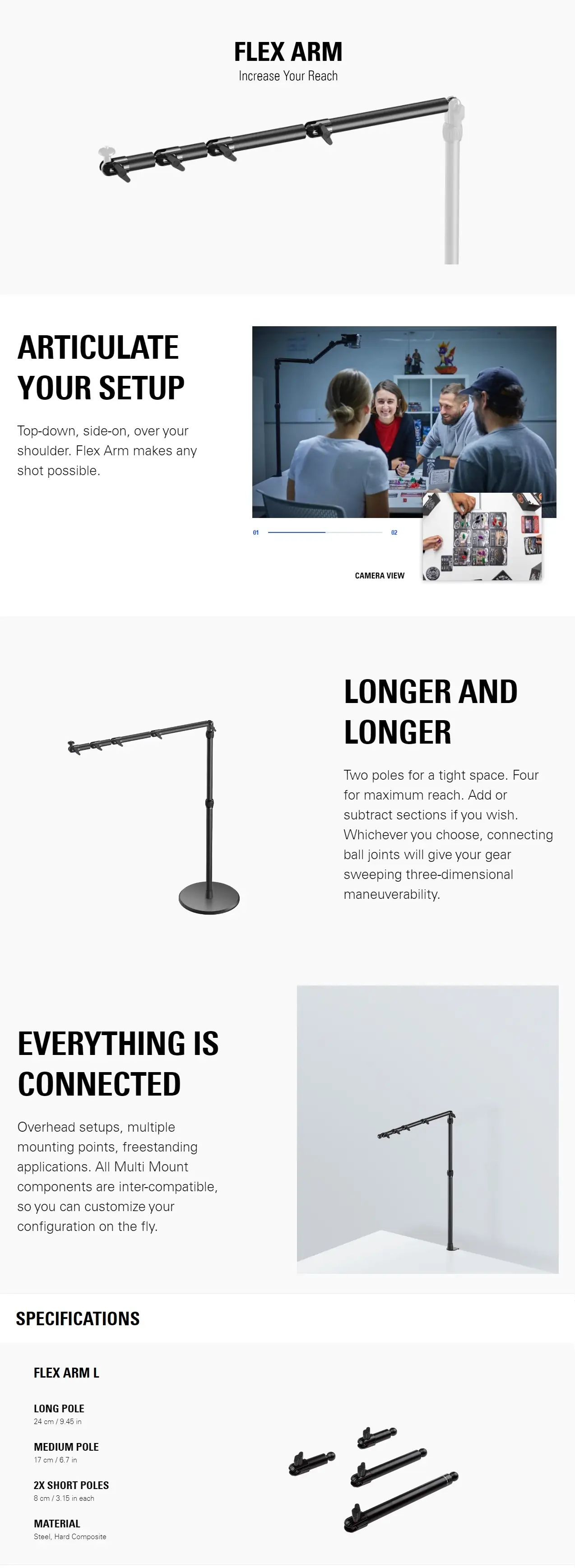
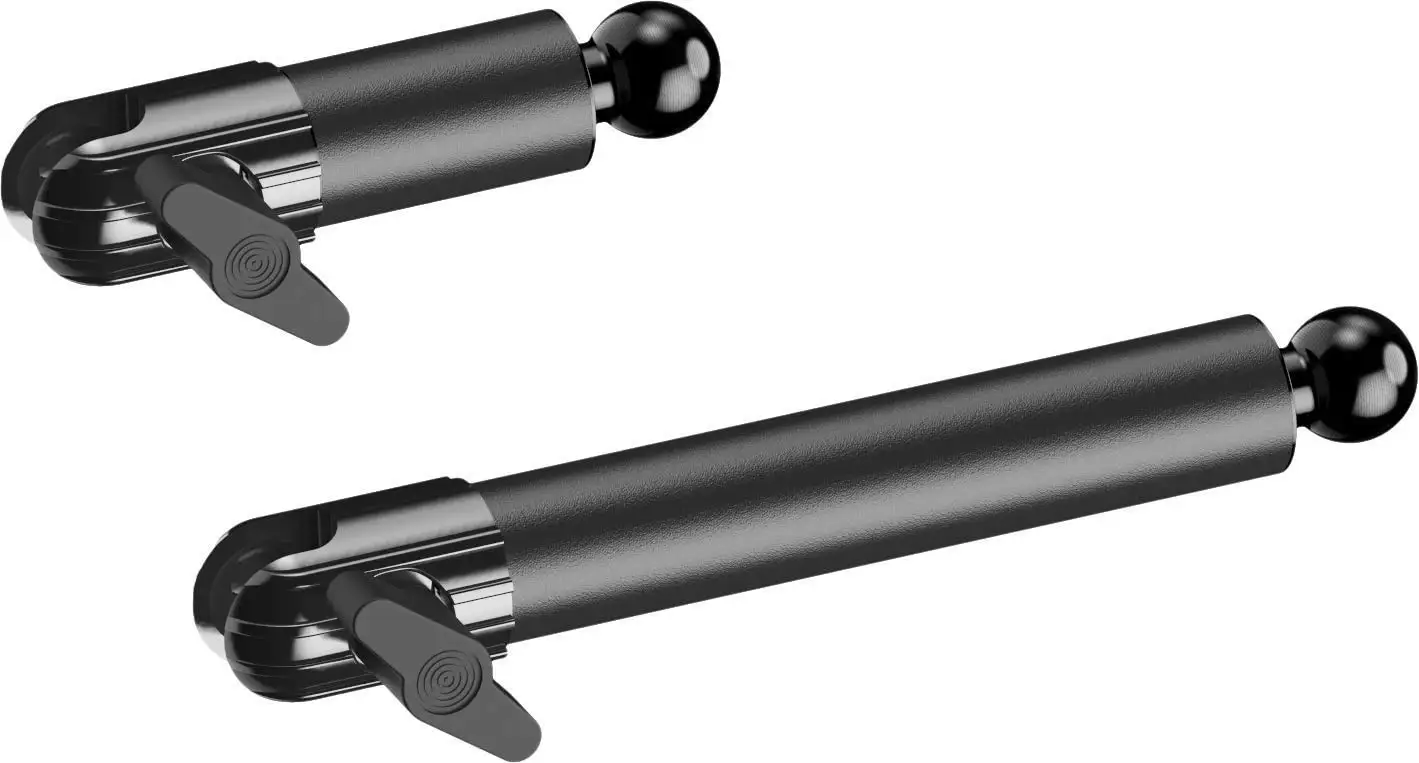
Elgato markets the Flex Arm L as providing “extra reach and three-dimensional adjustability” for lights, cameras, and microphones. The arm’s four steel sections—one long, one medium, two short—are supposed to deliver “any shot possible.”
Digging deeper into user reports, this claim mostly holds true in controlled setups. Best Buy reviewer big rob davis shared: “I needed a camera arm to help get me the right overhead angle… the arm gave me plenty of height for the right overhead view.” For vloggers, that three-dimensional maneuverability translates into creative freedom for over-the-shoulder, top-down, or side-on shots.
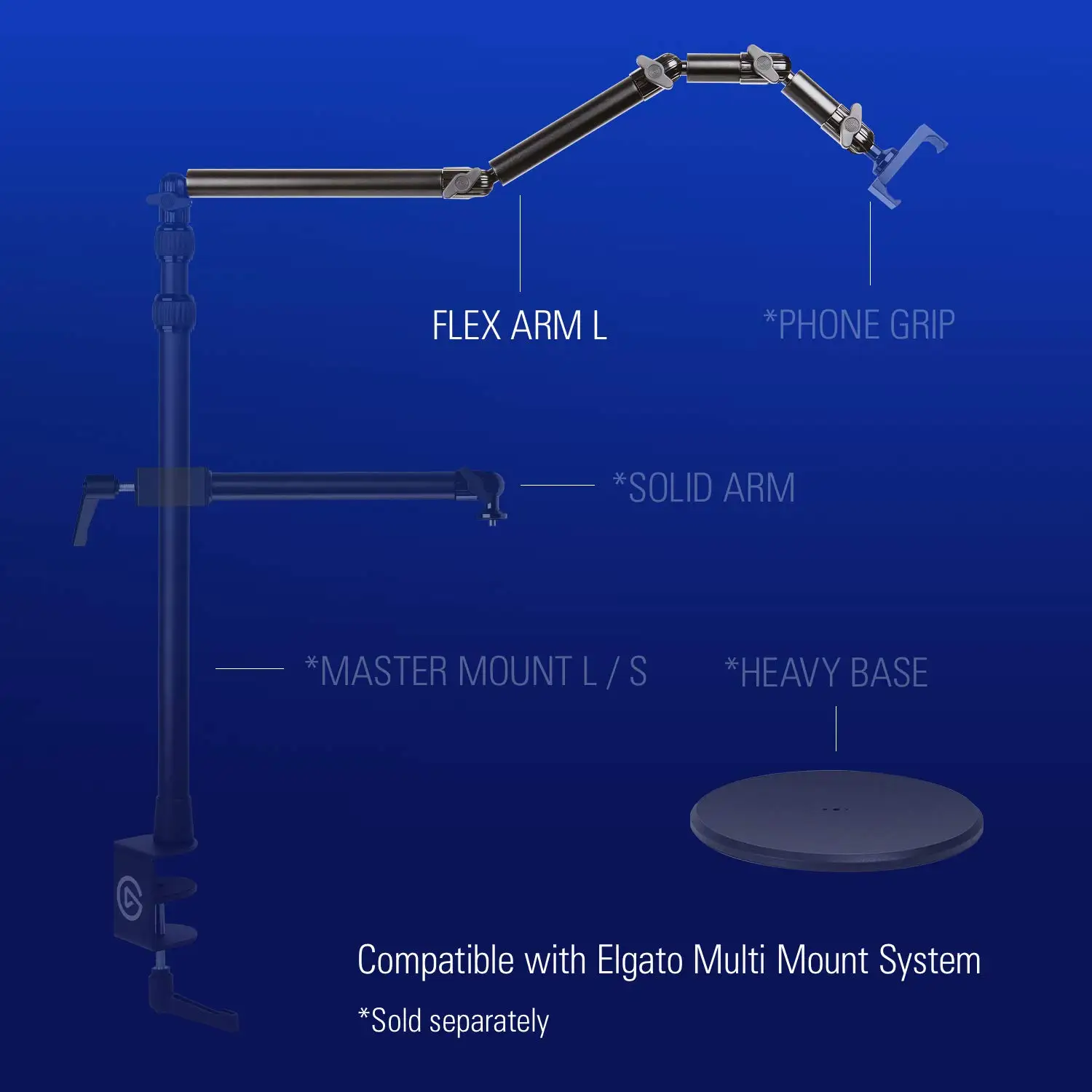
However, multiple users challenge the implicit promise that it’s ready-to-use out of the box. steinway cautioned: “Super misleading primary picture! This doesn’t come with the main unit that connects to your desk. It is only an extension.” This gap between marketing imagery and product reality catches first-time buyers off guard—particularly those unaware of Elgato’s separate Master Mount requirement.
A third claim emphasizes durability—“steel and hard composite” with a “premium black powder coating.” Here user sentiment diverges: while red sonya praised that it’s “stable, sturdy and strong,” rockx4 raised concerns about clasp longevity: “I’m not completely sure how long the clasps will last. I have to really tighten it… it hurt my finger.” The hardware is robust, but the connection points are a stress zone over time, especially under heavier gear.
Cross-Platform Consensus
Universally Praised
Across Reddit, Best Buy, and Amazon, one consistent theme is sturdiness under load—when paired with the right base mount. luis fps confidently reported: “It held up my Sony A7III with no issues, great product.” Streamers setting up overhead shots for tutorials or unboxings find the arm’s ball joints offer finely tuned positioning. red sonya described being able to “aim it directly facing downwards, getting a full view” for tabletop content.
For content creators already invested in Elgato’s ecosystem, the compatibility is a major plus. Reviewers celebrate how easily the Flex Arm integrates with ring lights, microphones like the Elgato Wave 3, and solid arm mounts. tech junkie noted: “I was able to move [my ring light] exactly where I wanted it without moving the mount… great quality and super easy to add if you have any existing Master Mount arms.”
That ability to add or subtract sections depending on workspace needs is treasured by multi-purpose studios. Whether two short poles in cramped conditions or a full four-section arm for maximum reach, users appreciate not being locked into a single size.
Common Complaints
Where disappointment sets in is largely tied to product presentation and modularity. Many buyers expected a complete mounting solution. king pickles vented: “It doesn’t come with the attachment to the desk. Only the top four bars.” This is compounded by retail product photos that show full setups, leading some to believe the clamp or base is included.
For heavier gear—specifically certain microphones—the tightening process can be physically taxing. rockx4 found the combined weight of sections and a Wave 3 mic “too heavy,” forcing removal of one segment for stability. Tightening the joints under load was described as finger-bruising by more than one reviewer.
Another minor complaint emerged around section proportions. tony wished “it came with 2 long attachments and 2 short attachments” instead of the medium size, which he found “a bit awkward” for his layout.
Divisive Features
The proprietary nature of Elgato’s Multi Mount system splits opinion. On one hand, it ensures seamless compatibility with the brand’s accessories. On the other, danman criticized that “these Elgato parts are all proprietary… needs to be clear and all sold at the same time.”
Some users find the modularity empowering, while others see it as a forced upsell. Buyers without existing Elgato gear may resent needing the Master Mount L before the Flex Arm L is usable—turning a $39.99 accessory into part of a chain of purchases.
Trust & Reliability
Looking at long-term use, durability seems largely intact for most. Reddit and Best Buy posts from owners after months of use still praise stability, provided clamps are properly tightened. The steel construction does not appear prone to bending or warping in normal conditions.
However, trust issues mainly stem from sales transparency—misleading product images and unclear requirement for the Master Mount. The Corsair/Elgato brand reps have responded to some complaints, clarifying that the Flex Arm L “is designed to be used in conjunction with the Master Mount L,” but this often comes after frustration rather than preemptively via clear listings.
The mechanical joints and clasps are a potential weak point over years of use, especially in commercial or daily streaming setups. While no systemic failure is reported within our data set, occasional notes like rockx4’s clasp worry highlight the need for careful handling with heavier devices.
Alternatives
Within available feedback, no direct competitor is explicitly named or compared. Users do reference other Elgato Multi Mount accessories—such as the Solid Arm or weighted base—as complements or substitutes depending on application. For those needing standalone stability without desk clamping, the weighted base provides a freestanding option. The smartphone holder is another accessory frequently paired in multi-device setups.
Those seeking a one-box solution with arm and clamp included may consider third-party mounting arms, though they may sacrifice the precise modular integration that Flex Arm L offers within Elgato’s lineup.
Price & Value
Community consensus pegs the Flex Arm L’s retail price at around $39.99 USD, with regional listings up to 49.99€ or AU$226 in certain markets. Resale value is not well documented, but given Elgato’s reputation for quality and streaming focus, used units in good condition can still attract interest—especially from buyers already owning a Master Mount.
Buying tips from experienced users stress knowing exactly what’s included. Check whether you already have a Master Mount or plan to budget for one; missing this detail turns an affordable accessory into a far larger investment. Streamers in particular see strong ROI in the arm’s adaptability, but only if it slots into an existing Elgato mounting setup.
FAQ
Q: Does the Flex Arm L come with a base or clamp?
A: No. Multiple reviewers stress it’s “only the extension” and requires a Master Mount L or compatible arm to attach to your desk or base.
Q: Can it hold a heavy DSLR or mirrorless camera?
A: Yes, within reasonable weight limits. Users like luis fps report success with a Sony A7III, and coel runnings with a Canon DSLR—provided joints are well tightened.
Q: Is setup difficult?
A: Most find assembly straightforward. prmvr described it as “easy and straightforward,” though tightening can be strenuous with heavier loads.
Q: Can sections be swapped or adjusted?
A: Yes. The four poles can be rearranged or removed to match space constraints, offering flexibility for varied shooting angles.
Q: Is it compatible with third-party mounts?
A: It’s designed for Elgato’s Multi Mount system, and while possible to adapt to other setups, proprietary fittings limit seamless third-party use.
Final Verdict: Buy if you’re a streamer, content creator, or studio professional already using Elgato’s Master Mount system, and need precise, sturdy positioning for cameras, lights, or microphones. Avoid if you expect a standalone solution—this is an accessory, not a full mount. Pro tip from the community: Tighten each joint carefully under load to protect clasps, and plan your section lengths for balance before setup.





