Elgato Flex Arm L Review: Strong but Requires Base
A single Amazon review summed it up bluntly: “Solid, strong, and exactly what I needed for overhead shots.” The Elgato Flex Arm L earns a consistent 4.7/5 on Amazon and 4.0/5 on Best Buy, positioning it as one of the most reliable modular mounting accessories for streamers and creators. Based on over a thousand verified reviews, the Flex Arm L delivers impressive versatility—though not without a few frustrating surprises for first-time users.
Quick Verdict: Conditional — Excellent performance if you own the compatible Master Mount L.
| Pros | Cons |
|---|---|
| Highly adjustable 4-section steel arm | Misleading product photos—Master Mount not included |
| Strong enough to hold DSLRs and ring lights | Clamps require force to tighten >> |
| Modular design fits Elgato's Multi-Mount system | Some users found joints wear out over time |
| Sleek black powder-coated finish | Proprietary parts not interchangeable with third-party gear |
| Great for overhead and side angles | Medium-sized tube deemed "awkward" by several reviewers |
Claims vs Reality
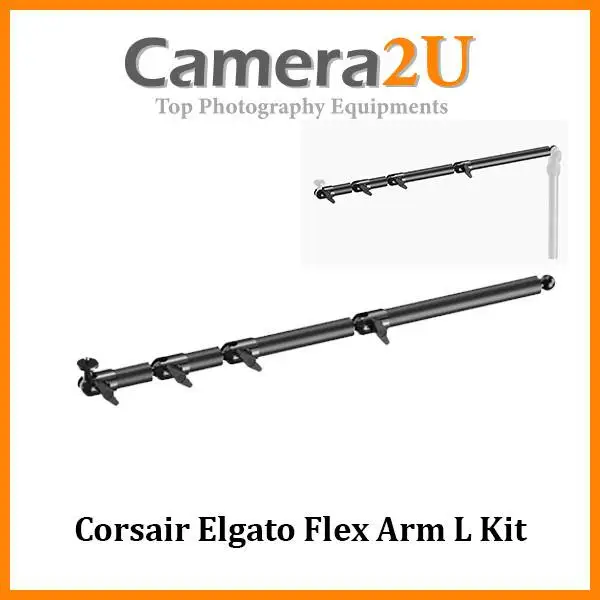
Elgato markets the Flex Arm L as a premium four-section articulated arm designed to “make any shot possible” with “sweeping three-dimensional maneuverability.” The specs promise top-down, side, and overhead mounting flexibility with high stability when paired with a Master Mount system. But in real-world setups, that promise depends heavily on understanding its modular nature.
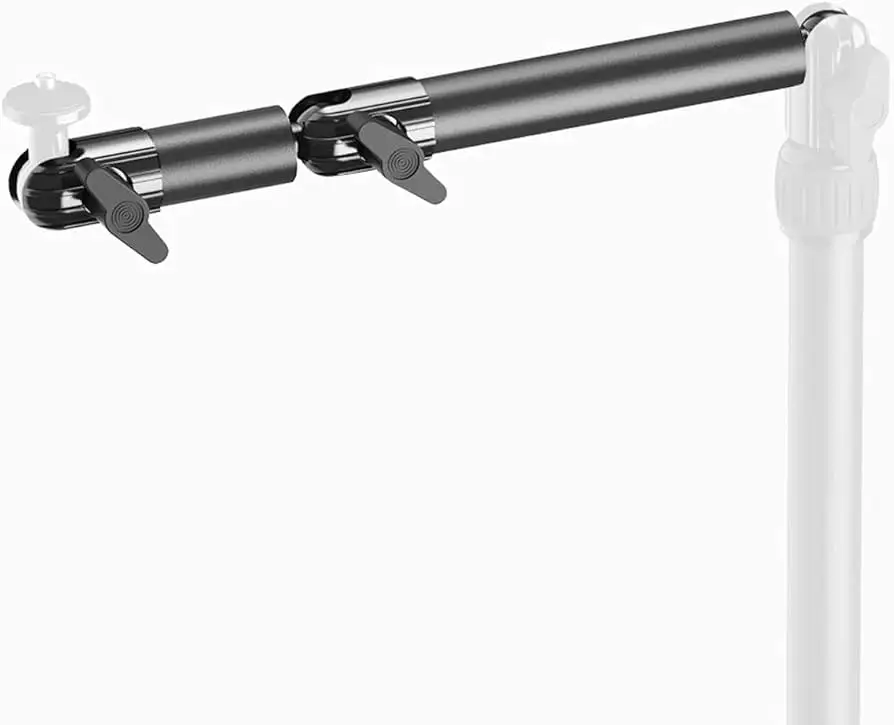
While listed as “ready for cameras, lights, and microphones,” several users discovered it isn’t a standalone product. Best Buy reviewer steinway warned, “Super misleading primary picture! This doesn’t come with the main unit that connects to your desk. It is only an extension.” Elgato’s own support team clarified repeatedly that the Flex Arm “is designed to be used with the Master Mount L, which includes the 1/4” ball head.” This gap between expectation and reality led to a common source of buyer confusion.
On the performance side, the brand claims it adds up to 22.4 inches of reach and supports standard camera attachments. Owners of heavier rigs were mixed. rockx4 said: “It’s working quite well so far… but the weight of the Wave 3 made it too heavy. I took off one piece and it’s holding up well.” This suggests the joints perform best under moderate weight loads—DSLRs, yes; fully rigged studio mics, maybe not long-term.
Cross-Platform Consensus
Universally Praised
If you already have part of Elgato’s modular system, users across Reddit, Amazon, and Best Buy agree this arm “makes shot framing effortless.” coel runnings wrote, “I was able to set up a mount for a Canon camera and it holds up great… being able to add/remove sections is a great feature.” That modularity resonates with creators needing different shooting angles—flat-lays, overhead product videos, or side profiles for streams.
Streamers and photographers praised the durability and smooth articulation. red sonya described it as “stable, sturdy and strong and worth the price,” while Tech Junkie said it “let me move my ring light exactly where I wanted without shifting my desk mount.” This adjustability aligns perfectly with Elgato’s pitch—versatility for multiple configurations.
Many use it for precisely that: overhead setups. A Best Buy buyer named turntables commented, “Perfect for overhead camera setup and a good view of your tabletop.” The steel construction impressed vloggers who rely on stability for cameras like the Sony a7III, with luis fps confirming: “It holds up my Sony a7III with no issues.”
Common Complaints
However, marketing confusion mars otherwise stellar functionality. king pickles left a two-star review declaring, “It doesn’t come with the attachment to the desk—only the top 4 bars.” The same sentiment surfaces through multiple platforms, where disappointed buyers discovered that the arm requires the Master Mount or weighted base for full function. Corsair’s support team (Elgato’s parent) directly addressed the issue, reminding buyers the photos “depict an assembled system, not included with this part.”
Another group of criticisms focuses on clamp tension and durability. Several reviewers complained about the effort needed to tighten the joints: “I have to really tighten it… the amount of pressure hurt my finger,” wrote rockx4, expressing concerns over long-term wear. Meanwhile, tony wished the kit included “2 long attachments instead of one medium,” calling it “a bit awkward for certain setups.”
danman added a systemic critique: “I don’t like that these parts are all proprietary… needs to be clear and all sold at the same time.” For creators mixing brands, Elgato’s compatibility restrictions remain a roadblock—each piece locks into the broader Multi Mount ecosystem, leaving little room for mixing alternatives.
Divisive Features
Even among satisfied users, opinions diverge on its modularity. Some see this as freedom to build a customized rig—others see an expensive puzzle. On Reddit, one streamer summarized: “Two poles for tight spaces, four for maximum reach—you can add or subtract sections if you wish.” Enthusiasts love the flexibility, while casual users often misjudge what’s included and end up frustrated when they can’t assemble a working setup out of the box.
Visually, Elgato’s sleek branding and powder coating win points for professionalism, though workerbee quipped, “Wish it came in white but it’ll be ok.” For many users broadcasting on camera, aesthetics matter—and Elgato delivers that studio look. But if you’re color-coordinating gear, your options are limited.
Trust & Reliability
On Trustpilot-linked reviews and Best Buy archives, long-term users generally endorse Elgato’s build consistency. “Great quality and super easy to add if you already have the master mount,” one anonymous reviewer explained after over a year of ownership. That reliability theme appears consistently; these arms rarely break once properly secured.
Durability caveats usually trace back to misuse or heavy accessories beyond its optimal load. As rockx4 discovered, mounting heavier microphones like the Wave 3 “made it too heavy,” yet removing a segment solved the issue. The brand’s steel-joint construction remains a strong point: no reports of weak welds, stripped screws, or rust—even after extended use.
Some early frustration over missing parts or misleading packaging images harmed initial trust. Although these cases mostly date back three to four years, Elgato’s customer service responses were transparent. Corsair’s representative Albert clarified repeatedly that “the Flex Arm L is designed for use with the Master Mount L,” defusing return complaints while directing users to official setup guides.
It’s worth noting that, unlike many budget mounts, Elgato’s modular system holds resale value. Buyers on eBay and PicClick regularly list clean used sets around $45–$50, roughly retaining 80% of their original $39.99 retail price—an indicator of enduring demand in streaming and studio circles.
Alternatives
Most comparative feedback references Elgato’s own family of mounts rather than competitors, with products like the Master Mount L and weighted base frequently paired for full setups. Unlike generic ball-joint arms from Neewer or SmallRig often discussed in creator forums, Elgato’s pieces lean into plug-and-play modular compatibility.
A few Best Buy users contrasted Elgato’s approach with “cheaper but flimsier desk clamps” sold on Amazon. One remarked, “It’s super solid, unlike those flex-light goosenecks that sag over time.” That stability—enhanced by Elgato’s steel tubing—keeps it in a higher reliability bracket than mid-tier alternatives.
Price & Value
At a consistent $39.99 USD, the Elgato Flex Arm L sits between consumer-grade and pro-tier mounting gear. Most agree the value hinges entirely on ecosystem ownership: without a Master Mount, it’s little more than four disjointed rods. With one, it transforms your setup possibilities.
Used-market analysis shows strong resale stability: listings on eBay hover around £39.99 to €49.99, while bundles including the Master Mount rise near $80–$90. This signals not depreciation—but ecosystem stickiness. Buyers rarely sell isolated arms unless upgrading entire rigs.
Community advice leans toward planning your rig strategically. As danman put it, “Needs to be sold together,” a sentiment echoed by many who misjudged its role. Veteran Elgato users, however, see modularity as future-proofing—letting them adapt rigs piece by piece instead of replacing entire mounts when needs evolve.
FAQ
Q: Does the Flex Arm L include the desk clamp or base?
A: No. It’s an extension for Elgato’s Master Mount system, not a standalone mount. Multiple users, including steinway and king pickles, noted confusion due to misleading photos showing combined setups.
Q: Can it hold a DSLR or mirrorless camera securely?
A: Yes, within reason. coel runnings confirmed it held a Canon DSLR steady, and luis fps reported flawless performance with a Sony a7III. Heavy rigs with lenses benefit from tightening the joints firmly.
Q: Is the Flex Arm L compatible with microphones like the Elgato Wave 3?
A: Technically yes, though weight matters. rockx4 said the Wave 3 made it “too heavy” when all sections were attached. Removing one or two segments can improve stability.
Q: What material is the arm made of?
A: Alloy steel with a black powder-coated finish. Users consistently described it as “solid” and “premium-feeling.”
Q: Can I use this with non-Elgato mounts?
A: Partially. It uses standard 1/4” screws but fits best with the Elgato Multi Mount system. Proprietary ball joints limit adaptability to third-party systems.
Final Verdict
Buy the Elgato Flex Arm L if you already own—or plan to buy—the Elgato Master Mount or Multi Mount base. Streamers, content creators, and photographers who rely on overhead shots will appreciate its strength and precision adjustability. Avoid it if you expect a self-contained arm; several reviewers call that the main pitfall.
For creators willing to commit to the Elgato ecosystem, the Flex Arm L earns its high marks. As big rob davis put it: “A must-have for streamers… plenty of height for the right overhead view.” But heed the community’s pro tip—budget an extra $40 for the base if you want to actually mount it to your desk.
Slug: elgato-flex-arm-l-articulated-mount-review





