DYMO LabelWriter 450 Review: Conditional Buy (7.9/10)
A Reddit flipper paid $8 for this printer and still wondered if it was “worth it nowadays” — that single line captures the DYMO LabelWriter 450 Direct Thermal Label Printer story better than any spec sheet: it’s beloved when it fits your workflow, and maddening when it doesn’t. Verdict: conditional buy. Score: 7.9/10 (based on aggregated review analysis citing 997 reviews).
Quick Verdict
For address labels, file folders, barcodes, and small-format product labels, DYMO LabelWriter 450 Direct Thermal Label Printer can feel like a cheat code. For 4x6 shipping labels (or anyone fighting software/driver issues), the love fades fast.
| Verdict | Who it fits | Why users say that |
|---|---|---|
| Conditional “Yes” | eBay shippers using smaller labels | Reddit user green_olive_tree said: “i mainly sell on ebay, and i love that it saves a lot of time compared to taping labels.” |
| Yes | Small business organizers | A verified reviewer in the ReviewIndex dataset noted: “very helpful in printing labels for my small business ...” |
| No | Anyone needing 4x6 labels | Reddit user green_olive_tree said: “it doesn’t take 4x6 labels.” |
| No | People stuck on software/compatibility | A verified reviewer in the ReviewIndex dataset said: “the new dymo connect software… is impossible to use- very cumbersome and confusing.” |
| Mixed | Reliability-focused buyers | A verified reviewer in the ReviewIndex dataset said: “i have printed thousands of labels with this printer and it’s great,” but another wrote: “i bought this printer less than a year ago and it just stopped working…” |
Claims vs Reality
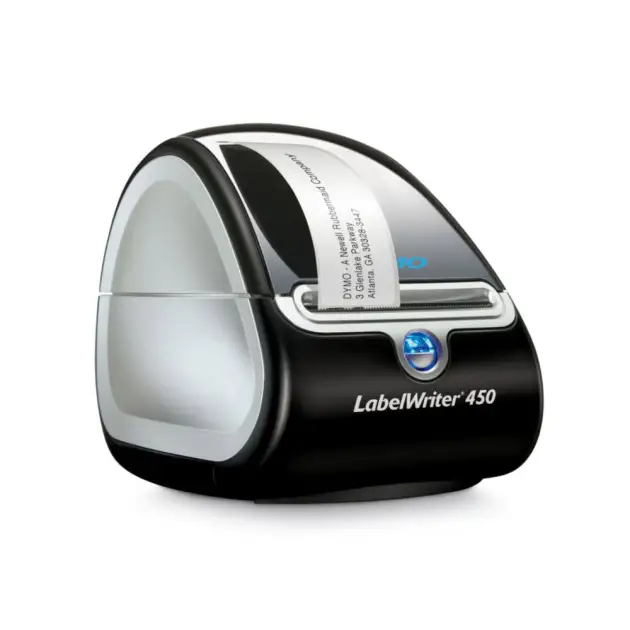
DYMO’s official messaging frames the DYMO LabelWriter 450 Direct Thermal Label Printer as “the most efficient solution” for “professional labeling, filing, and mailing needs,” emphasizing direct thermal printing so you “never buy ink again,” plus speed claims of “up to 51 labels per minute” (DYMO product page; DYMO Shop listing echoes similar specs). Digging deeper into user reports, the “no ink/toner” promise lands exactly as intended for people who hate managing consumables—until the conversation turns to label costs and proprietary ecosystems.
On Reddit, the long-term value argument comes through in plain language. Reddit user madmarkd said: “thermal printers are definitely the way to go… you don't have to worry about buying toner,” describing it as part of a broader goal to “simplify my tools.” That’s the real-world translation of DYMO’s “never buy ink again” pitch: fewer supplies to track, less friction, and faster turnaround when you’re shipping daily.
But “mailing” can mean radically different things. While marketing implies broad shipping usefulness, multiple community comments draw a hard line around label size and platform compatibility. Reddit user green_olive_tree said: “the 450 works for ebay and paypal labels… it doesn’t take 4x6 labels.” Another Reddit commenter (username not available in the provided excerpt) stated even more bluntly: “the 450 is a great label printer, but the downside is you can not use it for fedex or amazon labels.” While DYMO positions it for “mailing and shipping,” the data suggests that statement is true mainly for workflows that don’t require 4x6 carrier labels.
Speed is another claim that looks clean on paper and messy in practice. Official materials commonly cite 51 labels per minute, and Amazon listing copy even references “71 labels per minute” in a description block. In user feedback, “fast” shows up frequently, but it’s rarely framed as a lab-measured number; it’s framed as time saved during real shipping runs. A verified reviewer in the ReviewIndex dataset wrote: “makes shipping on ebay so much easier than printing on paper!”—a reminder that perceived speed is often about eliminating steps, not raw ppm.
Cross-Platform Consensus
Universally Praised
A recurring pattern emerged across sources: when the DYMO LabelWriter 450 Direct Thermal Label Printer is used for what it’s structurally designed to do—compact, USB-connected, small-format thermal labels—people describe it as a workhorse. On Reddit, the eBay seller persona is the clearest beneficiary. Reddit user green_olive_tree said: “i love that it saves a lot of time compared to taping labels. it also prints much faster than my inkjet.” For part-time and mid-volume resellers, that “less taping, more shipping” payoff is the difference between a smooth nightly routine and a pile of half-finished packages.
Small-business labeling also surfaces as a consistent win. A verified reviewer in the ReviewIndex dataset noted: “very helpful in printing labels for my small business ...” and another said: “this printer easily handles all of my label needs for my amazon fba business … this is the perfect label printer for my business.” In this use case, the implication is less about shipping labels and more about product IDs, barcodes, and inventory organization—areas where smaller labels are standard and a thermal printer shines.
Ease of setup and day-to-day use is another bright spot, at least for users whose systems cooperate. A verified reviewer in the ReviewIndex dataset wrote: “super easy to install as well,” and another added: “really easy to set up - download the latest 'dymo connect' software… then you are ready to print.” This is the “it just works” story—plug it in, install software, start labeling—exactly the frictionless narrative DYMO sells.
Even beyond business, the household organizer persona shows up: a verified reviewer in the ReviewIndex dataset said: “purchased this label maker to label things around the house,” framing it as a practical tool for bins, storage, and home office order. That aligns with the compact footprint praised in older review content and echoed in user snippets like “fast and quiet” and “small but perfect!”
After those narratives, the praised themes compress cleanly:
- Fast output for small labels (Reddit; ReviewIndex)
- Time savings vs inkjet/handwriting (Reddit)
- Easy label creation for barcodes and custom stickers (ReviewIndex: “you can even create your own barcodes.”)
- Compact, desk-friendly form factor (ReviewIndex)
Common Complaints
Digging deeper into user reports, the biggest frustrations aren’t about print quality—they’re about the ecosystem around the printer: software, drivers, and compatibility. A verified reviewer in the ReviewIndex dataset complained: “no software for this issue has been pushed since windows 7!” Another said: “the new dymo connect software… is impossible to use- very cumbersome and confusing.” For offices with managed IT environments, or anyone upgrading computers over time, those comments read like warnings: the hardware may be fine, but getting it to talk to modern systems can be the real battle.
Reliability is also sharply contested in the review analysis data. One user story is glowing—A verified reviewer in the ReviewIndex dataset said: “i have printed thousands of labels with this printer and it's great.” Another is the opposite: “i bought this printer less than a year ago and it just stopped working after a few months.” That split matters most for small businesses that need predictable throughput. When a label printer becomes a “paperweight,” it’s not just an inconvenience—it can stall shipping deadlines.
Jams and mechanical quirks appear often enough to form a pattern, even when users say they’re solvable. A verified reviewer in the ReviewIndex dataset noted: “gets jammed once in a while but easy fix !” while another criticized the design: “no option to open the paper path, as on most printers.” For high-volume label runs, “easy fix” still means downtime and reprints.
Finally, there’s the size limitation—an especially painful complaint for ecommerce sellers who assume “shipping label printer” means 4x6. Reddit user green_olive_tree said: “it doesn’t take 4x6 labels,” and another Reddit commenter (username not available) echoed the platform limitation: “you can not use it for fedex or amazon labels.” The common thread: the printer can be excellent, but only inside a narrower lane than many buyers expect.
After those narratives, the frequent pain points summarize as:
- Software/driver compatibility headaches (ReviewIndex)
- Reliability variance: “thousands of labels” vs “stopped working” (ReviewIndex)
- Occasional jams and limited access to clear paths (ReviewIndex)
- Not suitable for 4x6 shipping workflows (Reddit)
Divisive Features
The label-cost conversation splits users into two camps: people who treat consumables as a predictable operating cost, and people who feel locked into an expensive supply stream. Reddit user danielle derek gave the harshest take: “sell it , labels are too expensive.” In contrast, Reddit user the badguy below offered a workaround: “for buying labels, check out houselabels on ebay… good quality labels, and a great value,” and a RedditFavorites excerpt similarly mentions “houselabels labels… much more affordable.” For budget-focused users, the “worth it” question often becomes “can I get good third-party rolls reliably?”
USB-only connectivity is another divider. The DYMO Shop Q&A explicitly states: “does the printer have wifi? a) no. it is usb only.” For solo users at one workstation, that’s fine; for shared offices, it’s a limitation that pushes people toward print servers or different models. The DYMO Shop itself suggests network sharing via Windows sharing or a separate print server—extra complexity that some teams won’t want.
Trust & Reliability
Trust signals in this dataset are complicated by the sources themselves. The Trustpilot entry provided is a repost of a DYMO Shop-style editorial review (“labelwriter 450 is the most popular… setting up… straightforward”), not a typical stream of individual, time-stamped consumer reviews. That means scam-pattern detection (fake shipping, bait-and-switch, etc.) isn’t strongly supported here; what does emerge instead are operational trust issues: “missing items,” “used product,” and return frustrations in the aggregated review snippets.
A recurring reliability narrative is the time-bomb scenario: a buyer waits too long to open or install, then discovers it doesn’t work after the return window. A verified reviewer in the ReviewIndex dataset said: “i made the mistake of buying this a month before i need it… it didn't work and now im stuck with it because the return time is over.” That’s less about fraud and more about risk management—especially relevant if you’re buying discontinued hardware through marketplaces.
From Reddit, durability stories appear indirectly through long-term use and upgrade paths. Reddit user green_olive_tree described using one “for ebay” and implied it remained valuable until the need for 4x6 forced an upgrade: “i would probably upgrade… like a rollo.” Another Reddit commenter (username not available) described using the 450 for “a couple of years” before upgrading to the “dymo 4xl.” These are “it served me well, until my needs changed” stories—often the most credible form of reliability feedback.
Alternatives
Only competitors mentioned in the provided data are included here: DYMO 4XL, DYMO 550, Rollo, and Zebra (LP 2844 / Eltron 2442 / 2824).
For sellers centered on 4x6 shipping labels, the DYMO 4XL is the most direct “stay in the DYMO family” upgrade. One Reddit commenter (username not available) said: “upgraded to the dymo 4xl that takes the 4x6 labels,” framing it as the solution to the 450’s biggest limitation. If your workflow is FedEx/UPS/Amazon-style labels, that single capability shift can be decisive.
Rollo appears as the generic “4x6 compatible thermal printer” upgrade path. Reddit user green_olive_tree said: “if i were selling more… i would probably upgrade to a 4x6 compatible thermal printer like a rollo.” The implication is straightforward: platform breadth and label size flexibility over DYMO’s smaller-label specialization.
The DYMO 550 is positioned by at least one source as the replacement model, but user-facing discussions often revolve around label restrictions. The LabelValue article highlights that the 550 series uses RFID chips and “only works with dymo-branded labels,” while “the 450 series remains compatible with third-party labels.” That’s not a consumer quote, but it’s presented as a key decision factor and matches the broader user anxiety around consumable costs.
Zebra models (LP 2844, Eltron 2442, 2824) come up in Reddit advice framed around free/cheap label supply streams. Reddit user danielle derek said: “eltron (ups) 2442… ups will give you boxes or rolls of labels for free,” positioning Zebra/Eltron as the “optimize shipping ops” route rather than DYMO’s office-labeling niche.
Price & Value
Pricing is volatile because the DYMO LabelWriter 450 Direct Thermal Label Printer is widely described as discontinued in multiple listings, while still being sold through marketplaces. The Amazon listing in the provided data shows a high price point (“$239.94” plus additional shipping/import costs) alongside “only 12 left in stock,” which reads like scarcity pricing. Meanwhile, eBay market snapshots show used units commonly around the $118–$200 range depending on model and condition, with new listings much higher.
The best value stories come from bargain finds and secondhand deals. In the Reddit thread, the original poster bought one “for $8,” and Reddit user green_olive_tree said they paid “$40 or so” for a used/open-box 450 Turbo. Those prices create a very different cost-benefit equation: at $8–$40, many users argue it’s almost impossible to regret as long as it works for your label sizes.
Buying tips from the community concentrate on label sourcing. Reddit user the badguy below recommended “houselabels on ebay,” and RedditFavorites excerpts similarly mention third-party labels as “much more affordable.” On the flip side, the “labels are too expensive” warning from Reddit user danielle derek suggests that for some buyers, consumables determine whether the printer is a win or a trap.
FAQ
Q: Does the DYMO LabelWriter 450 print 4x6 shipping labels?
A: No. Reddit user green_olive_tree said: “it doesn’t take 4x6 labels,” and another Reddit commenter (username not available) wrote: “the 450 does not use the 4x6 labels.” For 4x6 needs, they mentioned upgrading to a DYMO 4XL instead.
Q: Is it worth it for eBay shipping labels?
A: Conditionally yes. Reddit user green_olive_tree said: “the 450 works for ebay and paypal labels,” adding: “it saves a lot of time compared to taping labels.” If your platform exports labels that fit the 450’s narrow formats, it can streamline daily shipping.
Q: How painful is setup and software?
A: It varies. Some users find it simple—one verified reviewer noted: “super easy to install as well.” Others report serious software friction, like: “the new dymo connect software… is impossible to use- very cumbersome and confusing,” and “no software… pushed since windows 7!” (ReviewIndex dataset).
Q: Are third-party labels a common strategy?
A: Yes. Reddit user the badguy below advised: “check out houselabels on ebay… good quality labels, and a great value.” Another RedditFavorites excerpt similarly says: “as for labels, i use houselabels labels… much more affordable,” often framed as the key to keeping running costs down.
Q: Does it have Wi‑Fi?
A: No. The DYMO Shop Q&A states: “does the printer have wifi? a) no. it is usb only.” They suggest sharing via Windows printer sharing or using a separate print server if multiple users need access.
Final Verdict
Buy the DYMO LabelWriter 450 Direct Thermal Label Printer if you’re an eBay reseller, office admin, or small business that needs fast address labels, file folder labels, and barcodes—and you’re okay living in the narrow-label world. Avoid it if your workflow depends on 4x6 carrier labels for Amazon/FedEx/UPS; Reddit user green_olive_tree put it simply: “it doesn’t take 4x6 labels.”
Pro tip from the community: Reddit user the badguy below said: “for buying labels, check out houselabels on ebay,” a workaround repeatedly framed as the way to keep the printer’s low-ink promise from turning into high-label frustration.





