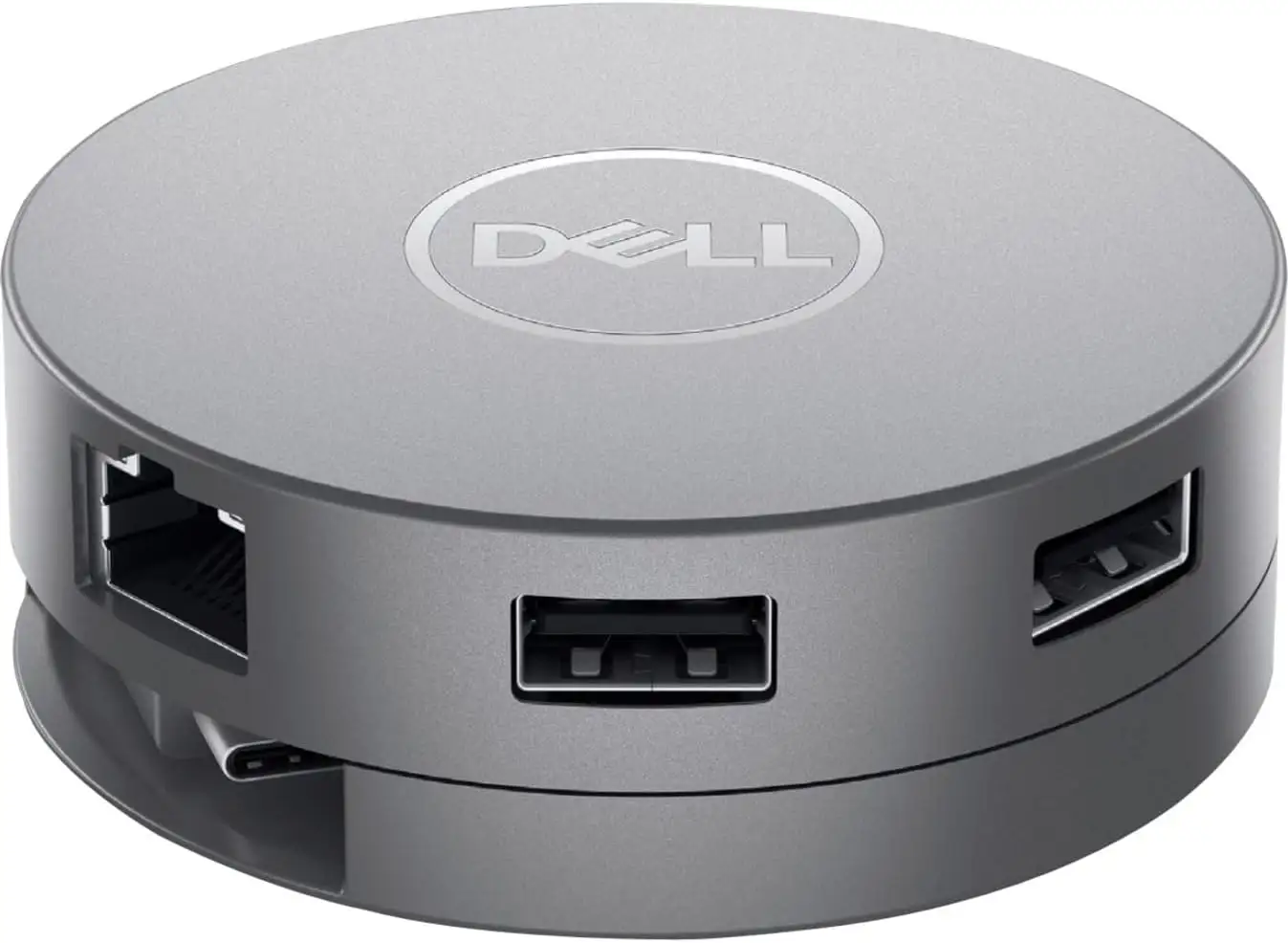
Dell USB-C Multiport Adapter Review: Strong Travel Pick
A Reddit user macuser summed it up best: “This compact adapter can handle just about any connection scenario.” The Dell USB-C Multiport Adapter (7‑in‑1) earns a solid 8.8/10 from users for its portability, port variety and clever retractable cable design—though short cord length and occasional compatibility quirks keep it from perfection.
Quick Verdict: Conditional Buy
| Pros | Cons |
|---|---|
| Extremely compact, “about the size of a Hostess ding dong” | |
| Cord is very short, limiting placement | |
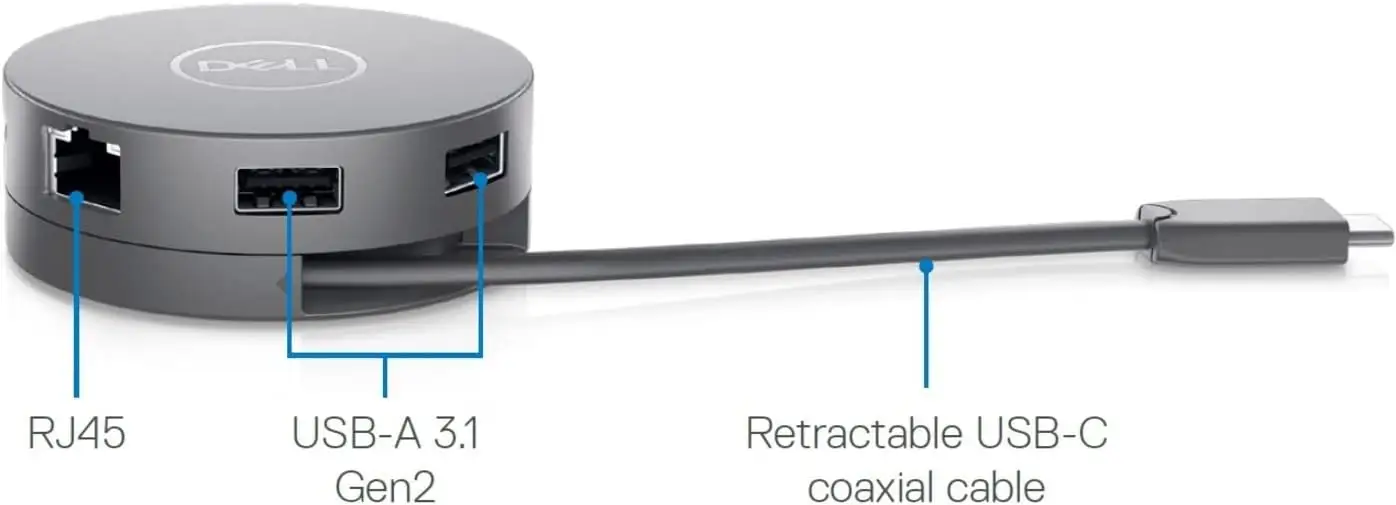
| Clever retractable cable mechanism | |
| Only supports one video output at a time | |
| Up to 90W USB‑C power delivery passthrough | |
| Mixed results with macOS (DisplayPort issues) | |
| Gigabit Ethernet, HDMI, DisplayPort, VGA, USB‑A and USB‑C in one device | |
| Occasional USB device dropouts | |
| Strong build quality and sleek appearance | |
| Expensive compared to generic hubs |
Claims vs Reality
Dell markets the DA310 as the smallest and most compact 7‑in‑1 adapter with the widest variety of ports available. On paper, it delivers HDMI, DisplayPort, VGA, Ethernet, USB‑A, USB‑C, and up to 90W passthrough power. User feedback confirms portability is exceptional. A Best Buy reviewer flyingc noted, “The hub itself is about the size of a hostess ding dong… cable cleverly rolled up or released by twisting the hub,” making it pocket‑ready for travel.
Another claim is crisp 4K resolution at 60Hz. While this holds true for HDMI and DisplayPort, macOS users ran into snags: an Amazon buyer reported, “DisplayPort does not work on my M1 MacBook Pro… everything else was fine, but not the DisplayPort.” That’s a significant caveat for Mac professionals relying on DP output.
Finally, Dell touts Seamless compatibility with major OS including Windows, macOS, Ubuntu, Chrome OS. Most Windows and Chromebook owners agreed it’s “plug and play,” as den cmsgt said, working instantly with his XPS and Chromebook. But a Reddit user mac lemoor cautioned it “does not work across platforms, Apple and Android,” suggesting some cross‑device edge cases.
Cross-Platform Consensus
Universally Praised
Travel‑friendly professionals and service techs alike lauded the portability. Bearded guy explained he buys them “for our service techs as their PCs only have USB‑C ports—compact and plenty of I/O.” For presenters, the multiple video outputs mean one device can replace a bag of dongles. The office1234 shared, “In the past I would take every kind of adapter… now this replaces power supply, USB hub, DP adapter, VGA adapter, HDMI adapter, and Ethernet all in one clever device.”
The retractable cable mechanism is more than a gimmick: it protects the connector in bags and allows for quick tidy storage. Multiple reviewers praised its durability; write turn on red said the “protected cord will age well” after frustration with hubs dying just past warranty.
Power passthrough up to 90W proved transformative for locked‑down work laptops. Flyingc plugged his USB‑C charger into the hub and powered his laptop while driving an external monitor—something older hubs couldn’t juggle efficiently.
Common Complaints
Cord length comes up over and over. Sundee called it “very short,” and cheryl said it “makes it a little bulkier than if all of the connections were on one side.” For desks with awkward port placement, this can be problematic.
Only one video output can be active at a time—though marketed as having HDMI, DP, and VGA, Dell’s own specs clarify this limitation. Flyingc warned, “This won’t work for you if you’re trying to add two external monitors.”
A few users encountered USB instability. Steveshissler reported, “Occasionally I have had to power down my laptop as USB items keep going in and out.” Another Amazon reviewer found their USB/Bluetooth speaker “cuts out and has static,” forcing them to only charge devices while in use.
Mac compatibility issues cropped up particularly for DisplayPort. Krnewb’s DP port wouldn’t work with his M1 Mac mini, aligning with the earlier Amazon complaint.
Divisive Features
The hockey‑puck form factor is “cool” to some (tiki loved its show‑off appeal), but others found connections on all sides less ergonomic. While many like the retractable cable, mac lemoor warned if the connection's longer than 3 inches “this dock will hang awkwardly.”
The premium price is seen as justified by Dell quality for some, but too steep for others accustomed to generic hubs. A verified Amazon buyer advised not wasting money on knockoffs after spending $135 on failures—but others said they wouldn’t pay full price unless using “all ports and need the passthrough power feature.”
Trust & Reliability
Long‑term reports suggest the Dell build quality holds up better than nameless imports. An Amazon reviewer contrasted it with “imported no‑names… didn’t work after a few months,” saying the DA310 worked flawlessly with his Dell 9530. Multiple Best Buy customers noted months of daily use without degradation.
There are occasional concerns over defective ports (especially DisplayPort) but no widespread scam reports—most sellers deliver genuine items with warranty intact. The 3‑year limited warranty offers peace of mind, a sharp contrast with bargain hubs offering 30–90 days.
Alternatives
Several reviewers compared the DA310 with Dell’s older DA300 model, noting the DA310 adds an extra USB‑A port and supports 90W power passthrough. While generic hubs can cost less, they often lack VGA or Ethernet, and build quality is suspect. For users needing legacy VGA for projectors—a common scenario in corporate or educational spaces—the DA310 stands out.
Price & Value
The price varies wildly: Dell’s list is around $100, but Best Buy clearance dropped to $19.99, while eBay listings hover between $39 and $155 depending on condition. Resale value is strong due to Dell branding and port variety.
Community tips include buying during seasonal sales or from legit open‑box sellers to save over MSRP. One Best Buy buyer admitted, “Was ~$74 when I purchased… not sure I would buy at full price unless… need the passthrough power feature.”
FAQ
Q: Can it connect two external monitors at the same time?
A: No. Users and Dell’s specs confirm only one video output can be active—HDMI, DisplayPort, VGA or USB‑C—at a time.
Q: Does it work with MacBooks?
A: Yes, but with caveats. HDMI generally works, but multiple reports note DisplayPort issues with M1 Macs.
Q: How powerful is the passthrough charging?
A: Supports up to 90W, enough for most laptops. Verified buyers used it to run laptops and power peripherals simultaneously.
Q: Is this suitable for travel?
A: Absolutely. Multiple users likened its size to a small snack cake, with retractable cable making it bag‑safe and portable.
Q: Will it work with Android phones?
A: Only if the phone supports USB‑C DisplayPort Alt‑mode. Some cross‑platform attempts failed.
Final Verdict: Buy if you’re a mobile professional, presenter, or tech needing varied ports in a portable form. Avoid if you require dual monitors or flawless DisplayPort on M1 Macs. Pro tip from the community: pair it with a USB‑C extender cable to overcome short cord limitations.