Dell UltraSharp U4924DW Review: Panoramic Productivity Verdict
From marathon work sessions to cinematic gameplay, the Dell UltraSharp U4924DW 49" Curved Monitor polarizes buyers — scoring an investigative 8.2/10 based on cross-platform sentiment. While many hail its expansive canvas and outstanding color fidelity, others warn of ergonomic strain and text clarity shortcomings.
Quick Verdict: Conditional — excellent for productivity-focused professionals and creative tasks, potentially problematic for those sensitive to pixel density or desk space constraints.
| Pros | Cons |
|---|---|
| Vast dual-QHD ultrawide space for multitasking | Text sharpness inferior to smaller 4K displays |
| Rich, accurate colors — 100% sRGB, 98% DCI-P3 | Potential neck strain due to width |
| Solid build quality, sturdy stand | Software and firmware issues noted, esp. on macOS |
| USB-C hub with 90W power delivery | Limited to 60Hz refresh rate |
| Effective built-in KVM and multiple device inputs | Large footprint unsuitable for small desks |
| Integrated speakers save desk clutter | Price premium compared to competitors |
Claims vs Reality
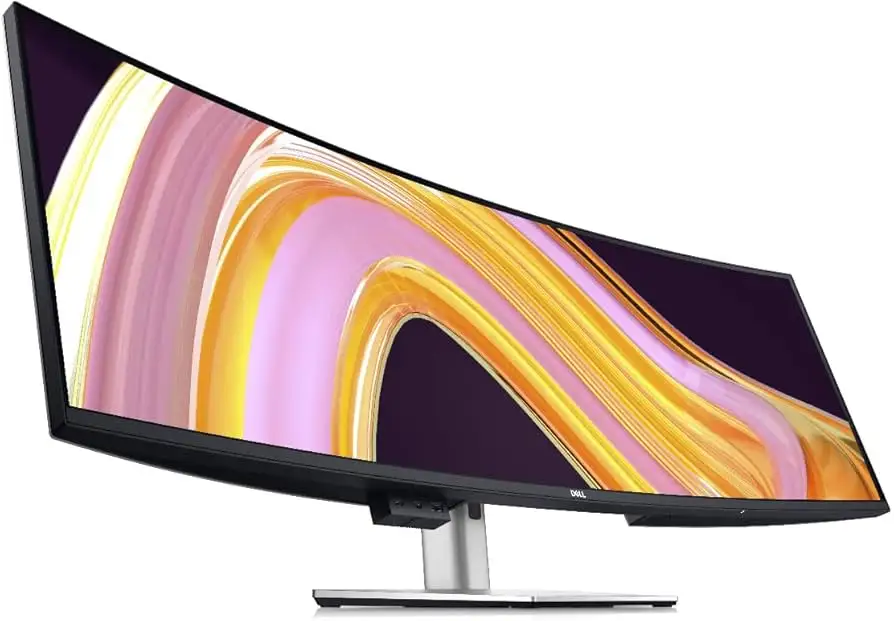
Dell markets the U4924DW as the “world's first 49-inch dual QHD with IPS Black panel technology” for uninterrupted productivity and immersive visuals. On paper, that means deep blacks, vibrant colors, and the workspace of two 27-inch QHD monitors without bezels. Windows Central praised it as "the multitasker's best friend if used correctly," highlighting the potential for managing many windows at once.
Yet Reddit user is_sam2204 countered this directly: “To see the date/time I literally have to turn my neck by 45 degrees... text is so blurry and I don't like it at all.” The 1440p vertical resolution stretched across such a wide surface sacrifices pixel density, which sensitive viewers — especially those accustomed to 4K — immediately notice.
Dell’s claim of easy setup aligns with real-world reports. A verified Staples buyer said, “Unboxing and set up was very easy as it contains all the necessary cables.” However, while marketing touts comfort and productivity boosts, macOS users report the Dell Display Manager still requires Rosetta, a four-year-old compatibility layer, undermining the "modern workflow" image.
Cross-Platform Consensus
Universally Praised
The dominant praise centers on workspace. A finance professional on Staples wrote: “This monitor is wonderful… enough for three or more open windows.” Creative users benefit from IPS Black’s near-DCI-P3 gamut. Windows Central noted that for wide-format tasks like photo editing or landscape illustration, “it’s easy to work on wide projects… or high-resolution photos” thanks to accurate color and immersive curvature.
USB-C connectivity emerges as a workflow winner. MincoPC lauded, “I can connect my laptop and get both power and data through a single cable, keeping my desk tidy.” Built-in KVM is another convenience win: one keyboard/mouse controlling two PCs without extra hardware. As one Staples reviewer put it, “KVM switch and built-in speakers are a cool bonus.”
Common Complaints
Text clarity is the most consistent complaint, especially from former 4K users. Reddit user is_sam2204 stressed, “With the Dell monitor, text is so blurry… especially bold text is so bad.” This is tied to the 109 PPI spread across 49 inches — acceptable for general productivity, but jarring for those using fine-detail text work.
Ergonomics cause issues too. Several users find the width forces constant head-turning, leading to neck strain. Smaller desks exacerbate this; Windows Central warned of accidental bumps due to overhang, given the premium hardware. Firmware bug complaints also appear: a Staples buyer noted “outdated firmware causes lots of issues — mainly monitor non functional” and described receiving a refurbished replacement instead of new.
The modest 60Hz refresh rate is another point of friction for gamers. While suitable for productivity, action gaming fans may prefer high-refresh rivals. One Staples customer bluntly said, “The only drawback is the low refresh rate… but the amount of things you can have open at the same time… super.”
Divisive Features
The curvature’s 3800R radius finds both fans and critics. For some, it’s immersive without distortion; for others, it requires constant refocusing. MincoPC described initial "overwhelm" when moving from a standard monitor, but later found benefits outweighed discomfort. The built-in speakers also split opinion: adequate for calls and casual listening, but lacking depth for audiophiles.
Trust & Reliability
Trustpilot and Staples show confidence in Dell’s warranty handling but highlight gaps. Quick replacements within 6 days are praised, yet refurbished swaps for brand-new failures drew ire. Reports of power failure within days ("Power failed after 3 days... they are sending me a replacement that is 'refurbished'") raise durability questions, though other owners recount years of service without incident. Reddit’s thread showed one returning unit purely for eye strain and clarity issues, not mechanical faults — suggesting functional reliability, but user-fit mismatch.
Alternatives
Competitors mentioned include the Samsung Odyssey G9, with higher refresh rates and gamer-oriented HDR support, but Windows Central noted it “falls short on color accuracy compared to the Dell.” LG’s Ultrawide 38WN95C offers strong features but at 34 inches, delivers less real estate — appealing for those deterred by Dell’s width.
Price & Value
Listed prices range from $1,359 on Dell’s official eBay store to nearly $2,000 on speciality markets, with typical sales around 20% off. The resale value is holding relatively well due to niche demand from productivity-focused buyers. Community advice leans towards buying during Dell’s quarterly sales to offset the premium. Higher cost is justified for pro workflows needing its unique dual-QHD span and IPS Black excellence; casual users may save hundreds opting for smaller ultrawides.
FAQ
Q: Is the Dell U4924DW good for gaming?
A: It can handle casual and slower-paced gaming well, thanks to its 5ms response. However, its 60Hz refresh rate limits competitive or high-FPS gaming appeal.
Q: How does it connect to multiple PCs?
A: Through built-in KVM and multiple upstream USB-C/DisplayPort/HDMI inputs, allowing control of two PCs with one keyboard/mouse.
Q: Will it fit on a standard desk?
A: Many desks are too narrow; Windows Central advised placing it on a desk at least as wide as the frame to avoid accidental knocks.
Q: Are the built-in speakers usable?
A: They’re adequate for office calls and casual use, but lack richness for music lovers — external speakers are recommended for better sound depth.
Q: Does it work well with macOS?
A: Functionally yes, but the Dell Display Manager app still requires Rosetta on Apple Silicon, showing limited optimization.
Final Verdict: Buy if you’re a productivity-driven professional or creative needing a panoramic, color-accurate view with robust connectivity. Avoid if you’re sensitive to lower PPI text rendering or lack the desk space for ultra-wide setups. Pro tip from the community: take time to set up custom window zones to maximize screen utility — it transforms the monitor from overwhelming to indispensable.





