Dell Pro KM5221W Review: Strong Features, Mixed Verdict
The Dell Pro KM5221W Keyboard & Mouse earns a conditional verdict of 7.9/10. While it delivers strong productivity features like programmable keys, secure AES-128 encryption, and an impressive claimed battery life of up to 36 months, recurring reports of lag, connectivity quirks, and compatibility limitations temper the enthusiasm. For office-based professionals with a stable setup, it’s a solid performer, but mobile or multi-device users may find its constraints frustrating.
Quick Verdict: Conditional
| Pros | Cons |
|---|---|
| Programmable keys and scroll wheel for workflow shortcuts | No multi-device connectivity |
| Secure AES-128 encryption for data protection | Reports of lag and missed keystrokes |
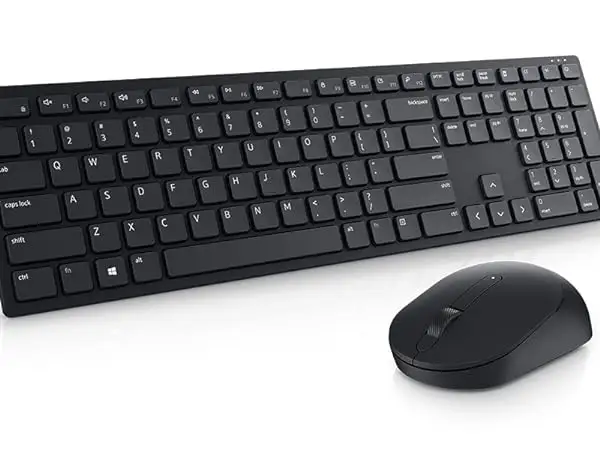
| Comfortable symmetric mouse design for left/right-hand use | Dell Peripheral Manager can cause device recognition issues |
| Adjustable DPI up to 4000 for precise tracking | No backlighting for low-light use |
| Claimed industry-leading battery life up to 36 months | Battery drain issues reported by some users |
| 3-year advanced exchange warranty | Limited compatibility with certain setups (KVM, older OS) |
Claims vs Reality
Dell markets the KM5221W as having “one of the industry’s leading battery lives at 36 months.” While some users back this up, such as a BestViewsReviews contributor who noted, “The battery life of the keyboard and mouse is impressive with 24 and 12 months respectively,” others report far shorter runtimes. One Amazon verified buyer shared: “I am on my second set… the battery drains from the mouse in about 4 days.”
Similarly, Dell promotes “seamless connection to your Dell PC” and easy management via Dell Peripheral Manager (DPM). Yet, Trustpilot feedback paints a different picture: “When DPM installed… the keyboard and mouse stopped responding… uninstalling DPM makes them work, but I cannot manage the settings.” This incompatibility is especially pronounced for users connecting through KVM switches.
The third major claim is “quiet typing for proximity work.” Users generally agree here—Reddit and Amazon comments frequently praise the low noise profile. For office workers in shared spaces, this feature genuinely meets expectations.
Cross-Platform Consensus
Universally Praised
Across platforms, the KM5221W’s programmable keys stand out as a workflow booster. Provantage’s analysis highlights this, noting they “allow users to quickly access frequently used applications.” Business users benefit most—Reddit user reports emphasize faster spreadsheet navigation and app switching thanks to custom shortcuts.
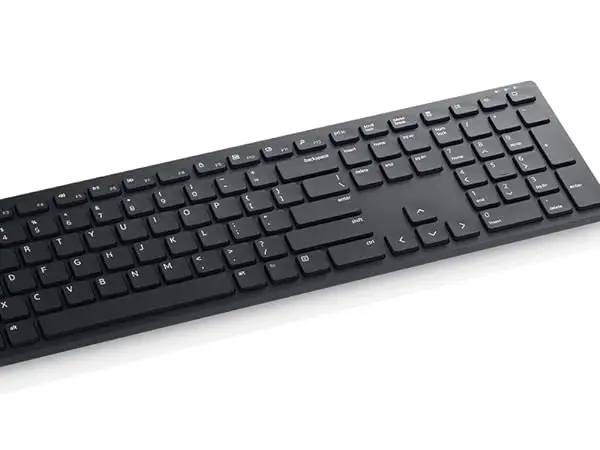
The symmetric mouse design is another widely appreciated element. Amazon reviewers say it’s “comfortable for both left and right-handed use,” enabling teams to share equipment without ergonomic complaints. Adjustable keyboard tilt legs also receive approval, letting typists set their preferred angle for extended sessions.
Battery longevity—at least in ideal conditions—earns praise from stationary office setups. One BestViewsReviews customer confirmed, “Keyboard still going strong after a year without battery change,” suggesting that low-interference environments help achieve Dell’s claims.
Common Complaints
Lag and missed keystrokes emerge as the most persistent grievance. A Twitter user reported: “The keyboard lag is worse than the mouse… misses keystrokes, lags, and eventually stops working all together.” Interference from nearby wireless devices often worsens the issue, and proximity to the receiver can be critical—BestViewsReviews notes, “The USB receiver works fine when it is just over half a foot away… shouldn’t be the case.”
Battery drain problems, especially with the mouse, frustrate owners. One Amazon buyer recounted replacing batteries “every few days,” undermining the advertised lifespan advantage. Compatibility limitations also frustrate—Provantage flags “no multi-device connectivity” and “limited compatibility with older systems,” while Trustpilot users report failures with KVM setups and certain OS integrations.
Dell Peripheral Manager, intended as a central control hub, is divisive. While some users value its DPI adjustments and battery status checks, others find it the root cause of connection dropouts.
Divisive Features
DPI adjustability up to 4000 is a split feature. Graphic designers and multi-monitor users enjoy the precision—Amazon reviewers say it “tracks accurately across varying resolutions.” However, casual office workers rarely need extreme DPI ranges and some find switching sensitivity mid-task disruptive.
The absence of backlighting is another point of contention. Minimalists appreciate the clean aesthetic and battery savings, but users in low-light environments call it a dealbreaker. Provantage lists “no backlighting” among key considerations for prospective buyers.
Trust & Reliability
Trustpilot feedback raises concerns about Dell’s support responsiveness. One user described repeated, irrelevant troubleshooting questions and ultimately “returning the hardware” after unresolved connectivity failures. These reports suggest that while the 3-year advanced exchange warranty is valuable, the support experience may vary widely.
Long-term durability stories are mixed. Reddit threads generally agree the physical build holds up well—keys retain their feel after months of use—but electronic reliability is more variable. Lag issues sometimes appear only after several weeks or months, hinting at potential firmware or interference-related degradation.
Alternatives
In user discussions, no specific competing models are named, but context suggests that multi-device wireless sets with Bluetooth connectivity (e.g., Logitech MX Keys + MX Master series) could address the KM5221W’s single-device limitation. These alternatives often include backlit keys and better cross-platform support, though at a higher price point.
Dell’s own higher-tier wireless combos might resolve some compatibility issues, but community reports caution that DPM-related problems can persist across models.
Price & Value
The KM5221W’s official Dell USA price is $39.99, with eBay listings as low as $28.04 for open box units. Amazon ratings average 4.2 stars, suggesting overall satisfaction despite flaws. Resale value trends indicate modest depreciation, with used units selling around $25-$32 depending on condition.
Community buying tips emphasize proximity between receiver and device to avoid lag, and caution against relying solely on DPM for settings—some recommend manual DPI adjustments where possible.
FAQ
Q: Does the Dell Pro KM5221W work with multiple devices simultaneously?
A: No. It can only connect to one device at a time via its USB receiver, limiting flexibility for multi-device workflows.
Q: How long does the battery really last?
A: While Dell claims up to 36 months, user reports vary from several days to over a year depending on usage patterns, interference, and battery brand.
Q: Is Dell Peripheral Manager required?
A: Not strictly—uninstalling it can resolve certain connectivity issues, but you’ll lose access to advanced settings like DPI adjustment and key programming.
Q: Will it work through a KVM switch?
A: Trustpilot feedback suggests it may fail when connected via KVM, especially after DPM installation. Direct USB connection is more reliable.
Q: Is there backlighting on the keyboard?
A: No, the KM5221W lacks backlit keys, which can be inconvenient in dim workspaces.
Final Verdict: Buy if you’re a single-device office user who values programmable shortcuts, quiet typing, and long theoretical battery life. Avoid if you need multi-device pairing, work in low-light conditions, or rely on complex USB routing like KVM switches. Pro tip from the community: Keep the receiver as close as possible to the keyboard and mouse to minimize lag and missed inputs.





