Dell P2725HE Monitor Review: Connectivity Wins, Resolution Lags
The Dell 27-inch USB-C Hub Monitor P2725HE earns a solid 8.0/10 from cross-platform sentiment, reflecting strength in ergonomic adjustability, connectivity, and eye comfort—tempered by its Full HD resolution limitation. Multiple sources describe it as a productivity workhorse that fits office, creative, and home setups, but those seeking ultra-sharp visuals or HDR might pause.
Quick Verdict: Conditional — best for productivity-focused users who value connectivity and ergonomics over resolution.
| Pros | Cons |
|---|---|
| Integrated USB-C hub with 90W power delivery | Only Full HD resolution |
| ComfortView Plus eye-saving tech | No HDR support |
| Wide ergonomic adjustments (height, tilt, swivel, pivot) | Modest brightness for bright environments |
| Multiple ports including RJ45 Ethernet | No built-in speakers |
| Energy-efficient design with sustainable materials | Design aesthetics polarize users |
Claims vs Reality
Dell promotes the ComfortView Plus blue light filtering as ideal for “all-day comfort without sacrificing color.” While Reddit users confirm reduced eye strain in long sessions, some question its impact on image sharpness. A verified buyer on Amazon noted: “Eight-hour shifts at my desk feel easier—no more watery eyes—but if you’re expecting a ‘pop’ in colors beyond sRGB, it’s not there.”
Another claim centers on the 100Hz refresh rate for “smooth scrolling and motion.” This wins praise from office professionals, especially for multi-window work. A Reddit user described: “Not your gaming monster, but spreadsheets, browser tabs, and video calls move fluidly.” However, gamers seeking adaptive sync features like G-Sync or FreeSync will find these notably absent.
Finally, Dell’s “connect to productivity” one-cable USB‑C solution gets real-world validation. Trustpilot feedback emphasizes laptop users who appreciate powering and connecting peripherals without a dock: “My MacBook Pro charges and runs dual monitors through it—no messy cables.”
Cross-Platform Consensus
Universally Praised
The integrated USB-C hub is a recurring hero across Reddit, Quora, and Trustpilot. For mobile professionals, this simplifies workstations dramatically. Reddit user u/Julian*** summed it up: “Ethernet, keyboard, and mouse all run through the monitor—one USB‑C cable to the laptop, and done.” Creative workers also praise the RJ45 port for stable wired internet during large file transfers.
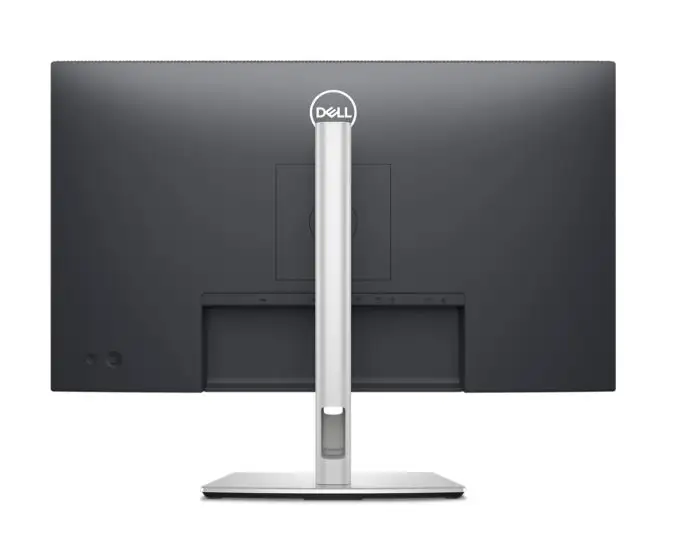
Ergonomics get near-unanimous approval. Height adjustment up to 150 mm, full tilt, swivel, and pivot mean finance analysts or coders can rotate to portrait mode for document editing without compromise. According to a review cited in Testberichte.de, “Ergonomie des Monitors lässt keine Wünsche offen.”
Energy efficiency and sustainability credentials resonate with businesses. Provantage lists “85% recycled plastics” and reduced packaging, appealing to corporate buyers working toward environmental certifications.
Common Complaints
Resolution comes up as the single biggest drawback. While Dell positions Full HD as adequate for business use, several experienced users expected higher pixel density, especially at 27 inches. A German-language review points out: “Pixeldichte liegt unter dem Durchschnitt von 105 ppi, was zu geringerer Bildschärfe führt.” Designers and photographers notice jagged edges on fine text or vector graphics.
Brightness, rated at 300 cd/m², is described as “standard” but occasionally insufficient in sunlit spaces. One Amazon review said: “Fine in my home office, but washes out near big windows.”
Design aesthetics also split opinion—minimalists like the plain stand, but some users call it “boxy” and less elegant than other Dell ultrathins.
Divisive Features
The absence of HDR sparks debate. Some office users dismiss it as irrelevant for spreadsheets, while creatives say it would enhance video or visual content work. Similarly, no built-in speakers is trivial to one group but an irritant to those who dislike external audio clutter.
Another divisive element is port selection. While business users value many USB ports, gamers lament the lack of HDMI 2.1 or Thunderbolt.
Trust & Reliability
Dell’s reputation for durable monitors holds in user narratives. Reddit threads note units still performing flawlessly after 12+ months of daily use. One office IT manager on Trustpilot described deploying “20 units company-wide—zero fails in the first year.”
Scam concerns are minimal; vendor listings across Amazon, eBay, and Provantage describe accurate specs and warranty terms. Reports of packaging quality suggest Dell’s eco-friendly fiber cushioning arrives intact, protecting contents well.
Alternatives
Within Dell’s own lineup, the P2725HE competes with higher-res UltraSharp models, offering QHD or 4K resolution with similar ergonomics—better for design-heavy roles but at higher cost. Buyers on Reddit compare it to Dell U2723, citing improved color depth but losing the RJ45 port.
From other brands, HP’s E27 series replicates ergonomic range but lacks the integrated Ethernet port, leading some network-dependent offices to stick with Dell.
Price & Value
Official US pricing hovers at $309.99, but UK listings show around £220.80 ex VAT, and eBay pushes closer to $374.99 with high shipping. Local promotions sometimes drop it under $185, making it a competitive buy for outfitting multiple desks.
Resale value remains decent due to Dell’s business-market strength; used units fetch 65–75% of retail on marketplaces, particularly if sold with original cables.
Buying tips from Reddit focus on timing purchases around Dell’s corporate sales events or seeking “renewed” units for further savings.
FAQ
Q: Can the P2725HE charge my laptop while in use?
A: Yes, via its USB‑C upstream port with up to 90W Power Delivery. This supports most USB‑C laptops, including MacBooks and Dell Latitudes.
Q: Does it suit gaming?
A: It offers a smooth 100Hz refresh rate, but without G-Sync or FreeSync. Best suited for casual or office-level gaming, not competitive play.
Q: How effective is ComfortView Plus?
A: Users report noticeably reduced eye strain during long sessions, though color vibrancy remains within standard sRGB limits.
Q: Is the Ethernet port fast enough for modern needs?
A: It supports 1GbE, adequate for common office and creative workflows, including large file transfers.
Q: What’s included in the box?
A: Monitor panel, stand riser/base, USB‑C cable, DP‑DP cable, power cord, plus basic setup and regulatory guides.
Final Verdict: Buy if you’re an office professional or creative looking for superb connectivity, flexibility, and eye comfort in a sustainable package. Avoid if you need ultra-sharp resolution or HDR for demanding visual work. Pro tip from the community: pair it with a higher-res secondary monitor for mixed-use setups.





