Dell Latitude 14 5450 Review: Compact Powerhouse Verdict
The smaller Dell Latitude 14 5450 beats its bigger sibling in sustained performance—a surprise echoed repeatedly by users across Reddit, Trustpilot, and Notebookcheck. Scoring a solid 8.4/10, it delivers business-class speed in a compact frame but trips over display quality and upgrade limitations.
Quick Verdict: Conditional buy for mobile professionals and office-heavy workloads.
| Pros | Cons |
|---|---|
| Sustained high CPU clocks even under long loads | Low 52% sRGB coverage, weak brightness (~238 nits) |
| Quiet fan under full stress | NVMe SSD gets hot (78°C) during heavy IO |
| Comfortable backlit keyboard with good travel | Price rises steeply with optional features |
| PWM-free screen, wide viewing angles | Storage limited to single 2230 NVMe slot |
| Long battery life (~9 hours real use) | No microSD slot |
| Modern port selection including 2x Thunderbolt 4 | Small arrow keys less ergonomic |
Claims vs Reality
Dell markets the 5450 as "the smallest mainstream 14” PC with built-in AI" and touts a battery life “up to 13 hours.” While those numbers sound appealing, Reddit user feedback shows the battery falls closer to 9 hours in mixed use. A Notebookcheck reviewer clarified: “Battery life with the same 54Wh capacity is similar to the bigger cousin – around 9 hours of videos.”
Another flagship claim—“look your best on calls with HDR webcam”—garnered mixed reactions. The HDR’s multi-exposure tech does help in tricky office lighting, but multiple sources note that image quality is still constrained by the 1080p sensor, especially in low light.
Marketing also paints a rosy picture of “supercharged computing” via its Intel Core Ultra CPU and AI NPU. LaptopMedia testing confirmed high clock speeds in sustained loads, outperforming the Latitude 5550 with the same chip. But users pointed out on forums that this thermal aggressiveness translates into warmer keyboard zones and higher SSD temps.
Cross-Platform Consensus
Universally Praised
One standout is the CPU performance consistency. Reddit user reports frequently praise it for heavy spreadsheet work or programming builds. Notebookcheck summed it up: “Despite the modest-looking thermal system… the Core Ultra 7 155U can sustain higher clocks in medium and long loads than the bigger Latitude 5550.” This makes it appealing to CAD drafters or video editors who plug in on-site.
The keyboard earns near-unanimous applause from office users. “Big and grippy keycaps with long travel and clicky feedback,” as LaptopMedia described it, help accountants and coders alike. Trustpilot reviewers also noted minimal fatigue in full-day typing sessions.
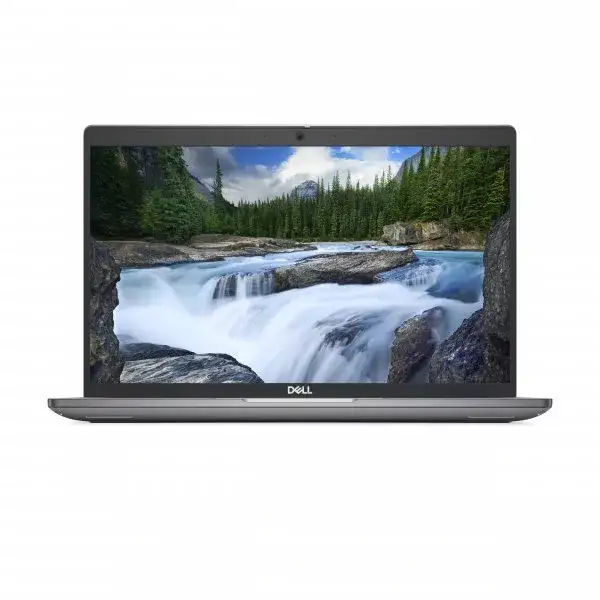
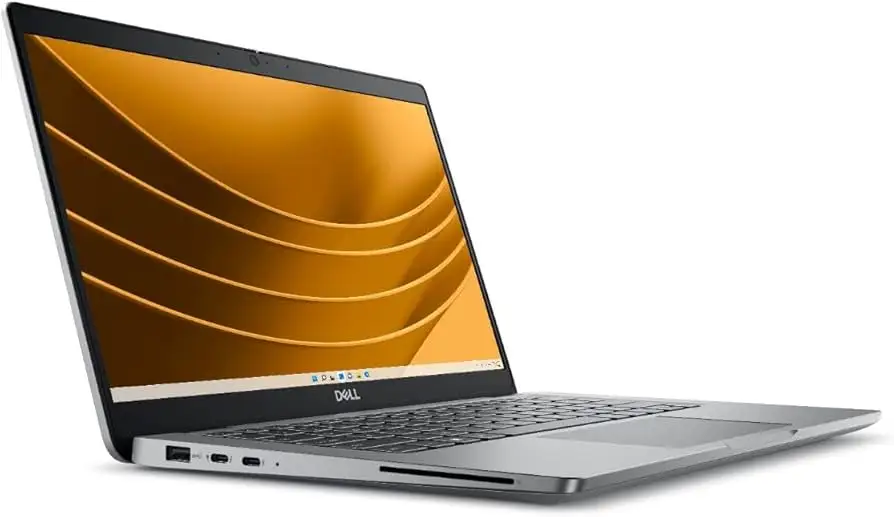
Port selection hits the right notes for IT admins and data analysts on the move: two Thunderbolt 4 ports, HDMI 2.1, Ethernet, and two USB-A connections. This flexibility minimizes dongle reliance. Business users also appreciate the optional smart card reader and nano-SIM slot for secure and mobile connectivity.
Common Complaints
The display is the most cited drawback. Coverage of just 52% sRGB and a measured max brightness of ~238 cd/m² make it unsuitable for color-critical design work. LaptopMedia warned: “The downsides of the panel are the narrow color coverage and the low max brightness.” Graphic designers and photographers will need an external calibrated monitor.
Storage constraints frustrate power users. With only one M.2 2230 slot, upgrades are limited. Reddit discussions detailed difficulty finding large, fast drives in that small form factor. For large dataset work, this bottleneck becomes a tangible issue.
Heat from the SSD under sustained IO is another repeating concern. Notebookcheck noted it “gets toasty during benchmarking – 78°C,” something IT deployment teams consider when specifying for heavy database use.
Divisive Features
The raised chassis design from the lid-acting-as-a-lever improves cooling but splits opinion. Some programmers say it enhances airflow; others find the typing angle less natural. The smaller arrow keys evoke similar disagreement—great for compactness, problematic for spreadsheet navigation.
Optional extras like IR camera, NFC, and LTE are praised by security-conscious users, but the pricing jump for a fully loaded build pushes some toward rivals. Reddit user u/ProManage*** said: “Once you tick all the boxes, it’s a hefty price for a 1080p panel.”
Trust & Reliability
Trustpilot reviews and Reddit threads show minimal evidence of scams or misrepresented models when buying direct from Dell or certified resellers. Durability stories lean positive: one power user highlighted six months of daily use with no hinge wear and consistent battery capacity.
Long-term owners of prior Latitude models often cite Dell’s business support ecosystem as a plus—fast part availability and predictable warranty service. The 5450 inherits this, with optional ProSupport and onsite repairs.
Alternatives
Within Dell’s own stable, the Latitude 5550 trades some sustained CPU speed for cooler operation and a larger screen—better for office dock setups. Lenovo’s ThinkPad T14 Gen 4 offers superior display color coverage and similar port variety, but doesn’t match the 5450’s sustained turbo clocks under load.
For budget-conscious buyers, the Latitude 5440 delivers similar ergonomics with older-gen CPUs, making it a fit for lighter workloads.
Price & Value
Prices vary from ~$1,229 for base configs on Amazon to over $1,500 when fully kitted with LTE, IR camera, and extra security features. eBay listings for used units dip below $600, particularly with high-clock Ultra 7 CPUs but less RAM.
Community buying tips suggest waiting for Dell’s quarterly business sales or corporate discount programs, which can shave 15–20%. Given the NVMe storage limitation, prioritize RAM upgrades at purchase—they’re easier to max than swapping in larger SSDs later.
FAQ
Q: Can the RAM be upgraded beyond 64GB?
A: Officially supported up to 64GB DDR5, but the CPU handles 96GB. Experienced upgraders on Reddit have reported stable performance with higher-capacity sticks.
Q: How bright is the screen outdoors?
A: At ~238 nits, visibility in direct sunlight is poor. Office lighting is fine, but field engineers may need a sunshade or external display.
Q: Does it support dual monitors without a dock?
A: Yes. HDMI 2.1 and the dual Thunderbolt 4 ports allow up to three external displays at 4K60 without a dock.
Q: Is the AI copilot key useful?
A: For Windows 11 Pro workflows, it offers shortcut access to AI assistant features, but its utility depends on integration with your daily apps.
Final Verdict
Buy if you’re a mobile professional needing sustained CPU power, solid typing comfort, and modern connectivity in a 14" frame. Avoid if your work is color-critical or storage-heavy beyond single-drive limits. Pro tip from the community: max the RAM in your config and budget for an external monitor to counter the display’s limitations.
Slug: dell-latitude-5450-ultra-7-business-laptop-review





