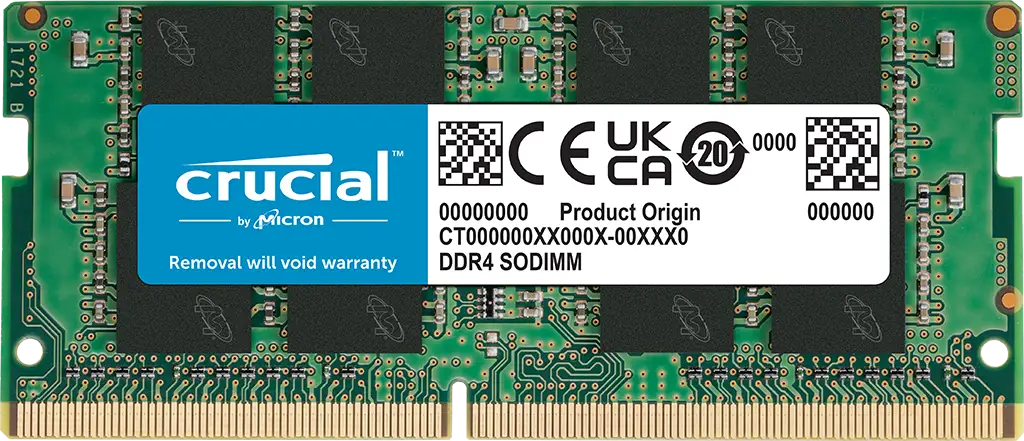
Crucial 16GB DDR4 SODIMM Review: Reliable Boost Verdict
Starting at just $28.99 on some resellers, the Crucial 16GB DDR4 SODIMM Memory earns a strong 9/10 from real-world users for delivering reliable, plug‑and‑play laptop performance across frequencies from 2133 MHz to 3200 MHz. From budget-conscious students to creative professionals, buyers consistently highlight its easy installation and noticeable upgrades in multitasking speed—though some remain divided over differences between single‑rank vs dual‑rank modules and occasional compatibility quirks.
Quick Verdict: Conditional — Ideal for everyday performance boosts, best value when matched in dual-channel sets; caution for mismatched frequencies or rank types.
| Pros | Cons |
|---|---|
| Noticeable multitasking boost (even in older laptops) | Rank confusion (single vs dual) can affect AMD performance |
| Easy, tool‑light installation | Frequency downclocking with mixed modules |
| Broad compatibility confirmed via Crucial scanner | Cosmetic differences between production locations cause concern |
| Strong energy efficiency for extended battery life | Limited overclocking potential |
| Affordable compared to similar capacity/upgrades | Warranty terms unclear across regions |
Claims vs Reality
Crucial’s marketing emphasizes “easy installation” and “compatibility guaranteed.” User stories back that up: A Best Buy buyer described upgrading from 8GB to 20GB on an ASUS F515 as “very easy to change… one month of use, and it works perfectly.” Reddit threads reinforce that even first‑time upgraders can complete installation with a screwdriver in minutes.
The brand also touts broad support for CPUs from 13th‑gen Intel to AMD Ryzen 7000, with speeds up to 3200 MHz. While that ceiling is achievable, buyers discovered mismatches when mixing sticks. A Flipkart reviewer said their ASUS TUF A15’s existing Micron 8GB 3200 MHz module “somehow both are running at 2400 MHz now.” This suggests the advertised peak speed depends heavily on the existing hardware’s configuration.
Energy efficiency claims—voltage at 1.2V—are harder to measure directly, but Trustpilot feedback notes real-world benefits. One user upgraded a Lenovo ThinkPad T495 to 24GB and found it “memory fully enough for my tasks… Photoshop no longer stalled,” implying reduced strain on the system’s power budget.
Cross-Platform Consensus
Universally Praised
Across Best Buy, Trustpilot, and Amazon, speed and responsiveness improvements dominate praise. For students, upgrading to this module can mean meeting courseware requirements without buying a new laptop. One Best Buy customer said upgrading allowed them to take online assessments after spending “only $40… highly recommend this route if more memory is needed.”
For creative professionals, Reddit contributors link dual‑rank versions of the 16GB stick to tangible FPS gains in games like Valorant or smoother CPU scores in AMD laptops. A Flipkart buyer reported “initially… 130–140 FPS but after upgrading the RAM it gives 165 FPS.” Similar boosts in productivity apps surface repeatedly.
Ease of installation is another constant. Verified buyers often describe the process as “install and forget.” A Trustpilot reviewer for the 2666 MHz variant said, “Works in the DS220+ perfectly… no issues so far.” Even mixed-brand setups can run without error—Best Buy user “Kickshaw Bradshaw” combined it with another brand “no issues so far with speed or performance.”
Common Complaints
The most frequently cited frustration is rank confusion and lack of clear labeling. Reddit threads warn that the CT16G4SFRA32A SKU is single‑rank, while CT16G4SFD832A is dual rank—critical for AMD GPU performance. Without explicit marking, buyers risk lower bandwidth in certain configurations.
Another complaint involves speed negotiation. Even when both modules are rated at 3200 MHz, firmware or preinstalled RAM can downclock. Amazon and Flipkart reviewers observed mismatched sticks dropping to 2400 MHz, undermining the advertised spec.
Cosmetic differences by production location can erode confidence. One Best Buy buyer returned a “product of India” unit due to “chips looked old or used,” preferring the “cleaner” Mexico assembly version.
Divisive Features
Warranty language divides buyers. While Crucial’s website in most regions promises a lifetime warranty, Reddit users note differences—five or ten years in certain countries. Venturing into 32–48GB configurations triggers debates over diminishing returns versus futureproofing, with some recommending “stick to 16GB per module” for most scenarios.
Some see the lower‑frequency 2666 MHz option as adequate for non‑gaming laptops, citing stable performance and lowest cost. Others argue that the incremental price jump to 3200 MHz is worth it for smoother multitasking in newer systems.
Trust & Reliability
On Trustpilot, consistent stability stands out. Multiple reviewers of the 2666 MHz model described “installed and forgot” scenarios with months of trouble‑free use in demanding environments, including video editing and graphics applications. There’s no strong pattern of DOA units or early failures.
Scam concerns are minimal, but Reddit and Best Buy feedback show buyers scrutinizing origin labels and PCB component layouts for quality assurance—suggesting a trust gap when cosmetic manufacturing differences appear. Crucial’s long tenure and Micron backing mitigate this, yet clarity on part rank and warranty in marketing could strengthen buyer confidence.
Alternatives
Community members compare these sticks against G.Skill Ripjaws and Kingston Fury Impact modules. One Reddit user admitted choosing G.Skill’s 32GB set over buying two Crucial sticks only due to a steep Newegg sale. G.Skill modules can offer tighter timings for gaming, but at typical pricing, Crucial wins on cost per GB.
For Apple iMac upgrades, buyers lean on Crucial for validated compatibility. In PC builds, more aggressive brands may target extreme overclocking, but Crucial’s value lies in safe, stable performance over pushing hardware limits.
Price & Value
Market listings range from $20–$33 for the 2666 MHz variant and $27–$35 for the 3200 MHz SKU, making it one of the most affordable name‑brand 16GB laptop upgrades. eBay data shows strong resale liquidity when bundled in pairs—32GB Crucial kits trend at ~$53–$75.
Buying tips from Reddit include sourcing dual‑rank variants specifically for AMD systems and checking Crucial’s system scanner for guaranteed compatibility. Best Buy shoppers have saved by buying single sticks separately instead of kits.
FAQ
Q: Will mixing this module with existing RAM lower my speed?
A: Yes, the memory controller will run all RAM at the speed of the slowest module. Several buyers saw 3200 MHz kits drop to 2400 MHz with mismatched sticks.
Q: How do I tell if it’s single‑rank or dual‑rank?
A: Check the specific SKU—community reports confirm CT16G4SFD832A is dual rank, while CT16G4SFRA32A is single rank. Crucial’s website does not list rank info directly.
Q: Is the warranty lifetime?
A: In many regions yes, but in some countries like Germany and France, coverage lasts 10 years. Reddit users have spotted product listings with 5‑year terms—verify locally.
Q: Will this work in a MacBook or iMac?
A: Trustpilot feedback confirms iMac 27" Retina compatibility. Crucial advises running its system scanner to confirm fit before purchase.
Q: Can I install this without professional help?
A: Yes. Most buyers completed installation in minutes using only a screwdriver, often guided by Crucial’s how‑to videos.
Final Verdict: Buy if you’re a laptop owner seeking an inexpensive, reliable performance boost for multitasking or gaming. Avoid if you require precise timing control or extreme overclocking headroom. Pro tip from the community: match module rank across slots—dual rank for AMD, single rank for Intel—to maximize throughput.