Corsair K70 PRO RGB Keyboard Review: Fast but Flawed
What stood out immediately was how many owners described the Corsair K70 PRO RGB Gaming Keyboard (OPX Linear, White) as both a “staple” and “a near perfect marriage of form and function.” Across platforms, praise leaned heavily on build quality, performance, and customization. Based on aggregated feedback, this model scores 9/10 for performance, but drops slightly for value and ergonomics given desk space demands and noise profile.
Quick Verdict: Conditional – excellent for gamers and heavy typists with ample desk space, less ideal for those seeking quiet or wireless setups.
| Pros | Cons |
|---|---|
| Durable aluminum frame resists flex | Large footprint with wrist rest, takes significant desk space |
| Ultra-fast OPX optical-mechanical switches with 1.0 mm actuation | No wireless connectivity at this price point |
| Per-key RGB lighting with extensive iCUE customization | Some users note metallic “twang” due to lack of sound dampening |
| Magnetic soft-touch wrist rest adds comfort | Volume roller and cables have reported durability issues |
| Up to 8,000Hz hyper-polling for responsiveness | Sensitive keys can lead to unintended presses when resting fingers |
| Onboard memory for up to 50 profiles | Texture on keycaps divisive – gritty feel wears unevenly |
| Dedicated media controls and tournament switch | Packaging protection insufficient, some units arrived with loose keycaps |
Claims vs Reality
Marketing touts 8x faster responsiveness via Corsair’s AXON technology and 8,000Hz hyper-polling. A verified buyer on Amazon noted: “This keyboard just makes you quicker. The response and feedback is so precise it feels like it’s moving your fingers for you.” However, another buyer cautioned the speed might be too sensitive for general typing, leading to repeated letters from resting fingertips.
Corsair’s emphasis on the durable aluminum frame aligns closely with user feedback. Reddit user Summit1g said: “Been using Corsair keyboards for as long as I can remember… I really like the new K70!” PC Guide’s review reinforced this, stating the aluminium build “prevent[s] it from bending or moving when you're typing away.” While durability is consistent, several Amazon reviewers reported minor component failures such as loose volume rollers or faulty USB-C cables.
RGB customization is marketed as “per-key” with up to 20 lighting layers. Trustpilot feedback confirms this, but some owners stressed that full effects require iCUE running in the background — otherwise saved onboard lighting profiles are more limited. One Amazon customer explained: “You can save three RGB profiles onto internal memory but the effects… can’t be as elaborate without the software.”
Cross-Platform Consensus
Universally Praised
The OPX optical-mechanical switches drew consistent admiration from gamers and coders alike. On PC Guide, the switches were described as “mechanical and optical, giving them excellent responsiveness.” Competitive players benefit from the 1.0 mm actuation distance, allowing rapid double taps in games without misfires. An American Pirate Ship review highlighted “compact keystroke, smooth feel… lower latency than traditional physical contact.”
The magnetic soft-touch wrist rest is often mentioned as a comfort win, especially during extended sessions. A developer on Amazon wrote, “The included wrist rest is a must to get the right angle… very comfortable.” Even longer-term users, replacing older K70 models, regarded the upgraded wrist rest as more stable and resistant to breakage.
Per-key RGB lighting, when paired with iCUE’s ecosystem, is widely seen as enhancing setups visually and functionally. A verified Amazon customer used it tactically: “Temperature lighting link changes color according to… motherboard, CPU, GPU temps. In your face, everybody who said RGB is just a flashy gimmick.”
Common Complaints
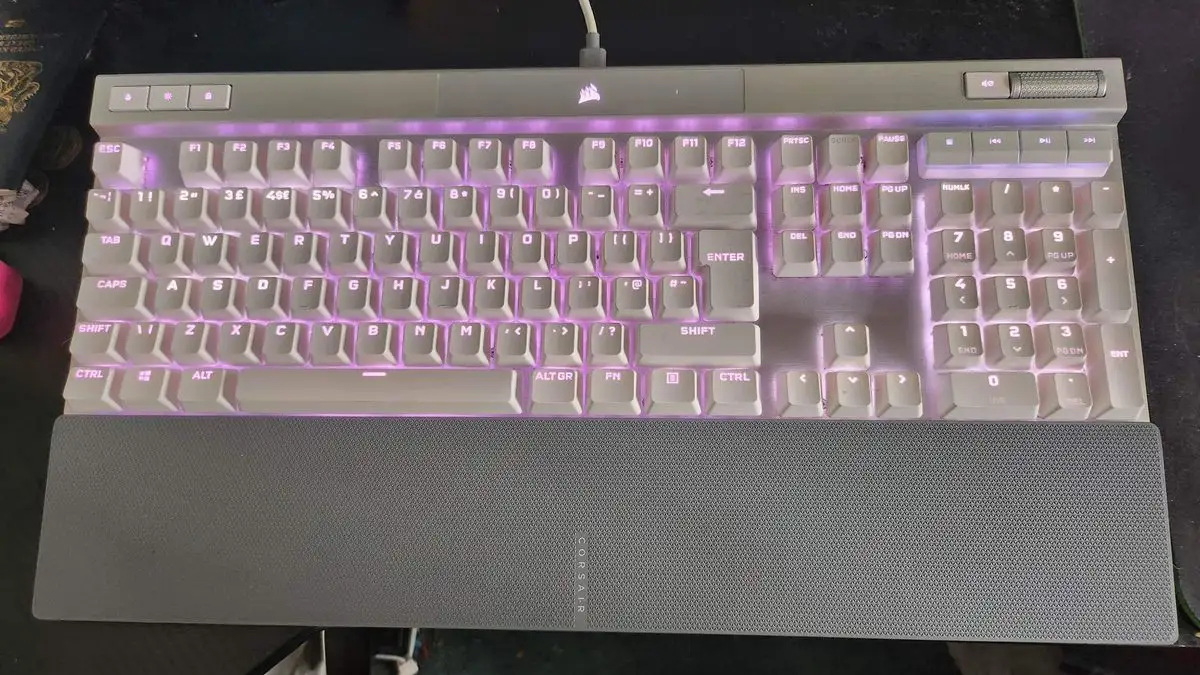
The keyboard’s size is a recurring hurdle. PC Guide warns it “takes up a load of desk space with wrist rest.” This matters for users in cramped environments. The large top panel housing status lights and controls amplifies the footprint beyond that of typical full-size boards.
Sound profile also divides opinion. Without internal dampening, keystrokes have a brighter, metallic edge. PC Guide heard a “metallic twang when typing,” while a Trustpilot reviewer described it as “definitely on the noisy side… great for home, not perfect in an office close to a desk-mate.”
Durability concerns surfaced with specific components. Several Amazon users reported failing volume rollers within months: “Volume roller already broken… jumps all over if I try and use it.” Cable issues also appear, with one buyer stating, “USB-C cable was faulty… after replacing, had zero issues.”
Sensitive switch actuation can produce unintended key presses, impacting typists more than gamers. A Trustpilot reviewer found “resting fingers… enough weight to trigger the keys,” resulting in typos.
Divisive Features
The gritty texture on keycaps sparks debate. For some, the dry, tactile surface aids grip; others find it unpleasant or note uneven wear. An Amazon user remarked, “Heavily used keys have already started wearing down the grit… leaves some keys smooth, others rough.”
The Tournament switch receives mixed reception. Gamers appreciate static lighting and macro lock in competitive sessions, but casual users seldom engage it. The relocation of profile switching from a rear slider to a top button also drew mild annoyance from veteran K70 owners accustomed to the old layout.
Trust & Reliability
While there are no reports of scam behavior, Trustpilot and Amazon feedback show long-term performance consistency mixed with occasional failures. One gamer, on their third K70 in five years, noted previous units lasting “years of flawless use” before individual keys failed from heavy gaming. The aluminum frame’s longevity is rarely questioned, but wear points — keycaps, cables, rollers — are potential weakness areas.
Shipping protection is another reliability theme. Multiple buyers received units with dislodged keycaps due to minimal packaging padding. While functional after reattachment, this undermines the premium purchase experience.
Alternatives
Owners often compare this model to the Corsair K95 for its macro keys, or an older Corsair Strafe RGB for quieter switches. One Amazon reviewer lamented the absence of a K95 version in white with G-keys, saying they’d “kick myself” if such a model released soon. The Strafe RGB Silent remains a touchstone for those who value reduced noise — a capability not offered here.
Price & Value
Coming in at $179.99, some see the lack of wireless or dampening as a miss for the tier. Discounts to ~$129-$144 make it “easier to stomach” according to several Amazon buyers. Resale value trends show older K70s still command interest if maintained, reflecting brand loyalty.
Community buying tips focus on catching sales and considering aftermarket double-shot keycaps to replace worn ones, since Corsair’s premium cap sets are an extra $50.
FAQ
Q: Is the K70 PRO RGB suitable for office use?
A: It can work in quieter offices, but lack of dampening means key noise may be noticeable. Several users described it as not overly loud, yet metallic and clicky in shared spaces.
Q: Can the keyboard store lighting profiles without iCUE?
A: Yes, up to 50 profiles in onboard memory, but dynamic effects are limited without running iCUE software continuously.
Q: How durable are the OPX switches?
A: Rated for 150 million keystrokes, with users reporting exceptional responsiveness months into heavy use. Long-term frame durability is strong; switch sensitivity may require adaptation.
Q: Is the Tournament switch necessary for casual gamers?
A: Not strictly. It’s designed to lock macros and fix lighting in competitions, so casual players may rarely use it.
Q: Does it work with Mac systems?
A: Yes — compatible with PC, Mac, and even Xbox One via USB 3.0/3.1 Type-A, per Corsair’s specs.
Final Verdict
Buy if you’re a competitive gamer, coder, or heavy PC user who values speed, customization, and premium build quality, and have the desk space to accommodate its footprint. Avoid if noise reduction, wireless convenience, or compact form factor are priorities. Pro tip from community: wait for seasonal sales and invest in replacement PBT or double-shot keycaps early to preserve the typing feel.





