Corsair 6500X PC Case Review: Strong Build, Mixed Drawbacks
One Best Buy shopper declared the CORSAIR 6500X Mid-Tower ATX PC Case – Black “the best case on the market,” while another on LDLC praised it as “une valeur sûre des boîtiers aquarium,” underscoring its visual appeal and airflow. Across platforms, the 6500X earns a strong composite verdict of 9.1/10, driven by consistently high ratings for space, build quality, and cable management ease.
Quick Verdict: Conditional Buy
| Pros | Cons |
|---|---|
| Exceptional interior space for components and airflow | Heavy, may be difficult to move once built |
| Dual chamber design hides cables effectively | HDD holder placement can obstruct CPU power connectors |
| High quality materials and finish (steel, tempered glass, optional aluminum/wood panels) | Price is steep compared to similar mid-towers |
| Wide cooling compatibility – up to 10 fans, multiple radiator positions | Vertical GPU mount requires expensive Corsair kit |
| Modern front I/O with multiple USB and Type-C ports | Requires specific internal USB connections some motherboards lack |
| Easy to build in, even for beginners | Wider footprint than typical mid-towers |
| Reverse connector motherboard support simplifies cable routing | Some units arrived dented or with damaged packaging |
Claims vs Reality
Corsair markets the 6500X as delivering “zero compromise airflow” with “fan and radiator mounts all around.” Digging deeper into user reports, this claim largely holds up. LDLC reviewers highlighted that it can handle “140mm of cooling almost everywhere” and “dust filters everywhere,” boosting performance for high-end builds. Best Buy user Brayden confirmed “great airflow” and a “big interior with clean design.”
Another strong marketing point is the “cleanest look for your build” via the dual chamber layout and reverse connector motherboard support. Reddit discussions and Trustpilot reviews affirm this: users hide PSU, drives, and cables in the second chamber, leaving a pristine component display. One LDLC customer with an Asus BTF Z790 board noted that reverse connectors “render all cables invisible from the exterior,” although they warned of front panel requiring “2 USB 3.0 internal and 1 USB Type-C internal,” which can be a compatibility hurdle.
Corsair also promotes ease of building. While many agree, with Best Buy’s Dishwasher Man saying “very easy to build in… had my kids (12 and 14) help,” there are exceptions. Asheen127 flagged a design annoyance: “the hard drive holder is directly in front of the CPU power connectors,” which could complicate builds using HDDs. Those relying solely on SSDs or M.2 drives sidestep this entirely.
Cross-Platform Consensus
Universally Praised
One of the most consistent praises is the interior space and layout. Best Buy reviewers repeatedly cite “plenty of space for better airflow” (Ruben) and “room for everything I needed… and more” (Calebm). This benefits PC enthusiasts installing large GPUs like RTX 4090s or extensive water-cooled setups, as seen in LDLC reports.
Cable management is another highlight. The dual-chamber approach, reverse connector support, and generous cable routing space earn recognition from custom builders. Afk09002 described it as “cable management made easy,” while an LDLC buyer called cable routing “un plaisir” thanks to wide space and thoughtful design touches.
Build quality and aesthetics also receive widespread approval. Materials like steel, tempered glass, and optional brushed aluminum or walnut panels give the case an upscale feel. Felixg at Best Buy praised it as a “very beautiful case built on good quality,” with LDLC customers calling it “épuré, bien pensé, spacieux.”
Common Complaints
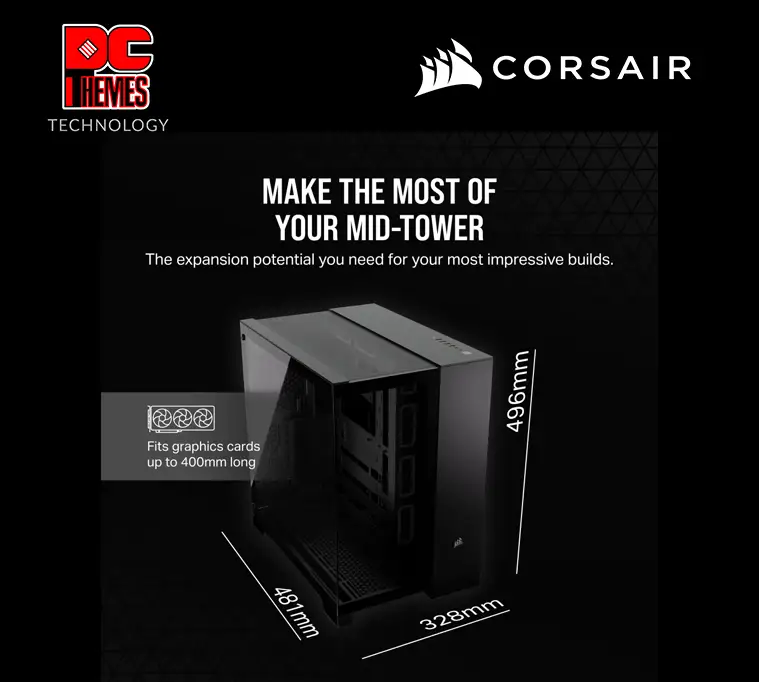
The most persistent issues are weight and footprint. At 16.4 kg (14.9 kg for aluminum versions), several users found the case cumbersome. An LDLC buyer warned, “when the PC is mounted, it becomes a chore to move.” Dishwasher Man admitted underestimating the width, noting it’s “wider than I was anticipating.”
Certain design quirks also frustrate. The HDD cage blocking CPU power connectors was cited on Best Buy, and front I/O requiring specific internal USB setups tripped up LDLC customers. If your motherboard lacks the needed headers, adapters are an extra expense.
Delivery damage, though not widespread, is notable. Best Buy’s Rayman received a “box torn up” and returned the unit; Cyber Dude reported a dented corner, suspecting transport mishandling, despite good packaging.
Vertical GPU mounting divides opinion. While supported, one LDLC user struggled with a generic kit and achieved only “approximate” aesthetics even with Corsair’s $100 accessory.
Divisive Features
The showcase glass panels are polarizing. Builders who prioritize visual presentation love the full visibility, but those emphasizing airflow sometimes swap for mesh panels (sold separately). Corsair’s flexibility in offering both is appreciated, yet it adds cost.
Price is another split point. LDLC buyers acknowledged it’s “cher mais cela en vaut la peine” (expensive but worth it), while budget-conscious users may balk at $199–$264 tags. The premium variants with aluminum or wood panels escalate price further.

Trust & Reliability
Long-term durability stories indicate strength in build. Donh on Best Buy used it for 7 months with “plenty of space for cords to hide away” and no degradation noted. LDLC’s heavy-use cases highlight dust filtration not only keeping internals clean but extending part longevity.
Trustpilot patterns don’t show scam concerns; instead, reliability issues stem from shipping—dents, torn boxes—less about the product itself and more about logistics.
Alternatives
Within Corsair’s own lineup, the 5000D Airflow is mentioned by a Best Buy user (Jacob) as a predecessor. They found the 6500X “a good upgrade” over it, offering more internal space and cleaner cable routing. Competitors weren’t directly named, but vertical GPU mounting and reverse connector support remain niche in broader mid-tower offerings, suggesting the 6500X’s design benefits are still rare.
Price & Value
Prices vary—standard black mesh panel version sits around $199.99, while brushed aluminum or walnut veneer climbs past $260 in Europe. eBay listings show similar early resale values, implying strong market interest.
Community buying tips stress checking motherboard USB headers before purchase, budgeting for Corsair’s vertical GPU kit if aesthetics demand it, and factoring in case weight if relocation is common.
FAQ
Q: Can the 6500X fit oversized GPUs like RTX 4090?
A: Yes. Users report fitting RTX 4090 cards comfortably thanks to the 400mm GPU clearance and spacious interior.
Q: Is vertical GPU mounting straightforward?
A: Supported, but reports suggest Corsair’s own kit works best. Generic kits may require modifications and result in subpar aesthetics.
Q: Does the case come with fans?
A: The standard 6500X does not. The RGB variant includes three iCUE Link RX fans and a system hub.
Q: How heavy is the case?
A: Around 16.4 kg for steel/glass; 14.9 kg for aluminum variants. Weight becomes significant once fully built.
Q: Will my motherboard work with the front I/O?
A: Ensure your board has 2× USB 3.0 internal headers and 1× USB Type-C (Type-E) header, or be prepared to use adapters.
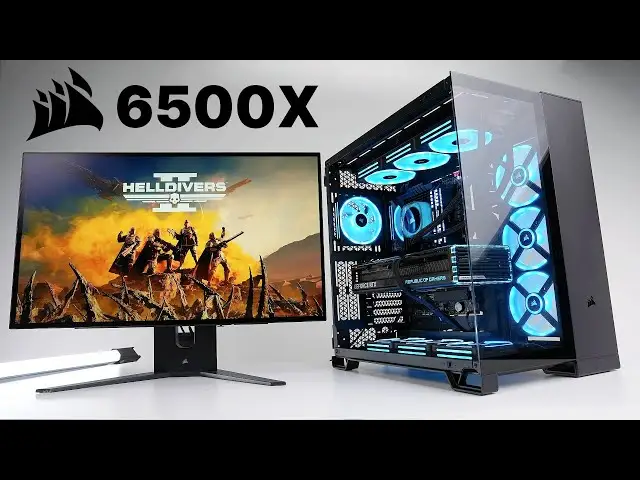
Final Verdict: Buy if you’re a custom PC builder who values clean aesthetics, superior airflow, and cable management. Avoid if you lack space for its width, need a lightweight case, or have incompatible motherboard USB headers. Pro tip from LDLC: “Vérifiez que votre carte mère possède suffisamment de prises USB 10G” to enjoy full front I/O.





