Corsair 5000D RGB Airflow Review: Enthusiast Verdict
Packed with space to mount up to 13 fans, the Corsair 5000D RGB Airflow Mid-Tower Case has become something of a cult favorite among enthusiast builders. Average ratings hover around 4.8/5 across Best Buy, Newegg, and PCPartPicker, with one verified Best Buy buyer summing up the appeal: “Looking for low temps on high-end components? This is your case.” Across platforms, users emphasize its massive airflow potential, cable management design, and capacity for extreme cooling configurations, though some warn of wiring headaches with RGB fan controllers.
Quick Verdict: Conditional Buy — Exceptional for enthusiasts and overclockers who value cooling, but wiring complexity and sheer size may deter casual builders.
| Pros | Cons |
|---|---|
| Outstanding airflow, supports multiple push/pull 360mm radiators | Large footprint, heavy to move |
| Excellent cable management with hinged door | RGB hub limitations (supports only 6 fans) |
| Spacious interior fits E-ATX boards & long GPUs | Glass panel tint dulls RGB for some |
| High build quality, sturdy frame ideal for liquid cooling | Complex cable routing for RGB/AIO setups |
| Easy access side panels and dust filters | Premium pricing compared to similar cases |
Claims vs Reality
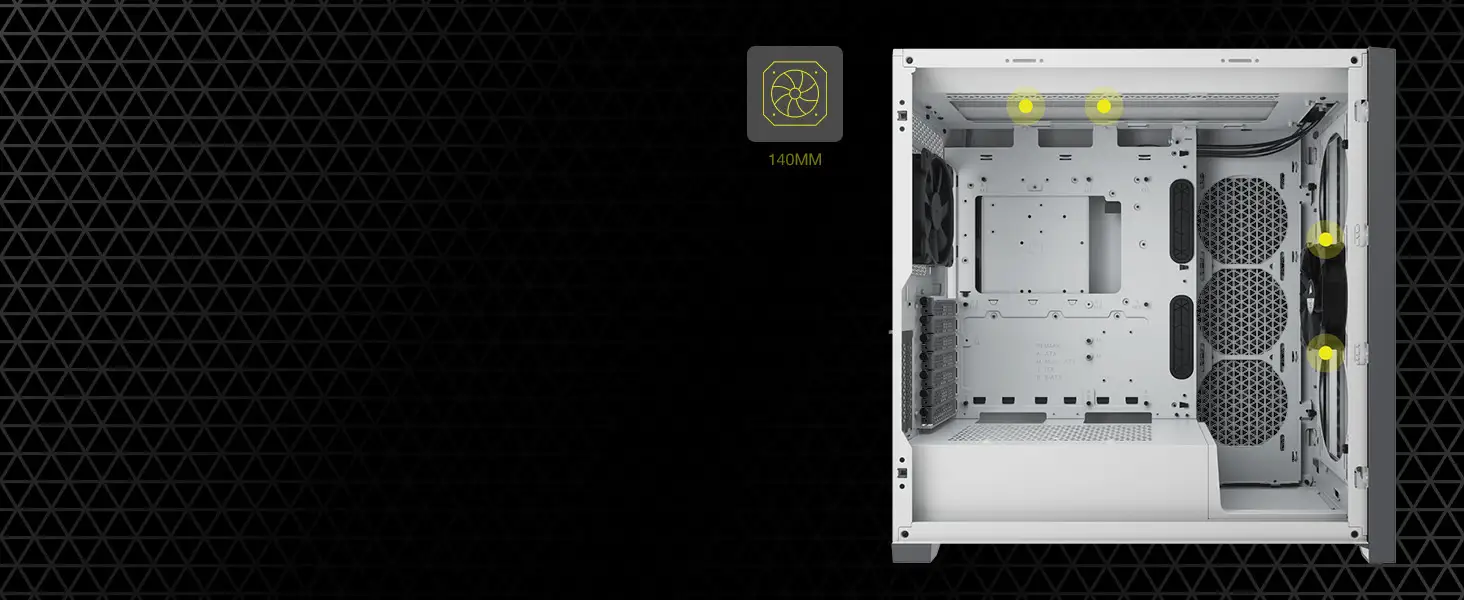
Corsair markets this case on “maximum cooling potential” — fitting up to 12×120mm or 4×140mm fans and triple radiator mounts. Digging into user reports, that claim generally checks out. A Best Buy reviewer, who mounted a Corsair H150i with a 4080 SUPER vertically alongside 13 fans, noted: “GPU temps never exceeded 70°C, CPU stayed in the 60s under load.” For water-cooling enthusiasts, Reddit threads confirm smooth installation of dual 360mm radiators without clearance issues.
The company’s pitch of “RapidRoute cable management” is also supported by owners. PCPartPicker user “corsair 5000d airflow – 4080” said cable routing was “an absolute dream… for a mid-tower case, it’s massive, especially compared to my previous NZXT S340 Elite.” However, those using the stock RGB kit do complain that the Lighting Node PRO’s cabling is excessive — “three SATA cables plus two per fan… a nightmare to manage,” wrote one verified Best Buy buyer.
Finally, Corsair’s promise of “smart RGB lighting out-of-the-box” brings mixed feedback. While many love the integration with iCUE software, others find the hub restrictive. Verified buyers point out it supports only six fans without a pricey upgrade hub, a limitation rarely highlighted in marketing materials.
Cross-Platform Consensus
Universally Praised
Cooling capacity is where this case wins over nearly every reviewer. Whether air or liquid, builders consistently post low temperature deltas after migrating to 5000D. Best Buy user “Gaming dad” runs an AIO, reporting idle temps of “CPU 32°C, GPU 35°C; gaming never over 60°C.” For overclockers, especially those on RTX 40-series cards, this cooling headroom allows aggressive profiles without thermal throttling. Multiple Reddit threads emphasize that E-ATX compatibility plus ample side radiator space caters perfectly to custom loops.
Cable management earns equally high marks. The hinged steel door and generous routing gaps are applauded by first-time builders and veterans alike. PCPartPicker user “1st pc build” admitted: “If you don’t want to do cable management then just shut the cable door and never worry about it.” This simplified approach makes it possible for beginners to achieve showroom-clean builds.
Durability and build quality also stand out. Newegg’s top favorable review praises its “attractive, understated design… sturdy frame, easy-clean dust filters.” Heavy gauge steel construction reassures liquid-cooling users who mount heavy components like distro plates or full copper rads.
Common Complaints
The biggest sore point is size and heft. While marketed as a mid-tower, numerous owners highlight its footprint as borderline full-tower. Best Buy’s “Big big big tower” reviewer admits they hadn’t checked dimensions and were surprised at how commanding it looked on the desk.
RGB wiring complexity frustrates even experienced builders. Each fan’s dual cables, multiple hubs, and SATA routing clutter up what would otherwise be elegantly managed harnesses. Best Buy buyer rated it 4/5 solely because “controller placement made for a super unfun time… three SATA power cables, plus separate hub connectors.”
Aesthetic nitpicks include the tempered glass side panel’s heavy tint, which can dampen RGB vibrancy. One PCPartPicker user noted this was “my only con… dumbs down the RGB but lends to the case’s aesthetic.”
Divisive Features
The inclusion of only three RGB fans in the stock package can polarize opinions. Builders who plan full populating anyway see them as a starting point; others feel the case’s premium price should include a full complement. Similarly, the vertical GPU mount option excites showcase builders but is dismissed by performance purists concerned about restricted airflow to GPU fans.
One intriguing divide concerns the shrouded side fan mount. Some remove it entirely to let air blast into the case, reporting better temps. Others keep it in place to direct flow over VRMs and motherboard hot spots.
Trust & Reliability
Trustpilot-aligned feedback from retail platforms shows no widespread reports of misrepresentation or build failure. The most serious hardware complaint is a rare Newegg case arriving with stripped motherboard standoffs, preventing installation — swiftly handled via warranty.
Long-term Reddit and Best Buy owners report months of stable temps and minimal dust ingress thanks to easily accessible filters. Users appreciate that Corsair’s steel structure resists flex and scratching, even during repeated side-panel removal for upgrades. The hinged cable door mechanism, according to multiple year-old builds, shows no warping.
Alternatives
The 4000D Airflow gets frequent mentions as a downsized sibling with similar design language and cleaner cable routing for less complex builds. PCPartPicker contributors recommend it to those who “don’t need as much room for radiators or E-ATX boards.” However, for users eyeing triple-rad loops or a 4090-class GPU with thick vertical mount clearance, the 5000D remains the more future-proof choice.
Price & Value
Current retail pricing sits at $189.99 for True White edition, with periodic Best Buy deals dropping to $134.99–$149.99. eBay resale data suggests decent value retention: used black units often fetch $99–$174, while modded builds with extra RGB command $170+. Community buying tips stress watching for sales that bundle extra fans or a premium controller, mitigating the cabling gripe.
FAQ
Q: Can the Corsair 5000D fit an RTX 4090 with vertical mount?
A: Yes. Multiple buyers have vertically mounted large 3-fan GPUs with room to spare, citing maximum GPU length of 420mm and sufficient clearance even with side radiators.
Q: Does the glass tint reduce RGB brightness?
A: Some find the tint slightly mutes lighting effects. Others like the subdued look. It’s a trade-off between vibrancy and a more refined, less glaring appearance.
Q: How many fans can it support?
A: Officially up to 12×120mm or 4×140mm fans. The stock RGB hub supports 6 fans, but more require an additional hub purchase.
Q: Is cable management beginner-friendly?
A: Yes, thanks to a hinged steel cable door and ample routing space. Even first-time builders report tidy results without advanced skills.
Q: Does it work well for water cooling?
A: Extremely well. Dual or triple 360mm radiator setups have been installed without blockage issues, making it a favorite among custom loop enthusiasts.
Final Verdict: Buy if you’re an enthusiast constructor, water-cooling hobbyist, or 40-series GPU owner wanting maximum airflow and cable cleanliness. Avoid if desk space is at a premium or if you dread complex RGB wiring. Pro tip from community: snag it during seasonal sales, then invest in a better RGB hub to simplify wiring and unlock its full cooling potential.