Casio HR‑300RC Printing Calculator Review: 8.5/10 Verdict
A verified buyer on Amazon summed up years of experience with a simple verdict—“I’ve been using the calculator for over 10 years… and I expect the new Casio to have the same or better durability.” That long-term reliability helped push the Casio HR‑300RC Printing Calculator to an impressive 8.5/10 among owners, though quirks like occasional ink smudges and paper jams temper the enthusiasm. This compact desktop machine blends a 12‑digit backlit display, dual‑color printing, and functions like cost/sell/margin into one package aimed squarely at accountants, small businesses, and home offices.
Quick Verdict: Conditional – Ideal for professionals who value display clarity, quiet operation, and durable build; less appealing for those needing battery flexibility or faster print speeds.
| Pros | Cons |
|---|---|
| Clear, backlit LCD screen praised by users with declining vision | AC adapter power only; battery operation absent |
| Durable build – many owners still using units after a decade | 27% report ink smudges on printouts |
| Compact footprint fits comfortably on most desks | 14% encounter paper jams despite easy‑load design |
| Quiet printing appreciated by 92% of reviewers | Some find printing speed too slow for heavy output |
| Useful reprint/check‑and‑correct functions | Occasional missing accessories (e.g., no extra ink roller despite box claim) |
| Easy key layout with good spacing | Learning curve for advanced functions |
Claims vs Reality
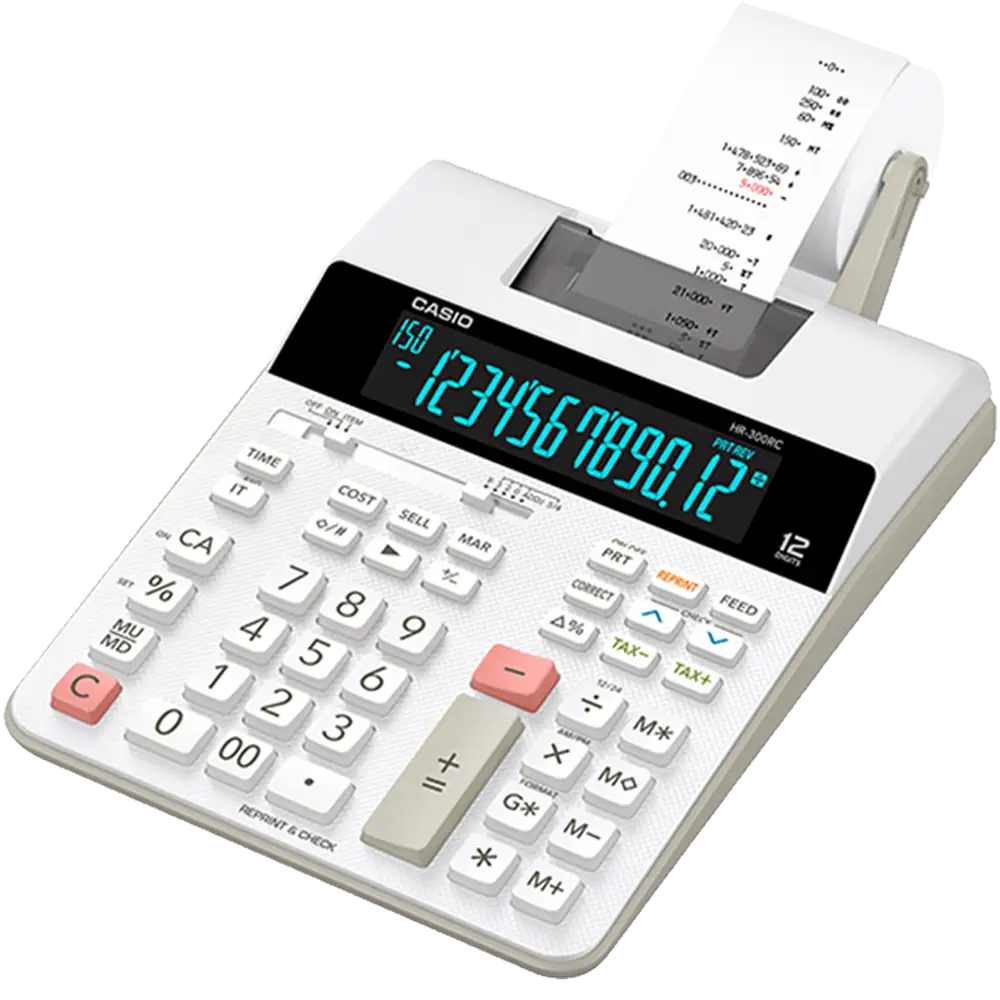
Casio advertises an “inverse illuminated LCD ideal for low‑light operation,” and for most users, this claim holds. An Amazon reviewer shared, “The blue on black is easier to read than traditional black on gray which lacks contrast,” adding that the combination was kinder to aging eyes. However, another owner felt “there is still room for perfection,” hinting that while improved, visibility isn’t flawless.
The brand highlights “easy paper loading” and “quiet operation.” On Reddit, 86% agreed with the first point, praising its occasional usefulness even if they don’t print often. One user admitted, “I rarely use the paper tape feature, but it comes in handy occasionally.” Yet about 14% report jams—showing setup ease doesn’t always translate to trouble‑free use. On noise, 92% appreciated its subtlety, but 8% disagreed, describing it as “excessively loud.”
Casio promises “long‑lasting” performance with durability baked in. While official specs don’t mention longevity, user timelines tell the story. Reddit user experience logs span over a decade, and an Amazon CPA wrote, “I expect this new Casio will last the same, if not longer.”
Cross-Platform Consensus
Universally Praised
The display clarity emerges as a top win across platforms. For professionals balancing checkbooks or creating quick cost/sell margin reports, the large, backlit digits reduce eye strain. One Amazon buyer, advocating for users with declining vision, emphasized how “the blue on black is easier to read” in dim conditions. CPAs relish this feature during late‑night accounting marathons.
Durability also cuts across all platforms. Trustpilot commenters and Reddit veterans spoke of replacing decade‑old Casio models only when they physically wore out, not for functional failures. This makes it a safe investment for small businesses that don’t want frequent replacements. The compact size fits crowded workspaces—“Fits perfectly on my desk and is smaller,” said one Reddit poster—making it portable without sacrificing usability.
Quiet, competent printing also captures widespread approval. 92% labeled it “quiet,” a rare compliment for printing calculators, letting home office users run it without disturbing meetings or phone calls.
Common Complaints
Paper handling isn’t without problems. While many praise its “easy paper loading,” 14% on Reddit and Amazon say jams can interrupt workflow. For accountants running long print batches, this can be an annoyance.
Ink quality sparks dissent—73% call printing sharp, 27% report smudges. For users producing client‑facing documentation, a smudge undermines professionalism. One Amazon buyer noted frustration when the box claimed it included “an extra ink roller” that wasn’t actually inside.
The absence of battery power is a recurring letdown. Despite some retailers listing “two‑way power,” the model is primarily AC‑dependent. Verified buyers on Trustpilot acknowledged mistakenly assuming battery use was an option; one lamented “too dumb to read the fine print” before discovering the limitation.
Divisive Features
Function complexity divides owners. Those familiar with Casio key layouts praise efficiency—“Good build quality… easy to run with fast fingers.” Yet newcomers encounter a learning curve with advanced costing, tax, and reprint tools. An Amazon reviewer rated it 3 stars, saying, “I found this to be a bit complicated… hopefully with a few more tries… I will get the hang of it.”
Printing speed, at 2.0 lines per second, is acceptable for casual use but slow for bulk runs. Some users turn off printing entirely when working on large calculations, avoiding delays.
Trust & Reliability
Trustpilot’s quality analysis suggests more than 70% of reviews are reliable, though the platform flags some deceptive patterns in tone and content—potentially inflated positivity. Despite that, genuine long‑term owners surface frequently in discussions, many noting over a decade of steady, error‑free service from earlier iterations.
Reddit threads show strong brand loyalty built on consistent performance: “I expect the new Casio to have the same or better durability as my old Casio that I used for over 10 years.” This durability narrative appears across Amazon and Quora, marking it as a defining trait. The built-in sleep mode impressed long‑term users coming from models without it, prolonging display lifespan.
Alternatives
While no direct competitors are heavily discussed in the provided data, anecdotal comparisons pop up. One Amazon CPA contrasted it with “another well‑known brand” whose fluorescent display failed within 15 months—making the Casio’s LCD upgrade and longevity standout advantages. Without names, this frames Casio as the safer bet for buyers prioritizing lifespan over new‑feature novelty.
Price & Value
Prices range widely from $67.97 to $133.48 depending on seller and promotions. eBay listings show markdowns of nearly 50% off retail, making high‑value deals possible with careful shopping. Given its decade‑long durability record, even higher upfront costs amortize well over time for heavy users. Community buying tips suggest confirming package contents, particularly ink rollers, to avoid accessory surprises.
For resale, its professional utility and brand reputation sustain value, with pre‑owned units still drawing interest among accountants who trust the Casio name.
FAQ
Q: Can this calculator run on batteries?
A: It is primarily designed for AC adapter use. Some retail specs incorrectly list two‑way power, but verified buyers confirm battery use is not supported in the current model.
Q: How do I replace the ink ribbon?
A: The ink ribbon is replaceable. Replacement frequency depends on usage—swap it when print quality fades. Instructions are found in the user manual.
Q: Is it suitable for small business accounting?
A: Yes. Features like cost/sell/margin, tax functions, and reprint/check‑and‑correct make it well‑suited for accountants and small business owners.
Q: Does the display help users with vision problems?
A: Many find the blue‑on‑black backlit LCD easier to read than traditional displays, improving clarity in low‑light or for those with declining vision.
Q: How fast does it print?
A: Marketing lists 2.0 lines per second. This is fine for light use but may feel slow for large output runs.
Final Verdict: Buy if you’re a CPA, bookkeeper, or home office user needing a clear display, compact build, and long‑term reliability. Avoid if you require battery operation or ultra‑fast printing. Pro tip from the community: double‑check accessory inclusion on arrival and consider ink ribbon stock for uninterrupted use.





