Casio HR-170RC Review: Great Tape Tool, Loud Setup
The tape is the selling point—and people keep coming back to it. One Best Buy reviewer summed up the vibe: “people laugh at me for having a calculator with paper, but it has saved me countless times because i can review the tape to ensure that i haven't made any mistakes.” That “old-school” proof trail, plus a compact footprint, is why Casio HR-170RC Printing Calculator keeps landing on desks during tax season.
Casio HR-170RC Printing Calculator verdict: strong pick for home-office accounting and tax prep, with recurring complaints about noise, confusing instructions, and occasional setup friction. Score: 8.6/10.
Quick Verdict
Conditional — great if you want a compact, easy-to-read printing calculator and you’ll actually use the tape; avoid if you’re noise-sensitive or want “plug-and-play” simplicity.
| What matters | What people liked | What people didn’t like | Sources |
|---|---|---|---|
| Ease of use | “easy to use and to read” | “to complicated” | Best Buy, Staples |
| Print usefulness | “prints well… you can easily reprint a receipt” | “printing errors randomly” | Best Buy, Fakespot (Trustpilot feed) |
| Size/desk fit | “small and compact” / “compact size saves space” | Some expected smaller: “larger than i thought” | Best Buy |
| Readability | “nice and large… easy to read” / “big buttons and clear display” | — | Best Buy |
| Noise | “noise level is average” (for category) | “it makes too much noise!!” / “loud” | Staples, Best Buy |
| Setup/instructions | Some learned via videos | “instructions are virtually useless” / “Instructions are not very good at all” | Fakespot, Staples |
Claims vs Reality
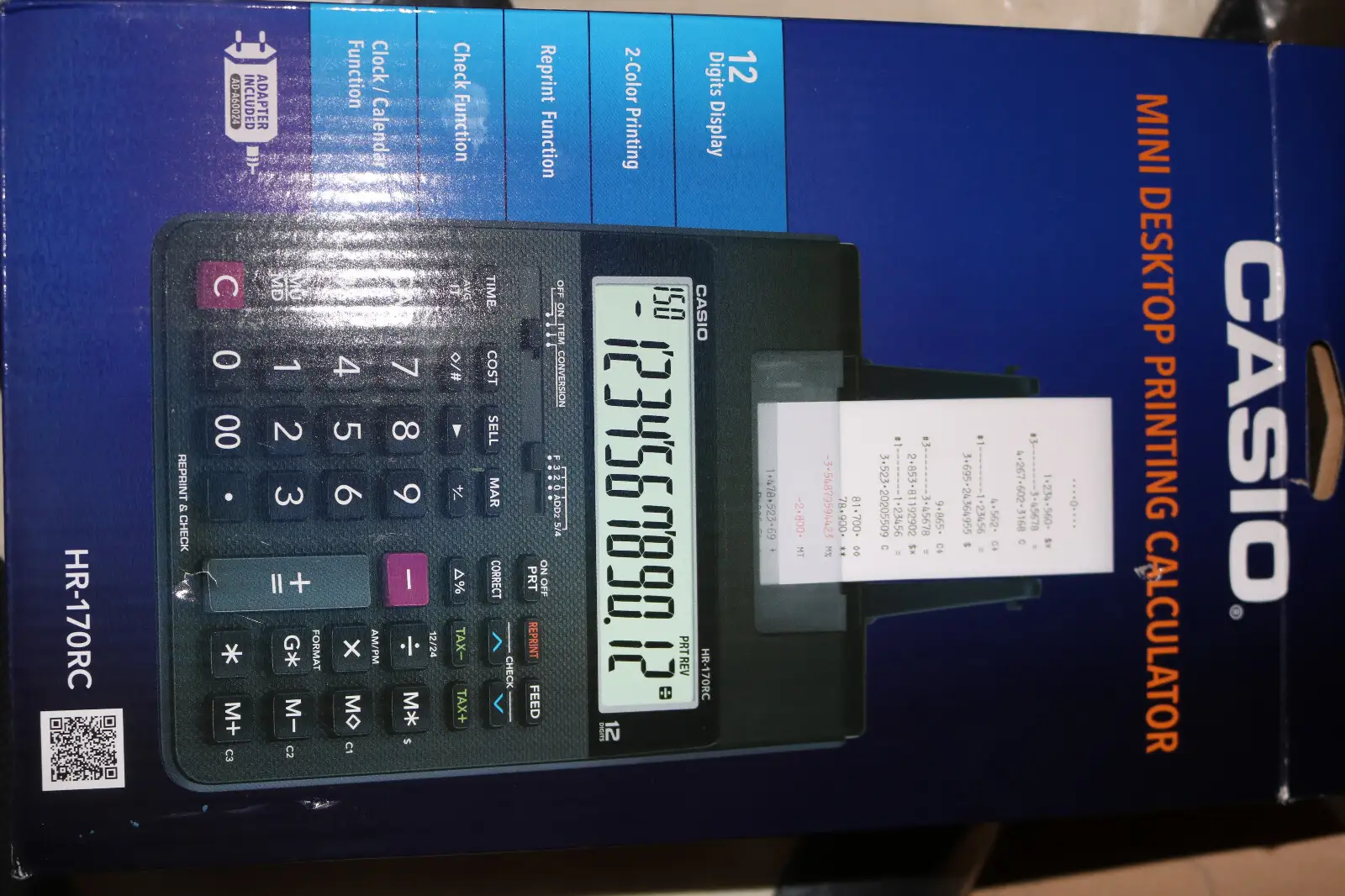
Casio and retailer listings pitch a compact, dual-power, two-color printing calculator with business-friendly extras like tax keys, reprint, and review/correction. Digging deeper into user reports, the broad shape holds—but the lived experience depends heavily on why you bought it (tax prep vs. basic adding) and what annoys you (noise, documentation, or quirks in how totals accumulate).
Claim 1: “Compact design” that’s easy to use anywhere.
A recurring pattern emerged: users genuinely like the desk footprint and portability. A Best Buy reviewer said, “love it. small and compact. easy to use. battery operated. just what i was looking for.” Another added it’s “nice compact size but still has print on paper capability.” For home offices, that compactness feels like a way to keep a “tape calculator” without sacrificing workspace.
But “compact” doesn’t always match expectations. One Best Buy customer admitted, “i ordered this and discovered it was larger than i thought but i love it.” The implication: for buyers upgrading from truly tiny desktop adders, the HR-170RC can feel bigger than imagined—even if they still end up satisfied once they see the larger display and keys.
Claim 2: Two-color printing and clear output to reduce errors.
On paper, the two-color idea is straightforward: negatives stand out. Users echoed that practical benefit. One Best Buy reviewer wrote, “i like that it has red ink to show negative numbers,” linking the color feature to fewer read-back mistakes during longer work sessions.
Still, not every “clear printing” claim lands perfectly in real life. A verified review excerpt surfaced via Fakespot warns: “the ink is faint to begin with,” and another notes it “still has printing errors randomly.” Those reports don’t dominate the mainstream retailer reviews, but they’re important for anyone who relies on the printed tape as a record rather than a convenience.
Claim 3: Review/correction features for long calculations (150 steps).
This is where the HR-170RC seems to earn its keep for tax prep and verification work. Best Buy’s “review” fans describe it as a safety net: “the ‘review’ feature is a plus i will use. you can review previous operations and correct them if necessary.” Staples customers also pointed to correction as a standout; one said it has “a nice option to make a correction… and was impressed.”
The gap is that more features can also feel like more complexity. One Staples reviewer complained: “do not like it. to complicated, and l can't get it to shut off.” Another added, “Instructions are not very good at all. i yet am unable to rely on it.” For buyers who only want fast add/subtract with a tape, “loaded with features” can read as “more to learn than I wanted.”
Cross-Platform Consensus
Universally Praised
The strongest agreement across Best Buy and Staples is that Casio HR-170RC Printing Calculator feels like a practical tool for real paperwork—especially taxes, bills, and long columns where a phone calculator fails you the moment you forget a number. The appeal isn’t flashy; it’s accountability. One Best Buy reviewer called it “high tech old-school” and explained why: “it has saved me countless times because i can review the tape to ensure that i haven't made any mistakes.” That’s the core user story: when accuracy matters, the tape becomes a second set of eyes.
For tax preparers and home-office bookkeepers, the printer is the feature that turns a calculation into a record you can track. A Best Buy reviewer said it’s “great for printing long columns and taxes.” On Staples, another user described active tax-season use: “doing taxes right now and using the printer a lot to make entries onto the tax form from data on the printer.” In both cases, the benefit is workflow: instead of re-checking totals in your head, you check the tape.
Size and readability also show up repeatedly—but in a very specific way: people like “big buttons” and a “large” display in a unit that still fits on a desk. A Best Buy reviewer wrote, “nice size, big buttons and clear display,” and another said, “the display is nice and large so easy to read.” For users with spreadsheets, receipts, and forms spread around them, that readability reduces friction during repetitive entry.
Finally, simple satisfaction statements tend to bundle portability with printing reliability. On Best Buy, one person summarized their needs and the fit: “my requirement is a printing calculator that’s easy to use, which is exactly what this is… print quality is sharp and dark.” Another praised flexibility: “works great and can be battery operated to place anywhere.” Those stories align tightly with the marketed “dual-power” concept, even when users don’t mention the spec explicitly.
Common praise, in users’ words:
- Best Buy reviewer said: “love it. small and compact. easy to use… prints well and also you can easily reprint a receipt.”
- Best Buy reviewer said: “great calculator… nice size, big buttons and clear display.”
- Staples customer noted: “it does everything i want it to do but in a smaller size. it’s great!”
Common Complaints
Noise is the complaint that keeps resurfacing when people get specific. One Best Buy review is blunt: “loud, but compact and easy to use,” suggesting the tradeoff is acceptable but real. Staples customers are less forgiving at times—one wrote, “it makes too much noise!!” For quiet home offices or shared spaces, that printing sound can be the thing that turns a “helpful tape” into an annoyance.
Instructions and learning curve are another recurring pain point, especially for buyers who expected a simple add-and-print machine. A Fakespot-surfaced verified excerpt complains, “the instructions are virtually useless due to really bad translation,” and a Staples review similarly says, “Instructions are not very good at all. i yet am unable to rely on it.” When documentation fails, users often compensate by searching for videos; one Staples reviewer wrote, “i watched videos and checked the reviews,” implying the manual alone didn’t do the job.
Setup issues show up as real-world friction rather than minor nitpicks. One Staples customer shared: “bought at store. couldn't put it together. went back to store and an employee did it for me.” Another said, “can't get it to turn on.” These aren’t broad trends across all reviews, but they matter because they’re the kind of failure that stops work completely—exactly when buyers often need it (tax time).
Supply/consumables complaints appear in the “paper roll” and ink ecosystem. A Best Buy reviewer noted, “the roles paper hard to find… just regular calculator rolls… scarce,” framing it less as a product flaw and more as a shopping hassle. Meanwhile, Fakespot excerpts emphasize the starter roll limitation: “the tiny roll of paper that comes with it is enough for set up and thats it” and “only came with one paper roll as well.” For anyone who expects to start printing heavily out of the box, this becomes an immediate “extra trip” problem.
Common complaint themes, in users’ words:
- Staples customer said: “it makes too much noise!!”
- Staples customer said: “do not like it. to complicated, and l can't get it to shut off.”
- Verified review excerpt (via Fakespot) noted: “the tiny roll of paper that comes with it is enough for set up and thats it.”
Divisive Features
“Loaded with features” is both a compliment and a warning sign. A Best Buy reviewer praised the depth: “this is loaded with features i will probably never use… the ‘review’ feature is a plus.” But a Staples reviewer pushed the opposite direction: “do not like it. to complicated.” Digging deeper into user reports, the dividing line looks like intent: if you’re doing tax prep, correction/review can feel essential; if you’re replacing a simple adding machine, extra modes feel like friction.
Noise is similarly split between “acceptable for a printing calculator” and “too much.” One Staples reviewer defended it with context: “some people mentioned it was loud. the noise level is average compared to other printing calculators.” Yet another Staples user simply couldn’t tolerate it: “it makes too much noise!!” The same hardware trait becomes either “normal category behavior” or a dealbreaker depending on environment and expectations.
Even the “how it totals” behavior can surprise long-time adding machine users. A Staples reviewer compared it to an older Casio: “old casio gave separate totals per page… this one gives total of first but adds first in when getting total of second. not what i was hoping for.” For anyone with entrenched habits from previous tape calculators, that difference isn’t cosmetic—it changes how they reconcile pages.
Trust & Reliability
On review integrity, the available Trustpilot-related feed comes via Fakespot’s analysis of review patterns, which says “over 90% high quality reviews are present” and flags “minimal deception involved.” That doesn’t guarantee every review is real, but it suggests no obvious mass-manipulation signal in the sampled set.
Reliability in day-to-day use shows a split between “it just works” and “I can’t depend on it yet,” often tied to setup and instructions. Staples has both ends of the spectrum: one user wrote, “works very well,” while another said, “Instructions are not very good at all. i yet am unable to rely on it.” The investigative takeaway: confidence tends to rise once users get past the early learning curve, but documentation quality can slow that down.
Long-term durability stories are limited in the provided community excerpts, but there is at least one continuity signal: a Staples reviewer said, “the one i bought was the same as the one i bought probably five years ago it seems to work really good.” That kind of repeat purchase suggests the model line meets expectations for routine home-office use.
Alternatives
Only a few alternative models are explicitly surfaced in the provided data, and even then mostly as listings rather than detailed user comparisons. The most concrete “alternative” evidence comes from users referencing their prior calculators rather than naming competitors. For example, a Staples reviewer contrasted behavior against an “old casio” that handled page totals differently: “not what i was hoping for.” Another Best Buy reviewer framed the alternative as using a phone calculator—and rejected it: “much easier than trying to use my phone.”
Given what’s available, the real choice reflected in user stories is less “brand vs brand” and more “tape calculator vs phone/app.” The HR-170RC wins when you need a printed audit trail, especially for “printing long columns and taxes,” and loses when you want silence and zero learning curve.
Price & Value
Retail pricing in the provided data clusters around the mid-$30 to ~$40 range in the US: Amazon shows about $34.46 (with a list price near $47.96), Best Buy lists $39.99, and Casio’s own page references $40.24. That consistency supports the idea that buyers aren’t chasing bargain-bin deals—they’re paying for a specific workflow (printed tape, two-color printing, correction/reprint).
Resale value evidence from eBay shows meaningful spread depending on condition. A used listing appears at $14.94 + $8.70 shipping, while a “brand new” listing is around $26.00. There’s also an auction result showing a very low sale price ($3.95) labeled “appears new,” which looks like an outlier from an auction environment rather than a typical market price. The takeaway for value hunters: buying used can be attractive, but shipping and completeness (paper/roller/parts) can erase savings quickly.
Buying tips are embedded indirectly in complaints: plan for supplies early. Users mention the starter roll being tiny and paper roll availability being “scarce.” If your use case is tax prep, those small frictions can matter because you often need the tool immediately.
FAQ
Q: Is the Casio HR-170RC easy to use for taxes?
A: For many buyers, yes—especially because the printed tape helps verify entries. A Best Buy reviewer called it “great for printing long columns and taxes,” and a Staples customer said they were “doing taxes right now and using the printer a lot” to transfer figures onto forms.
Q: How loud is the printer in real use?
A: Noise is one of the most repeated complaints. A Staples customer wrote, “it makes too much noise!!” and a Best Buy reviewer described it as “loud, but compact and easy to use.” Another Staples reviewer argued it’s “average compared to other printing calculators,” so tolerance varies.
Q: Do the instructions help you get started quickly?
A: Some users struggle with the documentation. A verified excerpt via Fakespot says, “the instructions are virtually useless,” and a Staples reviewer added, “Instructions are not very good at all.” One Staples customer said they “watched videos,” suggesting external help may be useful.
Q: Does it come with enough paper to begin printing?
A: Several comments suggest the included roll is minimal. A verified excerpt via Fakespot notes, “the tiny roll of paper that comes with it is enough for set up and thats it,” and another says it “only came with one paper roll.” Heavy users may want to buy extra rolls upfront.
Q: Is the size truly compact for a desktop printing calculator?
A: Many buyers praise the footprint, calling it “small and compact” and saying it “saves space on desk” (Best Buy). But one user also said it was “larger than i thought,” so expectations matter—especially if you’re used to very small adders.
Final Verdict
Buy Casio HR-170RC Printing Calculator if you’re a home-office user, tax filer, or bill-payer who wants a “tape calculator” you can double-check—because, as one Best Buy reviewer put it, “i can review the tape to ensure that i haven't made any mistakes.” Avoid it if you’re noise-sensitive, hate feature-heavy controls, or need crystal-clear instructions from day one.
Pro tip from the community: budget for supplies immediately—users warn the starter paper roll is “enough for set up and thats it,” and another buyer flagged paper rolls as “hard to find.”





