Canon TS5320 Printer Review: Strong Photos, Slow Speed
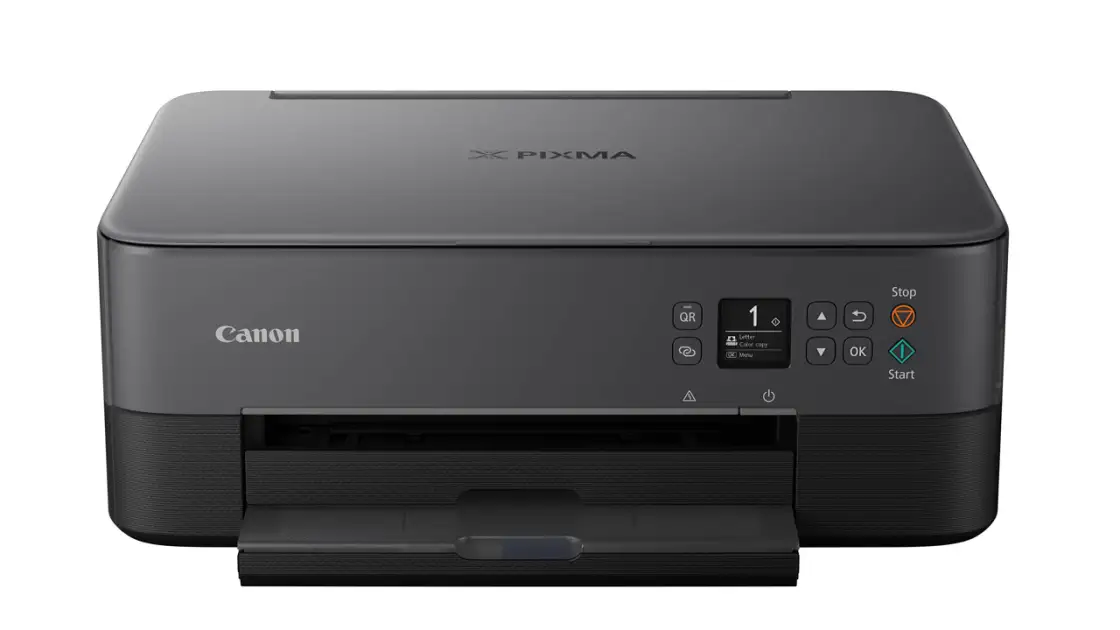
The Canon TS5320 All in One Wireless Printer lands in the middle of the pack with a score of 7.5/10—praised for photo printing and connectivity, but frequently criticized for slow speeds, high ink consumption, and setup quirks. As one Walmart buyer summed it up: “Great printer for the price… but the ink goes quick and paper jams are annoying.”
Quick Verdict: Conditional buy
| Pros | Cons |
|---|---|
| Excellent photo print quality—vibrant, detailed | Slow printing for both black and color documents |
| Strong wireless connectivity options including Wi-Fi, Bluetooth, AirPrint | Low page yields mean frequent cartridge replacements |
| Compact build, fits in small home offices or dorms | Ink costs can add up quickly |
| Dual paper feeds for plain and photo paper | Paper jams reported, especially on setup |
| Easy smartphone printing via Canon Print app | Small OLED display, no touchscreen |
| Borderless photo printing supported | Scanner lacks automatic document feeder, making multipage scans tedious |
Claims vs Reality
Canon markets the TS5320 as “easy to set up” with wireless connect for instant smartphone pairing. While some owners back this up—Walmart customer Katie Doe celebrated that it “prints from all laptops and our phones”—others found setup more frustrating than promised. Best Buy reviewer reported they “missed the short return window” after failing to get AirPrint working reliably, and another Walmart buyer described spending “3 days playing with settings” just to connect.
The dual paper feed is touted as a time-saver, allowing simultaneous loading of plain and photo paper. Enthusiasts like Lonniey on Walmart enjoyed “printing smaller sized paper from the rear feed” without swapping trays. However, multiple users—like the Trustpilot reviewer who returned the printer—encountered persistent paper jams, sometimes “10-20 pieces… every time” during setup attempts, undermining the claim of effortless handling.
Canon also promises “sharp text documents and great looking photos” from its hybrid ink system. Here reality mostly aligns: Rtings.com confirmed “great photo printing quality… rich in detail,” and 86% of BestViewsReviews feedback agreed on print quality. But complaints persist over streaks and faded output, with one BestViewsReviews user warning of “lines running through the whole image… not suitable for printing documents or drawings.”
Cross-Platform Consensus
Universally Praised
Across Amazon, Walmart, BestViewsReviews, and Reddit, photo quality is the biggest win. A Best Buy reviewer called it “excellent printer for photos,” and Rtings found images “full of vibrant colors” with natural tones. This makes it appealing for home users prioritizing family snapshots or creative projects. Hobbyists benefit from the Canon Creative Park integration—Reddit descriptions highlight printing “greeting cards to 3D paper crafts” seamlessly from the app.
Wireless versatility also garners consistent praise. The Canon Print app earns an “outstanding” rating from Rtings, letting users print, scan, and even perform maintenance from smartphones. Apple AirPrint and Mopria compatibility extend ease to iOS and Android devices. For students, this means printing assignments directly from cloud storage without fuss—BestViewsReviews noted strong “software compatibility” for most tasks.
Compactness is another clear plus: at under 6 inches tall, it saves desk space. Walmart’s Stev liked that “doesn't take up much room,” and Best Buy purchasers often recommended it for small home offices or dorm rooms. Dual paper feeding also gets applause from organized users who switch between tasks—Lonniey even bought a second unit for a friend after enjoying the feature.
Common Complaints
The most repeated frustration is low ink yield and high running costs. Rtings measured just 146 black pages and 191 color pages per standard cartridge. Best Buy reviewers reported “burns through ink quickly” after minimal use, and Walmart buyers pointed to “wasteful usage” with combined color cartridges forcing early replacements.
Speed is another sore point. Despite Canon’s spec of 13 ppm black, 6.8 ppm color, real-world experiences tell otherwise. Rtings clocked 6 ppm for text and 3 ppm for color documents. Best Buy users labeled it “very slow” and “barely print one page in a minute.” For small business owners needing volume, this becomes a dealbreaker.
Connectivity reliability draws mixed feelings. While many succeed with Wi-Fi and Bluetooth, others run into recurring disconnects—BestViewsReviews noted “limited connectivity range,” and Trustpilot reviews complained it “would not stay connected… returning it tomorrow for HP.” Bluetooth pairing, in particular, is hit or miss; one BestViewsReviews user was “unable to connect… via bluetooth” despite advertising.
Scanner limitations annoy multi-page document handlers. Without an automatic document feeder, even Rtings acknowledged “time-consuming” tasks when scanning longer papers—a Best Buy complaint illustrates this: “scan long documents… frustrating.”
Divisive Features
The compact OLED display splits opinion. Canon frames it as stylish and clear, yet Best Buy’s “tiny display” comment is common, especially among those expecting touchscreen ease. For tech-savvy users, button navigation is a non-issue; for casual family use, it can slow down operations.
Color accuracy also divides. Photo hobbyists find it acceptable, but Rtings recorded “noticeably inaccurate” blues and greens, making it less appealing for professional graphic output. Walmart reviewers similarly disagreed on color vibrancy, with some praising sharp results and others noting “washed out” prints on plain paper.
Trust & Reliability
Durability confidence is mixed. While some Best Buy owners keep it running happily in dorm rooms with “no complaints,” others face early mechanical faults like paper trays refusing to feed. Trustpilot and Best Buy reveal jam issues during first-day setup, prompting returns.
Ink longevity raises reliability concerns—several reviewers across platforms saw fading ink after minimal use, even when idle. Even casual users like one Walmart buyer noticed rapid depletion: “sounds like it goes thru a head cleaning… inks will be used up rapidly.”
No widespread scams or counterfeits emerged, but short return windows, as noted by Best Buy customers, make buyer caution wise—test heavily within the first weeks to ensure your unit operates as promised.
Alternatives
Within feedback data, HP all-in-one printers appear as the main rival. Disappointed Canon buyers—like the Trustpilot reviewer—switched to HP units, reporting easier setup and steadier Wi-Fi. While HP may lack the Canon’s creative photo integration, they typically offer more consistent document output and better handling of high-volume tasks.
Another comparative mention is Epson, with one Walmart dissatisfied user calling their Epson “superior” despite lacking full ink at purchase. For office-heavy workloads, Epson's reliability appears to outpace Canon’s in these accounts.
Price & Value
Market listings show open-box TS5320 units from $27.50 to $70 on eBay, far below its $99.99 Best Buy rate and Canon’s $129 MSRP. Resale values remain modest due to budget-tier positioning, but this works for bargain hunters eyeing secondary markets.
Value ultimately hinges on usage type. For light photo printing, low page yield matters less, making it cost-effective. For document-heavy environments, ink and time costs balloon quickly. Walmart buyers like Lonniey saw extra value in features (“bought for a friend too”)—underscoring that knowing your needs upfront is critical.
FAQ
Q: Does the Canon TS5320 support double-sided printing?
A: Yes, it offers automatic duplex printing for documents, which saves paper. However, one Walmart reviewer noted misaligned pages when attempting duplex mode.
Q: Can I print directly from my smartphone?
A: Absolutely. With Canon Print app, AirPrint, and Mopria support, you can print directly from Android and iOS devices without extra drivers.
Q: How good is the photo printing quality?
A: Users and independent tests agree it’s excellent—vivid colors, solid detail—but blues and greens may be slightly inaccurate for professional work.
Q: Is it easy to set up?
A: Opinions vary. Some buyers say setup is “a breeze,” others needed days troubleshooting wireless connections, especially AirPrint and Bluetooth.
Q: What’s the biggest drawback for office use?
A: Low page yields and slow print speeds make it inefficient for heavy black-and-white document printing in business settings.
Final Verdict: Buy if you’re a home user or student prioritizing high-quality photo printing and occasional documents, with patience for slower speeds. Avoid if you’re running a document-heavy office where ink yield and speed are critical. Pro tip from the community: invest in XL cartridges early—they reduce replacement frequency and may save costs over time.





