Canon PIXMA TS702a Review: Photo Quality vs Ink Costs
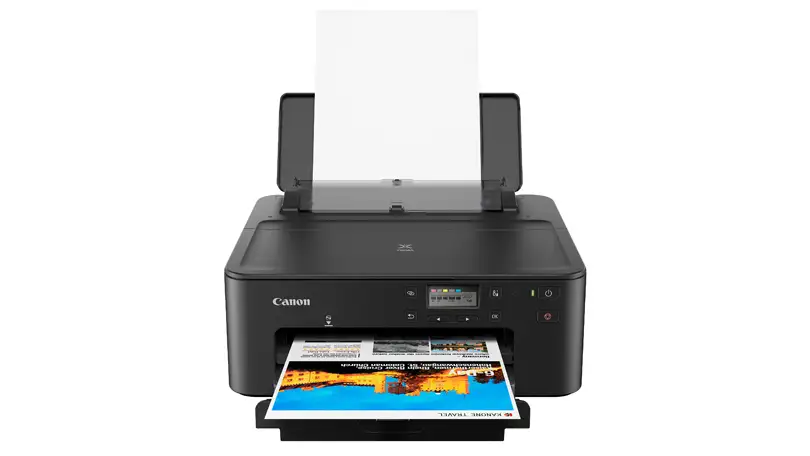
Digging into user reports, the Canon PIXMA TS702a Wireless Printer emerges as a compact, high-capacity inkjet aimed at home and small office use, but with a unique split between expectations and actual experience. Scoring 7.1/10 across aggregated reviews, it’s widely praised for vibrant photo printing and versatile connectivity, yet marred by low black ink yields, occasional alignment issues, and its print-only limitation.
Quick Verdict: Conditional — Best for photo-focused home users who value connectivity, less ideal for high-volume monochrome printing.
| Pros | Cons |
|---|---|
| Excellent photo print quality with vibrant colors | Low black page yield, frequent cartridge changes |
| Large paper capacity (350 sheets) | No scanner or copier function |
| Multiple connectivity options (Wi-Fi, Ethernet, AirPrint, Mopria) | Occasional alignment issues |
| High-yield XL/XXL cartridges available | Tedious Wi-Fi setup reported |
| Compact footprint with fast warm-up | High maintenance requirements if printing a lot |
Claims vs Reality
Canon markets the PIXMA TS702a as “built for fast print speeds” with up to 15 ipm for monochrome and 10 ipm for color, plus photo prints in 21 seconds. While users confirm warm-up is quick, actual sustained speeds vary. RTINGS.com found it “only pushes nine black and seven color prints per minute,” slightly below the advertised rate. This discrepancy matters most for office users expecting high throughput.
Another key claim is “high performance for home & office” thanks to a 350-sheet capacity and compatibility with XL/XXL cartridges. While the capacity is indeed generous, multiple Reddit and Consumer Reports users note that black ink runs out long before the paper tray empties. One verified buyer said, “You’ll run out of black ink before you run out of sheets in the cassette.”
Canon also touts “great looking borderless photos”. Here, reality aligns more closely with marketing — RTINGS.com praised “photos look vibrant and detailed… very good color accuracy,” and Trustpilot reviewers highlighted “fantastic draft quality” and “slightly better than my HP OfficeJet 3830” for 5x7 prints.
Cross-Platform Consensus
Universally Praised
For casual photographers and creative home users, the TS702a’s photo output is a standout. RTINGS.com emphasized its “good color accuracy and fairly wide color gamut,” and Consumer Reports noted photos were “fine for casual users.” Trustpilot feedback confirms satisfaction: “The photo quality is good… prints on printable CDs.” This makes it appealing for hobbyists printing family albums or custom media. High-yield cartridge options extend usability for those printing color-heavy projects.
Connectivity earns high marks across platforms. Users appreciate the flexibility of Ethernet, Wi-Fi, Wi-Fi Direct, AirPrint, Mopria, and the Canon Print app. A verified Amazon buyer noted, “It works from another room and is fast,” while Reddit discussions point out that multiple device households — including mixed OS environments — benefit from this versatility.
Large paper capacity is another uncontroversial win. With a 250-sheet front cassette and 100-sheet rear tray, it supports varied media without constant refilling. RTINGS.com also highlighted the ability to print custom sizes and specialty media like CDs/DVDs, greeting cards, and magnetic photo paper.
Common Complaints
Low black ink yield is the most consistent frustration. RTINGS.com measured an estimated 227 black pages per cartridge, and Consumer Reports described replacement intervals as “very short… about 6 months” for typical use. For high-volume document printing, this becomes costly and inconvenient. One Trustpilot reviewer warned, “You will need to replace the ink cartridges pretty soon after purchasing… the ones that come with the printer only last for about 100 color photos.”
Alignment issues affect both text and graphics. RTINGS.com found “some alignment issues persist even after running alignment or cleaning tasks,” forcing users to print in high quality mode — which uses more ink. This impacts those printing detailed monochrome documents, like legal briefs or academic papers.
Setup headaches surface in multiple accounts. Consumer Reports testers found Wi-Fi configuration “more tedious than usual,” and Trustpilot noted “wifi error… requires downgrading your wifi security protocol” in some cases. These issues disproportionately affect non-technical users or those with secure enterprise networks.
Divisive Features
The lack of a scanner splits opinion. Some buyers accept it as a dedicated photo/document printer, while others see it as a dealbreaker for office workflows. As one Reddit user put it, “No scanner… not a good choice if your workflow requires you to scan things.”
Maintenance perceptions vary. RTINGS.com detailed built-in cleaning and alignment tools, but also warned of “risk of print head clogging if it sits unused for long periods.” Light home users may never encounter this, yet heavy users find the maintenance interruptions annoying.
Trust & Reliability
Trustpilot’s analysis suggests “minimal deception” in reviews, with over 90% high-quality feedback. However, they flagged that “Amazon has altered, modified or removed reviews… up to 299.” This indicates some curation of user sentiment.
Durability stories are mixed. While build quality is generally solid, RTINGS.com noted “plastic feels solid except for the lid… hinges seem flimsy.” After months of use, some users report consistent performance, but others found mechanical errors like “Lookup error 5100” requiring service. Long-term ink costs remain a sticking point — Consumer Reports projected a 5-year ownership cost of $784, typical for an inkjet but high for monochrome-heavy workloads.
Alternatives
Consumer Reports compared the TS702a to the earlier PIXMA TS702, which offers similar photo quality but with different ink models and slightly higher text speed. For those needing scanning, Canon’s multifunction PIXMA series or Epson EcoTank models may be better suited, albeit at higher upfront cost. RTINGS.com notes that regional TS704a/TS705a variants are “identical in features and performance,” so availability may dictate purchase.
Price & Value
eBay listings show a range from $99 (Adorama) to $145 (My Mommys Shop), with most new units including starter inks. Given the recurring ink costs, savvy buyers recommend securing XL/XXL cartridges upfront. Community advice leans toward purchasing during sales around $120-$130, balancing initial investment with ongoing maintenance. Resale value appears modest, as ink costs deter second-hand buyers unless bundled with cartridges.
FAQ
Q: Does the Canon PIXMA TS702a have scanning capability?
A: No, it’s a print-only unit. Users needing to digitize documents or photos should look at Canon’s multifunction PIXMA models.
Q: How quickly does it print photos?
A: Marketing claims 21 seconds for a 4x6 borderless photo. Testing shows around 32 seconds in practice, which is still competitive for casual photo printing.
Q: Is Wi-Fi setup straightforward?
A: Not always. Some users find it tedious, and certain networks require adjusting security protocols. The Wireless Connect button helps on mobile devices.
Q: How long do the starter ink cartridges last?
A: Reports suggest about 100 color photos or a few hundred text pages before replacement is needed. High-yield options improve longevity.
Q: Can it print on specialty media like CDs or magnetic paper?
A: Yes, it supports printable CDs/DVDs, greeting cards, magnetic photo paper, and various photo paper sizes through the rear tray.
Final Verdict: Buy if you’re a home user or hobbyist who values vibrant photo printing, diverse connectivity, and large paper capacity. Avoid if you need scanning, print heavy monochrome volumes, or want minimal maintenance. Pro tip from the community: invest in XL/XXL cartridges immediately to reduce frequent replacements and lower long-term costs.





