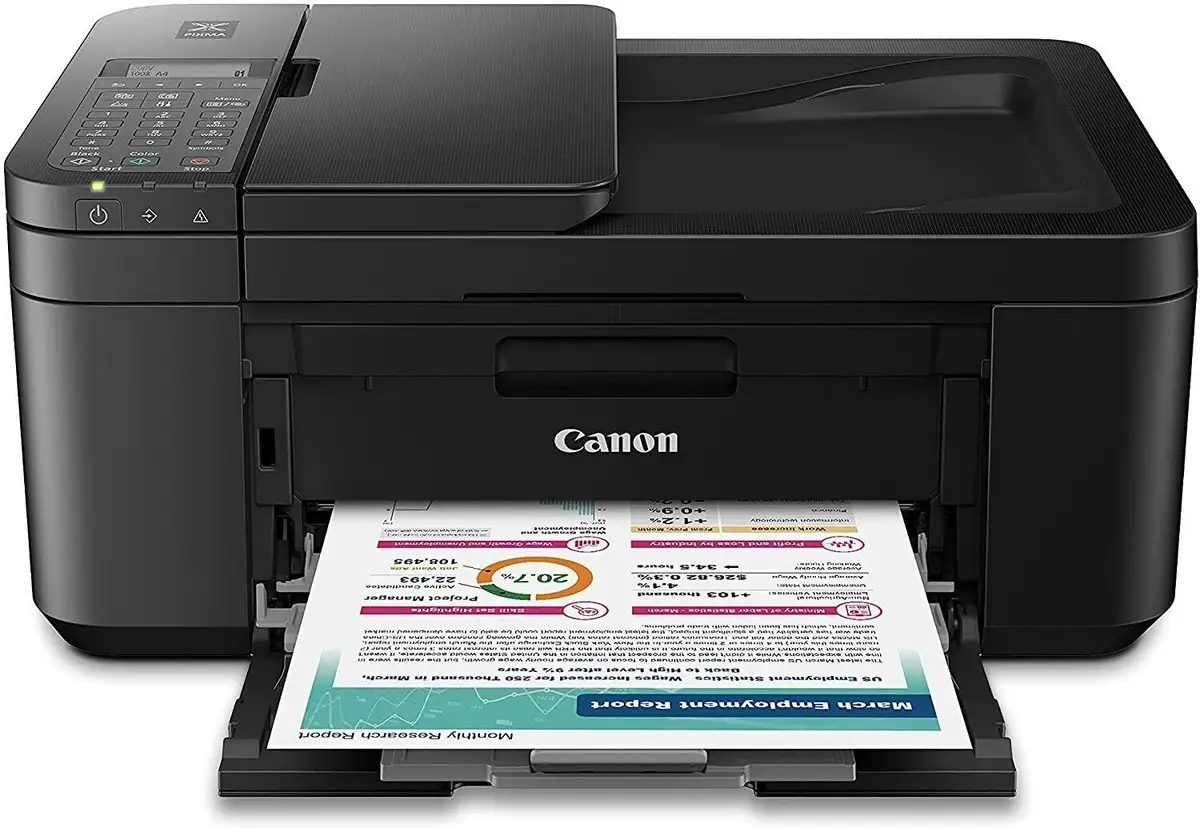
Canon PIXMA TR4720 Review: Compact 4-in-1 With High Costs
The surprising finding from user reports is that while the Canon PIXMA TR4720 All-in-One Wireless Printer is marketed as a compact, versatile 4‑in‑1 solution, its real-world performance splits opinion sharply — scoring a conditional 6.8/10 based on cross-platform feedback. It delivers respectable print quality and useful office features, yet recurring complaints about ink costs, Wi‑Fi setup frustrations, and durability temper enthusiasm.
Quick Verdict: Conditional — worth buying for light home office use if you accept high ink costs and are willing to navigate setup quirks.
| Pros | Cons |
|---|---|
| Sharp black text and vivid color prints | Very high running costs over time |
| Auto 2‑sided printing saves paper | Wi‑Fi setup often frustrating |
| Compact footprint for a 4‑in‑1 | Multi‑color cartridge waste when one color runs out |
| Auto document feeder for multi-page scanning | Scanning quality rated below average |
| Built‑in fax with memory storage | Paper tray design requires removing paper to close |
| Works with Alexa, Google Assistant | Small monochrome display, hard to read |
| Easy cartridge installation | Lacks Ethernet and SD card support |
Claims vs Reality
Canon promotes the PIXMA TR4720 as “simple to set up” through the Canon PRINT Inkjet/Selphy app, with “easy cartridge installation” and “efficient document printing & scanning.” A Reddit user, however, described a very different onboarding: “It’s impossible to connect the printer to Wi‑Fi through the app… no matter how many times you manually input the size, it just doesn’t save.” This suggests that while the setup process is streamlined in theory, app connectivity can be unreliable for some.
Another major claim is “save up to 50% of paper costs with auto 2‑sided printing.” Cross-platform feedback confirms duplex printing works, but Consumer Reports noted “the flip side has a slight loss of quality,” which may matter for professional documents. The marketing emphasis on versatility — print, copy, scan, fax — holds true, but scanning quality is consistently described as “below-par” compared to other all‑in‑ones.
Cross-Platform Consensus
Universally Praised
Users across Amazon, Best Buy, and Trustpilot agree the TR4720 produces “very good text quality” and “color graphics printing… very good for reports, newsletters and web pages.” A verified buyer on Amazon noted, “The black ink cartridge produces crisp, sharp black text for all your documents.” For home offices, the built‑in fax and auto document feeder are highly valued — especially for scanning stacks of pages without manual intervention. Best Buy customers appreciated that “using the ADF it will scan multiple pages… as a single PDF file.”
The compact design also earns praise from those with limited desk space. One Trustpilot reviewer said, “It’s not too bulky, but appears to be sturdy,” and older users found it “very intuitive” after reading the manual.
Common Complaints
The most consistent frustration is ink cost. Consumer Reports estimated a yearly ink expense of $234, with a five‑year total exceeding $1,200 — high for an inkjet. Best Buy user “holly” warned, “The most expensive cartridges I’ve ever used… approximately $90 for both. Almost the same as the cost of the printer.” Because the TR4720 uses a multi‑color cartridge, any single color depletion forces a full replacement, leading to waste.
Wi‑Fi setup is another sore point. Trustpilot feedback described it as “a complete absolute nightmare… spent 2 weeks going in circles.” The printer also lacks an Ethernet port, limiting wired options. Reddit user AlternativeAgency862 lamented the absence of SD card scanning and found the numeric keypad “super hard to type with.”
Scanning quality disappoints many. Consumer Reports rated it “not as good as most all‑in‑ones,” and the small monochrome LCD display is described as “impossible to see or read” in certain lighting.
Divisive Features
Auto 2‑sided printing splits opinion. While some appreciate the paper savings, others dislike the reduced quality on the reverse side. Voice assistant integration (Alexa, Google Assistant) impresses tech‑savvy buyers but is irrelevant to those who prefer direct PC printing. Ink installation is praised as easy, yet the cartridge system’s limited capacity frustrates heavy users.
Trust & Reliability
Trustpilot’s analysis found 76.4% of reviews reliable, with minimal deception. However, durability concerns emerge in long-term reports. One Best Buy user stated, “I bought this printer last July… suddenly it has started printing ridiculously slow. It has reached its maximum dependable age.” Others reported units “only lasted 2 months” before failure. While some owners run the TR4720 for years without issue, a pattern of early breakdowns suggests variable build quality.
Alternatives
Reddit discussions frequently compare the TR4720 to older HP models, with some users regretting the switch due to missing features like Ethernet and SD card slots. For those seeking lower running costs, Canon’s refillable ink tank series (MegaTank) is often suggested on forums, trading a higher upfront price for dramatically cheaper long-term printing.
Price & Value
eBay listings show new units between $79.99 and $105.99, well below the $149.99 MSRP — indicating strong discounting and resale availability. Used units sell for under $65 but often come with “low ink” warnings. While the initial purchase is inexpensive, the high cost of consumables quickly erodes value. As one Best Buy reviewer put it, “If I had known this, I would have bought a different model.”
FAQ
Q: What ink cartridges does the Canon PIXMA TR4720 use?
A: It takes Canon PG‑275 (black) and CL‑276 (color) cartridges. Some users report high costs, with replacements approaching $90 for both.
Q: Can it print without Wi‑Fi?
A: Yes, it has a USB port for direct PC connection. Several buyers confirmed using it non‑wirelessly without issue.
Q: Does it support duplex printing?
A: Yes, auto 2‑sided printing is available, but some users note reduced quality on the second side.
Q: Is it compatible with Windows 11 and Chromebooks?
A: Reports confirm compatibility with both. Chromebook printing may require the Canon app.
Q: How do you load paper?
A: The tray loads from the front, but it doesn’t close with paper inside — you must remove paper to close it fully.
Final Verdict
Buy if you need a compact 4‑in‑1 for light home office use, value sharp text and color prints, and don’t mind high ink costs. Avoid if you expect to print heavily, require flawless Wi‑Fi setup, or need advanced scanning quality. A pro tip from the community: consider XL cartridges to reduce replacement frequency, and use the Canon app to manage settings — even if initial setup is frustrating.