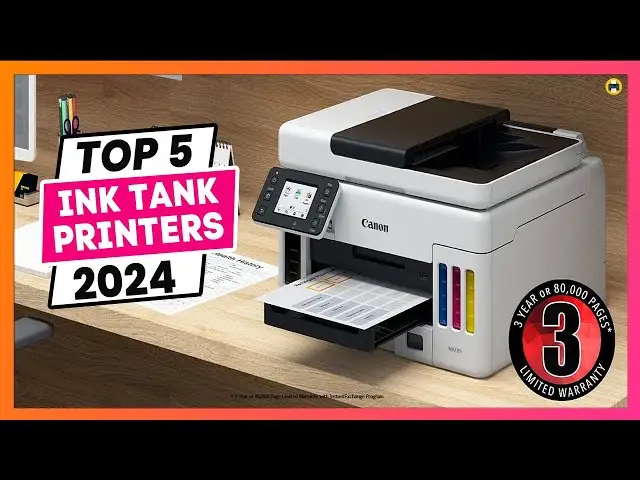
Canon Megatank GX4020 Review: Great Value, But Quirky
“Worst printer ever” sits right next to “Canon has officially won my heart back” in the same review pool, and that tension tells you almost everything about the Canon Megatank GX4020 All-in-One Wireless Supertank Printer. Based on cross‑platform feedback, it lands as a strong pick for high‑volume home and small‑office printing, but with real workflow snags that can sour the experience. Verdict: Conditional buy, 8.3/10.
Quick Verdict
Conditional — a great fit if you print a lot and can tolerate some setup/UI quirks; less ideal for people who need flawless duplex output or hassle‑free software.
| What users like | What users dislike | Who it matters to |
|---|---|---|
| Huge ink capacity and low running cost | Occasional software/print‑queue hangs | Windows-heavy offices, remote workers |
| Sharp text and vibrant color | Duplex printing can smear/ghost | Anyone printing double‑sided flyers/contracts |
| Easy ink filling with visible tanks | Wi‑Fi setup sometimes tedious | Non‑tech users setting up solo |
| Multiple trays and media flexibility | Touchscreen doesn’t tilt; small | Shared workspaces, standing users |
| Good scans for documents | ADF duplex scanning is manual | People scanning multi‑page, two‑sided sets |
Claims vs Reality
Canon markets the GX4020 as a productivity monster with “up to 6,000 black or 14,000 color pages” per ink set and easy tank refills. Digging deeper into user reports, that claim is a huge part of why buyers are excited. A verified buyer on Best Buy wrote about escaping cartridge churn: “I was really sick and tired… needing to replace the color ink. Not anymore!! This is a mega tank printer… you can physically see the actual ink levels.” Several reviewers echoed the practical impact: fewer interruptions and predictable costs. Consumer Reports’ lab data backs the low cost‑per‑page angle, estimating “0.5 cents per page” for text and a roughly “$5 yearly cost” for typical printing, reinforcing that the economics are real for most users.
Canon also pushes “fast print speeds up to 18/13 ipm” and auto duplexing. Here the gap shows. Many buyers say single‑sided output feels brisk for home office work. A verified buyer on Best Buy called it “very fast… prints with a nice sharp and crisp finish.” But double‑sided printing exposes a drying-time bottleneck. Another verified Best Buy reviewer warned: “You can choose faster printing or double sided printing, but not both… results in some ghosting… fixed by increasing drying time… goes from 5 pages per minute… to 2 pages per minute.” So while officially rated as fast, multiple users report that duplex quality forces them to slow down or switch to simplex.
Canon highlights easy wireless and mobile printing, yet user stories split. Some found setup effortless. A verified buyer on Best Buy said: “Set up was the easiest yet… fast and easy mobile set up.” Others ran into friction. Consumer Reports noted Wi‑Fi setup was “more tedious than usual,” and a Best Buy reviewer described “auto wireless set up didn’t detect the printer… had to manually set it up taking a few tries… entering the password was like old school texting.” The printer can be painless, but not reliably so for everyone.
Cross-Platform Consensus
Universally Praised
The ink tank system is the centerpiece of nearly every positive review. For families and busy home offices, the practical relief is obvious: no surprise cartridge depletion in the middle of a school project. A verified buyer on Best Buy who prints for a household of four kids said the tanks mean “a ton of ink on hand at any given time,” and called the front‑facing level windows “extremely useful.” Another Best Buy reviewer framed the larger shift away from cartridges: “Instead of paying astronomical prices for little… cartridges… with the 4020 you simply buy bottles of ink.” The message is consistent: people feel in control of their printing costs and downtime.
Print quality for documents and everyday color work also draws repeated praise. Consumer Reports described “very good text quality” and “very good color graphics printing… for reports, newsletters and web pages.” In user terms, that becomes crisp flyers, clean invoices, and bright school handouts. A verified buyer on Best Buy said their flyers had “no issues with jamming either, nor streaks… print quality… very crisp.” Another wrote, “text, even small text, is clear and sharp… color prints… appear on par with what is on the screen.” For small‑business owners like real‑estate agents, this translates into in‑house marketing output that looks professional without outsourcing.
The refill process itself earns trust because it feels low‑risk. Multiple users mentioned keyed bottles and mess‑free filling. A verified buyer on Best Buy said, “Don’t be afraid, it’s not a messy procedure at all,” while another called refilling “as easy as aligning the bottle… with no mess.” That ease matters for non‑technical users who are wary of tank printers after bad experiences with older refill kits.
Finally, versatility and connectivity get consistent nods. Reviewers like having Wi‑Fi, Ethernet, and USB options, plus multiple trays. One verified Best Buy reviewer appreciated that Canon “made the right decision to keep USB connectivity,” calling it useful for “legacy desktop PC” setups. Another praised the tray mix for labels and specialty media, noting “multiple paper feeding options… depending on paper and print type.” For mixed‑use home offices, that flexibility means fewer compromises.
Common Complaints
The most frequent functional complaint is double‑sided printing quality. People who do duplex flyers, forms, or contracts report smearing/ghosting unless they slow the printer down. One Best Buy reviewer described ink not drying before re‑feeding, causing “ghosting of text or images near the bottom of the page.” Another added that two‑sided prints can look “fuzzier… perhaps from the smearing of the ink.” This issue hits marketing-heavy users and anyone printing two‑sided handouts in batches; they may have to babysit drying settings per job.
Setup and software/UI friction is the other recurring sore spot. A Best Buy reviewer said setup was “a bit cumbersome (no manual) and the rear feeder is not intuitive.” Another called the Canon app “outdated” and complained that errors are “annoying to clear,” sometimes not surfacing on the PC. The sharpest report comes from a 1‑star Best Buy reviewer: “The printer hangs quite often… print error… ‘cancel’ ‘resume’… grayed out… hangs about 1 out of every 6 print jobs.” That kind of queue lockup disproportionately affects Windows 11 users running remote print jobs or shared queues.
Hardware ergonomics show up too. Several users mention the non‑tilting screen and small interface. One said, “My only complaint… screen size and the lack of a ‘tilt’ function.” Another noted password entry feels like “old school texting… numeric buttons.” This isn’t fatal, but it slows down first‑time setup and occasional maintenance tasks.
There are also smaller but persistent paper‑handling quirks. One reviewer reported Outlook forcing prints to the rear tray “even if… set to use the main tray,” and another found 4x6 photo paper triggers “wrong size” errors unless bypassing checks. These seem like firmware or driver oddities rather than mechanical failures, but they add friction for anyone switching media types frequently.
Divisive Features
Speed perception depends on what and how you print. Some users call it quick for a tank inkjet. A verified Best Buy reviewer said “printing speed is fast, and does not stutter.” Others think it lags behind lasers, especially on duplex. One reviewer compared it to a Brother color laser: “my friends… laser printer… does 12 pages double sided per minute… this printer… 2 pages per minute” when drying time is raised. So heavy duplex users may feel it’s slow, while simplex document printers are happier.
Scan performance also splits. Consumer Reports rated scanning “very good,” and several Best Buy buyers liked the resolution for archiving documents. But for high‑volume scanning, it can feel sluggish. A verified buyer warned the ADF scan “is not fast, at all… frequent scanning is highly discouraged.” If scanning is occasional, users are satisfied; if it’s a daily workload, patience wears thin.
Trust & Reliability
Scam concerns are not a major theme in the feedback provided, and there aren’t clear Trustpilot‑style red flags in this dataset. What does surface is reliability variance between units and environments. Consumer Reports describes predicted reliability and owner satisfaction as high in testing, but individual buyers still report failures. The outlier 1‑star Best Buy review calling it “complete trash” because it “hangs quite often” shows that for some Windows setups, stability is a real risk. Meanwhile, many long‑trusted Canon users describe the GX4020 as dependable over weeks to months: “so far no jams or issues,” and “no issues with jamming either, nor streaks.”
Long‑term durability stories in this set are mostly inferred rather than explicit “six months later” posts. Still, users note replaceable heads and maintenance cartridges. One reviewer cautioned about ownership costs if parts wear: “the print head is over $150… be aware of the cost of operation.” That suggests confidence in serviceability, but also a reminder that business‑grade upkeep exists here.
Alternatives
Only a few competitors are mentioned directly. A verified Best Buy reviewer compares duplex speed to a Brother color laser printer, noting the laser is faster for double‑sided runs but costs more per page: “his page cost is ~$.04… this printer is <$.01.” Another reviewer said GX4020 printing is “significantly better than ink jet printers… from Brother,” especially for graphics.
The Bestprintershop review brings up HP Smart Tank 7602 and Epson EcoTank ET‑4850, stating GX4020 delivered “comparable print quality” with “marginally faster text document processing.” For buyers already in the tank‑printer category, that positions Canon as a peer option with slight speed edge, though that’s a professional review rather than a community thread.
Price & Value
The official MSRP hovers around the mid‑$400s to $700s depending on region and retailer. Consumer Reports called the purchase price “very high” for a tank AIO, around “$430,” and multiple users acknowledge the upfront hit. But nearly all positive buyers justify it through ink savings. A Best Buy reviewer summarized the tradeoff: “you can buy a cheap printer with expensive cartridges or an expensive printer with cheaper consumables.” For households and small offices printing hundreds of pages a month, that math feels worth it.
Resale and market signals are sparse here, but an eBay auction listing shows a unit selling for $30 used in “good condition,” implying steep depreciation once opened or liquidated. That’s a reminder to buy this for long‑term use, not for resale value.
Community buying tips center on matching the printer to your volume and duplex needs. Several reviewers suggest it shines for flyers, labels, newsletters, and mixed graphics, but not for photo‑centric or duplex‑heavy workflows unless you’re willing to tweak drying settings each time.
FAQ
Q: Is the GX4020 really cheap to run?
A: Yes for most users. Best Buy buyers repeatedly praise the “mega tank” savings, and Consumer Reports estimates about “0.5 cents per page” for text and very low yearly ink cost. The high upfront price is the main tradeoff.
Q: How is double‑sided printing in real use?
A: Mixed. Some users like the auto duplex feature, but several report smearing or “ghosting” unless drying time is increased. One Best Buy reviewer said duplex quality forces speed down to “2 pages per minute.”
Q: Is setup easy for non‑tech users?
A: Often, but not guaranteed. Many reviewers call setup “easy and quick,” especially via phone apps. Others struggled with Wi‑Fi detection and password entry, describing setup as “tedious” or needing manual network steps.
Q: Does it scan two‑sided documents automatically?
A: No. The ADF is single‑sided for scanning. Users say it’s workable but manual: scan one side, flip and rescan. If you scan two‑sided stacks frequently, this is a real slowdown.
Q: Is it good for photo printing?
A: Acceptable for casual photos, not for photo‑lab expectations. Users say glossy photos look “very good,” but one reviewer notes it “cannot print borderless photos,” and color accuracy can vary on some tones.
Final Verdict
Buy if you’re a high‑volume home office, family with heavy school printing, or small business doing lots of color documents and flyers and you want tank‑style savings. Avoid if your workflow depends on fast, flawless duplex printing or you need frictionless Windows print‑queue stability. Pro tip from the community: when duplexing, increase drying time to avoid ghosting, then switch back for speed‑critical simplex jobs.





