Canon IP8720 Review: Superb Photo Prints with Caveats
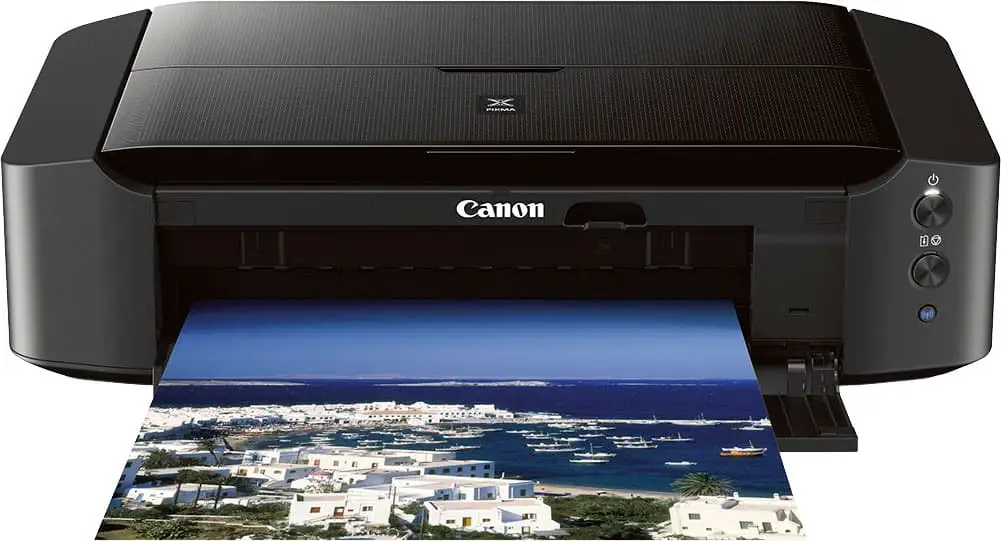
A verified buyer on Amazon summed up the appeal of the Canon IP8720 Wireless Printer in one sentence: "By far the best photo printer I've used to date." With wide-format capabilities up to 13x19 inches, a six-color ink system including gray for nuanced shading, and a reputation for producing “clear, vibrant, color accurate and sharp” images, community ratings average 4.3–4.4 stars. Based on aggregated feedback, it earns a solid 8.2/10 for buyers seeking affordable large-format photo printing with minimal frills.
Quick Verdict: Conditional – excellent for dedicated photo/art printing, less ideal for high-volume office tasks or those needing flawless wireless setup.
| Pros | Cons |
|---|---|
| Outstanding photo quality, especially on Canon papers | Wireless setup can be finicky for some |
| Wide-format printing up to 13x19 | Ink usage is high; replacement costs add up |
| Six-color system with gray ink for better B&W tones | No scanner/copier; single-function only |
| Affordable compared to pro-grade large-format printers | Print speeds slower for large, detailed photos |
| Supports mobile printing via AirPrint, Google Cloud | Occasional nozzle clogs reported |
| Simple, minimalist design without excess features | Colors can appear slightly dull without software tweaks |
Claims vs Reality
Canon’s marketing leans heavily on “stunning borderless photos up to 13 × 19” with “incredible quality and amazing detail” thanks to a six-color ink system. Digging deeper into user reports shows this holds true for many, but not all scenarios.
The official spec of 9600×2400 dpi resolution does translate into crisp, professional-grade output for photo enthusiasts, particularly when using Canon Photo Paper Pro Luster or Plus Glossy II. A Best Buy reviewer noted: “What makes it all better is that this printer produces great images! Clear, vibrant, color accurate and sharp.” However, others caution that “pictures become more dull” compared to on-screen previews unless settings are adjusted—one customer solved this by using My Image Garden software’s “Prioritize Output” option.
Marketing also emphasizes easy wireless printing via Wi-Fi, AirPrint, and Google Cloud Print. In reality, while some describe setup as painless—“Connecting it to my wifi network and installing driver(s) only took…15 to 20 minutes”—others spent over an hour troubleshooting and resorted to USB connections. A frustrated buyer admitted: “Never had a problem connecting Epson or HP…but this won’t stay connected.”
Another claim: fast photo printing—Canon cites 36 seconds for a borderless 4×6. While users broadly agree it’s quick for small formats, large detailed prints take longer. One Best Buy reviewer said an 8.5×11 photo took “a whole minute” depending on complexity.
Cross-Platform Consensus
Universally Praised
From Reddit to Best Buy, print quality dominates the praise. Artists and hobbyists repeatedly emphasize how the six-color system makes tonal transitions smooth. A small business owner explained: “I opted for a printer that does the one thing I needed it for really well—print art. You genuinely cannot beat the quality for the price.” Wide-format capability is transformative for many, enabling home production of posters, art prints, and scrapbook projects without outsourcing.
Photographers appreciate the gray ink channel for black-and-white accuracy. A verified buyer shared: “I have printed multiple 13 × 19, 5 × 7, 4 × 6 and 8.5 × 11 and still have yet to run out of the ink that came with the printer.” Mobile printing also earns high marks; one user noted: “I am mostly able to print straight from my phone…this printer had no issues doubling as a photo printer and a regular functional printer.”
Common Complaints
Wireless connectivity stands out as the most recurring pain point. Several owners report initial setup success followed by intermittent drop-offs from the network. The absence of a physical display means all troubleshooting must happen via software or sequence-button presses.
Consumable costs are another major gripe. Consumer Reports calculated a $127/year ink expense under light usage, labeling it “very high for an inkjet.” A low cartridge lifespan—“at least 10 months” in CR’s testing—also fuels cost concerns, especially when sticklers for OEM inks avoid cheaper refills.
Maintenance issues like nozzle clogs waste both time and ink. A Best Buy reviewer lamented: “The nozzle keeps getting clogged and wasted so much ink…Canon support is sending me free ink to figure this problem out.” Long-term owners also warn about unreliable recognition of non-Canon cartridges, sometimes triggering unbypassable error codes mid-job.
Divisive Features
Print speed divides opinion. For small jobs, many find it “incredibly quick,” but for full-page photo detail, it’s slower than regular office printers—a necessary trade-off for quality. Color rendering also splits the crowd: while 88% in BestViewsReviews lauded accuracy, a minority complained of “grainy” output or limited paper size choices (“I need 12×12 but the closest option is 10×12”).
Trust & Reliability
Trust indicators skew positive in terms of build. Users describe the chassis as sturdy, with covers that close to protect internal components when idle. Longevity is mixed—some report flawless operation over multiple years, while others encounter cartridge recognition failures in year two that necessitate replacement.
No notable scam accusations emerge, but warranty usefulness is limited if using third-party ink, which triggers error codes according to multiple Amazon reviews. Canon’s customer service is generally responsive, even sending out complimentary ink for troubleshooting, though this doesn’t always resolve hardware-level clog issues.
Alternatives
Several buyers compared the IP8720 to the HP XP-15000, often choosing Canon for better reviews on wide-format quality. One art buyer noted: “The Pixma IP8720 was the cheapest wide-format printer I could find and had better reviews than the similar HP XP-15000.” Higher-end Canon Pro models tempt some, but multiple reports declare the jump in price unjustified for casual photo work. Epson R-series printers are mentioned by defectors frustrated with Epson’s maintenance cycle.
Price & Value
Current listings hover around $240–$334 on retailers like Best Buy or eBay, undercutting professional-grade large-format models by hundreds of dollars. Resale values on open-box units average $169 according to PicClick data. Community tips emphasize pairing the purchase with bulk OEM ink buys or validated third-party suppliers to control ongoing expenses.
FAQ
Q: Can I print from my phone without a PC?
A: Yes. Users report seamless printing via the Canon Print app, Apple AirPrint, or Google Cloud Print, with many enjoying direct phone-to-printer workflows for photos and documents.
Q: Does it print only photos, or can it handle office documents?
A: While marketed as a photo printer, several owners use it for standard documents. Text quality is very good, though not as sharp as top-tier office inkjets.
Q: How hard is it to set up on Wi-Fi?
A: Experiences vary widely—some finish in under 20 minutes, others struggle for hours. Using WPS buttons on your router can speed up connection.
Q: What’s the maximum print size?
A: Officially 13 × 19 inches, ideal for posters, art prints, and large photos. Many users cite this as a key differentiator.
Q: How long do the starter ink cartridges last?
A: Reports suggest they can handle dozens of large prints; one buyer printed multiple 13 × 19 photos without exhausting the supplied ink.
Final Verdict: Buy if you’re a photographer, artist, or hobbyist who values large-format, high-quality prints and can tolerate occasional wireless quirks. Avoid if you require ultra-fast office printing or cheap consumables. Pro tip from the community: fine-tune color settings in Canon’s software to match screen vibrancy and maximize print satisfaction.





