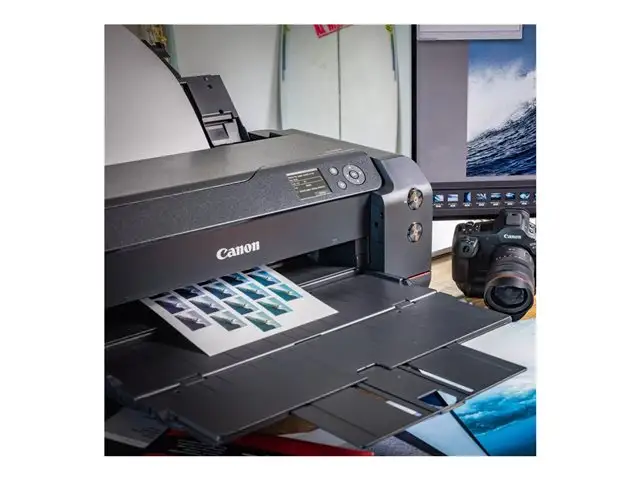
Canon imagePROGRAF TC-21 review: great prints, big quirks
A print that “falls on the floor” if you don’t catch it tells you more about the Canon imagePROGRAF TC-21 Large Format Printer than any spec sheet ever will. TechRadar’s reviewer described a workflow quirk bluntly: “without the optional stand… you have to catch each print as it emerges… or… dump them on the floor.” Verdict: conditional buy for posters/CAD in tight spaces, with a few gotchas. Score: 7.8/10
Quick Verdict
The Canon imagePROGRAF TC-21 Large Format Printer is a compact 24-inch, 4-color pigment wide-format printer positioned for posters, banners, and CAD line drawings, with roll + cut-sheet flexibility. The strongest third-party feedback in this dataset comes from TechRadar’s hands-on review of the closely related TC-21M variant (adds a scanner), which repeatedly praises print quality and ease of use—while flagging practical limitations like “no output tray” and “no auto-duplex.”
A recurring pattern emerged: the printer’s “desktop” pitch is credible in footprint, but less so in day-to-day ergonomics unless you plan your space around it. Canon marketing highlights small-space friendliness and hybrid workflows; the TechRadar narrative shows that the physical reality of handling A1/A0 prints can be awkward without accessories.
Buy it conditionally if your main job is CAD drawings, maps, posters, and banners—especially if bottled pigment ink economics matter. Avoid it if you need unattended output stacking, auto-duplex, or photo-printer-grade color gamut.
| What the data supports | Evidence (source) | Impact |
|---|---|---|
| Strong poster/CAD output | “bright and detailed images… strong all-round print quality” (TechRadar) | Great for schools, shops, studios printing signage |
| Easy setup with roll support | “shaftless roll holder makes this quite easy” (TechRadar) | Better for first-time wide-format users |
| Practical output handling issue | “you have to catch each print… or… on the floor” (TechRadar) | Desk placement and basket/stand matter |
| No auto-duplex | “there’s no auto duplex mode” (TechRadar) | Extra manual work for office-style documents |
| Quiet-ish operation (claimed) | “reduced operation noise level” (Canon UK product page) | Potential fit for small offices, but user confirmation limited here |
Claims vs Reality
Canon’s positioning for the Canon imagePROGRAF TC-21 Large Format Printer leans hard into “compact,” “easy to use,” and “hybrid support.” Digging deeper into the available user-facing narrative (TechRadar’s review of TC-21M), those claims aren’t baseless—but they come with caveats that matter for real workflows.
Claim 1: “Compact… perfect for home and small offices.” Canon UK calls it “a compact, affordable and sustainable desktop 24" large format printer… perfect for home and small offices.” TechRadar broadly agrees on the footprint logic, describing it as “quite a large unit” but arguing it’s “pretty compact” given it houses a 24-inch roll internally. That internal roll storage is a practical space win for small studios and school offices that can’t dedicate floor space to a stand-mounted plotter.
The reality check is that compactness doesn’t automatically mean tidy handling. TechRadar flags the missing output management: “there’s no output tray… unless you buy the optional stand with integrated basket.” For a shop printing multiple posters, that “desktop” experience can quickly become “babysit the printer” unless you add the basket/stand or a suitably large table.
Claim 2: “Easy to use… effortless connectivity.” Canon emphasizes a “tiltable operation panel” and “wireless connectivity… via Canon Print app.” TechRadar’s story matches that: “The touch screen simplifies the set up procedure… It’s even quicker to download Canon’s print app… and use that to connect it to your local wi-fi network.” For hybrid workers who need to send PDFs without wrestling printer drivers, that’s a meaningful win.
But the same account suggests usability is less about menus and more about physical logistics—especially at wide format. The reviewer notes it “takes two to lift it onto the table,” which is a “small office” reality that matters if you’re installing it solo.
Claim 3: “High quality prints… denser colour and sharper image.” Canon’s product language promises “denser colours and sharper image.” TechRadar validates this direction in plain terms: “the results are very good,” and “the four colors look bright… pigment-based, they dry quickly for smudge-resident and longer lasting results.” For CAD/GIS teams and retail signage, the pigment ink behavior—fast drying, less smudge risk—shows up as a day-to-day reliability benefit rather than a lab metric.
At the same time, TechRadar draws a boundary: with photo paper it “doesn’t achieve the wide color gamut and natural shading of photo printers like the 12-ink Canon imagePROGRAF PRO-1100.” So “high quality” is strongly supported for posters and line work, but not positioned as gallery-photo output.
Cross-Platform Consensus
Universally Praised
The clearest praise in this dataset clusters around output quality for posters, maps, banners, and drawings—and the way the printer is designed to make wide-format less intimidating. TechRadar’s reviewer repeatedly frames it as dependable in the moment: “printed without a hitch,” and “overall, it scored highly on ease-of-use and print quality.” For a school office printing event posters, that “no drama” experience is the difference between producing signage in-house and giving up to an external print shop.
A recurring pattern emerged around pigment ink’s practical benefits. TechRadar wrote: “being pigment-based, they dry quickly for smudge-resident and longer lasting results.” For retail and hospitality venues (explicitly cited by Canon UK as a target), that translates into prints that can survive handling—taping posters to windows, carrying banners across a shop floor—without the anxiety of freshly-wet dye ink. Canon’s own positioning reinforces the same use case framing: posters, banners, labels, envelopes, and CAD drawings (Canon UK product page).
Setup and media flexibility also come through as a standout advantage—especially for users who want both roll paper and cut sheets in one device. Canon’s spec/marketing copy stresses “continuous printing between roll paper and cut sheet” and a “built-in auto sheet feeder.” TechRadar’s narrative supports that physical workflow: “The shaftless roll holder makes this quite easy,” and notes the tray capacity: “There’s room for 100 sheets… while larger sheets… are loaded one at a time.” For a small architecture office, that means you can keep letter/A4 documents ready while still having a 24-inch roll for A1 posters.
Finally, the most concrete “it just works” praise is tied to interaction design: “The touch screen simplifies the set up procedure… telling you what to do next.” For non-specialists—teachers, store managers, admins—this kind of guided setup can matter more than raw DPI.
After those narratives, the praise condenses into:
- Strong poster/CAD print quality and bright pigment output (TechRadar)
- Manageable roll loading via shaftless holder (TechRadar; Canon UK positioning)
- Wi‑Fi/app setup that reduces friction (TechRadar; Canon UK “Canon Print app”)
Common Complaints
The sharpest repeated limitation in the dataset is not about print quality—it’s about workflow friction and missing “office printer” conveniences. TechRadar is explicit: “There’s no output tray to collect your prints, unless you buy the optional stand with integrated basket.” That complaint becomes more severe the more you print, and the wider the media. A busy print corner in a school or small business can’t always spare someone to “catch” output.
TechRadar turns that into a vivid operational problem: “you have to catch each print as it emerges and before the internal cutter sweeps across to dump them on the floor.” For a retail shop printing multiple posters back-to-back, that’s a real labor cost, not just a minor annoyance. Canon’s optional accessories (stand/basket listed in specs) implicitly acknowledge this; the complaint is that it’s not integrated by default for the most common real-world behavior: prints need somewhere to land.
The other major frustration is a capability gap: “there’s no auto duplex mode either.” For office users who expect two-sided printing for documents, that’s a meaningful downgrade. Canon’s own marketing emphasizes hybrid office/home use, but TechRadar’s account suggests this product is better framed as a wide-format poster/CAD machine that can also handle office sheets, not a do-everything office printer.
There’s also an economic tension buried in the consumables discussion. TechRadar says bottled ink is “potentially very economical,” but immediately adds: “it’s quite expensive for bottled ink.” That contradiction matters for small studios budgeting by project; the lower cost versus cartridges can still feel pricey if you’re comparing against third-party inks or you print sporadically.
After those narratives, the complaints condense into:
- Output handling: no integrated tray; prints may drop without a basket/stand (TechRadar)
- No auto-duplex (TechRadar)
- Ink economics: “economical” in concept, but Canon-branded bottles still “quite expensive” (TechRadar)
Divisive Features
The biggest split is how people interpret “compact” and “desktop.” Canon repeatedly sells the small-space angle, and TechRadar partly validates it: “given its broad functionality, I’d say this printer is pretty compact.” For a user upgrading from a floor-standing plotter, the internal roll holder and single-unit design can feel space-efficient.
But that same physical reality cuts the other way: “it takes two to lift it onto the table,” and its lack of output management pushes users toward buying a stand or dedicating a larger surface. For apartment studios and home offices, “desktop” can mean “fits on a desk,” not “requires a desk engineered around it.”
Print speed also lands in the “depends what you expect” category. Canon’s specs cite A1 CAD drawing times around 30 seconds (standard) for monochrome in some contexts, while TechRadar’s real-world poster framing is slower: “It takes nearly two minutes to print an a1 poster in standard quality, so it’s not fast.” The dataset suggests that expectations should be set by print mode and content type—CAD draft lines versus poster graphics.
Trust & Reliability
The dataset does not include typical long-term Reddit threads (“6 months later…”) or verified Trustpilot customer narratives about breakdowns, service issues, or sustained uptime. What it does contain is a detailed third-party review describing reliability within a test window: “printed without a hitch” with “only suffered one a4 paper jam… easily rectified” (TechRadar).
Digging deeper into maintenance risk, TechRadar flags a common inkjet reality: “prone to drying out and suffering clogged nozzles if left unused,” but adds that it’s “usually… solved by simply running a maintenance cycle.” For occasional-use environments—like a school that prints big posters only before events—this suggests the real reliability question is not build quality but usage pattern. The same reviewer points to replaceable parts: “you may need to replace the pf-08 print head and mc-32 maintenance cartridge” (TechRadar), aligning with Canon’s spec listing of user-replaceable consumables.
Alternatives
Only one alternative is explicitly discussed with evaluative context in the dataset: the Canon imagePROGRAF PRO-1100. TechRadar uses it as a benchmark to set expectations: the TC-21M “doesn’t achieve the wide color gamut and natural shading of photo printers like the 12-ink Canon imagePROGRAF PRO-1100.” For photographers and fine-art print sellers, that’s the clearest signpost: the TC-21 line is optimized for posters, graphics, and line drawings more than nuanced photo tones.
Within Canon’s own ecosystem in the provided data, the TC-21 is also framed as a “print-only version” relative to the TC-21M: TechRadar notes the TC-21M is “otherwise identical” to the “print-only version called imagePROGRAF TC-21.” If scanning/copying/enlarging from a flatbed matters to you, the dataset’s strongest story-based evidence points toward the M model’s integrated scanner workflow rather than the print-only TC-21.
Price & Value
Pricing signals in the dataset vary by market and seller. Canon Canada’s product listing page shows the imagePROGRAF TC-21 “from $1,295.00” (Canon Canada LFP site). Another retailer listing in the data shows “£599.78” discounted to “£499.82” (technoworld.com listing). A separate product page claims “$799.00 $749.00” (dtfprintersales.com), alongside a “product review score 4.81 out of 5 stars,” but the text on that page reads like marketing copy rather than individual user quotes, so it’s less useful as “feedback.”
From a value perspective, TechRadar’s review frames bottled ink as the central economic argument: it’s “potentially very economical to run,” especially for “such large prints,” and the included “four 70ml bottles… roughly enough ink for around 6,000 letter or a4 pages.” The same source complicates the value story by warning Canon-branded bottles are “quite expensive,” while “compatible pigment ink tended to be around a quarter the price.”
Practical buying tips implied by the feedback: if you’re budgeting, factor in accessories. TechRadar states the optional stand with basket costs “around US $180 (£140),” and the output-handling narrative makes it sound less optional in busy environments.
FAQ
Q: Does the Canon imagePROGRAF TC-21 handle roll paper and cut sheets at the same time?
A: Yes, it’s positioned for both. Canon highlights “continuous printing between roll paper and cut sheet” with a “built-in auto sheet feeder” (Canon UK/spec pages). TechRadar’s review of the related TC‑21M describes an internal roll holder plus a tray for up to “100 sheets” of A4/letter.
Q: Is it good for photo printing?
A: It’s better for posters, graphics, and line drawings than high-end photo output. TechRadar says prints are “bright and detailed,” but also notes it “doesn’t achieve the wide color gamut and natural shading of photo printers like the 12-ink Canon imagePROGRAF PRO-1100.”
Q: Does it have auto-duplex printing?
A: No. TechRadar explicitly states “there’s no auto duplex mode.” If you’re printing office documents that need two-sided output, this is a real workflow drawback compared to typical office multifunction printers.
Q: Do you need a stand or output tray?
A: You may, depending on how you print. TechRadar warns there’s “no output tray,” and without the optional stand/basket, “you have to catch each print… or… dump them on the floor.” For frequent poster runs, plan space and accessories accordingly.
Final Verdict
Buy the Canon imagePROGRAF TC-21 Large Format Printer if you’re a school, small shop, or AEC/CAD user who needs a compact 24-inch roll printer for posters, maps, and line drawings—and you can accommodate the output handling (ideally with the stand/basket). Avoid it if you need unattended output stacking or auto-duplex for office-heavy work. Pro tip from TechRadar’s experience: “easily solved by moving the printer to a bigger table” if you don’t want prints hitting the floor.