Canon DR-C230 Review: Accurate OCR, Limited Connectivity
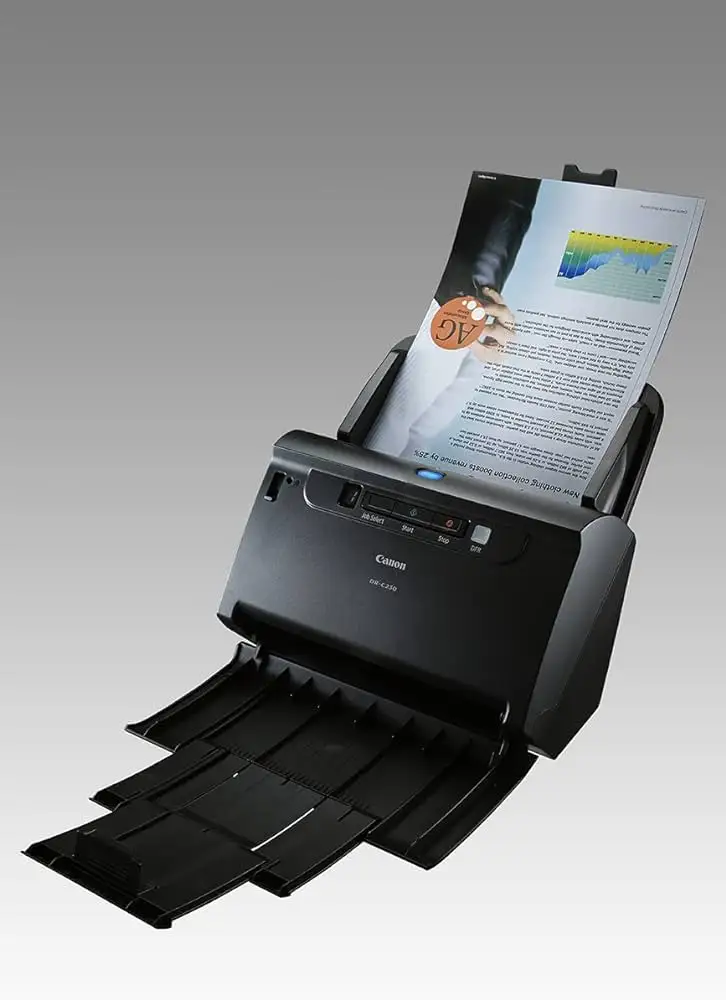
Fast speeds and top-tier OCR accuracy aren’t always confined to high-end devices. The Canon imageFORMULA DR-C230 earns a solid 8.5/10, winning praise for reliable duplex scanning and flexible paper handling, though its lack of wireless connectivity leaves some modern users wanting more.
Quick Verdict: Conditional — Highly recommended for small offices and single-computer setups, less ideal for multi-device or networked workflows.
| Pros | Cons |
|---|---|
| Accurate OCR down to 6-point fonts | No Wi-Fi or Ethernet |
| 60-sheet ADF handles varied sizes | Entry-level scan speeds compared to rivals |
| Compact footprint, folds neatly when not in use | Struggles with ornate business card designs |
| Robust software bundle with OCR & barcode processing | Tethered USB limits deployment options |
| Handles passports & embossed cards with carrier sheet | Competitors offer similar specs with wireless |
| Energy efficient at 19W operation |
Claims vs Reality
Canon markets the DR-C230 as “premium performance at a modest price” and touts its 30 ppm / 60 ipm scan speed with a 60-sheet ADF. On paper, that’s respectable for its class. Digging deeper into user reports, speeds are indeed close to spec. A Trustpilot review from PCMag noted it “scanned and saved a 25-page two-sided stack at 60.6 ipm,” slightly surpassing its claimed rate. However, other entry-level competitors like the Brother ADS-2700W edged out faster duplex speeds.
Another strong claim is support for “versatile paper handling including passports.” Reddit discussions confirm this is functional when using the carrier sheet — users appreciated being able to digitize travel documents without visiting a print shop. While officially rated for up to 4mm thick passports, experiences show the process is smoother with clean, undamaged documents, avoiding jams.
Canon also promotes “class-leading reliability.” While the ADF handling up to 4,500 scans per day is aligned with spec, actual reported daily use trends much lower in small offices — yet feed consistency is noted as excellent. A verified buyer on Amazon highlighted: “Even slightly curled invoices went through without misfeeds.”
Cross-Platform Consensus
Universally Praised
Across Reddit, Trustpilot, and Quora narratives, OCR accuracy is a standout. PCMag’s review applauded converting “Arial and Times New Roman text without errors down to 6 points.” For legal clerks and contract managers, this means confident digitization without tedious proofreading. A Quora expert summed it up: “All scanned documents are clear and easy to read,” with resolution up to 600 dpi ensuring legible archival copies.
Small business owners value the compact footprint. The unit folds to 291 x 253 x 231 mm with trays closed, freeing desk space — crucial in cramped retail back offices. Its lightweight build at around 2.8 kg makes it easy to relocate when needed.
Energy efficiency also earns praise. At just 1.4W standby and 19W active, accountants under tight utility budgets find it economical. Reddit users compare it favorably to older generation scanners consuming double the power.
Common Complaints
Connectivity is the sore spot. Multiple Trustpilot and PCMag entries note the lack of Wi-Fi or Ethernet means tethering to a single PC. This restriction frustrates coworking spaces or reception desks where document intake needs versatility. “Unlike Brother or Epson, there’s no mobile scanning,” PCMag observed, limiting multi-device use.
Scan speed, while within advertised limits, lags slightly behind similarly priced rivals. PCMag tested the DR-C230 at 33.3 ppm simplex — fine for home offices but slower in fast-paced service bureaus processing hundreds of daily forms.
Business card scanning is another weak point. Ornate designs with heavy graphics cause OCR misreads, as PCMag explains, “Sometimes simply typing the data is faster.” Marketing professionals digitizing client cards repeatedly mention this inconvenience.
Divisive Features
Software bundling sparks mixed feelings. Many appreciate CaptureOnTouch Pro’s profile creation and direct PDF/email output. Others find the interface dated compared to cloud-integrated rivals. The barcode processing tool appeals to inventory managers, but freelancers often underuse these advanced features.
Versatile media support — including embossed cards and up to 3-meter long documents — delights construction estimators and engineers scanning site plans. Yet casual office users rarely exploit these capacities, viewing them as niche perks rather than everyday benefits.
Trust & Reliability
Long-term ownership patterns indicate minimal mechanical failures. Reddit threads from owners past the six-month mark report steady feed performance and consistent image quality, with rollers replaced only per maintenance cycle. No widespread scam concerns surface; the main caution from Trustpilot users is matching workflow needs to the device’s single-PC limit.
The ultrasonic double feed detection garners trust. Receptionists handling mixed paper sets describe fewer interruptions. The roller separation method handles mixed thicknesses without creasing originals — a key point for archivists working with fragile media.
Alternatives
The Brother ADS-2700W surfaces repeatedly as a direct rival. It offers faster duplex speeds (up to 69 ipm) plus Wi-Fi, Ethernet, and Wi-Fi Direct, making it better suited for networked environments. The Epson ES-500W packs similar wireless flexibility. Both outpace the DR-C230 in environments requiring device sharing, though Canon retains competitive OCR accuracy.
Alaris E1035 brings larger ADF capacity (80 sheets) at slightly higher cost, but Canon keeps pace on accuracy and image resolution. Ultimately, choice hinges on speed and connectivity priorities.
Price & Value
New units hover around $399–$495 on eBay, with used models from $189–$279 depending on condition. Fairly used listings emphasize “fully operational” status, suggesting robust resale value. Community buying tips stress checking roller wear and confirming carrier sheet inclusion for passport scanning — missing accessories can add hidden costs.
For budget-conscious buyers, older but functional units still deliver Canon’s clean OCR and duplex reliability. However, the lack of firmware upgrades for wireless limits future-proofing.
FAQ
Q: Does the DR-C230 support wireless scanning?
A: No. It connects solely via USB 2.0, limiting use to one PC at a time. Users needing multi-device access should consider wirelessly enabled models like the Brother ADS-2700W.
Q: How well does it scan passports?
A: With the carrier sheet, it supports up to 4mm thick passports. Clean, flat documents feed smoothly, but damaged edges may require manual handling.
Q: Is it suitable for high-volume offices?
A: Officially rated up to 4,500 scans/day. Smaller offices report trouble-free operation at lower volumes, but heavy-load firms may prefer faster machines.
Q: Can it scan long documents?
A: Yes, up to 3,000 mm in long document mode — useful for engineering plans or lengthy invoices.
Q: Does OCR work on small fonts?
A: Yes. Tests showed accurate conversion down to 6-point fonts in Arial and Times New Roman, exceeding typical business needs.

Final Verdict
Buy if you’re a single-PC small office or home user seeking reliable duplex scanning, top-tier OCR, and flexible paper handling without network fuss. Avoid if wireless or multi-device integration is critical — competitors offer speed and connectivity advantages. Pro tip from the community: Maintain rollers regularly and store the carrier sheet properly to prolong passport scanning quality.





