Brother P-Touch PT-D460BT Review: Worth It? 8.6/10
“It never misses a cut!!” is the kind of praise that keeps popping up around the Brother P-Touch PT-D460BT Label Maker—but so do warnings like “hard to install and hard to get ready to use.” Verdict: a feature-rich office label maker with real workflow wins, as long as you’re willing to climb a learning curve. Score: 8.6/10
Quick Verdict
For the Brother P-Touch PT-D460BT Label Maker, the consensus is Conditional Yes: it’s a strong pick for frequent organizing and business-style labeling, but not the simplest “plug in and go” option for casual home users.
A Staples reviewer framed the upside clearly: “this is a great label maker, easy to use, with lots of design options and the ability to do the work on a mac computer and print from the p-touch.” Meanwhile, another Staples customer pushed back on setup friction: “hard to install and hard to get ready to use... it is not recognized by the program or computer.” That split—power vs. complexity—defines most of the feedback.
| What buyers focus on | Pros (with sources) | Cons (with sources) |
|---|---|---|
| Printing + output | “prints exactly as i expected it to” (Staples) |
“just wish it didn’t waste tape at the ends of the label” (Staples) |
| Cutting + keyboard feel | “It never misses a cut!! keys have a very nice feel.” (Best Buy) |
Manual cutter on this model (official specs) |
| Bluetooth + connected use | “the blue tooth works great. it is as described” (Best Buy) |
Some struggle getting software/PC to see it (Staples) |
| Fit for purpose | “great for organizing! works awesome! love the computer interface!” (Staples) |
“not for simple home use, buy smaller model” (Staples) |
| Portability expectations | Batteries or AC option praised (“either connect it or put on batteries”) (Staples) |
“i also wish there was a rechargeable battery” (Staples) |
Claims vs Reality
The official pitch positions the Brother P-Touch PT-D460BT Label Maker as a connected, versatile label system—Bluetooth + USB, templates, and professional formatting. Digging deeper into user reports, the most interesting gap isn’t about label quality; it’s about how easy it is to reach the “power user” benefits.
Claim: Easy connected labeling via Bluetooth and apps/software.
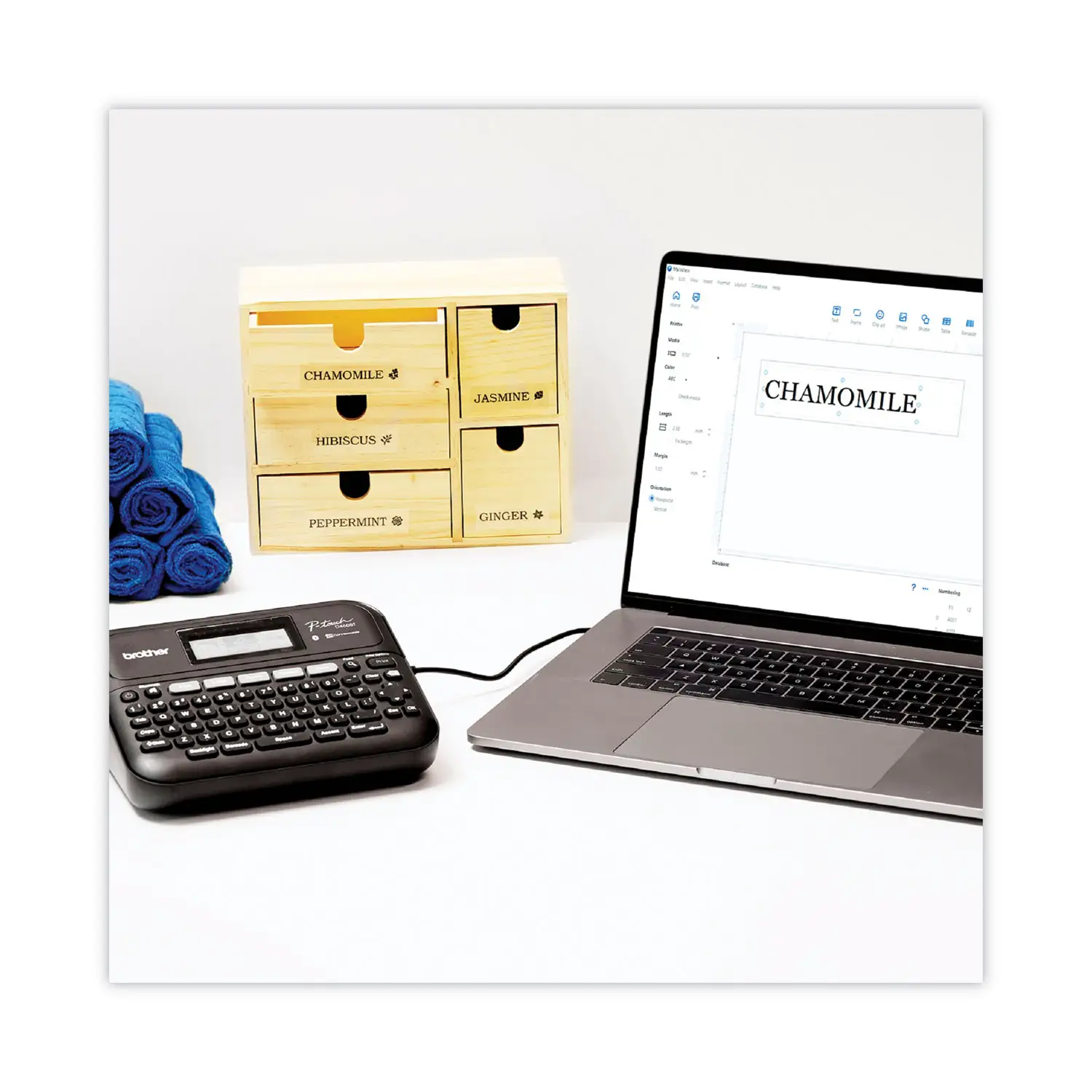
Official materials emphasize mobile + PC workflows (Bluetooth and USB connections, plus P-touch Editor and the iPrint&Label app). On the ground, some users say it delivers exactly that. A verified Best Buy reviewer (jrowe820) wrote: “the labeler was purchased to replace a smaller one . so far the blue tooth works great . it is as described.” Another Staples customer praised the computer workflow: “love the computer interface!”
But other reports show the connection promise can be fragile depending on setup. One Staples reviewer summarized the failure mode bluntly: “when attempting to print , it is not recognized by the program or computer.” For office admins rolling this out across machines, that’s the difference between a shared productivity tool and a support ticket magnet.
Claim: Efficient labeling with reduced waste and quick editing/preview.
The product materials highlight preview and templates; users echo some efficiency wins. A Best Buy reviewer (ladybug 68) specifically liked tape-saving behavior: “i do like the feature that saves tape by reducing the amount of wasted tape for margins.” That’s a tangible benefit for high-volume labelers watching consumable costs.
Yet the “waste” conversation doesn’t disappear—just shifts. A Staples reviewer still complained: “just wish it didn’t waste tape at the ends of the label.” So while some users notice margin optimization, others still see end-of-label waste as an ongoing annoyance, especially if they’re printing lots of short labels.
Claim: A polished, user-friendly experience with rich features.
Marketing emphasizes many fonts, styles, symbols, and multi-line labels. The feature depth is real—and some buyers love it. A Best Buy reviewer (remote) said: “i love my label maker . i love the fact that it has five lines that you can use.” But “feature-rich” can also mean “harder to learn.” A Best Buy reviewer warned: “the downside so far is that some of the instructions are hard to follow,” and a Staples customer similarly wrote: “a bit difficult to get acquainted with all of the instructions... but very good on the whole.”
Cross-Platform Consensus
Universally Praised
A recurring pattern emerged: people who label frequently—office organizers, small-business operators, and anyone maintaining bins, files, and equipment—keep describing the Brother P-Touch PT-D460BT Label Maker as a dependable “work tool,” not a toy. The praise is rarely abstract; it’s about repeatability and output that looks professional.
Cutting and tactile “this feels solid” feedback shows up strongly. Best Buy reviewer jrowe820 gave a simple but telling endorsement: “It never misses a cut!! keys have a very nice feel.” For users who print dozens of labels in one sitting—filing projects, inventory tags, equipment IDs—that reliability matters more than fancy features. A missed cut is wasted tape and rework; this comment reads like someone who’s been burned by flakier labelers.
Label quality and “does what I expected” performance also repeats across reviews. Staples reviewer Gregory W. called it “top notch” and emphasized predictability: “prints exactly as i expected it to . buy it , you'll like it .” Another Staples customer kept it practical: “product is easy to work and produces good quality labels.” For office staff who just need clean file-folder labels and consistent readability, those lines suggest it meets the baseline every day.
Connected workflows (especially Bluetooth) get real love—when they work. Best Buy reviewer charlenad said: “so far the blue tooth works great . it is as described.” On Staples, one reviewer highlighted cross-device flexibility: “lots of design options and the ability to do the work on a mac computer and print from the p-touch.” This matters for a workplace where one person designs labels (branding, formatting) and another prints them at the point of use.
Customization—icons, images, and multi-line labeling—lands with power users. A Staples reviewer who leaned on the app explained why: “i have used the app almost exclusively because you can add images.” Another Staples buyer celebrated creative control: “awesome you can make your own icons.” And for people labeling longer descriptions (file systems, storage bins, procedures), Best Buy reviewer remote highlighted the practical benefit: “the fact that it has five lines that you can use.”
After these narratives, the “why people keep it” summary looks like this:
- Reliable cutting and satisfying keys (Best Buy)
- Consistent label output and organization gains (Staples)
- Bluetooth/PC workflows that can speed up labeling (Best Buy, Staples)
- Strong customization via app/software, including images and multi-line labels (Staples, Best Buy)
Common Complaints
Digging deeper into user reports, the biggest frustration isn’t that the printer makes bad labels—it’s that getting from unboxing to “printing smoothly” can be messy for some buyers. That’s a critical distinction for teams: you can love the output and still resent the onboarding.
Instructions and learning curve come up repeatedly. Best Buy reviewer ladybug 68 admitted: “i am still in a learning curve... the downside so far is that some of the instructions are hard to follow.” Staples reviewer Howard R. echoed the same theme: “a bit difficult to get acquainted with all of the instructions... but very good on the whole.” For casual home users who just want to label lunch containers or kids’ school supplies, this learning curve may feel disproportionate.
Installation/recognition issues can be a dealbreaker for PC-centric workflows. One Staples reviewer wrote: “hard to install and hard to get ready to use . when attempting to print , it is not recognized by the program or computer.” That story matters most to offices expecting plug-and-play reliability across multiple computers, or to users who bought this specifically for the “connected” promise.
Consumables and tape waste/cost are a steady undercurrent. One Staples reviewer bluntly flagged the tradeoff: “only issue is the price of the tape.” Another complained about wasted material: “wish it didn’t waste tape at the ends of the label.” For high-volume labeling—asset tags, inventory, shelf labels—tape costs add up, and perceived waste becomes emotionally (and financially) loud.
Size and portability expectations are mixed. One Staples buyer loved storage friendliness: “its not bulky and i'm able to storage it away.” But another Staples reviewer called it out as the opposite: “it is pretty bulky - i wish it was smaller.” That contradiction suggests “bulky” depends heavily on what you’re comparing it to (tiny handheld labelers vs. desktop-style systems).
A quick complaints recap after the stories:
- Instructions can be hard to follow (Best Buy, Staples)
- Some users report software/PC recognition trouble (Staples)
- Tape can feel pricey and/or wasteful at the ends (Staples)
- Physical size feels too big for some, fine for others (Staples)
Divisive Features
The Brother P-Touch PT-D460BT Label Maker sparks split opinions most sharply around “how much machine you actually need.”
For business users, the complexity reads as capability. One Staples reviewer praised it as “versatile workhorse,” highlighting app-driven power: “you can add images.” For these users, the “extra options” are the whole point—logos, different fonts, structured layouts, and reprints.
For casual users, the same depth can feel like overkill. A Staples reviewer gave a clear warning: “does more than i need... not for simple home use, buy smaller model for casual use.” That’s not a complaint about quality; it’s a caution about mismatched expectations.
Trust & Reliability
One reliability signal comes from warranty and breakage narratives rather than day-one impressions. A Staples reviewer reported a long wait after failure: “item was fine until it broke , waiting 5 weeks for warranty replacement.” For workplaces depending on consistent labeling (inventory, compliance, file systems), downtime like that can disrupt operations even if the device performs well when it’s working.
The available “Trustpilot” data here is actually reposted retailer review content (Best Buy and Staples), not a separate corpus of scam reports. Within those reviews, the concerns tilt toward usability and support speed rather than fraud or fake listings. The more concrete long-term risk discussed is durability plus the time-to-replacement story, not payment or counterfeit anxiety.
Alternatives
Only one explicit competitor is mentioned directly in user feedback: the Brother PTD 420 (Staples). A Staples reviewer recommended the Brother P-Touch PT-D460BT Label Maker but added: “i would recommend this machine or it slightly less expensive relative ptd 420.” That positions the PT-D460BT as the more capable pick, while the PTD 420 is framed as a value alternative for buyers who want something similar but cheaper.
Within the same feedback set, there’s also an implied alternative category: smaller, simpler Brother labelers. One Staples reviewer advised: “buy smaller model for casual use.” While no exact model name is provided there, the “alternative” is clear: if your labeling needs are occasional and basic, users suggest stepping down rather than paying for features you won’t touch.
Price & Value
Current pricing signals vary by platform listing and condition, which reveals how buyers treat the Brother P-Touch PT-D460BT Label Maker as both a business tool and a secondhand bargain target.
On major retail listings, the commonly shown new price is around $79.99 (Amazon listing and Best Buy item page context), while Staples shows it at $89.99 in its review page context. For value-focused buyers, the used market looks meaningfully cheaper: an eBay listing shows $47.50 for a used unit with a major caveat—“no cords included - label maker only.” Auction-style resale can dip far lower: one ended listing shows $17.50 sold price in “good condition” context.
The user value debate also centers on ongoing costs. A Staples reviewer who otherwise liked the machine still flagged: “only issue is the price of the tape.” If you’re printing frequently, that recurring expense shapes the real cost of ownership more than the upfront device price.
Buying tips implied by the feedback:
- If buying used, verify accessories; one eBay listing explicitly lacked cords (“
no cords included”). - If printing high volume, budget for tape and watch waste complaints (“
waste tape at the ends”). - If you’re a casual home labeler, multiple users suggest a smaller model may deliver better value than paying for business-level features.
FAQ
Q: Does the Brother P-Touch PT-D460BT actually work well over Bluetooth?
A: Yes—many buyers say Bluetooth performs reliably, but not everyone has a smooth setup. A verified Best Buy reviewer noted: “so far the blue tooth works great . it is as described.” Still, a Staples reviewer reported PC/software trouble: “it is not recognized by the program or computer.”
Q: Is it easy for beginners, or does it take time to learn?
A: Expect a learning curve for full features. A verified Best Buy reviewer said: “i am still in a learning curve... the instructions are hard to follow,” and a Staples reviewer echoed: “a bit difficult to get acquainted with all of the instructions... but very good on the whole.”
Q: Does it waste a lot of label tape?
A: Some users see tape-saving benefits, while others still notice waste at the ends. A verified Best Buy reviewer liked that it “saves tape by reducing the amount of wasted tape for margins,” but a Staples customer complained: “wish it didn’t waste tape at the ends of the label.”
Q: Is it worth it for simple home labeling?
A: It can be overkill for occasional use. A Staples reviewer warned: “not for simple home use, buy smaller model for casual use.” People who label frequently, organize offices, or want advanced design options tend to see more value.
Q: Are the labels and overall output quality good?
A: Most feedback on output quality is positive and focused on consistency. A Staples reviewer wrote: “prints exactly as i expected it to,” and another said: “produces good quality labels.” Users also praise multi-line capability: “five lines that you can use” (Best Buy).
Final Verdict
Buy the Brother P-Touch PT-D460BT Label Maker if you’re an office organizer, small business operator, or serious home organizer who will actually use the computer/app workflow—especially if features like multi-line labels and image-based customization matter. Staples users repeatedly describe it as “a great label maker” with “lots of design options,” and Best Buy reviewers highlight dependable mechanics like “It never misses a cut!!”
Avoid it if you want a dead-simple labeler for occasional home tasks or if you’re allergic to setup friction; one Staples reviewer explicitly advised: “buy smaller model for casual use,” and another reported it being “not recognized by the program or computer.”
Pro tip from the community: if tape costs annoy you, pay attention to waste behavior—some buyers praise margin savings (“saves tape”), while others still complain about “waste... at the ends of the label.”





