Brother MFCL2710DW Review: Conditional Buy (8.2/10)
The “one of the best things I’ve ever bought” crowd is loud on this one—and they’re mostly talking about printing a lot without drama. Brother Monochrome Laser Printer MFCL2710DW earns a conditional buy at 8.2/10: a workhorse for black-and-white documents, but networking and driver setup can turn into the story you didn’t want.
Quick Verdict
Conditional — yes, if you want reliable monochrome printing and can tolerate (or bypass) finicky Wi‑Fi setup; no, if you need color or expect painless networking on every router.
| What matters | What users liked | What users didn’t | Sources |
|---|---|---|---|
| Reliability | “durable… extremely consistent” | “drop from the network frequently” | Reddit, Newegg |
| Setup | “easiest printer ever to set up” | “difficulties installing drivers on windows” | Reddit, Newegg |
| Print/scan quality | “prints are very sharp… blacks are very bold” | photos/graphics limits implied by mono use cases | Newegg, Reddit |
| Cost to run | “off brand toner is easy to find” | subscription models broadly disliked (avoidance praised) | |
| Connectivity | Wi‑Fi Direct praised for mobile | “wireless is limited to 2.4 ghz” | Newegg, Trustpilot |
| Paper handling | “manual paper feed… labels and envelopes” | tray durability concerns | Newegg |
Claims vs Reality
Brother’s marketing positions the Brother Monochrome Laser Printer MFCL2710DW as “easy to set up,” “quiet,” and “wireless.” Digging deeper into user reports, the “easy” part often holds—until it doesn’t, especially on certain Windows/network configurations.
One recurring claim is fast, fuss-free productivity. A Reddit commenter describing heavy daily academic printing called it “not only durable, it’s also extremely consistent and rarely has network issues or hiccups… one of the best things I’ve ever bought.” That’s the ideal story: high volume, minimal babysitting, and cheap consumables—“off brand toner is easy to find and sometimes quite good” (Reddit, r/BuyItForLife thread).
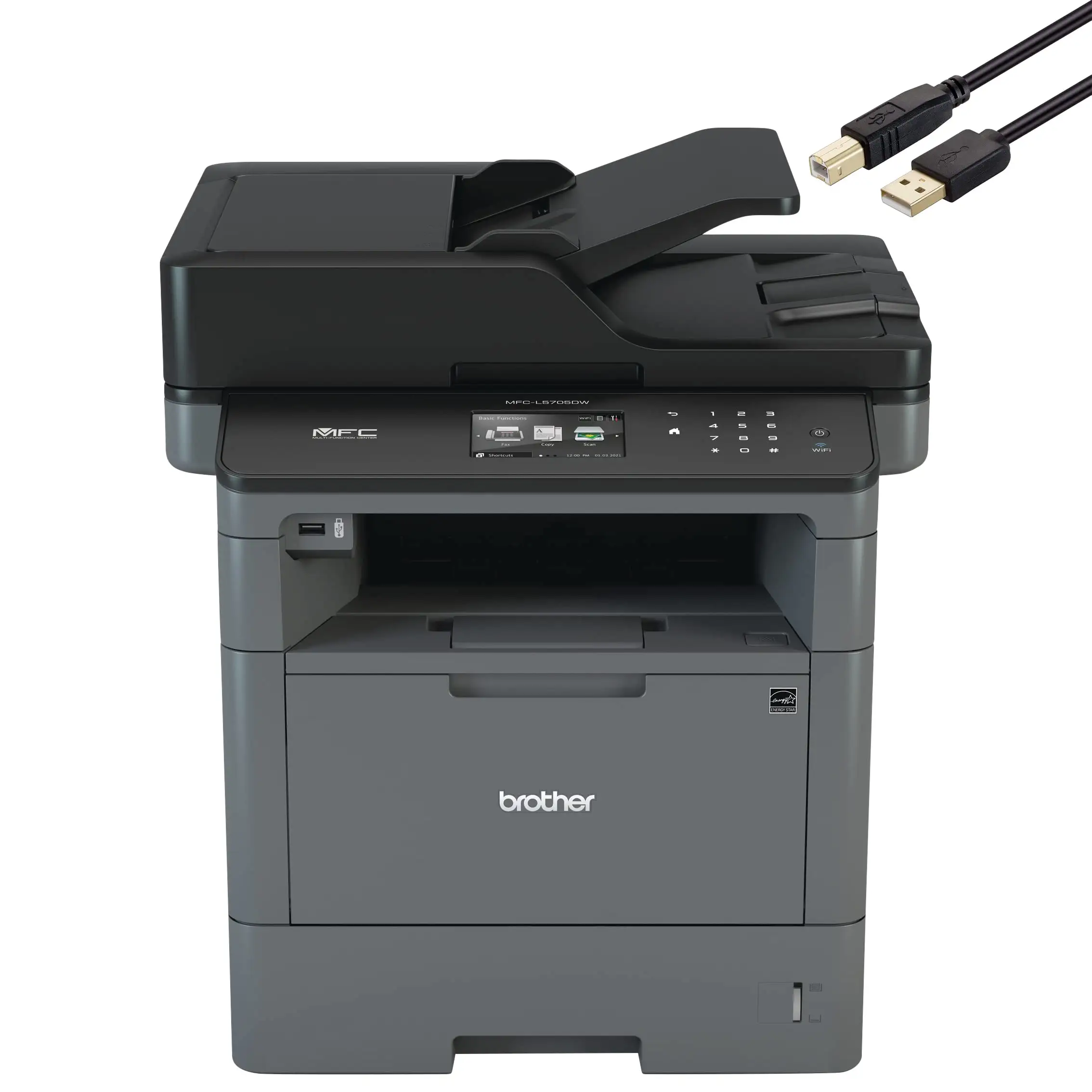
But that narrative collides with a different set of experiences where the printer is great only “when it’s up and running.” In a critical Newegg review, the user praised output—“original prints are very sharp, and the blacks are very bold”—then detailed a messy path to getting it installed: “difficulties installing drivers on windows 7 and windows 10… the brother website offers an all-in-one software package that was nearly useless… [I] do a manual search… ‘have disk’… scroll down to mfc-l2710dw series.” For less technical home offices, that’s the opposite of “simple.”
Wireless reliability is another marketing promise that becomes conditional in practice. A verified Trustpilot buyer liked the overall value but drew a hard line: “claims to be wireless but doesn't support 5 ghz.” They also described a practical trap: “I finally gave up and switched to wired ethernet… you also have to disable wireless access. It will not function with both enabled.” Meanwhile, the Newegg critical review was blunt: “wireless network reliability is very lacking… the only fix is to disable, then re-enable wlan.”
Cross-Platform Consensus
Universally Praised
The strongest agreement across platforms is that Brother Monochrome Laser Printer MFCL2710DW is a dependable black-and-white document machine when your life is PDFs, readings, and office forms—not photo prints. For high-volume readers and students, that consistency becomes the whole point. Reddit user reports read like survival stories after bad printers: one user said they bought the “black and white laser brother mfc-l2710dw series in 2020” and print “a bunch of stuff every day,” concluding it’s “durable… extremely consistent.” Another Reddit commenter, fresh off “an hp disaster,” framed the contrast as relief: “easiest printer ever to set up and it works marvelously.”
Print and scan quality also get concrete praise from people who care about legibility and sharp text. A Newegg reviewer described output in forensic terms: “original prints are very sharp, and the blacks are very bold.” That matters for home-office users printing contracts, homework packets, or research papers—where crisp text beats glossy color. The same reviewer noted you can reduce quality to save toner and still keep readability: “dial back the quality to save toner… doesn’t sacrifice the sharpness of fonts or charts.”
Mobile and direct printing workflows are another bright spot—especially for households where the printer is shared across phones and laptops. In the Newegg critical review, Wi‑Fi Direct was described as a standout: “a great feature… my samsung galaxy s7… worked flawlessly… no passcodes to memorize… just send your file to print.” For families or small teams, that’s a real quality-of-life gain: less IT, more printing.
After those stories, the pattern emerges: people aren’t praising bells and whistles—they’re praising not having to fight the printer. As one Newegg favorable review put it, “it is such a relief not having to work on the printer every time i want to print.”
- Best-fit users: students printing daily readings; home offices focused on text; small teams needing scan/copy/fax basics.
- Repeated strengths: crisp text, solid scan output, simple mobile printing (especially Wi‑Fi Direct).
Common Complaints
The most consistent pain point is networking—specifically Wi‑Fi reliability and setup complexity depending on your environment. The Newegg critical reviewer’s account reads like a slow-burn frustration: even with the printer “in the same physical room as the access point,” it would “drop from the network frequently,” and even the vendor software “cannot detect the device on the network.” Their workaround wasn’t elegant: “disable, then re-enable wlan on the printer through the menu.” For remote workers, this kind of intermittent failure isn’t just annoying—it’s the difference between printing a shipping label in 10 seconds and losing 20 minutes.
A verified Trustpilot buyer described a different angle on the same problem: Wi‑Fi limitations meeting modern routers. They wrote, “wireless is limited to 2.4 ghz,” and they “never quite got it to where i could print consistently from my laptop even though i have both 2.4 and 5 networks configured.” The takeaway isn’t that 2.4 GHz can’t work; it’s that households with dual-band setups may stumble into confusing routing, device discovery, or configuration quirks—especially if they’re “not a network engineer.”
Driver installation—particularly on Windows—also shows up as a recurring stumbling block. In the Newegg critical review, Windows wouldn’t “auto-detect appropriate drivers,” and the user ended up relying on a manual process with a specific .inf file. That’s a stark contrast to the “easy setup” stories and helps explain why some people call it painless while others call it “convoluted.”
Hardware feel is a smaller but notable complaint. A Newegg reviewer worried “the paper tray doesn’t feel very durable… best served in a home office… very small business.” For environments where multiple people tug trays and slam drawers, that perceived fragility can matter.
- Biggest downside: Wi‑Fi that can be “hit-or-miss” and occasionally unstable.
- Secondary downside: driver setup can require manual steps on Windows.
Divisive Features
Wireless printing is both the hero and the villain depending on how you use it. Some users describe near-instant onboarding and smooth mobile printing. A Newegg favorable reviewer said the app “found the new printer within seconds,” and they were “print pages in no time.” Similarly, Wi‑Fi Direct was praised as frictionless: “no passcodes to memorize… just send your file to print.”
Yet other reports describe wireless as the weak link. The Trustpilot buyer criticized the lack of 5 GHz support (“doesn't support 5 ghz”), and the Newegg critical reviewer concluded “wireless network reliability is very lacking.” Even within that frustration, the path to stability is telling: multiple users end up preferring Ethernet, or treating Wi‑Fi Direct as a workaround rather than relying on standard network printing.
Another divisive point is “subscription.” Printer buyers are sensitive to subscription lock-ins, and Reddit’s community sentiment is blunt: “avoid the subscription models.” What’s notable here is that some users see Brother’s approach as less aggressive. One Reddit commenter wrote the subscription option was “strictly opt in and very easy to avoid.” So for cost-conscious buyers, the printer feels like an escape from the “HP” ecosystem horror stories—without forcing you into recurring fees.
Trust & Reliability
A recurring pattern emerged: people trust this model because it keeps working after the honeymoon period—especially in text-heavy, real-world routines. The strongest long-term durability story comes from Reddit: a graduate student printing “a bunch of stuff every day” called it “durable” and “extremely consistent,” emphasizing that it “rarely has network issues or hiccups” in their use case. Another Reddit user generalized that confidence from a different Brother model, saying they’ve had a Brother for “about 10 years and it’s never let me down… i print exclusively wirelessly now, and it almost always works without a hitch.”
Trustpilot adds a different kind of reliability signal: satisfaction with core printing and cost, paired with skepticism about the “wireless” promise. The verified buyer still concluded: “i really like this printer overall,” but withheld a perfect score because network setup felt needlessly complicated and constrained by 2.4 GHz.
Alternatives
Only competitors mentioned in the data are included, and the contrasts are revealing. The “avoid HP” theme is repeated as a cautionary tale rather than a spec comparison. One Reddit user warned: “i strongly recommend you avoid hp. nasty software and very expensive ink. they shut themselves down when you don't use hp ink.” That context frames the Brother Monochrome Laser Printer MFCL2710DW as the anti-drama option for people burned by ink and software ecosystems.
Canon appears as the “if you need color” branch. A Reddit commenter wrote: “canon laser jets are good if you need some color prints,” while also saying “i avoid inkjet for anything but printing photos.” For users who occasionally need color charts or marketing materials, this is the clearest functional fork: stick with the Brother for monochrome document throughput, or look at Canon laser if color is non-negotiable.
Brother’s own lineup shows an internal alternative too: people sometimes wish for color, but acknowledge it adds complexity. A Reddit user said: “sometimes i wish it were able to print in colour, but that adds 3 more cartridges and a lot more complexity.” That’s effectively the tradeoff story: simplicity and lower running hassle vs. color capability.
Price & Value
Value is where the Brother Monochrome Laser Printer MFCL2710DW builds its fan base, especially for heavy text printing. A verified Trustpilot buyer made the economics personal: “$70 every 4 or 5 months make a $199 laser mfc an economic no-brainer,” and noted toner is “reasonably priced… especially compared to ink-jet.” On Reddit, cost control shows up through consumables flexibility: “off brand toner is easy to find and sometimes quite good.”
Market pricing also suggests it holds reasonable resale liquidity. eBay listings show the model appearing both “new” and “used,” with examples like “$190.53 new” and “$129.94 used” in the aggregated market view, implying ongoing demand for a discontinued-but-popular office staple. For bargain hunters, this aligns with community behavior: buy reliable monochrome laser, then feed it toner economically.
Buying tips from users skew toward avoiding pain rather than chasing deals. The Trustpilot buyer’s hard-won networking advice (“switched to wired ethernet… disable wireless access”) suggests that for some households, paying attention to how you’ll connect—Wi‑Fi vs Ethernet—matters more than shaving $20 off the price.
- Best value case: high-volume monochrome printing where ink costs used to be the main expense.
- Best buying angle: prioritize connectivity stability (Ethernet-ready setups) over marginal price differences.
FAQ
Q: Is the Brother Monochrome Laser Printer MFCL2710DW easy to set up?
A: Conditionally. Some users call it “the easiest printer ever to set up” (Reddit), while others describe Windows driver installation as manual and “convoluted” using the “have disk” method (Newegg). Setup experience seems to depend on your OS and network discovery behavior.
Q: How reliable is the wireless connection in real homes?
A: Mixed. One verified buyer said “wireless is limited to 2.4 ghz” and couldn’t print consistently until switching to Ethernet (Trustpilot). A Newegg reviewer reported it “drop[s] from the network frequently” and required toggling WLAN. Others, including a Reddit grad student, reported rare network issues.
Q: Is print quality good enough for school and office documents?
A: Yes for text-heavy work. A Newegg reviewer said prints are “very sharp” with “blacks… very bold,” and fonts stay crisp even when lowering quality to save toner. Reddit users who print daily readings and paperwork describe it as “extremely consistent” for bulk document output.
Q: Does it support cheap third-party toner?
A: Many users say yes in practice. Reddit user feedback emphasizes that “off brand toner is easy to find and sometimes quite good,” which is part of why heavy printers see it as a cost-effective replacement for inkjets. Official specs mention inbox toner and standard/high-yield options, but user stories focus on third-party availability.
Q: Should you avoid printer subscription plans with this model?
A: Users recommend avoiding forced subscription ecosystems, but note Brother’s subscription is often optional. One Reddit commenter said the subscription was “strictly opt in and very easy to avoid,” contrasting it with broader complaints about subscription-heavy printer brands.
Final Verdict
Buy Brother Monochrome Laser Printer MFCL2710DW if you’re a student, remote worker, or home office user who prints lots of black-and-white documents and wants a machine people describe as “durable” and “extremely consistent” (Reddit), with “very sharp” output (Newegg). Avoid it if your must-have is painless Wi‑Fi across modern dual-band networks—because a verified buyer called out 2.4 GHz limitations and others reported frequent disconnects.
Pro tip from the community: if wireless becomes the bottleneck, follow the path some users ended up taking—go wired. As the verified Trustpilot buyer learned, “you also have to disable wireless access” for Ethernet to behave consistently.





