Brother LC103 Ink Cartridge Review: Reliable, With Caveats
A verified buyer on Amazon snapped: “quite disgusted! definitely not worth the price if you don’t get anywhere near the ink volume,” after installing new Brother LC103 color cartridges that read “only 25% full” on the printer display. That one line captures the tension around Brother LC103 Ink Cartridge: widely praised for reliable, vivid output, yet dogged by scattered (but loud) reports of odd ink-level readings and occasional clogging. Verdict: strong pick for OEM reliability with caveats. Score: 8.6/10.
Quick Verdict
For most Brother inkjet owners who want predictable results, Brother LC103 Ink Cartridge is a Yes—especially if you’ve been burned by third-party cartridges. If you’re extremely price-sensitive or you hate uncertainty around “ink level” reporting, it’s Conditional.
| What people agree on | Evidence from user feedback | Who it matters to | Platform |
|---|---|---|---|
| Consistent print quality | “magenta color looks great. prints nice” | Students, home offices | Best Buy |
| Easy installation | “they just snap in and out and don’t leak” | Anyone replacing often | Best Buy |
| OEM beats many off-brands | “there’s simply no replacement in longevity and quality” | Reliability-first users | Best Buy |
| High-yield promise (600 pages) | “instead of 300 pages… you can get 600 pages” | Heavy printers | Best Buy |
| Ink-level weirdness complaints | “showing only 25% full after installation” | Anyone tracking ink closely | Amazon |
| Occasional clog/blockage reports | “caused clogs and total blockage” | Infrequent printers | Birdeye |
Claims vs Reality
Brother’s official positioning around Brother LC103 Ink Cartridge leans heavily on “high yield” and “optimum performance.” The specs list “yields up to 600 pages” and emphasize genuine supplies for “superior output.” On paper, that’s straightforward: pay more, print more, worry less.
Digging deeper into user reports, the “high yield” story holds up best when users describe semester-long stretches of printing. A Best Buy reviewer framed it in lived terms: “one xl cartridge lasts me for half my semester,” adding “more bang for your buck.” Another echoed the same workload reality: “i use a lot of ink… so i need to make the ink last as long as possible,” arguing the XL prevents “spending twice the money” on standard cartridges.
Still, the 600-page narrative runs into real-world skepticism. One verified Amazon buyer bluntly called it out: “in no way do these cartridges last for hundreds of pages. high yield is a fallacy.” That’s not a controlled page-yield test, but it’s a reminder that coverage, cleaning cycles, and print habits can make the “600 pages (5% coverage)” claim feel unreachable for some households.
The second marketing promise—smooth performance and accurate monitoring—faces the biggest gap. While officially high-yield and designed for “seamless unison,” multiple users report baffling ink-level readings immediately after installation. A verified Amazon buyer complained: “both are showing only 25% full after installation and rebooting of my printer.” A similar story shows up in other feedback channels: “the ink level in this new black cartridge is not full… it shows ink level only about 1/4%.” While these reports don’t prove the cartridge is physically underfilled, they show a recurring frustration: the printer’s gauge sometimes undermines confidence in what you just paid for.
Cross-Platform Consensus
Universally Praised
The strongest cross-platform theme around Brother LC103 Ink Cartridge is print quality that feels dependable day-to-day, especially for people who print schoolwork, church materials, or routine documents. A Best Buy reviewer celebrated the output plainly: “magenta color looks great. prints nice,” while another described results as “color is vibrant.” For students and parents juggling deadlines, that matters less as a spec and more as fewer “reprint” moments when color looks off.
A second pattern emerged: installation is repeatedly described as simple, quick, and low-mess—an underappreciated advantage for households that replace colors individually. One Best Buy buyer wrote, “they just snap in and out and don’t leak,” emphasizing that this also “makes recycling easy.” Another summed it up for frequent replacers: “these cartridges are easy to install, and you don’t have to change them all the time.” For small offices or families printing constantly, reduced hassle is part of the value proposition.
OEM trust is also a recurring refrain, particularly among users who tried cheaper compatibles and came back. A Best Buy reviewer said, “i’ve tried non oem printer ink… and i always find myself coming back to the original,” concluding, “there’s simply no replacement in longevity and quality.” On Birdeye, one long-term Brother user described how “knock-off consumables… was causing print quality issues… thought i needed a new printer,” but “ordered genuine brother inks and was able to bring the printer back to new quality.” For reliability-first users, these stories make LC103 feel like insurance against printer drama.
After those narratives, the praise tends to condense into a familiar trio: quality, longevity, and value when bought smart. Users repeatedly frame it as “good yield” and “lasts quite a while,” with one Best Buy reviewer noting they “usually only have to buy one per semester.”
- Commonly praised themes: “print quality,” “easy to install,” “lasts longer,” “more ink for your buck” (Best Buy)
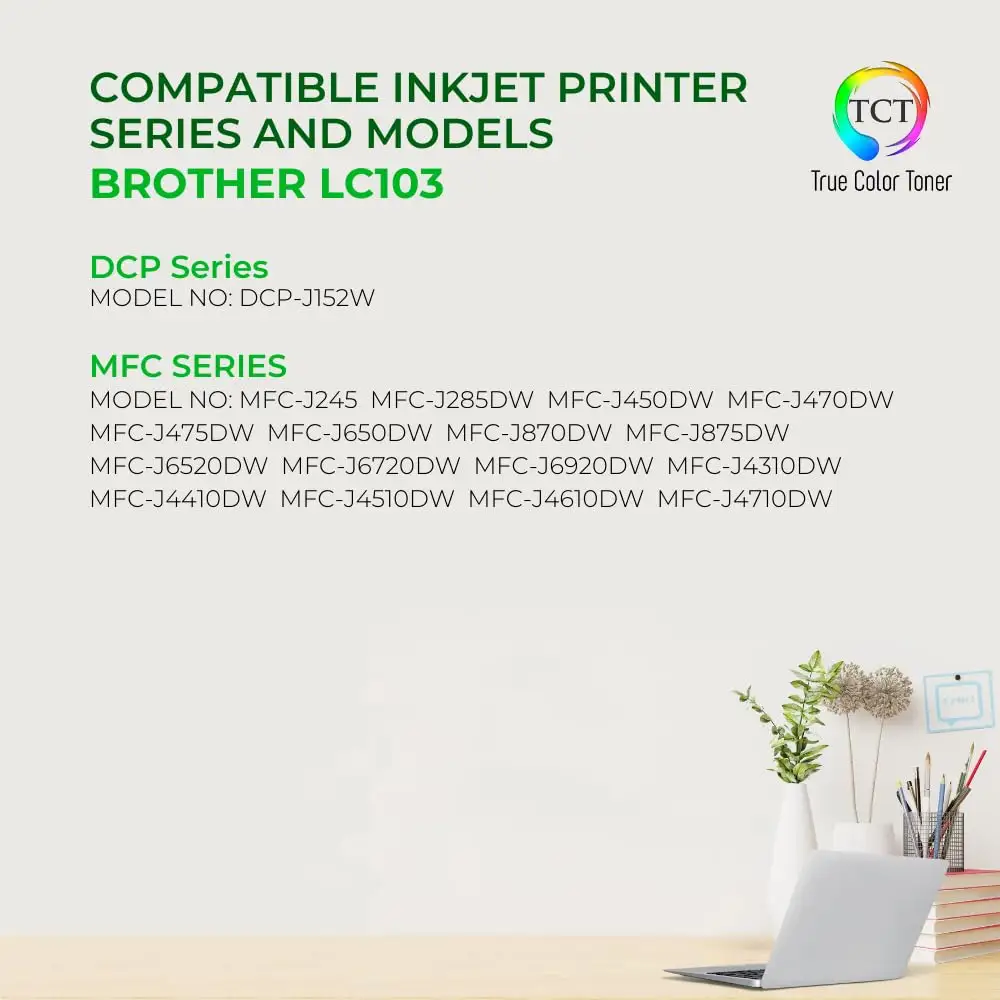
Common Complaints
The most emotionally charged complaint cluster around Brother LC103 Ink Cartridge is the ink-level indicator reading strangely low right after installation. A verified Amazon buyer didn’t hedge: “only 25% of ink in brand new cartridges… quite disgusted!” Another report outside Amazon mirrors the same experience: “it shows ink level only about 1/4%… not sure if this is due to the printer itself or the cartridge.” For users who budget ink tightly—or who equate the gauge with actual volume—this becomes a trust issue, not a minor annoyance.
A recurring pattern emerged when users describe printer behavior that contradicts the cartridge’s supposed remaining ink. One verified Amazon buyer mentioned the printer “on occasion tells me ink too low but there is plenty of ink in cartridge.” Even if the cartridge prints fine, that kind of warning can disrupt workflows, especially for home offices that need a print job now, not after troubleshooting.
There are also sporadic but serious reliability complaints about clogging or blockage. On Birdeye, one user wrote: “the two i have used so far have caused clogs and total blockage… within a few pages that color was clogged.” That’s the kind of report that hits hardest for infrequent printers—people who might go weeks between prints and then need perfect output for a form, a label, or a school project.
Finally, authenticity concerns appear in a smaller subset of reviews, but they’re stark when they show up. A verified Amazon buyer alleged: “this seems to be fake / refilled cartridges… don’t buy it.” That’s less an indictment of Brother as a manufacturer than a warning about marketplace sourcing—yet it still affects the LC103 experience if buyers can’t confidently tell what they received.
- Most common frustrations: low gauge readings (“25% full”), occasional clogging (“total blockage”), and suspected counterfeit packaging (Amazon, Birdeye)
Divisive Features
High-yield value is where opinions split most sharply for Brother LC103 Ink Cartridge. On one side, heavy users treat XL as a budget strategy: “they are cheaper than buying the standard and they print way more pages,” and “instead of 300 pages… you can get 600 pages.” For students or households printing frequently, this becomes a “fewer trips, fewer swaps” story.
On the other side, some buyers reject the implied payoff. A verified Amazon reviewer dismissed the longevity promise: “this ink cartridge lasts as long as it is advertised, nothing more,” while another went further: “high yield is a fallacy.” Those comments often read like frustration with real-world variability—ink used for cleaning cycles, graphics-heavy pages, or settings that don’t resemble the “5% coverage” yardstick.
There’s also a subtle divide in how people talk about cost. Some call it “reasonably priced” and “affordable,” especially compared with other brands, while others frame printer ink as inherently overpriced. One verified Amazon buyer joked darkly that it’s “one of the most expensive liquid materials in our everyday lives.” The product can be both “worth it” and “annoyingly expensive,” depending on whether the user prioritizes reliability or raw cost-per-page.
Trust & Reliability
Scam anxiety doesn’t dominate the conversation around Brother LC103 Ink Cartridge, but it punctuates it with high stakes. A verified Amazon buyer claimed the product “seems like refilled ink cartridges” and warned “don’t buy it,” citing missing packaging elements (“no twist off guard”). That kind of report tends to focus suspicion on sellers and listings rather than the OEM cartridge design—yet it’s part of the lived experience for buyers who shop marketplaces.
Long-term reliability stories, however, lean positive when users commit to genuine Brother supplies. One Birdeye reviewer described months of non-use without failure: “will go for months without printing anything and it always works… i have yet to have an ink cartridge dry out on me.” Another Best Buy reviewer emphasized consistent results after trying alternatives: “always buy brother ink… no replacement in longevity and quality.” For infrequent printers, these accounts suggest that sticking with OEM may reduce the “it dried out when I needed it” fear—though the clogging complaint shows it isn’t universal.
Alternatives
Within the provided data, the most direct alternatives to Brother LC103 Ink Cartridge are third-party compatibles and refill systems—often chosen by users who want to cut ink costs dramatically.
The Jalada compatible multipack is positioned as a high-volume bargain, promising “black is 600 pages… color is 600 pages” and “upgraded chips… show accurate ink level.” That’s the appeal for budget-focused users printing frequently. But user feedback in this dataset leans more heavily toward OEM reliability narratives, like the Best Buy reviewer who said off-brand attempts led them back to genuine ink: “there’s simply no replacement in longevity and quality.”
Refillable systems like InkOwl attract a different persona: the tinkerer who wants long-run savings and doesn’t mind syringes and filling. One Amazon reviewer praised it as “money saving and easy to use / refill,” saying “my printer accepted the new cartridges without any problems… the colors look great.” Another emphasized the scale of savings: “i would have bought at least 5 sets of ‘brand name’ ink… and i still have about 3/4 of each bottle left!” But even in that camp, reliability is framed as “you get what you pay for,” especially compared to cheaper refill kits that “flat out did nt work.”
Price & Value
The pricing picture for Brother LC103 Ink Cartridge spans OEM retail packs and third-party marketplace deals. Amazon’s OEM multi-color set is listed at $61.88 (with shipping/import fees varying by region in the provided snapshot). Best Buy reviewers repeatedly reference pricing and membership discounts, framing it as a place to buy genuine ink cheaper: “everyday regular price 15% lower priced than in other places,” and “it also helps to be a rewards member.”
On resale marketplaces like eBay, the spread is wide—from low-cost compatible packs to “sealed pouch” OEM units and lots that may be “expired.” That matters because expiry and storage conditions show up indirectly in user experiences: one Shopper+ reviewer warned that buying too many can backfire—“they lasted so long that some… expired before i could use them… one didn’t print very well and another had to do several cleaning cycles.”
Community buying tips embedded in reviews tend to be practical: buy XL if you print a lot, buy individual colors if your printer supports it, and be cautious with questionable listings. As one Best Buy reviewer put it: “i love my brother cause i can replace only the color i need.” For budgeters, that single-color replacement model can matter as much as the cartridge price itself.
FAQ
Q: Do Brother LC103 cartridges really yield 600 pages?
A: Officially, they’re rated “up to 600 pages” per cartridge (typically at 5% coverage). Some users agree it lasts longer—Best Buy buyers say the XL “lasts me for half my semester.” Others dispute it, with a verified Amazon reviewer saying “high yield is a fallacy.”
Q: Why does a new LC103 cartridge sometimes show 25% full?
A: Multiple users report odd gauge readings after installation. A verified Amazon buyer said new cyan and yellow cartridges were “showing only 25% full after installation and rebooting.” Another review also described a new black cartridge reading around “1/4%.” The feedback doesn’t confirm underfilling—just inconsistent reporting.
Q: Is OEM Brother ink better than compatible cartridges?
A: Many users strongly prefer OEM for consistency. A Best Buy reviewer wrote, “i’ve tried non oem… and i always find myself coming back to the original,” citing “longevity and quality.” Birdeye feedback echoes this: switching back to genuine ink “bring the printer back to new quality.”
Q: Are clogs a real problem with LC103?
A: They’re not the dominant story, but they appear in a few serious reports. One Birdeye reviewer said cartridges “caused clogs and total blockage… within a few pages.” Meanwhile, other long-term users report the opposite, saying genuine ink “never dries out” even after months of non-use.
Q: Should I buy XL (LC103) or standard yield (LC101)?
A: Users who print a lot tend to recommend XL for fewer replacements. Best Buy reviewers highlight that XL can be “worth the extra money” and cite “600 pages” vs “300 pages” for standard. If you print rarely, some buyers focus more on avoiding overbuying and potential expiry.
Final Verdict
Buy Brother LC103 Ink Cartridge if you’re a student, parent, or home-office user who values predictable print quality and wants to avoid the “off-brand ink nightmare.” Avoid if you can’t tolerate ink-level gauge weirdness or if you’re shopping from listings that raise counterfeit concerns.
Pro tip from the community: go XL if you print heavily—“more pages for your buck”—and take advantage of retailer pricing programs, since multiple Best Buy reviewers mention better deals via rewards discounts.





