Brother DR420 Drum Unit Review: Conditional Buy (7.6/10)
“‘Sub-standard drum - broke my brother printer - do not buy!’” isn’t the kind of line anyone expects to read about a simple consumable—yet it shows up right alongside people calling the OEM unit “dependable, as always.” Brother DR420 Drum Unit earns a conditional verdict based on the feedback provided, landing at 7.6/10 for the right printer models and the right buyer expectations.
A recurring pattern emerged across sources: the core idea—an imaging drum rated around 12,000 pages—makes sense on paper, but day-to-day satisfaction hinges on compatibility, reset/maintenance know-how, and whether you choose genuine Brother or a third-party drum.
Digging deeper into user reports, the strongest praise comes from OEM buyers who don’t want surprises, while the sharpest complaints cluster around some compatible drums triggering “drum error,” light prints, or fit issues. That split matters: for occasional home users, long idle periods and reset steps come up more than raw page yield.
Quick Verdict
Yes/No/Conditional: Conditional — a strong buy if you’re using a listed compatible Brother model and you’re willing to pay for OEM reliability (or accept risk with compatibles).
| Decision Factor | What feedback suggests | Best for | Risk |
|---|---|---|---|
| Compatibility | Model-specific; “only compatible with specific Brother printer models” (Provantage) | Owners of listed HL/MFC/DCP/FAX models | Buying wrong model |
| Print reliability | OEM praised: “works better than the generic brands” (Birdeye) | Low-hassle users | Aftermarket variability |
| Install ease | Often “fit… with no problems” (Birdeye) | DIY replacement users | Reset steps not obvious |
| Reset/maintenance | Multiple mention reset confusion | First-time drum buyers | “Replace Drum” persists |
| Cost | OEM called “too expensive” (Birdeye) | Budget-conscious shoppers | Paying more for peace of mind |
| Third-party drums | Mixed to negative in analysis quotes | Experimenters | “drum error,” poor output |
Claims vs Reality
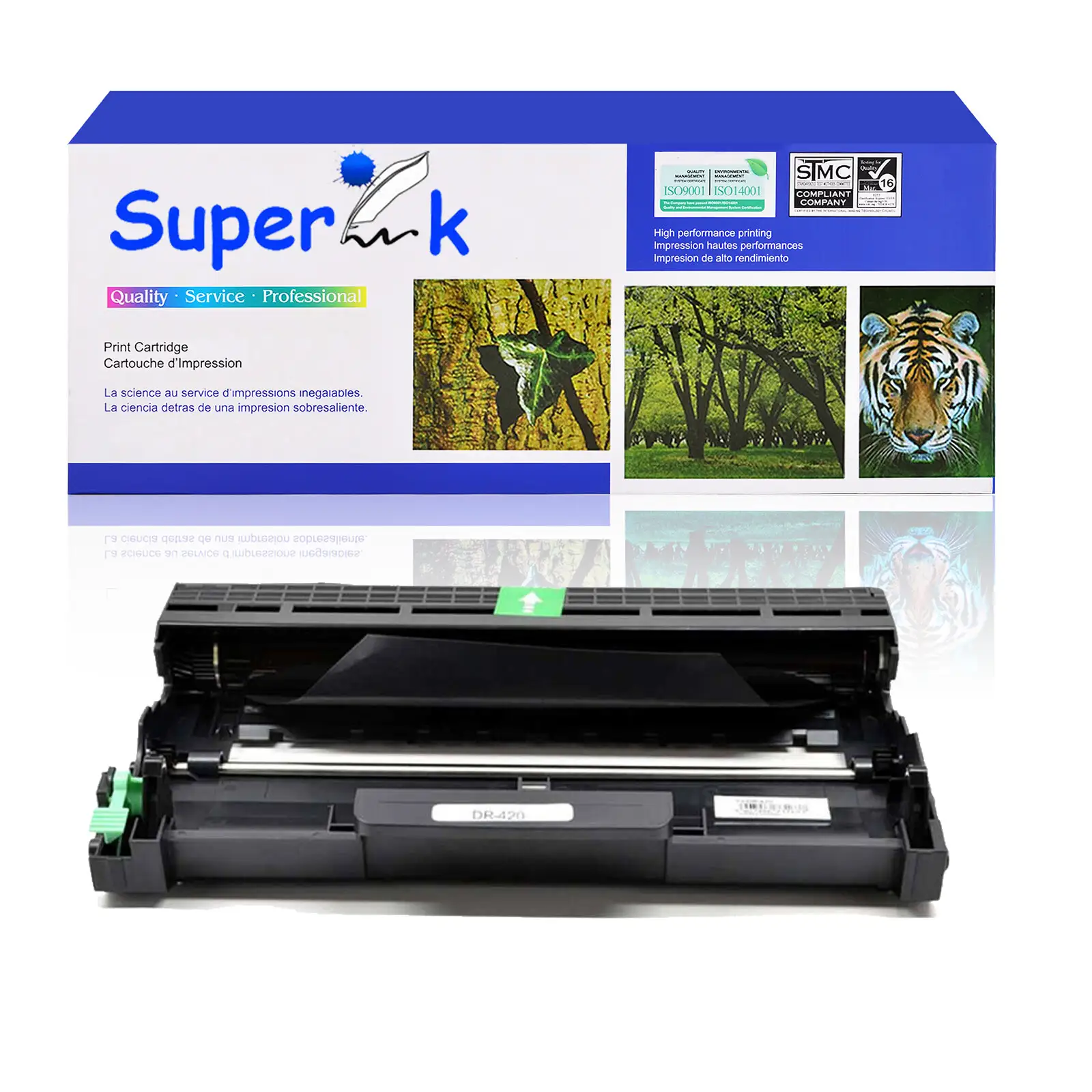
One of the headline claims repeated across official-style descriptions is the yield: up to about 12,000 pages at 5% coverage. Brother’s own guidance around the “Replace Drum” warning frames it as an estimate, not a guarantee, explaining that “temperature, humidity, type of paper, and how much toner you use” can change actual life (Brother USA help page). That framing matches what buyers implicitly run into: the drum is not a simple “print X pages and you’re done” part—it’s tied to usage patterns and printer behavior.
A verified buyer on Amazon noted: “‘part fit right in and worked right away, had to maunu ally reset the page counter before the drum and printer worked again’,” and even questioned whether they “really needed the new drum” if they’d known reset information. While the drum is officially a consumable, this kind of experience highlights a gap between replacement guidance and what users need to do to get back to printing—especially when the printer continues to prompt after a swap.
Marketing-style copy also leans on easy installation and consistent output. That’s largely echoed for genuine units: on Birdeye, one reviewer said, “‘product arrived… fit into the printer with no problems’,” and another emphasized reliability over guesswork: “‘this is such an important part of the printer that i won't gamble with a compatible. i knew this would work right, no guessing.’” But the story shifts when the drum is a third-party compatible: in the ReviewIndex analysis for an LD-compatible DR420 replacement, one quote warns, “‘quite soon after installation my printer started saying drum error and replace drum, even though drum was brand new… eventually it broke and got stuck inside my printer.’”
Compatibility claims also deserve scrutiny. Listings for compatible DR420 replacements name long printer lists, but user feedback suggests that “compatible” doesn’t always mean “works like OEM.” One frustrated comment from the same review analysis states plainly: “‘did not work with our brother printer at all.’” While marketed as a drop-in replacement, the lived reality for some buyers includes troubleshooting, error prompts, or degraded print quality.
Cross-Platform Consensus
Universally Praised
“Worth spending the extra” shows up as a theme among OEM-leaning buyers who value stability more than savings. On Birdeye, one user framed it as a direct comparison against generics: “‘works better than the generic brands out there. i replaced a generic in the time an oem was still working fine & still is. in this case its worth spending the extra $’” For home-office users printing intermittently, that reliability angle is especially important—less frequent use can expose streaking or “other problems” in cheaper units, as another Birdeye reviewer explained: “‘oem units work much better… this one does not seem prone to developing streak… even if it is left standing for a while.’”
The install experience—when everything matches—gets consistent approval. A Birdeye reviewer said the replacement “‘fit the description… and… fit into the printer with no problems’,” echoing the basic expectation that a DR420 drum should slide in cleanly on supported HL/MFC/DCP/FAX models. For small offices or households that just want the printer back online quickly, that “no drama” install is a major win, especially compared with the time cost of returns and troubleshooting.
There’s also a clear educational moment repeated in the feedback: people discovering that toner and drum are separate. In the ReviewIndex analysis, one user admitted: “‘i have a brother printer and didn't realize that the toner and drum were two separate things… if you need a drum it works great, if you need toner make sure you don't purchase a drum as well.’” For first-time laser printer owners, that distinction can prevent buying the wrong part—and explains why some drum purchases are driven by confusion rather than true end-of-life.
Finally, the rated yield itself—about 12,000 pages—remains a central reason people choose the DR420 ecosystem. Provantage summarizes the appeal as “high page yield” and “cost-effectiveness,” positioning it for higher-volume printing where a longer-life drum reduces interruptions. Even when buyers don’t quote page counts directly, their satisfaction often hinges on the drum “works as intended,” as one Birdeye review put it: “‘wow! works as intended.’”
- OEM buyers repeatedly praise reliability and fewer streaks (Birdeye).
- Installation is often straightforward when the model match is correct (Birdeye).
- Clearer expectations help: drum ≠ toner, and the drum typically “last longer than the toner” (ReviewIndex).
Common Complaints
The most persistent frustration isn’t the hardware—it’s the reset and messaging experience. One Birdeye reviewer said, “‘good so far. but no instructions on how to reset drum.’” Another described having to “refer to other reviews” because the included instructions weren’t actually there: “‘frustrating that i had to refer to other reviews… too bad the manufacturers didn’t include it in the instructions.’” For non-technical users, this creates a stressful moment: you replace the drum, but the printer still complains, and you’re stuck hunting for the right button sequence.
Price is the other recurring sticking point, particularly for buyers who believe the OEM is priced at a premium. A Birdeye reviewer summed it up: “‘too expensive… brother charges too much for their oem parts.’” That complaint often comes paired with a willingness to “take a chance on an aftermarket drum unit,” especially if the user has had good luck with cheaper toner cartridges. The implication is clear: some people accept aftermarket risk specifically because OEM pricing feels disproportionate to the part.
The harshest complaints cluster around third-party compatible drum reliability and print quality. In the ReviewIndex analysis (LD compatible DR420 replacement), one user reported immediate degradation: “‘changed the toner and the prints were worse than my old toner.’” Another went much further: “‘sub-standard drum - broke my brother printer - do not buy!’” and described “drum error” prompts and even a unit that “got stuck inside my printer.” For users who rely on a single printer for schoolwork or small business documents, that kind of failure is more than annoyance—it’s downtime and potential repair cost.
Compatibility confusion also shows up as a failure mode. Despite long compatibility lists on compatible listings, one review excerpt says simply: “‘did not work with our brother printer at all.’” That risk disproportionately affects buyers shopping quickly, buying based on a similar model number, or assuming “DR420” works across the entire Brother ecosystem.
- Reset instructions are frequently missing or unclear (Birdeye, Amazon review).
- OEM price triggers hesitation and pushes some shoppers toward aftermarket (Birdeye).
- Some compatible drums draw severe reliability and quality complaints (ReviewIndex).
Divisive Features
The biggest divide is OEM versus compatible. Some users treat the drum as “too important” to risk, like the Birdeye reviewer who said: “‘this is such an important part of the printer that i won't gamble with a compatible.’” For them, paying more is essentially an insurance policy against printer errors, streaking, and rework.
Others actively consider the aftermarket route because the OEM price feels high. One Birdeye reviewer who said “works fine” still concluded they “would have rather taken a chance on an aftermarket drum unit,” describing Brother’s pricing as excessive. This group often separates toner and drum choices—comfortable buying cheaper toner, but torn on the drum because it’s more closely tied to hardware reliability.
The yield claim is also divisive in practice—not because users refute the 12,000-page estimate directly, but because the Brother help guidance explicitly warns it’s variable and cannot guarantee a minimum. While officially positioned as around 12,000 pages, real satisfaction depends on environment, paper, and print-job patterns (Brother USA help page), which makes “expected life” feel inconsistent from user to user.
Trust & Reliability
Digging deeper into reliability signals, the sharpest warnings come from the review-analysis excerpts for the LD compatible DR420 replacement, where multiple quotes describe early failure and printer errors—“‘drum error and replace drum, even though drum was brand new’” and even “‘it broke and got stuck inside my printer.’” Those are the kinds of anecdotes that trigger scam or quality-control concerns, not because they prove fraud, but because the downside is high: the drum interfaces directly with the printer mechanism.
On the other side, long-term confidence is expressed most strongly by OEM buyers on Birdeye, where comments emphasize consistent behavior over time and less sensitivity to idle periods. One user attributed fewer issues to OEM quality, noting it wasn’t “prone to developing streak” even when the printer sat unused. That kind of durability story matters for retirees, occasional printers, or anyone who prints in bursts and then goes weeks without touching the machine.
A practical trust lesson also appears in user behavior: several people lean on community instructions to complete setup. The Birdeye reset walkthrough—“keep the door open… press the clear button… reset the drum”—reflects how owners rely on other owners when official packaging doesn’t help. For risk-averse buyers, that reliance on forum-style fixes can either be reassuring (there’s a known solution) or unsettling (why wasn’t this in the box?).
Alternatives
Only a few true “alternatives” appear in the provided data, and they’re largely third-party compatibles positioned against the genuine Brother unit: GREENCYCLE and ink4u DR420-compatible drums, plus the LD compatible drum referenced via ReviewIndex analysis. The narrative around these isn’t about new features—it’s about risk tolerance.
For bargain-focused users, compatible listings promise similar page yield (“up to 12,000 pages”) at dramatically lower prices than OEM. But user feedback around compatible reliability is the caution flag: the LD-compatible analysis includes complaints about poor print quality and failures, including the extreme “broke my brother printer” quote. That kind of report will matter most to small offices and students who can’t afford downtime.
For buyers who print occasionally and hate troubleshooting, the OEM path is repeatedly justified in Birdeye reviews as fewer streaks, fewer surprises, and longer effective life compared to a generic drum. The tradeoff is cost: even satisfied OEM buyers admit it’s “more expensive,” but frame that premium as buying certainty.
Price & Value
The value conversation splits cleanly into two camps: those who view the OEM as overpriced but reliable, and those who treat third-party drums as a cost-saving gamble. On Birdeye, the complaint is blunt: “‘too expensive… brother charges too much for their oem parts.’” Yet, in the same dataset, another user argues the opposite: “‘in this case its worth spending the extra $’” after watching a generic fail sooner than an OEM drum.
Marketplace pricing data from eBay shows a wide spread—everything from low-cost compatibles in the teens to higher-priced genuine OEM listings—and that spread mirrors the user experience range. A key buying tip implied by the community is to verify whether you’re buying a drum unit or toner, since at least one user purchased with confusion about the two being separate (ReviewIndex quote). That mistake can make any price feel like bad value.
Resale and secondary-market availability also suggest the DR420 ecosystem is mature and heavily circulated, with “open box” and “no retail box” listings common on eBay. For budget shoppers, that opens a third path beyond brand-new OEM versus brand-new compatible: sourcing genuine units via reputable sellers, though user feedback in the provided data is more about function than seller trust.
- OEM value pitch: fewer streaks, less downtime (Birdeye).
- Aftermarket value pitch: lower upfront cost, higher variability (ReviewIndex).
- Community tip: confirm you need a drum, not toner (ReviewIndex).
FAQ
Q: How many pages does the Brother DR420 drum unit last?
A: It’s commonly listed as yielding about 12,000 pages at 5% coverage, but real-life results vary. Brother notes factors like “temperature, humidity, type of paper,” and print-job patterns can change drum life and says it can’t guarantee a minimum page count (Brother USA help page).
Q: Why does my printer still say “Replace Drum” after installing a new DR420?
A: Some users report needing to manually reset the drum counter after installation. A verified Amazon reviewer said they “had to maunu ally reset the page counter,” and Birdeye reviewers complained about “no instructions on how to reset drum,” relying on other reviews for the reset steps.
Q: Is the DR420 the same as a toner cartridge?
A: No—several users learned the hard way they’re separate. In ReviewIndex excerpts, one owner said, “i didn't realize that the toner and drum were two separate things,” adding that “if you need toner make sure you don't purchase a drum.” The drum typically lasts longer than toner.
Q: Are compatible DR420 drum units safe to buy?
A: Feedback is split. Some buyers choose OEM because they “won't gamble with a compatible” (Birdeye). In contrast, ReviewIndex excerpts for an LD-compatible drum include severe complaints like “drum error,” “printing was poor, light,” and even “broke my brother printer,” suggesting higher risk.
Q: What printers work with the DR420 drum unit?
A: The DR420 is engineered for specific Brother models. Official-style listings and product descriptions cite compatibility with models such as HL-2230/2240/2270DW/2280DW and MFC-7240/7360N/7460DN/7860DW, plus DCP-7060D/7065DN and IntelliFAX-2840/2940 (Brother Canada listing, Provantage).
Final Verdict
Buy Brother DR420 Drum Unit if you’re an OEM-focused user who wants predictable results on a confirmed compatible Brother printer—especially if your printer sits unused for stretches and you want to avoid streaking and repeat replacements. Avoid if you’re counting on a bargain compatible drum to behave exactly like OEM and you can’t tolerate the risk of errors or poor output.
Pro tip from the community: expect a possible reset step—one buyer said they had to “manually reset the page counter,” and others wished reset instructions were included rather than learned from reviews (Amazon, Birdeye).





