Blackmagic Micro Studio Camera 4K G2 Review: Strong Broadcast Tool
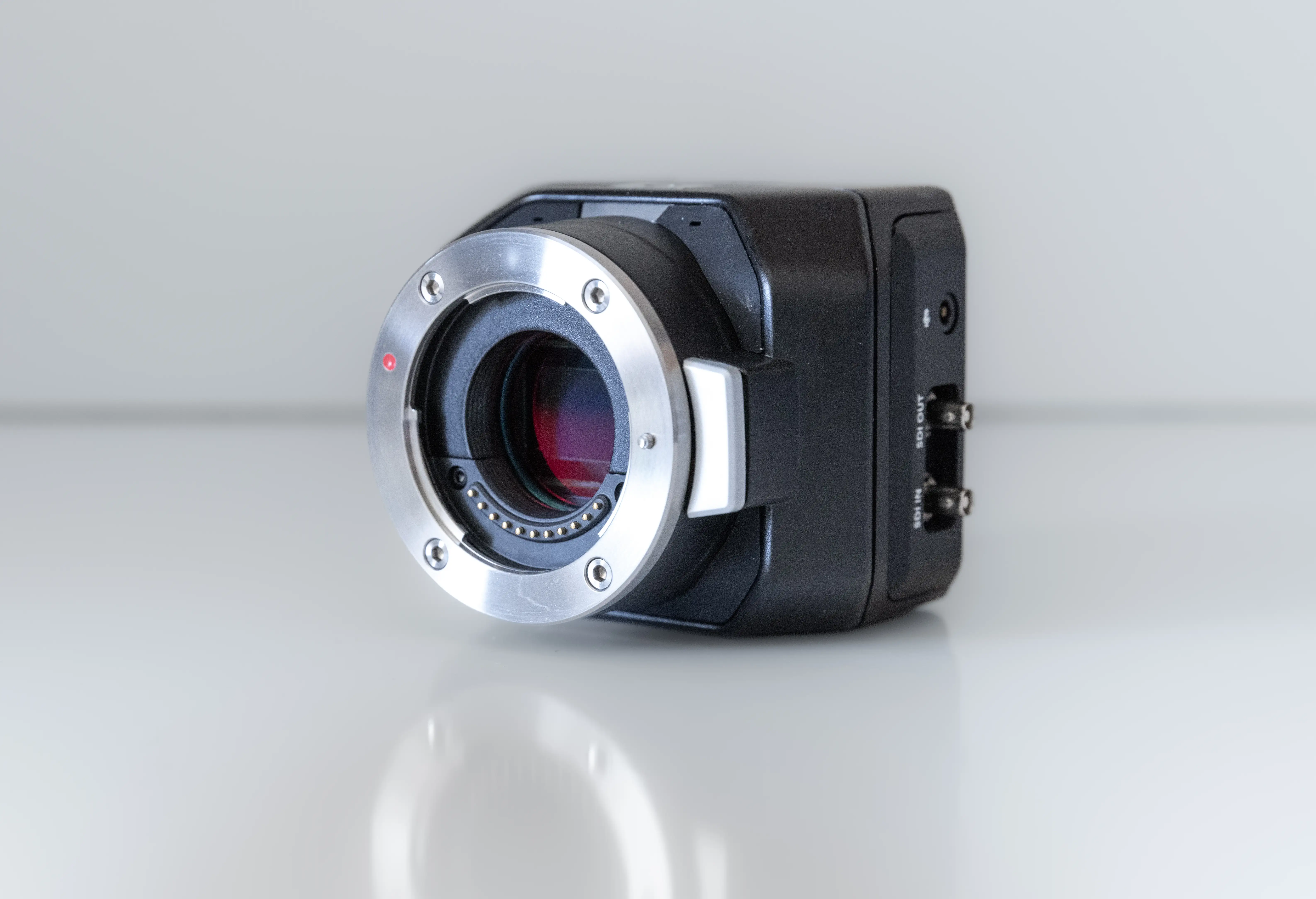
The Blackmagic Design Micro Studio Camera 4K G2 has been called "the world's smallest ultra HD broadcast camera" by its maker — but that tiny body hides a mix of brilliant features and frustrating omissions. Verdict from aggregated user feedback: 8.2/10. Broadcasters praise its cinematic image, live production workflow, and unbeatable form factor, while solo shooters lament missing playback, heating issues, and limited onboard controls.
Quick Verdict: Conditional — fantastic for studio and multi-cam broadcast environments, less ideal for independent, handheld run‑and‑gun creators.
| Pros | Cons |
|---|---|
| Exceptional 4K image quality with 13‑stop dynamic range | No built‑in screen — requires external monitoring |
| Compact, rugged magnesium alloy build | Camera heats noticeably during prolonged use |
| Strong low‑light performance with dual native ISO | No internal playback function |
| Full support for SDI/HDMI tally and camera control | Audio preamps require high gain for decent capture |
| Remote control integration with ATEM switchers | Finicky dongle/USB‑C compatibility for networking |
| Built‑in stereo microphones | HDMI output limited to HD, not UHD |
| Versatile lens options via active MFT mount | Cable management can ruin "micro" footprint |
Claims vs Reality
Blackmagic’s marketing emphatically touts “cinematic images for live production” through its Generation 5 Color Science and 13‑stop dynamic range. Digging deeper into user reports, that claim holds up — but only in controlled setups. Reddit user kingdom builder described using a Metabones .64x focal reducer with a Sigma Art 35mm: "At night I can still shoot at the low native ISO of 400 and have great success... BRAW is amazing from this little beast." This matches the advertised dynamic range, producing clean low‑light shots without crushing blacks.
Another bold claim: “Perfect for placing cameras on set when you don’t have space for regular sized cameras.” While true when the body is bare, Howard Roll noted on the Blackmagic Forum that "with all the cables sticking out every which way it loses its 'micro' volume pretty quick." Users rigging it for production often sacrifice the small footprint once external monitors, SSDs, and converters are attached.
The spec sheet boasts “remote camera control over SDI/HDMI or USB ethernet.” In reality, dongle compatibility proved tricky. Kevin Larat reported, "Stay away from dongles that have HDMI, they’re far more hit and miss," and others found that popular UNI Ethernet adapters failed to connect despite working on laptops. Control integration works seamlessly within ATEM environments, but can be finicky for third‑party networking solutions.
Cross-Platform Consensus
Universally Praised
Across Reddit, Trustpilot, and expert reviews, the standout praise is for image quality. Domipix’s review said the 4K sensor delivers “sharp, detailed footage with excellent dynamic range,” while multiple forum users underline BRAW’s flexibility for post‑production. This appeals most to broadcast engineers and colorists, as kingdom builder shared: "I’m taking classes to become a colorist... for a hybrid RAW it is amazing. I fell in love with it on my first shoot."
Live production crews highlight tally light integration. In church, sports, and stage setups, knowing which camera is live boosts presenter confidence. The large, multi‑color tally — red for on‑air, green for preview — drew praise for being immediately visible even in bright environments.
Its MFT lens mount versatility was another universal win. Both budget‑minded videographers and high‑end studio crews appreciate the ability to mount Olympus, Panasonic, Sigma, and adapt to broadcast glass. Remote lens control via ATEM or Focus Demand hardware was described as "life‑saving" for cameras in hard‑to‑reach mounts.
Common Complaints
Heating is the most frequent gripe. Forum user pancake worried the HDMI plug was “too hot to touch” and feared melting cable casing. Paul LRR confirmed heating at the SDI ports, though his rig’s metal housing worked as a heatsink. The official spec lists 0‑40°C operating range, but these real‑world accounts suggest heat management can be bothersome in long events.
The absence of a playback function frustrated many. Koalanyc noted widespread disappointment: "Folks lamenting the lack of playback on the MSC 4K G2.” This omission hits hardest for solo shooters and small crews without live monitoring — forcing reliance on external recorders like Holland Mars M1 just to review takes.
Audio capture drew criticism for weak preamps. Kingdom builder had to “crank the internal preamps to max as well as the Rode receiver to 0db” to get usable levels from a Wireless Go II through the 3.5mm jack. While built‑in mics earn credit for stereo separation, serious work requires an amplified feed.
Divisive Features
Cable management and ergonomics split the crowd. Studio engineers accept the clutter as the price for professional connectivity. Others, like Howard Roll, argue Blackmagic missed an opportunity for full‑size BNC and RJ45 ports. These criticisms matter less in fixed multi‑cam installs but detract from G2’s appeal as a mobile “micro” camera.
Its reliance on ATEM switchers for full control is loved by existing ATEM users — and resented by those outside that ecosystem. While deeply integrated with Blackmagic workflows, independent creatives find the rig less flexible than competitors like Panasonic BGH1.
Trust & Reliability
Threads show no signs of widespread defects or scams on major marketplaces. Long‑term durability is promising; magnesium alloy construction endures rough handling. Kingdom builder repeatedly reconfigured rigs with cages, SSD sleeves, and focal reducers without mechanical failure.
However, some network hardware experiments burned out fast. Niklas Olofsson’s PoE splitter died after 72 hours, likely from heat. And while no mass failures are reported, USB‑C accessory compatibility quirks can complicate setups. The absence of Bluetooth (confirmed by BMD tech support) dashed hopes of wireless control akin to URSA Mini Pro.
Alternatives
The Panasonic BGH1 surfaced in discussions as a competing box‑style camera with more direct “set it and forget it” shading control. Niklas Olofsson called it superior for consistent exposure without constant adjustment, though at the cost of Blackmagic’s integrated BRAW pipeline. For pure live production, some still lean to larger Blackmagic Studio Cameras for onboard screens and richer I/O, trading off G2’s compactness.
Price & Value
Current street prices range from $818 to around $1,095 new, with eBay listings between $575 and $1,150 depending on lens bundles. Resale holds decently; broadcast equipment tends to retain value in niche communities. For ATEM‑driven studios, the G2 is effectively “plug‑and‑play” with strong ROI in multi‑cam upgrades. Buying tips from forum veterans: avoid untested USB‑C network dongles, budget for an external monitor immediately, and consider passive cooling solutions for long events.
FAQ
Q: Can the Micro Studio Camera 4K G2 record internally?
A: No, it only records Blackmagic RAW to external USB‑C drives. Internal storage is not supported.
Q: Does it output UHD over HDMI?
A: No — HDMI output is fixed at HD up to 1080p60, even though SDI supports full UHD.
Q: How’s the low‑light performance compared to similar cameras?
A: Stronger than many broadcast cams due to dual native ISO (400/3200), though sensor noise increases at high gain.
Q: Will it show the menu on any HDMI monitor?
A: Some monitors won’t display the camera’s HUD/menu unless menu overlay is enabled; SDI outputs are always clean feeds.
Q: Can it integrate with non‑ATEM switchers?
A: Yes, for basic video/tally over SDI/HDMI, but advanced control features need ATEM‑compatible protocol.
Final Verdict: Buy if you’re a live‑production professional, church tech, or broadcast engineer working in ATEM environments needing discreet, high‑quality multi‑cam shots. Avoid if you rely on onboard playback, plan heavy handheld work, or can’t manage external monitoring. Pro tip from community: Pair with a reliable cage, SSD recorder, and a compatible network dongle to unlock the G2’s full potential without frustrating downtime.





